















Parenting today means helping your child understand and work their way through a digital world that’s constantly changing. From YouTube and gaming platforms to texting and social media, children are spending more time online than ever before. Choosing the right parental control app can help you encourage healthy habits while keeping your child safe.
If you’re comparing Bark vs Qustodio, you’re already looking at two of the most established parental control solutions available.
And while both aim to improve digital safety, they take very different approaches. One focuses on identifying potential risks through intelligent monitoring, while the other emphasizes structured controls that let you manage how your child’s device is used.
Let’s talk about the pros and cons of each (as well as one other option you may not have considered yet).
Key Takeaways
- Choosing between Bark and Qustodio shouldn’t just be a matter of which app has more features, but about how you can choose the parental control app that best matches your family’s goals.
- Bark prioritizes AI-powered monitoring and alerts for concerning activity, while Qustodio emphasizes screen time management, web filtering, and hands-on controls.
- Your child’s age plays a big role. Younger children often benefit from stronger controls for age appropriateness, while older kids may respond better to conversations supported by smart alerts.
- So many families don’t need intensive monitoring at all. They simply want healthier screen time, location tracking, and peace of mind. In that case, Findmykids may be another option.
Contents:
Bark vs Qustodio: Main Difference
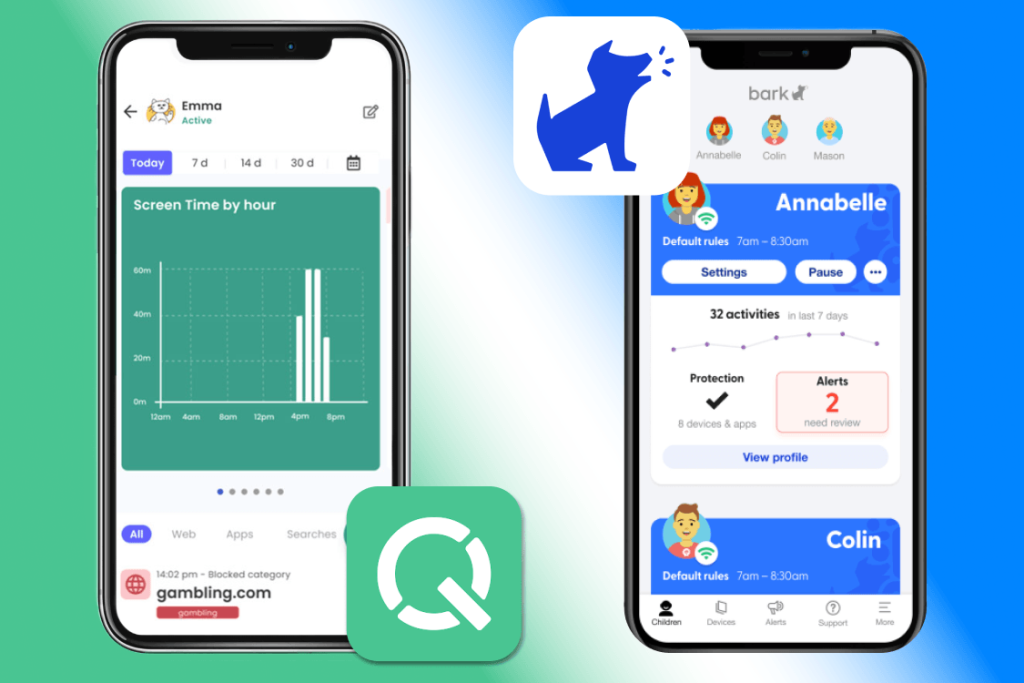
The biggest difference between Bark and Qustodio comes down to philosophy.
Namely, Bark focuses on detecting potential problems. Rather than reading every conversation yourself, Bark uses artificial intelligence to analyze text messages, emails, photos, and supported platforms for signs of issues like bullying, grooming, self-harm, suicidal ideation, explicit content, or other forms of risky behavior.
Instead of giving parents unrestricted access to every conversation, it typically reviews content automatically and alerts parents only when something appears to be concerning.
Qustodio takes a different route. Instead of emphasizing AI-driven monitoring, Qustodio offers detailed controls over how a child uses their devices. You can set time limits, create schedules, filter websites, block apps, review activity reports, and manage digital routines from Qustodio’s dashboard.
Neither approach is inherently better. They’re just solving different parenting challenges.
Which Parenting Style Fits Each App?
To choose the right app, think not only about the technology itself, but how that technology fits with your unique parenting style.
Bark fits a more trust-based approach. You allow your child more independence while using intelligent monitoring to identify problems that deserve attention. Instead of reading everything, you’re notified when something appears genuinely concerning.
Qustodio fits a more hands-on approach. You establish boundaries in advance by setting screen time limits, limiting specific apps, controlling websites, and reviewing reports regularly.
Many families discover they need a blend of both approaches as their children grow. Younger children often need stronger restrictions because they’re still developing healthy habits. As children become older kids and eventually teens, parents may shift toward conversations, trust, and alerts instead of constant controls.
So rather than asking whether Qustodio vs Bark has more features, ask yourself what problem you’re trying to solve. Do you want to know when something dangerous happens, or do you want to reduce the chances of it happening in the first place?
Bark Overview
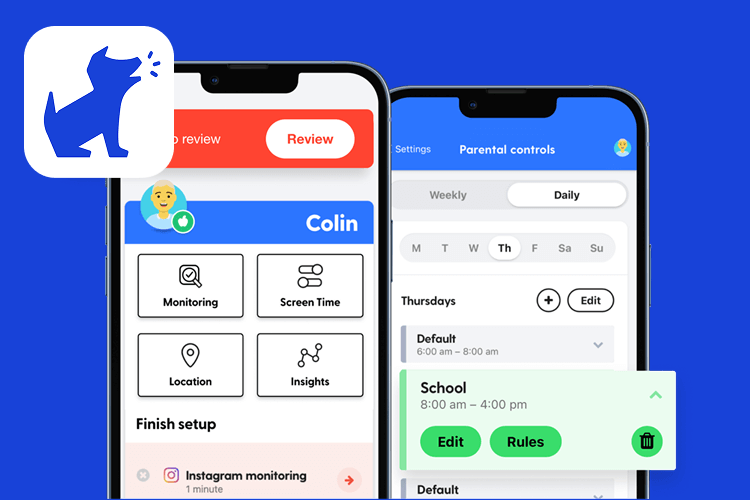
If your biggest concern is what your child encounters online, Bark’s core strength is its intelligent content analysis.
Bark is a cloud-based parental control app designed around AI-powered monitoring. Instead of constantly checking your child’s phone, Bark typically offers automated text monitoring, SMS monitoring, email scanning, YouTube monitoring, and monitoring across numerous supported communication platforms.
When its AI detects potential issues involving explicit content, predators, cyberbullying, eating disorders, violence, or self-harm, it sends a notification rather than overwhelming you with every conversation. For time-strapped parents who still want to stay on top of their child’s communications, this is important.
Its key features include:
- AI-powered social media monitoring
- SMS monitoring and text monitoring
- Email and YouTube monitoring
- Screen time tools
- Website blocking
- Location sharing on supported devices
- Uninstall protection on supported platforms
Bark offers multiple subscription tiers, including plans focused on inappropriate content monitoring and more comprehensive device management. The pricing varies depending on the features you choose, with plans starting at $6 per month for Bark Home and changing based on subscription type (such as phone, watch, etc).
Bark Pros
- Excellent monitoring for social media apps
- AI-powered text monitoring
- Alerts about potentially risky behavior
- More privacy-conscious than reading every conversation
- Strong support for older kids and teens
Bark Cons
- Fewer traditional screen time controls
- Less emphasis on detailed app management
- Some features depend on device type and permissions
- Can require additional setup on certain devices
Best if
- Your child is one of the older children in your household;
- Your biggest concern is monitoring social media;
- You want alerts instead of reading every conversation;
- You care most about identifying potential safety risks.
Qustodio Overview
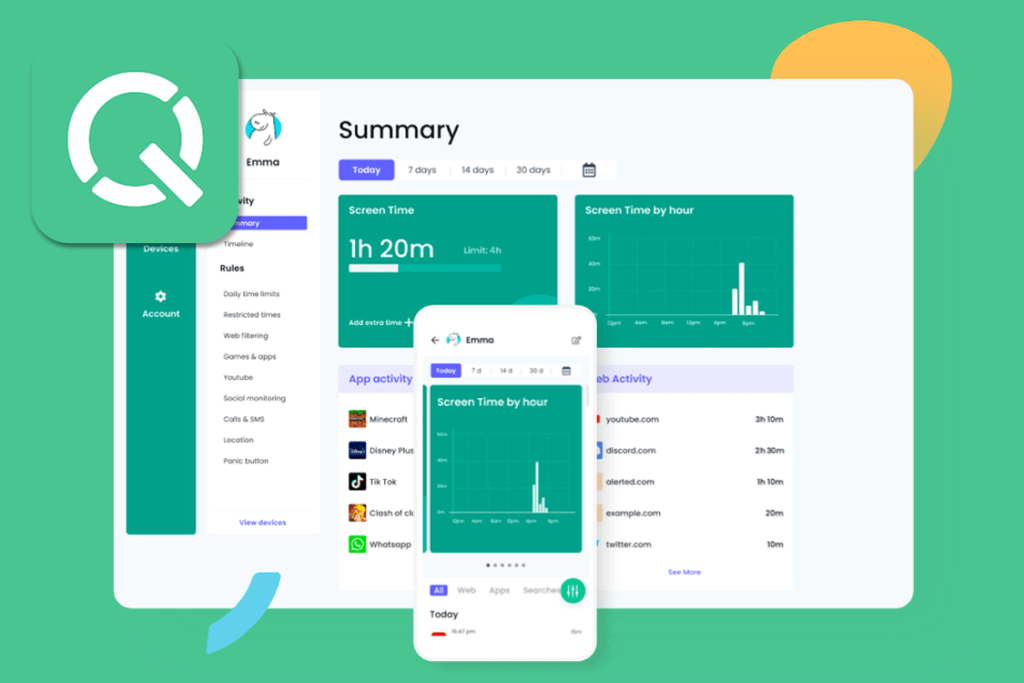
Where Bark emphasizes awareness, Qustodio leans into prevention. It offers tools that help you create consistent digital habits.
Developed by Qustodio LLC, Qustodio is a comprehensive parental control app focused on helping parents actively manage how children use their devices.
Instead of waiting until something concerning happens, Qustodio offers tools that let you shape how your child uses technology from the start. Parents can create screen time schedules, set daily time limits, restrict specific apps, enable safe search, review browsing history, and receive detailed activity reports.
If you have younger kids or pre-teens, these structured controls often feel more intuitive because you’re actively deciding when devices can be used rather than reacting afterward.
Qustodio core features include:
- Advanced screen time management
- Daily time limits
- Website and content filtering
- App management
- App blocking
- Location tracking
- Detailed activity reports
- Strong uninstall protection
Premium plans start at $5 per month for an annual basic plan. There are also free plans, though premium subscriptions unlock more advanced controls and support for multiple devices.
Qustodio Pros
- Excellent screen time management
- Powerful web filtering
- Easy app blocking
- Detailed activity reports
- Strong uninstall protection
- Qustodio’s dashboard is user-friendly
Qustodio Cons
- Less sophisticated social media monitoring
- Doesn’t analyze conversations as deeply as Bark
- Parents may spend more time adjusting settings
- Some advanced features require premium plans
Best if
- You have younger kids or pre-teens;
- You want stronger screen time controls;
- Web filtering is a priority;
- You want detailed reports and better control over your child’s digital routine.
Bark vs Qustodio: Feature-by-Feature Comparison
Let’s break down the features of each app, one by one, to help you decide.
Screen Time Limits and Scheduling
Qustodio offers one of the strongest screen time management systems available. You can:
- Create recurring schedules
- Set daily time limits
- Pause internet access
- Customize rules for weekdays, weekends, or bedtime
Parents who are focused on setting screen time limits usually appreciate the level of flexibility available.
Bark, on the other hand, includes screen time tools as well, but they aren’t the product’s primary focus. Instead, Bark combines basic scheduling with its broader safety platform.
Which App Is Better for Screen Time?
⠀
If your primary goal is managing screen time and creating routines, Qustodio is the stronger choice.
Web Filtering and Content Filtering
Qustodio offers robust web filtering that lets you block categories of websites, customize access rules, and enable Safe Search across supported browsers. Parents who want classic parental control features often prefer this hands-on approach.
Bark includes website blocking, but its emphasis is different. Rather than relying primarily on content filtering, it focuses on detecting dangerous interactions that happen after children access digital platforms.
Which App Is Better for Web Filtering?
⠀
If web filtering is one of your highest priorities, Qustodio is generally the better option here, too.
Social Media Monitoring and Messaging Apps
If you’re comparing Qustodio vs Bark, social media monitoring is where the differences become most obvious.
Bark focuses on AI-powered social media monitoring. It scans supported platforms, text messages, emails, and other communications for signs of cyberbullying, grooming, depression, self-harm, sexting, violence, and other potentially dangerous situations.
Rather than showing you every conversation, it reviews content in the background and alerts parents only when it detects something that may require attention.
Qustodio takes a more traditional approach. While Qustodio offers some monitoring capabilities and reports on device activity, it isn’t designed to analyze conversations with the same depth as Bark. Its emphasis remains on limiting access rather than interpreting what children are saying online.
Which App Is Better for Social Media?
⠀
Choose Bark if social media monitoring and text monitoring are your highest priorities. If you’re more interested in limiting access to apps than in analyzing conversations, Qustodio may be enough.
App Blocking and App Management
Qustodio offers stronger app management tools, allowing you to block apps, restrict specific apps, and customize usage rules based on your whole family’s schedule. This makes it easier to balance homework, bedtime, and entertainment without manually taking devices away.
Bark includes app controls, but they support its broader mission of digital safety rather than serving as the primary feature.
Which App Is Better for App Blocking?
⠀
If you want better control over specific apps, Qustodio is the stronger option.
Location Tracking and Location History
Both platforms include location tracking, but neither treats it as the centerpiece of the experience.
Bark allows parents to view a child’s location on supported devices, helping families know where children are throughout the day. Qustodio includes location monitoring, location history, and geofencing features on supported plans, making it easier to review where your child has been over time.
For most families, location features are useful additions rather than the main reason to choose either app.
Supported Platforms and Device Compatibility
Both Bark and Qustodio support major platforms, including Android, iOS devices, Windows, macOS, and Amazon Kindle devices, although individual features vary by operating system.
Both apps also include uninstall protection to help prevent children from removing the software without permission, though setup requirements differ depending on the device.
If your household includes several operating systems, it’s worth checking feature availability before subscribing, since certain monitoring or control functions may work differently across devices.
Bark vs Qustodio: Which Is Better for Your Family?

There isn’t a universal winner, as the best choice will vary by family. But think about what you want your parental control tools to accomplish.
Are you trying to prevent excessive screen time? Keep an eye on conversations? Encourage independence? Protect younger children? The answers will point you toward the right solution.
Choose Bark If…
- Your child is an older kid or teen
- Social media monitoring is your main concern
- You want alerts about risky behavior
- You do not want to read every message manually
- Your child regularly uses messaging apps and social platforms
- You prefer a privacy-conscious approach
- You care more about online safety alerts than strict daily limits
Choose Qustodio If…
- Your child is younger
- You want stronger screen time limits
- You need reliable web filtering
- You want app blocking
- You want screen time scheduling
- You value detailed activity reports
- You prefer a hands-on approach
- You want better control over specific apps
Consider a Third Path If…
Some parents discover they don’t need extensive monitoring or heavy content filtering at all. Instead, they mainly want to know:
- How much screen time their child is getting
- Which apps they’re spending time in through app usage insights
- Where their child is with reliable location tracking
- Where their child has been with access to location history
- Whether their child arrived safely at school, home, or another important place
- How to quickly reach their child or get help in an emergency with SOS features
- Whether their child’s phone battery is running low
- How to stay connected and support their child’s safety without feeling intrusive
If that sounds more like your parenting philosophy, there’s another option worth considering.
A Different Approach: Why Some Families Choose Findmykids Instead
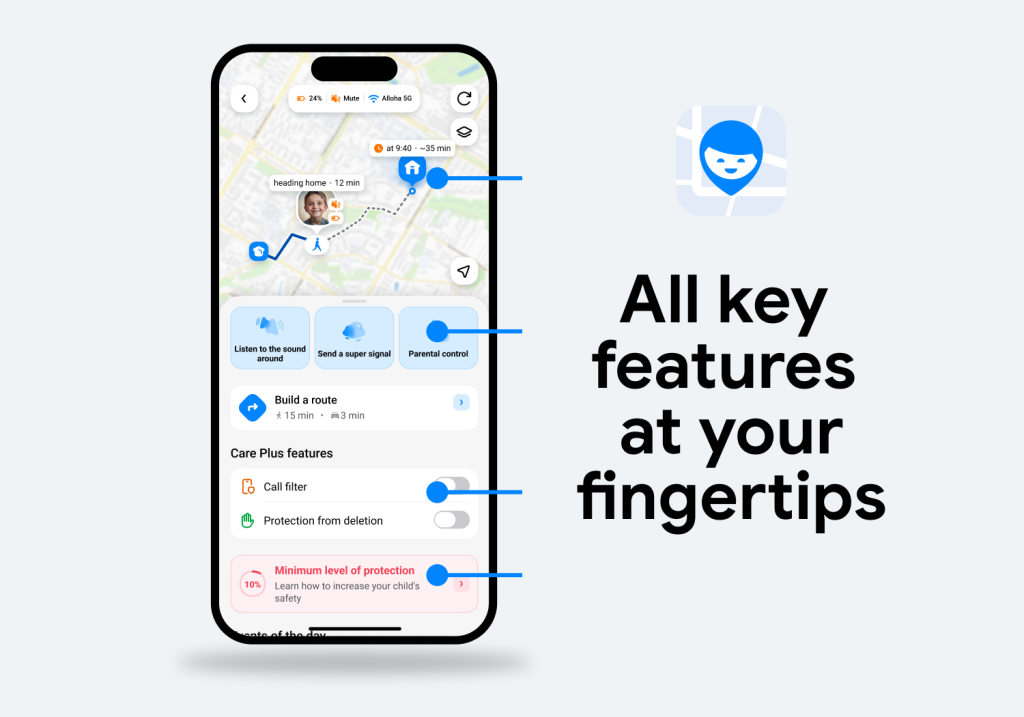
Findmykids app
Not every parental control app needs to monitor conversations or block large portions of the internet. Findmykids takes a different approach that centers on everyday family awareness rather than constant surveillance.
Findmykids helps parents stay connected to their child’s daily routine, understand their digital habits, and support healthier technology use.
With Findmykids, you can:
- Monitor screen time and daily phone use
- Set app-specific time limits for games or entertainment apps while allowing educational tools to remain available
- Create schedules that automatically adjust app availability during school, homework, bedtime, or family time
- View detailed app usage information without reading personal conversations
- Use reliable real-time location tracking with detailed location history
- Review your child’s routes, including where they traveled, how they moved, and whether their usual patterns have changed
- Get additional route insights and safety indicators to better understand potentially unusual situations
- Set up safe zones and receive notifications when your child arrives at or leaves important places like school or home
- Use Loud Signal to reach your child even if their phone is on silent mode or they miss a regular call
- Use Sound Around in emergency situations to better understand what is happening nearby (with the child being informed when the feature is activated)
- Give your child access to an SOS button for emergencies
- Get low battery alerts so you aren’t left wondering why your child’s phone stopped responding
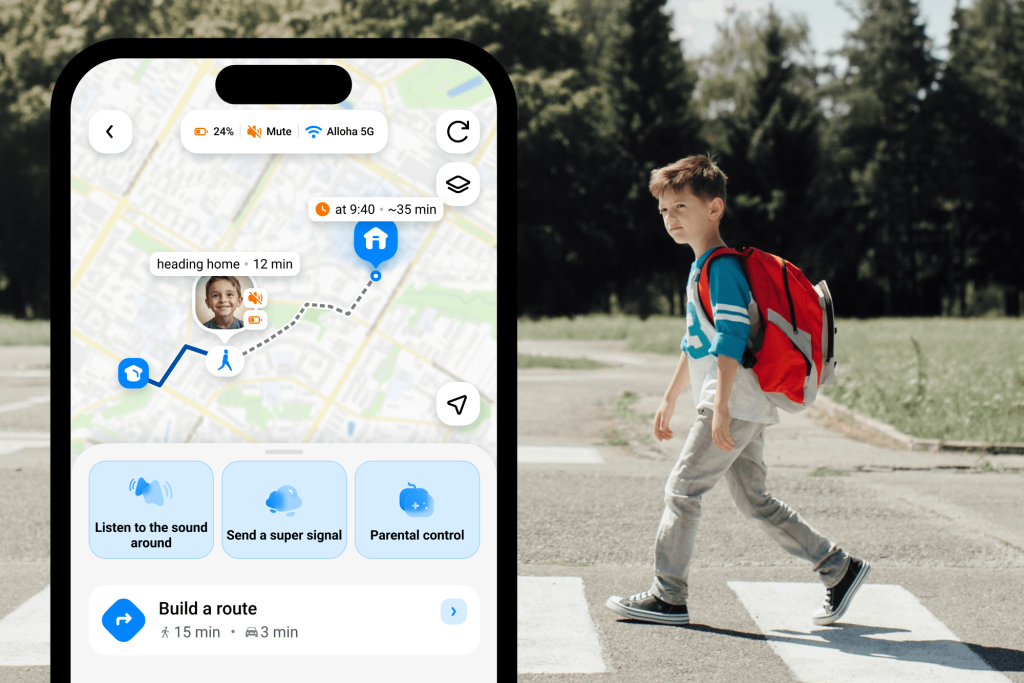
Findmykids app
Findmykids also goes beyond technology by helping parents navigate everyday challenges. The app provides practical parenting tips and guidance to support conversations about independence, safety, and healthy digital habits.
Findmykids is designed for families looking for balance. It gives parents practical tools for digital safety, routines, and family connection without making conversation monitoring the center of the experience.
For many families with younger kids, elementary students, or pre-teens, that balance often feels like a better fit.
Ready to build healthier digital habits and stay connected with your child’s everyday life? Try Findmykids for free today and explore the features that help your family feel safer and more connected!
Which App to Choose?
The table below highlights the main differences between Bark, Qustodio, and Findmykids so you can quickly see which approach matches your family’s needs:
| Feature | Bark | Qustodio | Findmykids |
| Main focus | Online safety through AI-powered monitoring and risk alerts | Device management, screen time control, and content filtering | Everyday family safety, location awareness, and balanced digital habits |
| Best for | Parents of older kids and teens who want alerts about potentially risky online activity | Families looking for structured screen time rules and stronger device restrictions | Parents who want to stay connected, support independence, and understand daily routines |
| Screen time limits | ✓ Available, but not the main focus | ✓ Advanced limits and schedules | ✓ Flexible screen time management with app limits and schedules |
| App-specific limits | ✓ Available on supported devices | ✓ Strong app management tools | ✓ Set limits for individual apps and understand where time goes |
| App blocking | ✓ Available | ✓ Strong app blocking features | ✓ Block apps and manage access based on family routines |
| Screen time schedules | ✓ Basic scheduling tools | ✓ Detailed schedules for weekdays, weekends, and bedtime | ✓ Create schedules for school, homework, sleep, and family time |
| App usage insights | ✓ Activity reports | ✓ Detailed activity reports | ✓ See which apps your child uses most and how digital habits change |
| Social media monitoring | ⭐ Main strength — AI analyzes supported platforms and alerts parents about potential risks | Limited compared with Bark | Focuses on usage awareness rather than reading or analyzing conversations |
| Message/content monitoring | ✓ AI-powered analysis of supported texts, emails, and platforms | Limited | ✕ Does not read private conversations |
| Web filtering | ✓ Available | ⭐ Strong website filtering and Safe Search tools | ✓ 18+ website blocking on supported iOS devices |
| Location tracking | ✓ Available on supported devices | ✓ Available with location history/geofencing on supported plans | ⭐ Real-time location tracking with detailed route history and safety features |
| Location history | ✓ Available on supported devices | ✓ Available on supported plans | ⭐ Detailed routes, movement history, and insights into changes in usual patterns |
| Safe zones & arrival alerts | ✓ Available on supported devices | ✓ Available | ✓ Receive alerts when your child arrives at or leaves important places |
| Emergency tools | Limited | Limited | ⭐ SOS button, Loud Signal, low battery alerts |
| Sound Around feature | ✕ | ✕ | ✓ Available on Android with child notification when activated |
| Uninstall protection | ✓ Available | ✓ Available | ✓ Available |
| Parent-child communication approach | Focuses on identifying risks | Focuses on managing device use | Focuses on safety, independence, and staying connected without constant monitoring |
| Best match if your main question is… | “Is my child facing dangerous online situations?” | “How can I better control device use?” | “Where is my child, how is their day going, and how can we build healthier habits?” |
Choose Findmykids if…
You want location tracking first, healthier screen time habits, and an easier way to stay connected without constant surveillance. It’s an excellent fit for families with elementary-age children, middle schoolers, or parents who want a simpler, everyday family safety solution.
Choose Bark if…
AI-powered content analysis and social media monitoring are your highest priorities, especially if you have older kids who spend significant time communicating online.
Choose Qustodio if…
You want extensive web filtering, stronger screen time management, detailed reports, and traditional parental control features that help establish consistent routines for younger children.
It’s easy to get caught up in feature lists. But a better question is what kind of support your family truly needs. Just remember: the best parental control app is the one that supports your parenting, not one that replaces it.
FAQs
Is Bark or Qustodio better?
It depends on your priorities. Bark excels at AI-powered social media monitoring and identifying potential risks, while Qustodio offers stronger screen time controls, web filtering, and app management. Findmykids is a better fit for families who want a balance of digital habits, location safety, and everyday connection without monitoring private conversations.
Is Bark better than Qustodio for social media monitoring?
Yes. Bark is widely considered the stronger choice for monitoring social media, text messages, and other communications because it uses AI to identify concerning content and notifying parents when necessary.
Is Qustodio better than Bark for screen time limits?
Generally, yes. Qustodio provides more flexible scheduling, customizable time limits, and stronger screen time management tools.
Which is better for younger children, Bark or Qustodio?
Many parents find Qustodio works well for younger kids because its structured controls make it easier to establish screen time rules from an early age. Findmykids is also a popular choice for younger children and pre-teens who need more independence while parents still want location tracking, safety alerts, and a better understanding of their daily routines.
Which is better for older kids and teens?
Bark is often the better choice for older kids and teenagers who spend more time communicating online, since it emphasizes safety alerts instead of constant restrictions. Findmykids can be a better option for families who want to maintain trust while staying connected through location sharing, screen time insights, and everyday safety features.
Can Bark and Qustodio replace parent conversations?
No. No parental control app can replace open communication. The best results come from using technology alongside regular conversations, trust, and age-appropriate guidance as your child grows.
Проверьте электронный ящик