














Choosing a family locator is less about finding the app with the longest feature list and more about matching the tool to the problem a household is trying to solve. The GeoZilla family locator app features cover general household location sharing, driving safety, and emergency support, while Findmykids is built more specifically around parents tracking their children.
Key Takeaways
- GeoZilla works well for households that want family location sharing, location history, place alerts, crash detection, and driver protection in one app.
- Findmykids puts more emphasis on child-focused family safety, including real-time location tracking, geofencing alerts, SOS alerts, a loud signal, battery monitoring, and child-device tools.
- GeoZilla has a free version for basic location exchange, while features such as two-week location history and Place Alerts require Premium.
- Findmykids offers a free Basic plan, with more detailed routes, alerts, and other tools available on paid plans.
- Neither service should be used for unapproved tracking. Location access should involve clear user participation, informed consent, and the permissions required by the device.
Contents:
How Does GeoZilla App Work?
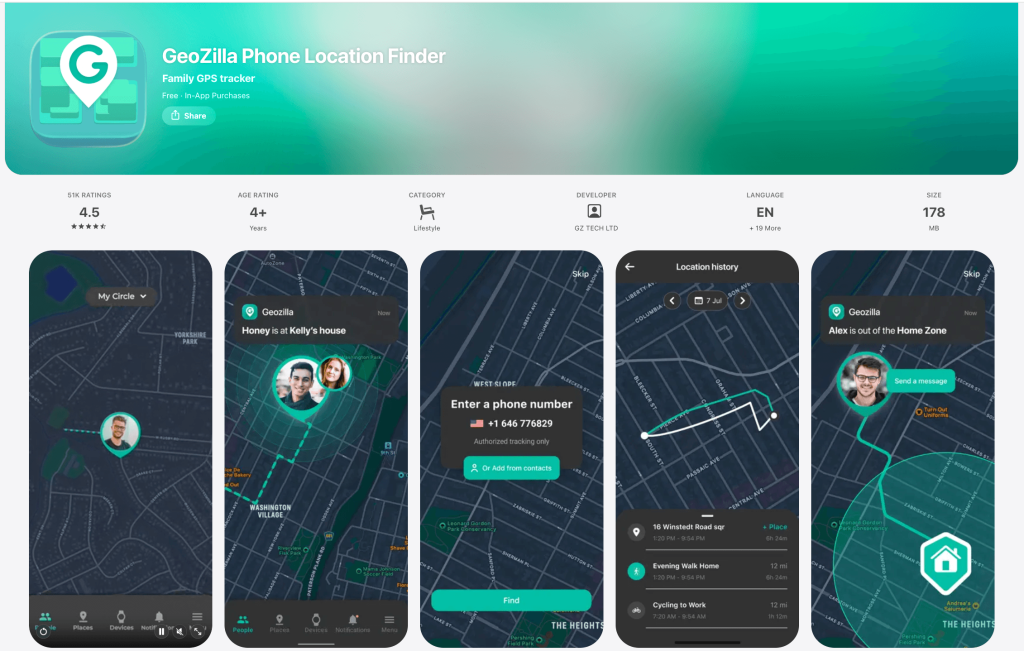
GeoZilla is a family GPS and safety app that places participating family members on a shared map.
A user can invite family by link, code, SMS, or QR code; scanning QR invites is one option. The invited member installs the app and accepts the invitation before joining the private family circle. GeoZilla says location sharing is opt-in, and its onboarding states that mutual consent is required.
The app uses the phone’s available location services rather than running GPS hardware continuously. GeoZilla says it does not enable continuous GPS tracking in the background; instead, it can receive significant-location-change updates and request a fresh location when a user opens the app or taps refresh. So, ‘live’ tracking doesn’t necessarily mean the phone’s GPS runs continuously.
GeoZilla Family Locator App Features
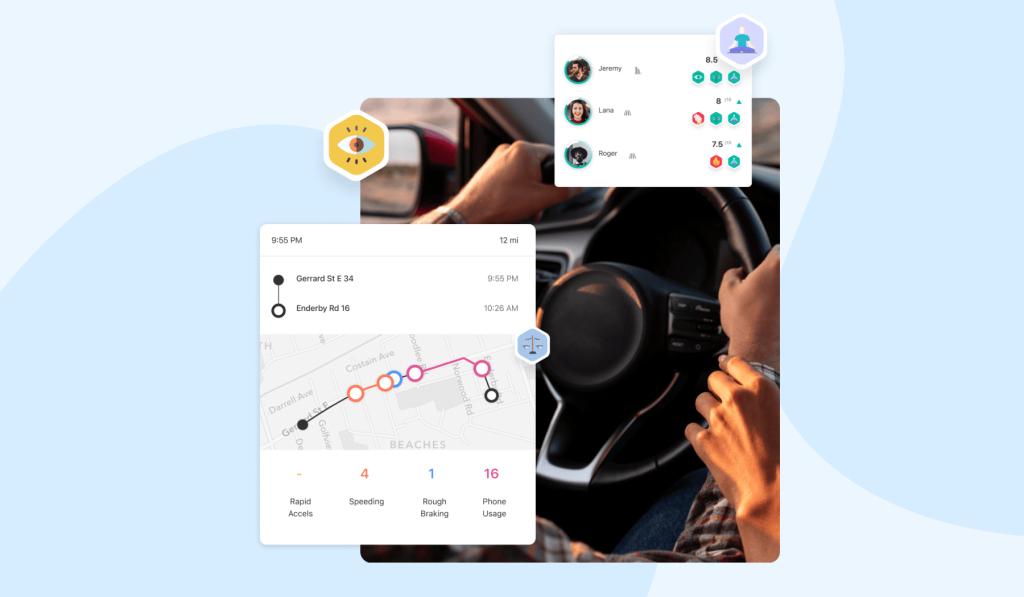
Credit: geozilla.com
The GeoZilla family experience centers on real-time location tracking, location sharing, saved Places, and alerts when family members arrive or leave. Premium adds two weeks of location history, scheduled alerts, Invisible Mode, fall detection, and driving tools.
GeoZilla also offers crash detection. Its driver tools are closer to driving behavior reports than child-focused behavior reports, and the company describes phone motion sensors rather than a separate activity recognition feature. If the phone detects a collision, the app can alert emergency contacts with the user’s position. Driving reports can flag speeding, phone use, and aggressive driving, which enhances driving reports beyond simple trip mapping.
Other family safety use cases include an emergency alert, low-battery information, and compatible wearables or trackers. The app’s privacy policy says device information may include battery level and charging status, and its support center documents Apple Watch, Fitbit, and Pico GPS tracker connections.
If Wear OS compatibility is important, check GeoZilla’s current device support before subscribing, since its support pages don’t clearly list every compatible smartwatch.
Which GeoZilla Features Are Free and Which Are Premium?
GeoZilla includes basic sending and receiving of location information at no charge. Premium adds location history for the previous two weeks, Place Alerts, Schedule Alerts, Invisible Mode, driving protection, fall detection, and family-plan access for family members in the Circle.
The company’s current web offer lists a three-day trial followed by an annual Premium charge, although pricing can vary by platform or promotion. Make sure you check the in-app price before subscribing.
Is GeoZilla Safe for Kids?
GeoZilla isn’t designed to support covert tracking. Its App Store listing says tracking requires explicit consent, and the recipient must approve a location request before you can see their exact location.
Invited users must actively participate through user approval, app permissions, and device settings. If you’re a parent or caregiver assisting dependents, follow local privacy laws and explain how location data will be used.
For older kids and adults, keep usage transparent. A user actively agrees to join the circle, so avoid hiding a GPS tracker on someone’s phone. Limit access to trusted circle members and discuss boundaries before turning on family GPS tools.
Findmykids as a GeoZilla Alternative for Parents
Findmykids is another family GPS option, but its feature set is more child-centered. It combines real-time location tracking with route history, location alerts, SOS, Loud Signal, battery status, and, on supported setups, tools such as Sound Around and app-usage information.
What Makes Findmykids Different From GeoZilla?
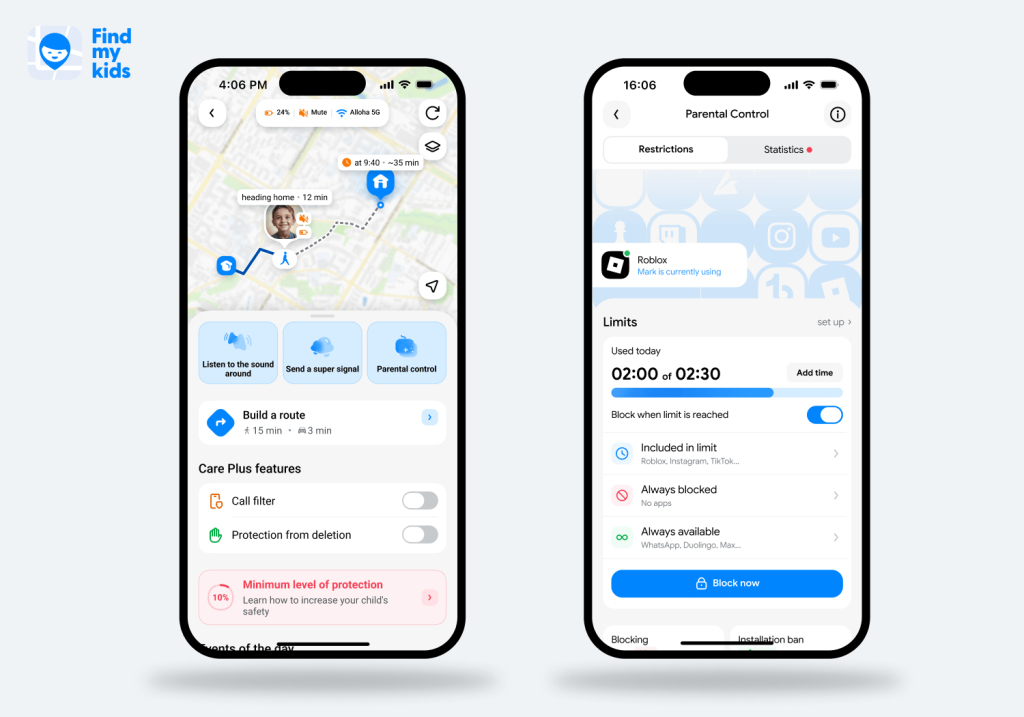
Findmykids app
GeoZilla is designed for a wider range of family and personal safety scenarios, while Findmykids brings location tracking, safety features, and parental controls together in one app. Parents can see a child’s real-time location and routes, receive alerts when they arrive at or leave saved places, send a Loud Signal if they are not answering, and manage screen time and app access from the parent app.
This makes Findmykids particularly relevant for parents who want more than family location sharing and need one place to manage both their child’s physical safety and digital habits.
Findmykids Features Review
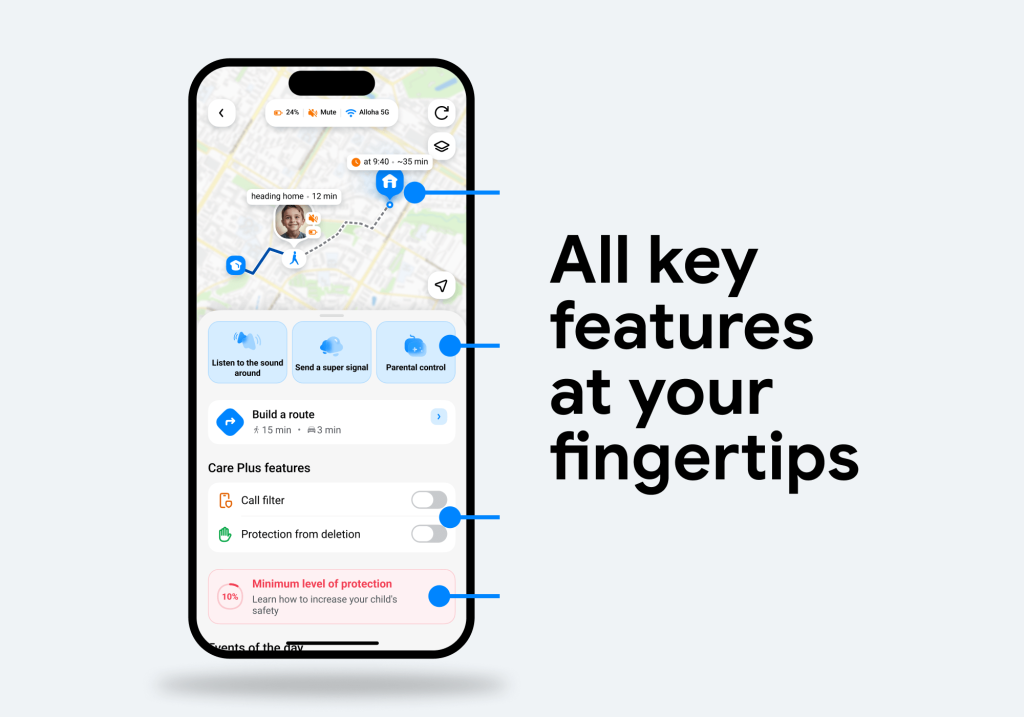
Findmykids app
For parents, Findmykids covers the main tools needed to stay connected with a child and keep track of their everyday activities:
- Real-time location tracking: See your child’s current location and check their location history and routes.
- Family Circles: Create private family groups where parents, children, relatives, and other trusted people can share their locations and stay connected on the same map. This can be useful when several family members need to know where the others are.
- Route and movement information: Review routes, stops, distance traveled, movement details, and other information about your child’s daily journeys.
- Location alerts: Get notifications when your child arrives at or leaves a saved place such as home or school, so you don’t have to keep checking the map.
- Parental controls: See how much time your child spends on their phone and which types of apps they use. On supported devices, you can also block apps and set limits on access to them, helping manage screen time without constantly taking the phone away.
- SOS: If your child taps the SOS button, connected family members receive an alert with the child’s current location, helping them respond quickly when the child needs help.
- Loud Signal: Play a loud sound on your child’s phone even when it is on silent, making it easier to get their attention when they miss a call.
- Battery monitoring: Check the child’s phone battery level and get alerts when it is running low.
- Sound Around: On supported devices, Sound Around lets parents listen to what is happening near the child’s phone. The child is notified when listening is active, and Findmykids recommends discussing the feature with the child beforehand.
Looking for a family tracking app with more than just GPS location? Try Findmykids to stay connected, manage screen time, and keep an eye on your child’s everyday safety.
Findmykids vs. GeoZilla
Both apps cover the basics of family location sharing, including real-time tracking, location history, place alerts, SOS, and battery monitoring. The main difference is what they add around location tracking.
| Feature | GeoZilla | Findmykids | Why it matters |
| Real-time location tracking | ✅ Yes | ✅ Yes | Both can show a participating device on a map |
| Location history | ✅ Premium, up to two weeks | ✅ Yes | Useful for reviewing routes rather than checking only the current point |
| Geofencing alerts | ✅ Premium Place Alerts | ✅ Yes | Helps parents receive alerts for arrivals and departures from common places |
| SOS/emergency alerts | ✅ Emergency Alert | ✅ SOS Signal | Both deliver key safety features when a family member needs help |
| Crash detection | ✅ Yes | ❌ Not a core advertised feature | GeoZilla includes automatic crash detection for driving-related safety |
| Driving reports | ✅ Yes | ✅ Yes | Both provide information about journeys and movement, including tools useful for families with drivers |
| Parental controls | ❌ No comparable parental-control feature | ✅ Yes | Findmykids can monitor screen time and app usage and restrict access to apps |
| Loud Signal | ❌ Not a primary advertised tool | ✅ Yes | Findmykids can help reach a child whose phone is silent |
| Sound Around | ❌ No comparable core feature | ✅ Supported on compatible child setups | Adds context when a child cannot answer, while notifying the child when listening is active |
| Family sharing | ✅ Circle-based | ✅ Family Circles | Both can include close contacts or other trusted contacts |
⠀
For parents looking for more than basic family location sharing, Findmykids adds child-focused tools that go beyond GPS tracking. In addition to real-time location, routes, place alerts, and SOS, it combines parental controls with features such as Loud Signal and Sound Around, giving parents more ways to manage a child’s device and stay connected when the child is not answering.
GeoZilla vs Findmykids: Which App Fits Your Family?
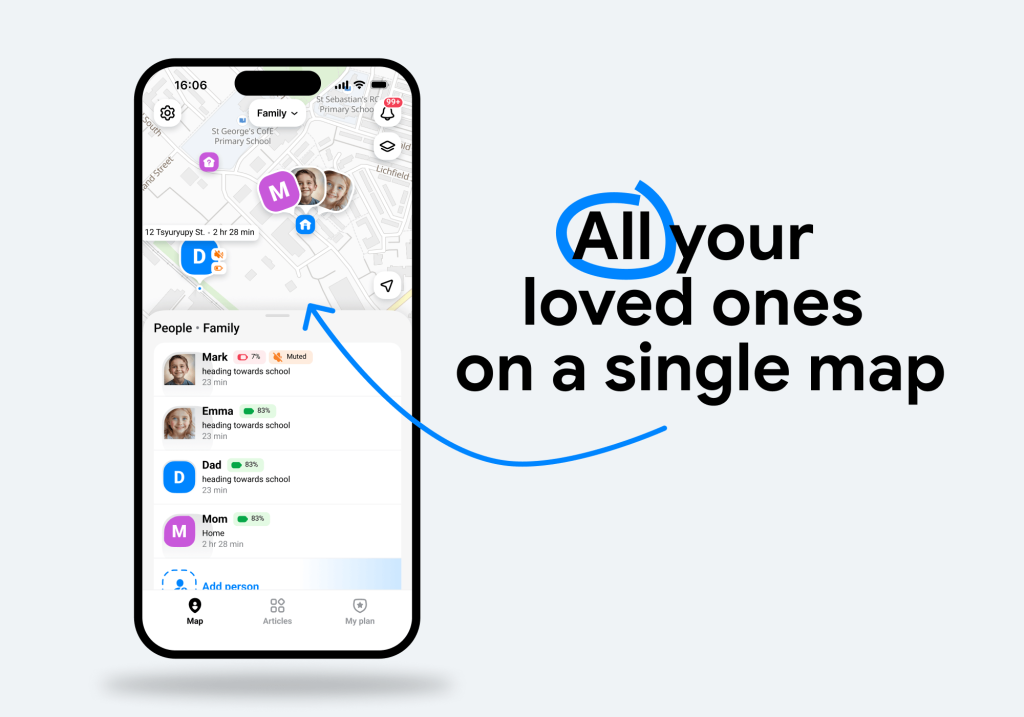
Findmykids app
Choose based on what you need the app to do:
- For school arrival and departure alerts: Both apps can notify you when a family member enters or leaves a saved place.
- For managing your child’s screen time: Findmykids offers screen-time monitoring, app usage information, and app blocking on supported devices. You can see how your child uses their phone and set restrictions without having to take the device away.
- For limiting distracting or inappropriate apps: Findmykids can block specific apps or restrict access to them on supported devices, making it useful for managing games, social media, and other apps.
- For a child who isn’t answering calls: Findmykids offers Loud Signal, which can make the child’s phone play a loud sound even when it is on silent.
- For an emergency when your child can’t talk: Findmykids SOS lets a child send an alert with their location. On supported Android devices, parents can also use Sound Around to check what is happening nearby, with the child notified when listening is active.
- For checking your child’s everyday movements: Both apps offer location history, while Findmykids also combines location data with routes, place alerts, and child-focused safety tools.
- For families with teen or adult drivers: GeoZilla offers driving protection, including collision detection and fall detection, so its feature set may be relevant when driving safety is a major concern.
- For keeping track of a child’s phone: Findmykids combines location tracking with battery monitoring and Loud Signal, which can help when a child’s phone is lost nearby or left somewhere on silent.
- For understanding your child’s digital habits: Findmykids can show how much time a child spends on their phone and which apps they use, giving parents more context than location data alone.
- For sharing locations with several family members: Both apps support private family groups, so parents and other trusted people can stay connected and see participating members on the map.
The best fit will usually be the app that gives you the alerts and location tools you’ll actually use without sharing more information than you’re comfortable with.
How to Get Started with Findmykids
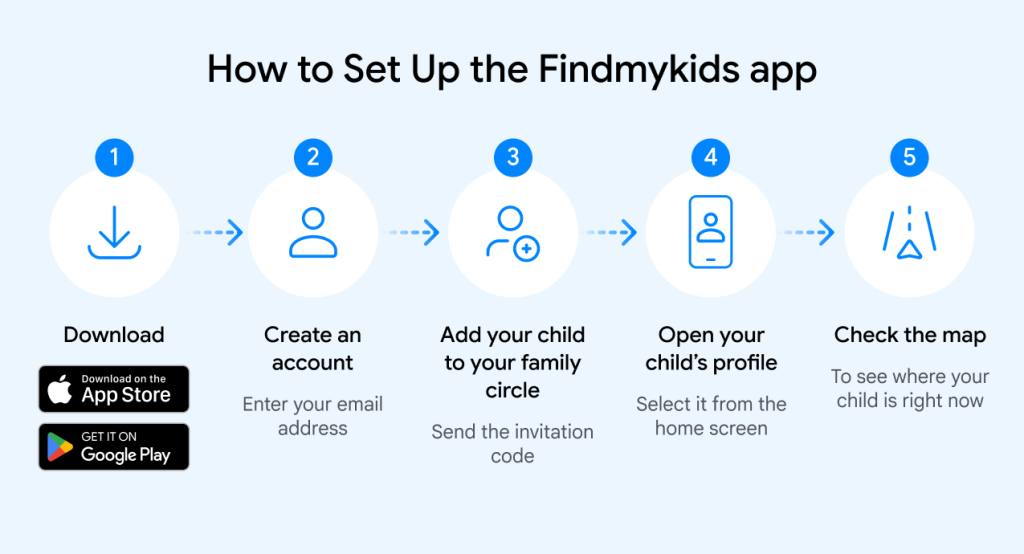
If Findmykids fits what you need, you can connect your child’s device and start using the main family safety features in a few steps:
- Install Findmykids on the parent’s iPhone or Android phone.
- Create your account and follow the setup instructions to connect a child.
- Install the app on the child’s compatible phone, or connect a supported GPS watch.
- Enter the invitation code to link the child’s device to your Family Circle.
- Allow the required permissions for location and notifications, then set up saved places and alerts.
Once the child’s device is connected, you can start using location tracking, Family Circles, safety alerts, parental controls, and other Findmykids features from the parent app.
Choosing the Right Kind of Family Locator
GeoZilla and Findmykids cover many of the same family GPS basics, but they’re built for slightly different needs. GeoZilla adds broader household safety tools like driving features and fall detection, while Findmykids focuses more on child location, routes, alerts, and communication.
Compare the features you’ll actually use, check current plan limits, and make sure everyone understands how tracking works. Used openly, either app can improve family safety without making everyday independence feel overly monitored.
FAQs
What are GeoZilla’s main family locator features?
GeoZilla includes family location sharing, real-time location tracking, Places, check-ins, and emergency functions. Premium adds two-week history, place and schedule alerts, Invisible Mode, crash-related driving protection, fall detection, and family-plan access.
Is GeoZilla or Findmykids better for tracking a child’s location?
Both can show a child’s location directly when the proper permissions are enabled. Findmykids is more specifically designed around parents tracking children, while GeoZilla is a broader family safety platform that also includes driver-focused tools.
Are GeoZilla and Findmykids free to use?
Both apps offer free access, but the features available without a subscription differ. GeoZilla’s free version covers basic location sharing, while more advanced location history and alerts require Premium. Findmykids also has a free version that gives parents access to core family-safety tools, including real-time location, basic movement notifications, and SOS. Paid access adds more detailed location and parental-control features, so families can start with the essentials and expand the tools they use as their needs change.
Can GeoZilla track someone without their knowledge or consent?
GeoZilla says location sharing is opt-in, and its App Store listing requires explicit acceptance from users being added to tracking. The service should not be used to track a person secretly, and families should follow applicable local privacy laws.
Do GeoZilla and Findmykids work on both iPhone and Android?
Yes. GeoZilla says its app works on Android phones and iPhones. Findmykids supports iOS and Android setups as well, although individual functions can vary by device and operating system.
Sources & References
- How Is the App Using My Battery?, GeoZilla
- What Are the Benefits of a Premium Subscription?, GeoZilla
- GeoZilla Privacy Policy, GeoZilla
- Real-Time Location Tracking, Findmykids
Проверьте электронный ящик