More people are using Instagram than ever before, but there are some serious privacy concerns associated with the platform. To help keep your kids safe online, it’s vital to be aware of these and how to mitigate them. Keep reading for how to turn off Activity Status on Instagram and the impact of this.
Contents:
What is Instagram Activity Status?
Let’s start with what Activity Status means on Instagram.
Activity Status shows whether a user is currently online and, if not, when they were last active on the platform. It appears in different places across the app, such as in Direct Messages (for example, “Active now” or “Active 5m ago”) and as a green dot next to a user’s profile picture.
Who can see your activity status? Only people you follow or users you have exchanged direct messages with, can see your Activity Status, unless you turn it off in your Instagram settings.
How to Turn Off Activity Status on Instagram
You can turn off your Active Status on Instagram so that others won’t see when you are online. Keep in mind: when you disable it, you also won’t be able to see when others are active.
On iPhone and Android
The steps are the same for both devices:
- Open the Instagram app and go to your profile.
- Tap the menu (three horizontal lines) in the top right corner.
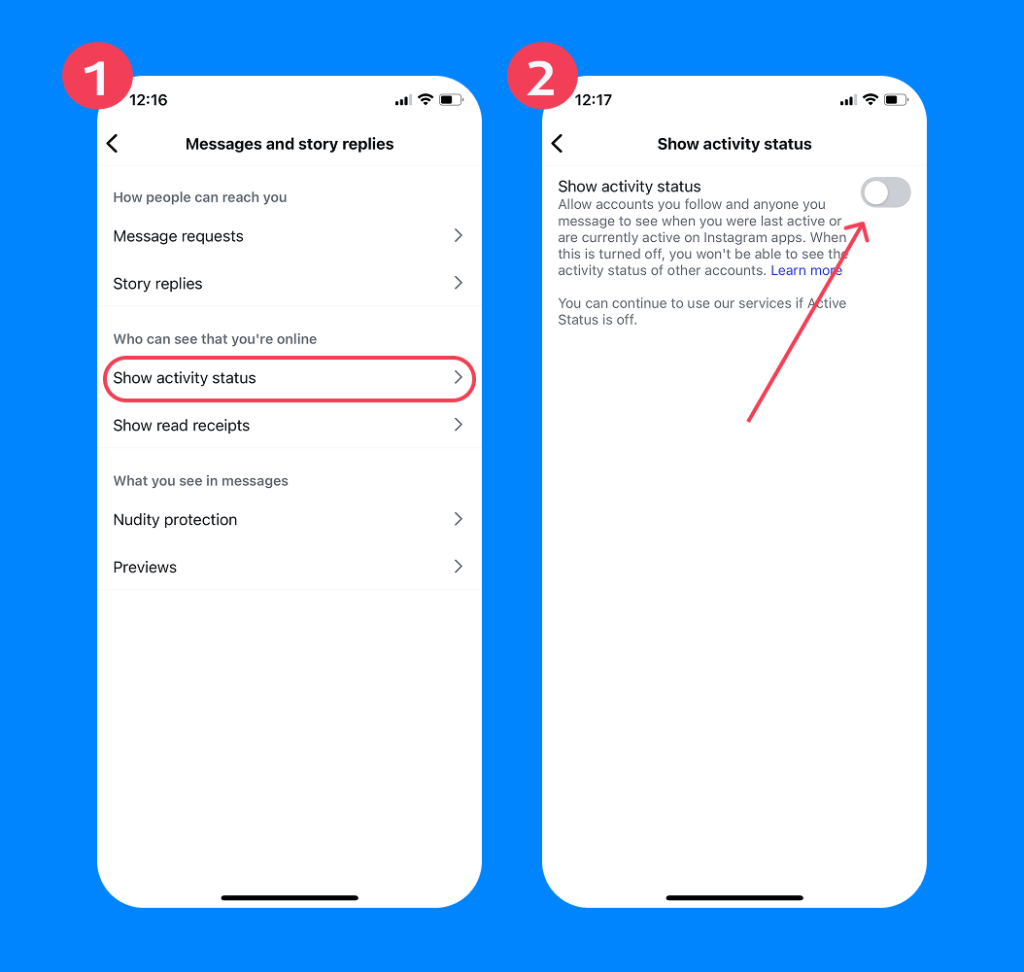
- Go to Messages and story replies.
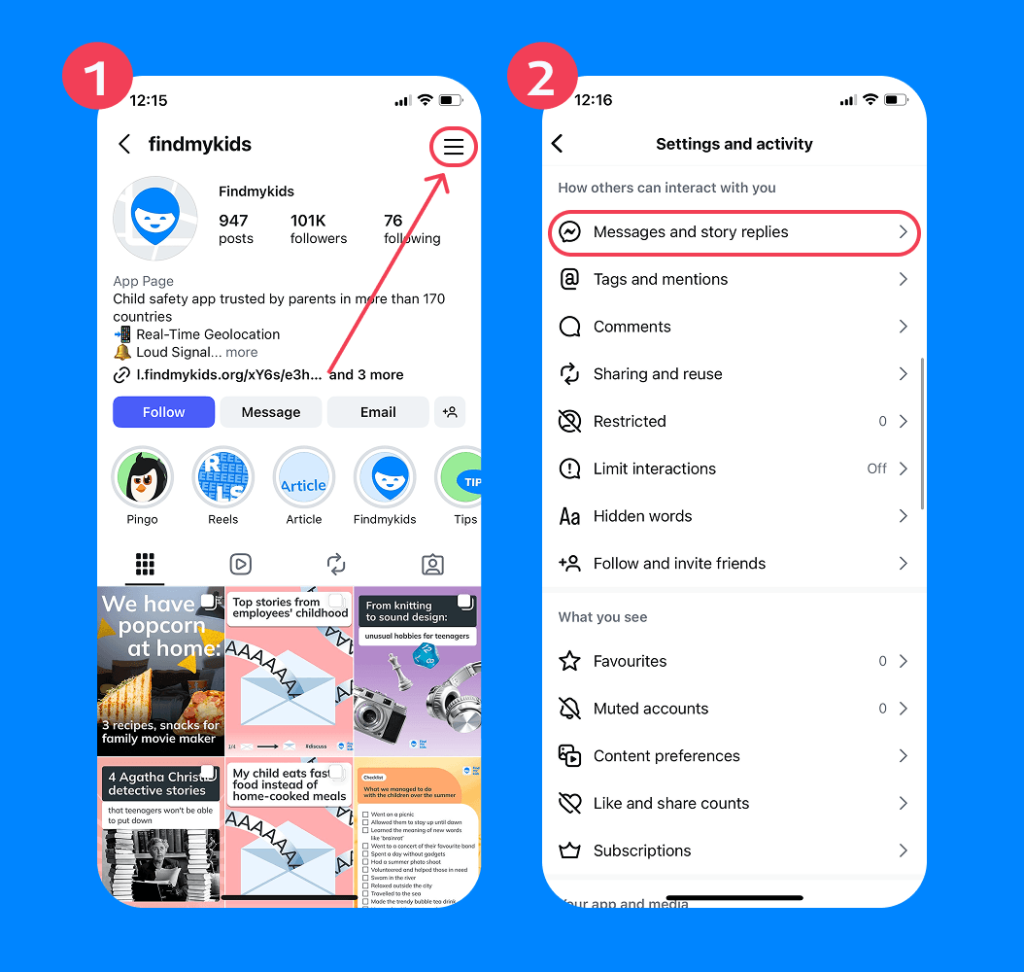
- Tap Show Activity Status.
- Toggle off Show Activity Status.
In some versions of the app, the path may look slightly different:
- Settings and privacy → Messages and story replies → Show Activity Status
On Desktop (Web Browser)
To turn off Active Status via Instagram’s website on a desktop:
- Log in to your or your child’s Instagram account on a desktop browser.
- Tap on the profile picture in the top right corner.
- Click the three-line icon and navigate to Settings.
- Open Messages and story replies and turn off Show Activity Status.
Can You Hide Activity Status from One Person?
Instagram doesn’t offer a direct option to hide your Activity Status from just one specific person. The setting works globally, which means you either show your online status to everyone or turn it off for all users.
If you’re thinking about privacy in a more flexible way—especially for teens—there are still a few options that can help you manage visibility and interactions in a safer, more controlled way.
Option 1. Turn Off Activity Status for Everyone
As we described above, you can turn off Activity Status in your account settings. That is the only official way to control whether others can see when you are online.
Note: When you turn off Activity Status, other users won’t see when you are online or when you were last active. You will also lose the ability to see other users’ activity status.
Option 2. Block This Person
If the goal is to stop a specific person from seeing your profile or interacting with you, blocking is the most effective option.
- Go to the person’s profile.
- Tap the three-dot menu in the top right corner.
- Select Block and confirm.
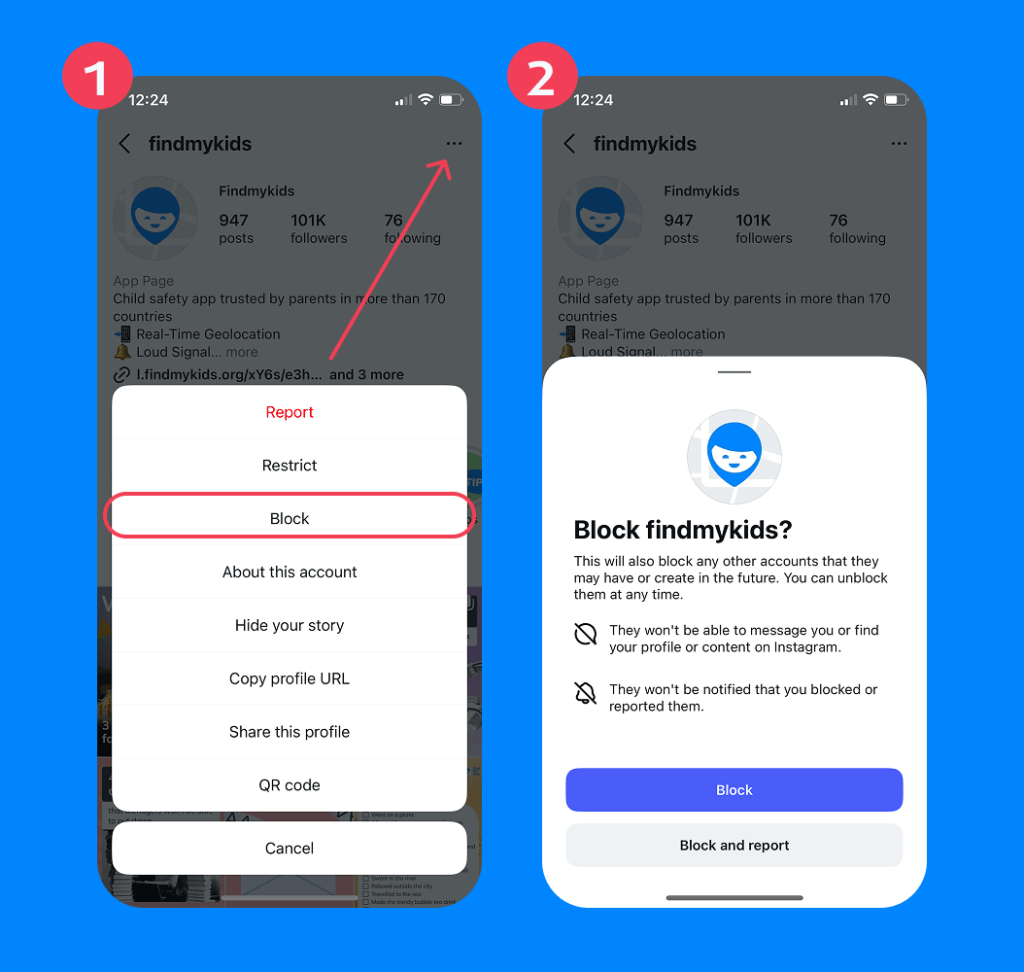
Blocking means:
- They cannot see your profile or posts
- They cannot message you
- They cannot see your activity or online presence
This is a stronger step and is usually used when there is unwanted contact or safety concerns.
Features like Close Friends or Mute do not affect online status.
- Close Friends only changes who can see your Stories
- Mute only hides content from your feed
What Turning Off Activity Status Does Not Hide
Turning off Activity Status only hides your online presence on Instagram. It’s really important that parents know that this won’t hide a user’s likes, comments, and other interactions on the platform. Disabling Activity Status also doesn’t affect read receipts, meaning people will still see when you’ve read their messages.
Why Kids Turn Off Activity Status
There are several different reasons that your kids might turn off Activity Status on their Instagram account, with the main ones being privacy concerns. Turning off Activity Status means that others can’t see when they are online, which can remove some of the pressure to respond to messages instantly.
For some kids, disabling this status is also a way to potentially avoid unwanted interactions or harassment—it can also be a way to hide their online status and activity from parents.
What Turning Off Activity Status Means for Parents
For parents keen to safeguard their kids online, turning off their Activity Status on Instagram helps preserve privacy and ensure their interactions are less intrusive and more controlled. Disabling this status means your child isn’t visible as being available to chat at all times, and so is an easy—but important—way of helping them achieve a healthy online—real world balance.
But there’s another side to the coin. If your kid turns off Activity Status, as a parent, you have less visibility into what they’re doing on Instagram and how long they’re spending on the platform.
How Findmykids Helps Parents Stay Aware Without Invading Privacy
Findmykids app
While turning off Activity Status can help teens feel more comfortable and less pressured online, it can also make it harder for parents to understand how much time their child is spending on Instagram and whether their digital habits remain healthy. For many families, the challenge is finding a balance between respecting privacy and staying aware of potential risks.
This is where parental control tools like Findmykids can help.
Findmykids is designed to support safer and healthier digital habits without requiring parents to constantly check their child’s phone or monitor every conversation. Instead of focusing on surveillance, the app helps families build awareness, routines, and reasonable boundaries around screen use.
With Findmykids, parents can:
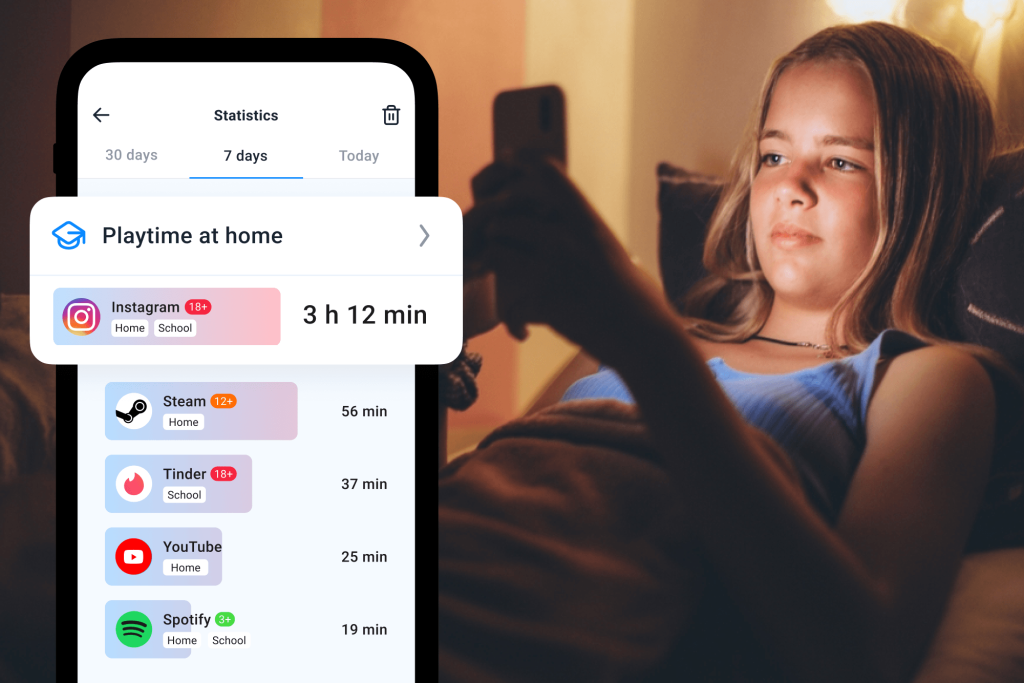
- See how much time their child spends on apps like Instagram
- Notice sudden spikes in social media usage or late-night activity
- Temporarily block specific apps when needed
- Set app blocking timers to limit access to distracting apps for a chosen period of time
- Better understand changing digital habits and online routines
This can be especially helpful if a child hides their Activity Status on Instagram, since parents still have a way to stay informed about overall app activity without intruding on private messages or conversations.
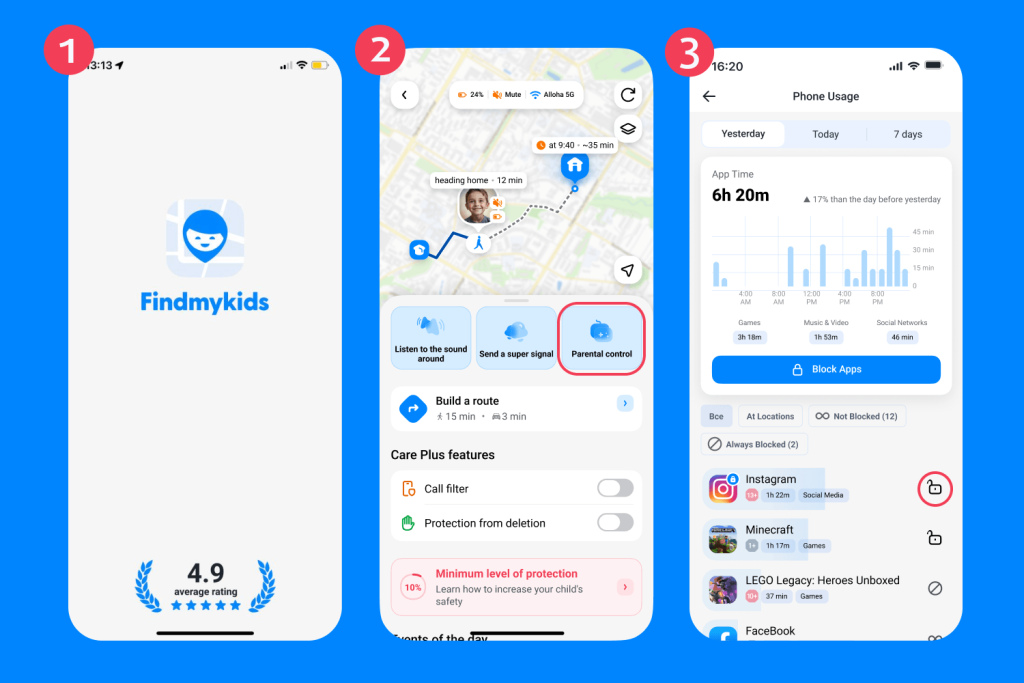
Getting started with Findmykids is easy:
- Simply download the app.
- Follow the instructions to link to your child’s phone—don’t worry, it’s a super straightforward process that should take no more than five minutes!
- Next, open the app on your own phone, select your child’s profile, and tap Parental controls (on older versions of the app, choose In games and social).
- Finally, tap Block all apps, either temporarily or permanently, or select Instagram from the list.
Findmykids app
Beyond social media awareness, Findmykids also includes several offline safety features designed to help parents stay connected in everyday life. The app offers:
- Accurate real-time location tracking
- Route history and Safe Zones notifications
- Loud Signal, which makes the child’s phone ring at full volume even if it is on silent
- Sound Around, allowing parents to hear what is happening nearby if they are worried about their child’s safety
Together, these tools help parents feel more confident about both their child’s online habits and real-world safety.
If you want a simpler way to stay aware of your child’s digital wellbeing while still respecting their independence, try Findmykids and explore its parental control and family safety features for yourself right now for free!
Turning Off Activity Status on Instagram — and Why it Matters
Activity Status means that others can view when your child is active on Instagram—it’s automatically set to on unless a user takes steps to disable it. This feature can cause issues around privacy (among other things), and it’s vital that parents understand what Active Status means and the potential impact of turning it off.
A reliable parental control tool like Findmykids can help keep kids safe online and promote healthy online habits, whether or not your child leaves their Active Status enabled on Instagram.
FAQs
How do you turn off active status on Instagram?
On both Android and iPhone devices, you can turn off Activity Status through your Instagram settings.
Open the Instagram app and go to your profile. Tap the three-line menu in the top right corner, then select Messages and story replies. Tap Show Activity Status and toggle it off. In some versions of the app, you may also find this setting under: Settings and privacy → Messages and story replies → Show Activity Status
Once disabled, other users will no longer see when you are online or when you were last active. You will also lose the ability to see other users’ activity status.
What happens when you turn off Activity Status?
When you turn off Activity Status on Instagram, your online presence is hidden, meaning that others won’t be able to see if you’re online or, if not, the last time you were active on the platform.
Can you hide active status from only one person?
There is no direct way to hide Activity Status on Instagram from a specific person, but this can be achieved via the Close Friends feature or by blocking or muting this person.
Does turning off active status hide read receipts?
Turning off Activity Status on Instagram does not hide read receipts, meaning that someone who messages you will still see when you’ve read their messages.
Cover image: generated by ChatGPT / OpenAI
Проверьте электронный ящик