















It’s no secret that social media platforms have become ingrained in teenagers’ lives, and Instagram is no exception. In fact, 61% of teens ages 13 to 17 use Instagram. However, many parents have concerns about their child using social media and the potential dangers that it comes with.
The good news is that Instagram features new Instagram Teen Accounts, which set age-appropriate restrictions for users under the age of 16. If you’ve been on the fence about allowing your teen to have an Instagram account, then this post is for you. It discusses what Instagram Teen Accounts are, the safety features that come with it, and how parents can protect their kids online.
Key Takeaways
- Instagram Teen Accounts automatically apply private profiles, stricter messaging controls, content filters, and limits on tags, mentions, Live, and settings.
- Parents can set time limits, block Instagram during certain hours, review followers, and see recent contacts without reading private messages.
- Every teen under the age of 16 automatically gets a Teen Account with its built-in protections.
- Parents should combine Instagram’s safety features with open conversations, age-appropriate rules, and the Findmykids parental control app for thorough online protection.
Contents:
What Are Instagram Teen Accounts?
Credit: meta.com
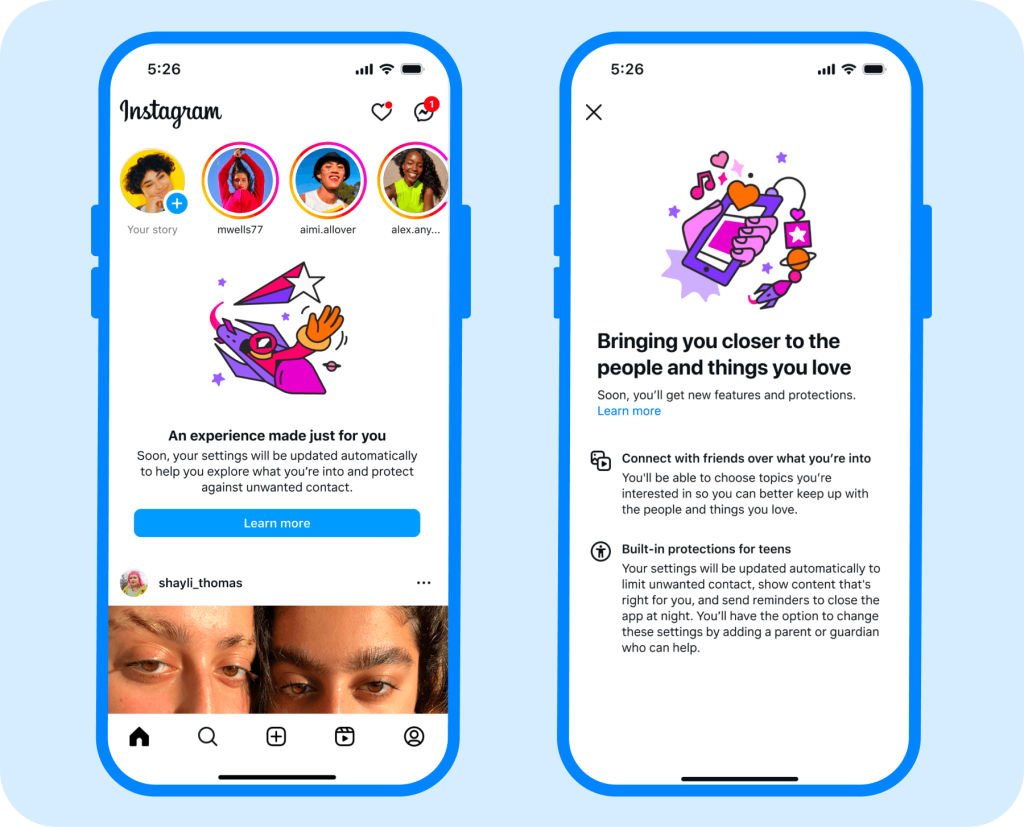
Instagram’s Teen Accounts are designed specifically for users aged 13 to 16, with built-in protections that help create a safer and more age-appropriate experience from the start.
Meta introduced Instagram Teen Accounts in 2024 to address growing concerns about teens’ exposure to harmful content, unwanted contact from strangers, and excessive time spent on social media. According to the company, the goal was to make the safest settings the default for younger users while giving parents greater oversight of their teen’s experience.
This means that teens on Instagram have restrictions, such as content filters, automatic private accounts, and message restrictions, meaning only people who follow the account can send them DMs. However, parental supervision is the standout safety feature here. Parents can view their child’s Instagram settings, receive notifications if their teen reports content, view followers and blocked accounts, and even see what their child asked Meta AI in the past seven days.
If a teen wants to change the settings on their Instagram, they must get permission from their parents first. It is not possible to change settings without parental consent.
Instagram Teen Accounts vs. Regular Instagram Accounts
If you have an Instagram account, you likely have a regular account with less protective settings. However, below is a breakdown of how Instagram Teen Accounts differ from regular accounts.
| Safety Feature | Instagram Teen Account | Regular Instagram Account |
| Account Privacy | Automatically private; only approved followers can see content | Can have a private or public account |
| Direct Messages | The strictest messaging settings where only followers or those whom your teen has already connected with can message | Users can receive private message requests from anyone, including fake accounts |
| Content Recommendations | Uses age-appropriate content settings to reduce mature or harmful content | Standard recommendations based on the user’s settings and activity |
| Tags and Mentions | Limited to people the teen follows | Can be adjusted, but protections are not automatic |
| Time Reminders | Reminds teens to take a break after 60 minutes of use each day | Optional time-management tools must be activated |
| Sleep Mode | Notifications are muted overnight | Quiet mode is available, but not automatically enabled |
| Instagram Live | Teens under 16 need a parent’s permission to go Live | No age-based parental approval for adult accounts |
| Changing Safety Settings | Users under 16 need parental approval to change settings | Account holders control their own settings |
| Parental Supervision | Parent or guardian can approve changes, set time limits, and review certain activity details | Not designed around parental supervision |
Instagram Teen Account Safety Features
When your child gets an Instagram Teen Account, there are automatic protective settings and features that come with it.
Privacy Settings
Credit: meta.com
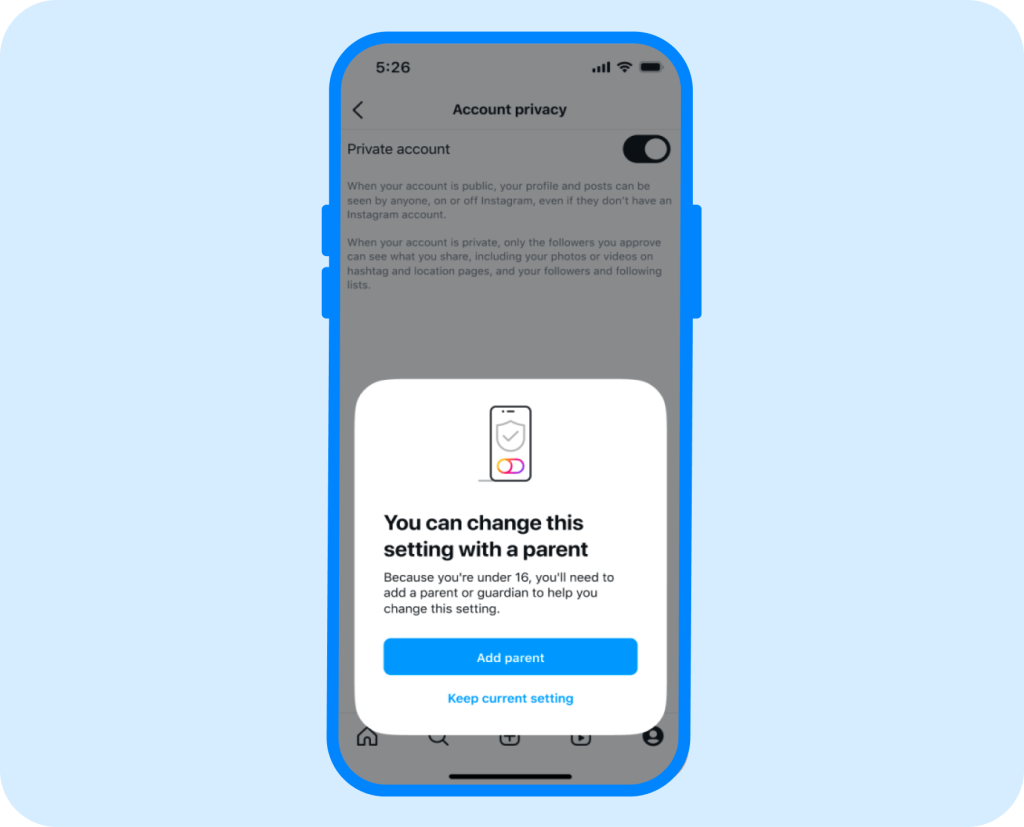
Every single Instagram Teen Account is set to private. That means users must approve new followers before they can see their stories, videos, and posts. In fact, every single user under the age of 18 automatically has private accounts, not just Teen Accounts.
Messaging Restrictions
Credit: meta.com
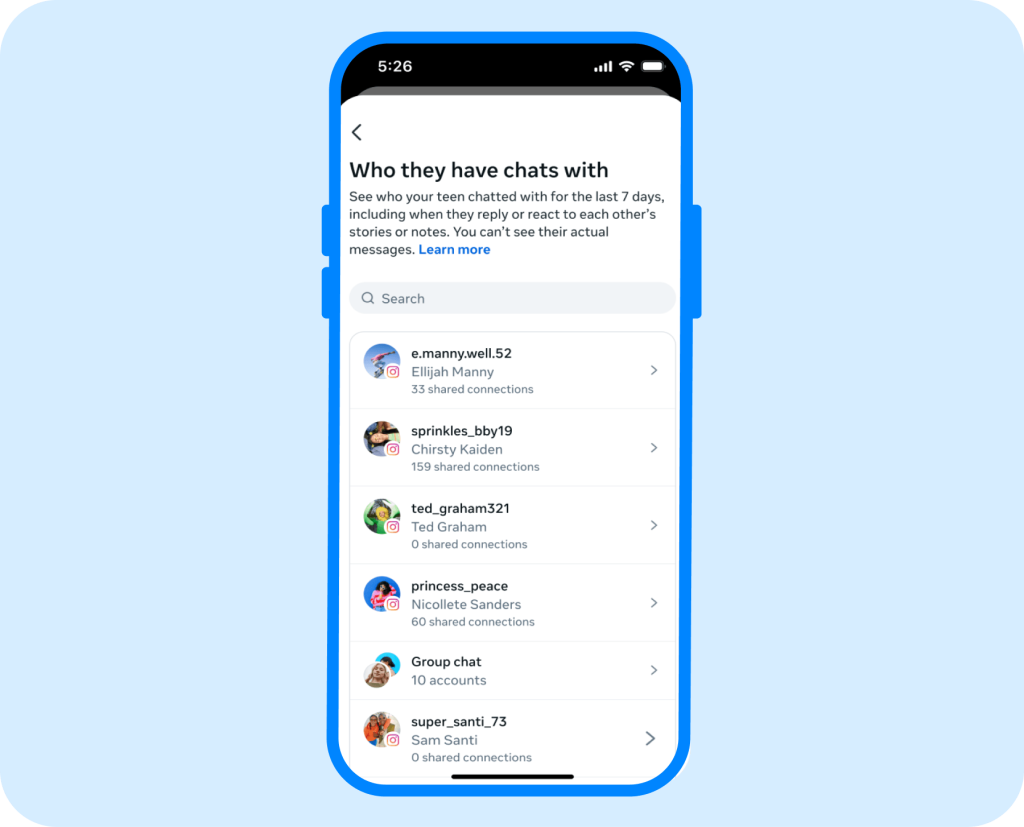
With Instagram Teen Accounts, the messaging feature has the strictest privacy settings. These settings only allow the teen’s followers to send them messages. Nobody who is not following your teen, except for someone they are already connected to, can send them a private message.
Sensitive Content Restrictions
Even though Instagram has Community Guidelines about the type of content users can post, there can still be inappropriate images or videos circulating on the platform. With the Instagram Teen Accounts, restrictive content settings and limitations are automatically enabled to the strictest settings.
Hidden Words and Anti-Bullying Features
In addition to content restrictions, Instagram goes even further to hide certain words in the teen’s comments from Instagram Teen Accounts. This means that any offensive words or phrases won’t show up in comments or DM requests.
Time Limit Reminders and Sleep Mode
Credit: meta.com
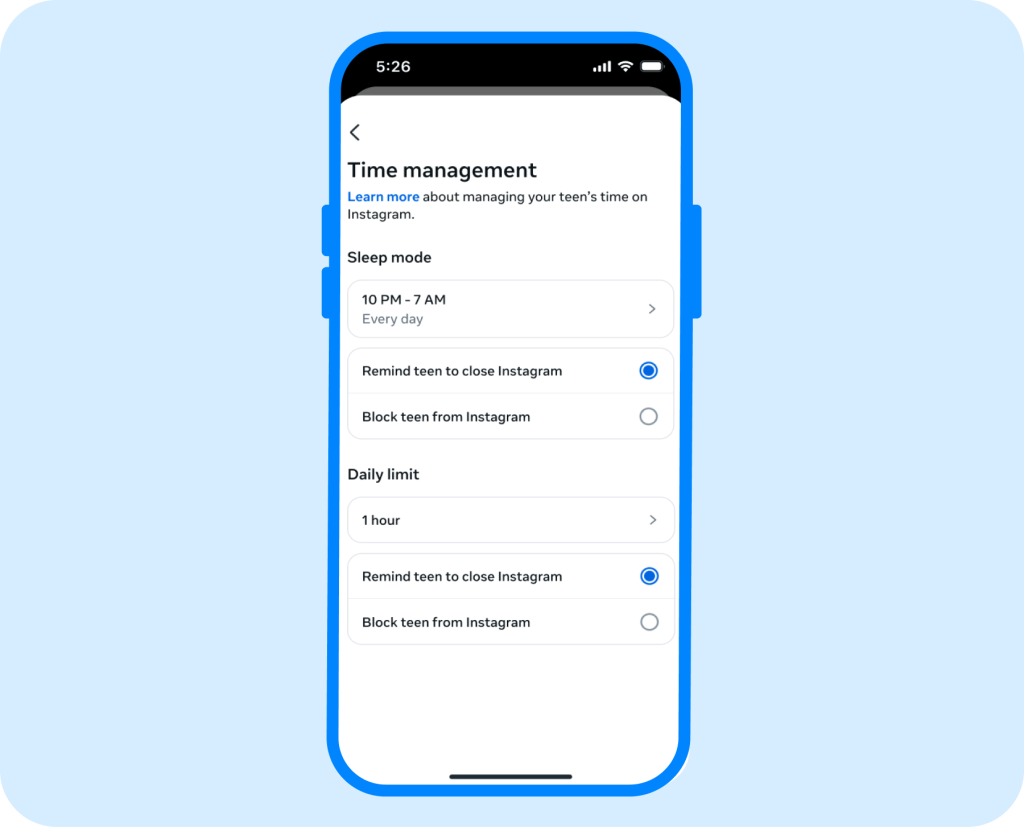
a majority of teen Instagram users spend an average of 5 hours or more scrolling through social media per day. When they have an Instagram Teen Account, though, the app notifies teens after 60 minutes of use each day, suggesting that they step away from their phone for a bit. Additionally, between 10 pm and 7 am, Instagram goes into sleep mode, so all notifications are muted. This is excellent for time management and building healthy habits.
What Parents Can See and Control
With Instagram’s built-in parental supervision features, families get a clearer view of their teen’s digital activity. Parents can access insights such as:
- Monitor messages: See who their teen has been messaging on Instagram over the past seven days. However, message content remains private—parents cannot read sent or received messages.
- Set daily time limits: Create daily limits for Instagram use. Once the limit is reached, the app becomes unavailable until the next day.
- Set scheduled breaks (Sleep Mode): Parents can choose specific times and days when Instagram use is limited or blocked, such as during school hours or at bedtime, helping teens stay focused on important activities.
- Review interests and topics: Parents can see topics their teen has chosen to explore on Instagram, helping them understand what type of content their child is interested in.
- Control sensitive content: Parents can adjust sensitive content settings to limit exposure to potentially inappropriate content.
- View teen account content: Access their teen’s posts, Stories, Reels, and comments left by other users.
To access these tools, both the parent and teen need Instagram accounts. Parents can set up supervision through Instagram’s Family Center:
- Open Instagram and go to Settings.
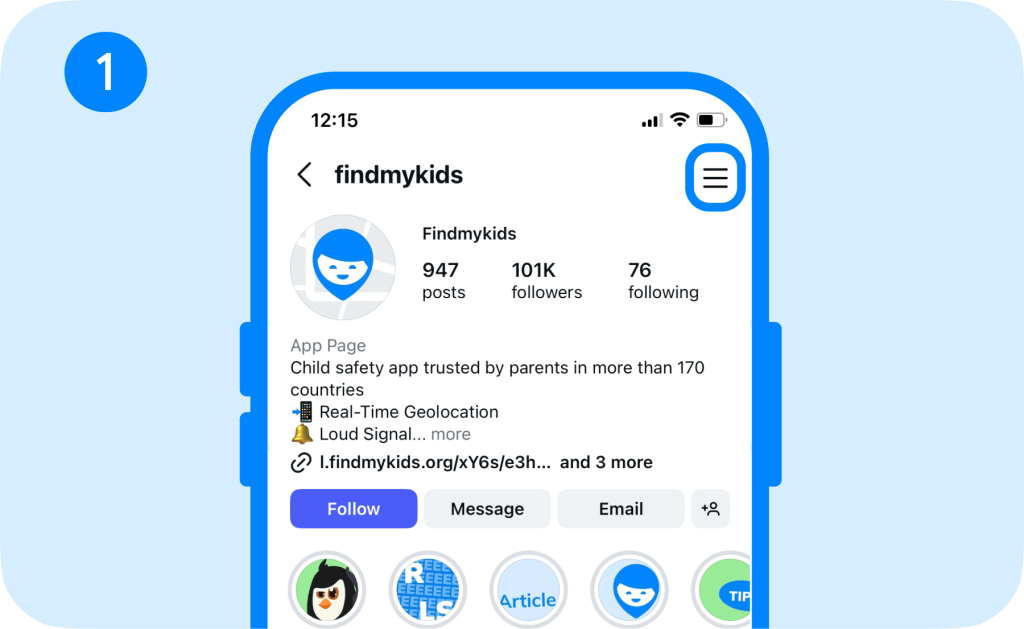
- Find Family Center.
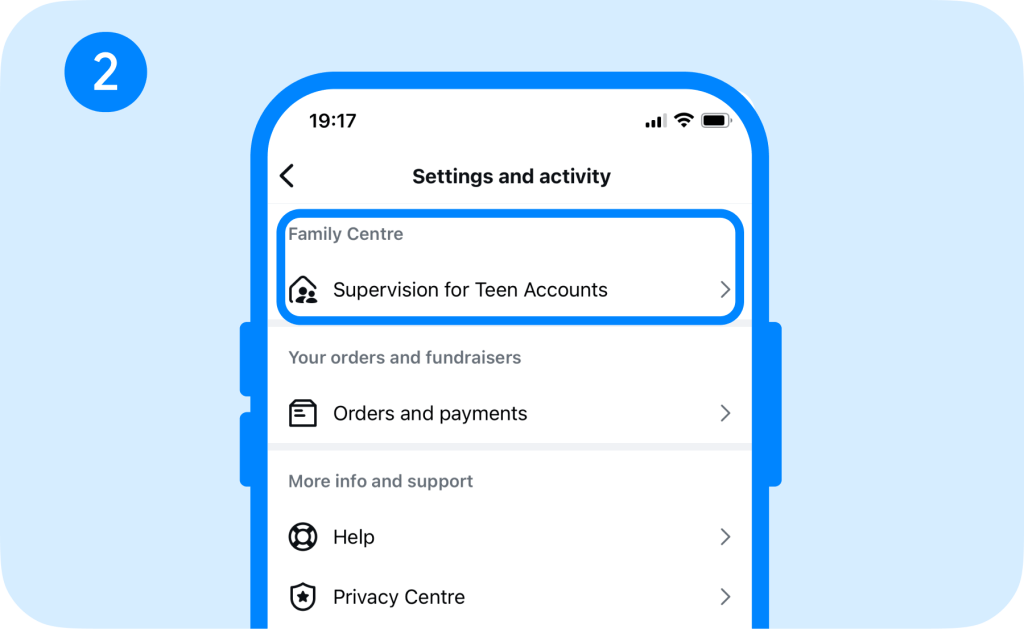
- Select Continue and Sendinvitation to your child’s profile.
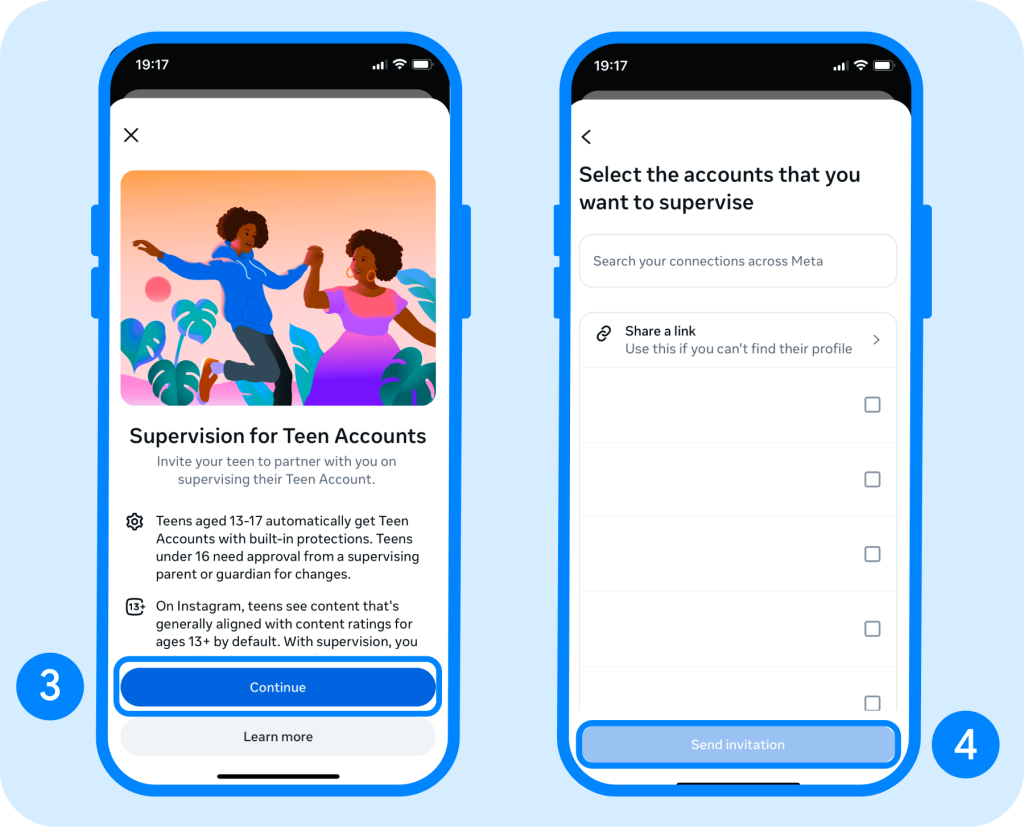
- Once the teen accepts the invitation, parents can view activity insights and manage available supervision settings from the Family Center dashboard.
Although these built-in Teen Account protections and insights for parents are helpful for creating healthy digital habits, in-app controls may not always provide the full level of visibility and flexibility some families need.
Are Instagram Teen Accounts Really Safe? Limitations & Risks
Despite being safer than regular accounts, Instagram Teen Accounts are not without their limitations and risks. Young people are automatically protected from inappropriate content, spending too much time on the app, strangers messaging them, and more. However, teens could still face:
- Inappropriate, upsetting, or misleading content that filters miss on the Explore page
- Bullying, harassment, scams, impersonation, or pressure from people they know
- Unwanted contact through approved followers or connected accounts
- Body-image pressure that can lead to eating disorders, depression, or anxiety
- Privacy risks from sharing photos, locations, school details, or personal information
- Ways to misrepresent their age or create additional accounts
Instagram also found that some teens bypass the automatic account settings by entering an adult birthday and claiming they are over 18 when creating the account. They did try to implement an age verification feature, but it was not as successful as they had hoped.
How Instagram Teen Accounts Compare with Parental Control Apps
While Instagram Teen Accounts do come with some impressive social media safety features, they don’t necessarily stack up to what parental control apps can do. We recommend pairing these teen-specific accounts with a third-party parental control app for the most restrictive settings and online safety for your child.
Let’s do a quick breakdown of how Instagram Teen Accounts compare with parental control apps:
| Area | Instagram Teen Accounts | Parental Control App |
| Coverage | Protects activity within Instagram | Covers multiple apps, websites, and devices |
| Privacy Protections | Automatically makes teen profiles private | Usually cannot change Instagram’s internal privacy settings |
| Content Controls | Restricts mature content and interactions within Instagram | Filters websites, blocks apps, and flags concerning activity across the device |
| Message Monitoring | Parents cannot read past or ongoing conversations | Some apps may detect or alert parents of risky communication |
| Screen Time | Includes daily reminders, Sleep Mode, and time limits | Set stricter schedules, block apps, or pause device access |
| Parental Insights | Shows settings, time spent, recent contacts, and certain safety alerts | Provides activity reports, location tracking, and alerts across several platforms |
| Cost and Setup | Built into Instagram for free | May require installation and a paid subscription |
⠀
Beyond Instagram: How Findmykids Helps Parents Build Healthy Digital Habits
Findmykids app
If you’re considering downloading a third-party parental control app, then look no further than Findmykids.
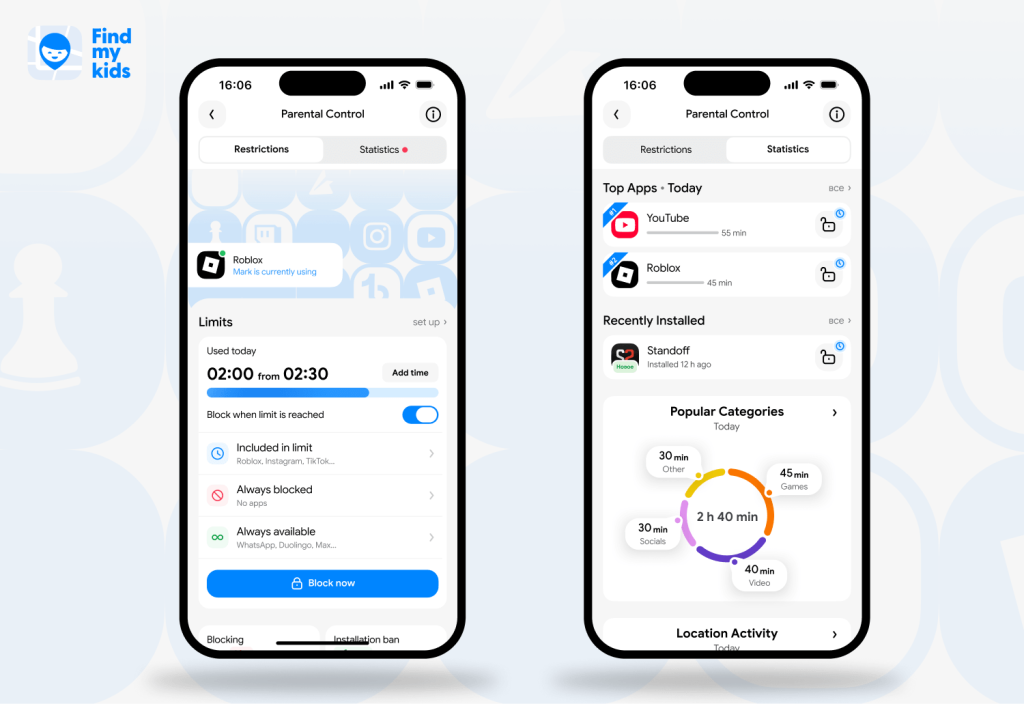
Findmykids helps parents set the foundation with their children to build healthy digital habits while also keeping them safe online. Parental control features include:
- Screen time limits: Set a screen time schedule and daily limits so your teen aren’t scrolling on their phone all day long. You can block specific apps at certain times of the day too.
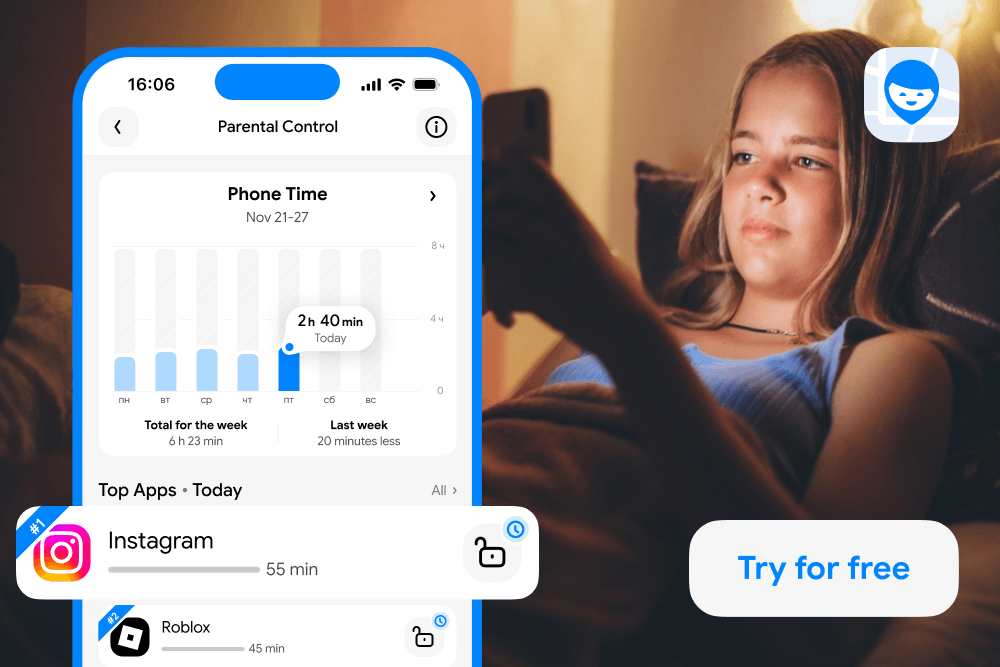
- Device use reports: View analytics and reports about which apps your teen uses, how long they spend on them, and even where they use them. With individual app reports, you can get all of this information for specific apps. From there, you can decide how to limit your teen’s screen time.
- Block 18+ apps and content: With a single button, you can block content and websites that are intended for adults across your child’s entire device.
- Recent app downloads: See exactly what apps your teen downloaded recently.
- Nighttime phone use: With a dedicated report, you can verify if your child uses their phone at night, at what time, which apps they open, and for how long.
Beyond digital safety, Findmykids also helps parents stay connected with their children in the real world. The app provides real-time location tracking, route history, geofencing alerts, a loud signal to find a nearby phone, and an SOS button for emergency situations. These tools help families stay connected while giving children more independence.
Findmykids app
Building healthy technology habits requires more than simply restricting screen time. By combining digital boundaries with real-world safety features, Findmykids gives parents a complete picture of their child’s daily routine and helps them support safer, more balanced technology use.
Ready to create healthier digital habits for your family? Download Findmykids today and start managing screen time, online safety, and everyday communication in one simple app!
At What Age Should a Child Have Instagram?
Instagram’s official age limit is 13 years old, but some parents do not allow their children to create accounts until they are 16 or even older. This decision truly comes down to the parent and their child’s maturity. However, no matter what age your teen is, if they are under 16, they will automatically get a new Teen Account on Instagram.
And now you know a bit more about Instagram Teen Accounts’ parental supervision feature, social media safety settings, and how the Findmykids app gives you even more protections. So, you can make a decision about whether your teen is ready for an Instagram account and create a space in the digital world.
If you know someone who isn’t sure about whether they should let their child have an Instagram account, make sure to share this post with them.
FAQs
What are Instagram Teen Accounts?
Instagram Teen Accounts are dedicated accounts with social media safety features and automatic privacy settings for teens under 16 years old.
Are Instagram Teen Accounts private by default?
Yes, Instagram Teen Accounts, and all accounts for those under 18, are private accounts by default. Older teens ages 16 and up may change this setting without parental permission.
Are Instagram Teen Accounts safe?
Instagram Teen Accounts are safer than regular Instagram accounts, but there is still a risk of bullying, inappropriate content, and mental health issues. This is why parents should always talk to their child about social media and how to create healthy digital habits.
Can parents read their teen’s Instagram messages?
No, parents cannot read their teen’s messages through Parental Supervision. However, they can see who their teen has messaged and which accounts they have blocked.
What is Sleep Mode on Instagram Teen Accounts?
Sleep Mode is enabled between 10 pm and 7 am and automatically mutes notifications overnight from Instagram, including messages, during that time.
What age is Instagram suitable for?
The age limit for Instagram is 13 years old, and teens under 16 all automatically receive a Teen Account. However, it is always up to the parents to decide whether their teen is mature enough to use social media safely and responsibly.
Sources & References
- Teens, Social Media, and Technology 2024, Pew Research Center, 2024
- Introducing Instagram Teen Accounts: Built-In Protections for Teens, Peace of Mind for Parents, Meta, 2024
- Instagram Community Guidelines FAQs, Instagram
- Teens Are Spending Nearly 5 Hours Daily on Social Media. Here Are the Mental Health Outcomes, American Psychological Association, 2024
- Instagram is using AI to find teens lying about their age and restricting their accounts, Techcrunch, 2025
- Introducing New Ways to Verify Age on Instagram, Meta, 2022
- Meta expands teen content controls globally, tests new Instagram tool to diversify feeds, Investing, 2026
Cover image: Garetsvisual / magnific.com
Проверьте электронный ящик