

Figuring out how to block TikTok porn is a major priority when you hand a smartphone to your kid.
You want them to have fun making videos and watching funny dances, but not come across adult content in their feed. This guide gives you the exact steps to lock down their device and protect them from inappropriate material.
Contents:
Can TikTok Expose Kids to Adult and Explicit Content?
TikTok relies heavily on an algorithm designed to keep users scrolling. The app constantly serves up new videos based on what people watch, like, and share. Because millions of users upload countless TikTok videos every single day, inappropriate content inevitably slips through the cracks of the platform’s content filters in many TikTok videos.
Creators sometimes use clever hashtags or tricky editing to bypass community guidelines. In other words, a video might start as a harmless dance trend and suddenly switch to explicit content. Kids can also stumble upon adult websites or bad videos on other platforms linked in a user’s bio.
If your child’s profile is set to public, strangers can send them direct messages containing links to problematic content. The sheer volume of videos on most devices makes the TikTok app a tricky spot for younger children to get through safely.
Can TikTok Itself Block Porn?
Unfortunately, TikTok can’t block porn completely, even with the best features the app has to offer. As a parent, you need to know exactly what the app can and cannot do, so you know which gaps in coverage need to be addressed.
TikTok has built-in safety settings that flag and remove obvious pornographic content. The platform uses artificial intelligence and human moderators to take down videos that violate its rules. However, these systems are far from perfect.
TikTok can’t catch every single inappropriate video before a child sees it. Because it’s not a real person doing the sleuthing, the algorithm struggles to identify subtle mature content, suggestive dancing, or inappropriate language hidden in audio tracks.
As the parent, you must treat in-app safety settings as just one additional layer of network security. Relying solely on the app leaves your child vulnerable to an unfiltered internet experience, so you need a multi-layered approach to block adult content effectively across all social media platforms.
Related: The Obvious and Hidden Dangers of TikTok: Safeguarding Your Kids.
TikTok’s Built-In Safety Settings You Should Use First
Before you look at any third-party apps, you need to configure the native tools inside the TikTok app, as these features give you a baseline of protection that you shouldn’t skip.
Setting Up Family Pairing
Family Pairing is TikTok’s main parental control feature. It allows you to link your parents’ account to your teen’s account in a setup that gives you remote control over their safety settings directly from your own phone.
To set up Family Pairing, follow these steps:
- Open the TikTok app on both your phone and your child’s phone.
- Go to the profile page on both devices and tap the three lines in the top right corner.
- Select Settings and privacy, and then tap Family Pairing on both devices.
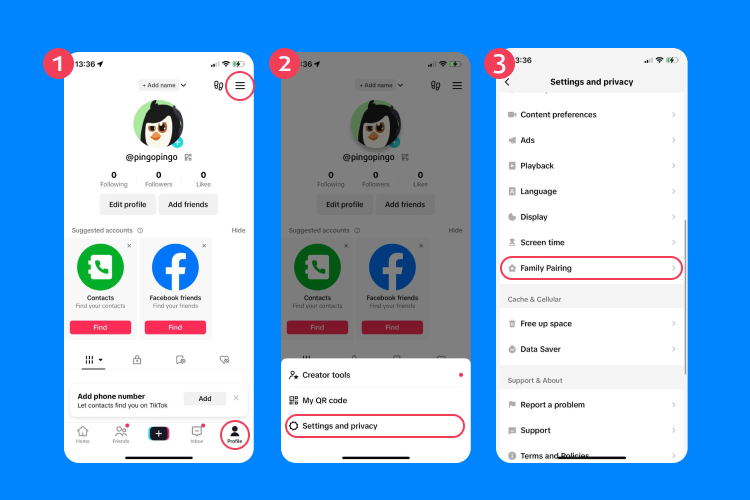
- Choose Parent on your device and Teen on your child’s device.
- Scan the QR code displayed on your screen using your child’s phone to link the accounts.
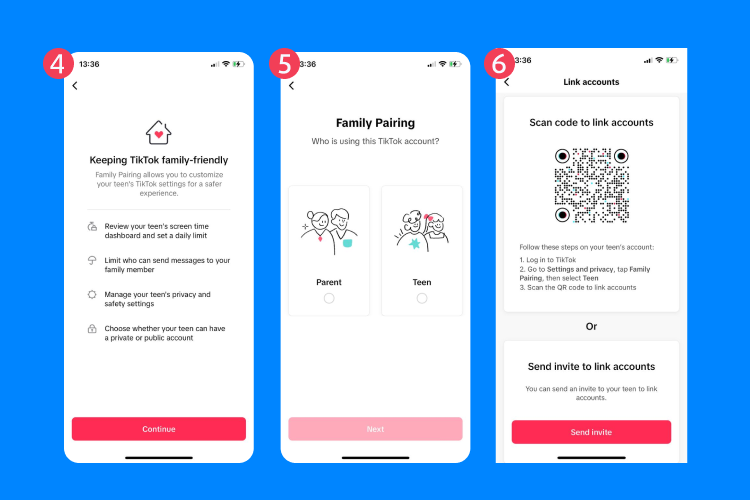
Once you’re linked, you have much more control over what your kid can do on the app. You can manage their screen time, restrict their search capabilities, and decide who can send them direct messages.
Enabling Restricted Mode
Restricted mode limits the appearance of videos that may not be appropriate for all audiences. It acts as an internal safe search filter for the app.
You can turn on restricted mode directly through Family Pairing or on the child’s device itself. To do this locally, go to the privacy menu, select Content Preferences, and tap Restricted Mode.
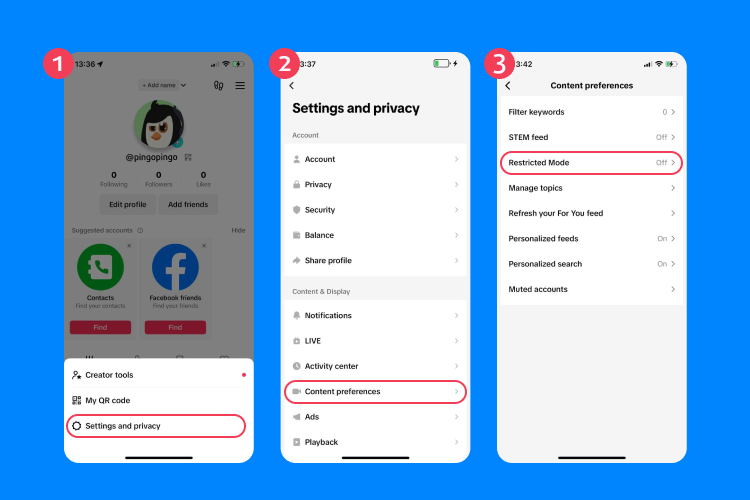
You will then need to set a custom passcode. This passcode guarantees that your kid cannot simply turn the filter off when you leave the room. While restricted mode is helpful, remember that it will not catch every piece of bad content. It just helps filter out the most obvious offenders.
Managing Screen Time
Too much screen time often leads kids down a rabbit hole of problematic content, but setting firm limits helps prevent them from mindlessly scrolling into dangerous territory.
TikTok offers a daily screen time feature in which you can set a limit of 40, 60, 90, or 120 minutes per day. Once your child hits that limit, they must enter a passcode to keep watching. You can manage this setting through the Family Pairing menu.

Even if you’re not concerned about TikTok porn, this is a wise step, since limiting their access teaches digital wellbeing and reduces the chances of them running into adult content late at night.
Read also: Recommended Screen Time for Kids: How Much Is Healthy by Age.
Adjusting Privacy and Direct Message Settings
Strangers often use direct messages to send links to adult websites, so you need to lock down your child’s privacy settings to stop this entirely.
Go into the privacy menu on your child’s profile and switch their account to a private account. This means only people you approve can follow them and watch their videos.
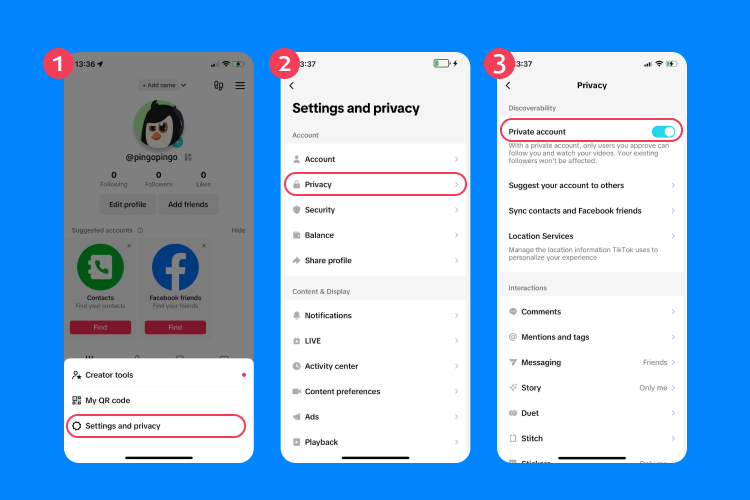
Next, change the Direct Messages setting to No One. This completely disables the inbox, preventing anyone from sending inappropriate material directly to your child. You should also turn off the ability for others to download your child’s videos or stitch their content.
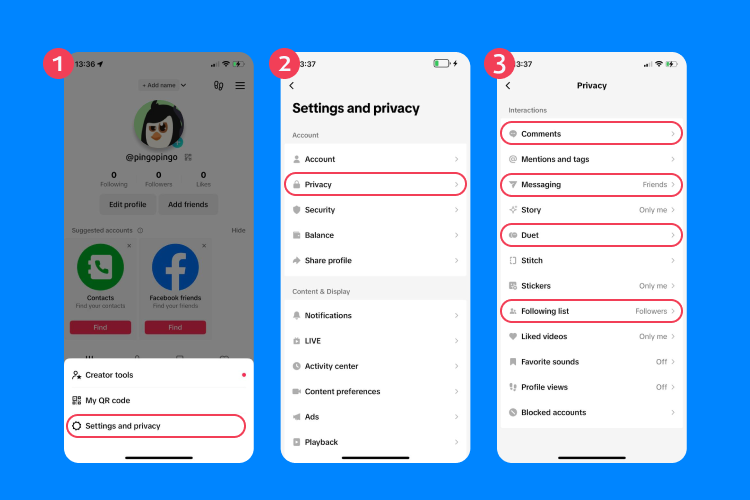
Device-Level Controls for Total Coverage
In-app settings only protect your kid while they are inside TikTok. You also need to apply restrictions at the device level to block adult content across the whole phone.
Setting Up Apple Devices
If your child uses an iPhone or iPad, Apple’s Screen Time feature is your best friend. This tool allows you to block specific apps, restrict web access, and lock down the App Store.
- To set this up, go to Settings and tap Screen Time.
- Turn it on and select This is My Child’s iPhone.
- You can now set up Content & Privacy Restrictions.
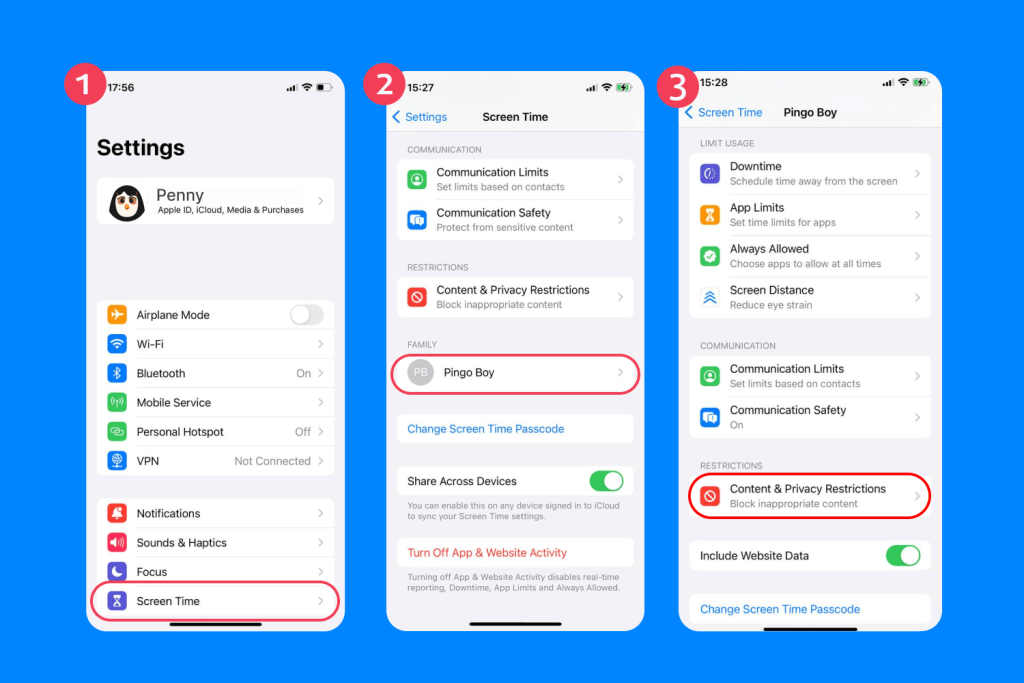
- Under Content Restrictions, choose Web Content and select Limit Adult Websites. This setting automatically filters out explicit content in the Safari browser without you having to download an additional browser extension.

You can also block the TikTok app entirely by going to App Limits and setting the timer for TikTok to zero minutes. Secure these settings with a strong Screen Time passcode so your kid cannot change them.

If you need more detailed guidance, you can find full instructions in this guide.
Setting Up Android Devices
For Android devices, Google Family Link offers the most robust parental control options. You can install the Family Link app on your parent’s device and use it to manage your child’s phone remotely.
Family Link allows you to view their screen time, approve or deny app downloads, and set daily limits. To block inappropriate websites, open Family Link, select your child’s profile, and tap Manage settings. Go to Filters on Google Chrome and choose Try to block explicit sites.
You can also restrict search results by turning on SafeSearch. If you decide TikTok is entirely unsafe, you can use Family Link to block access to the app completely, hiding it from their main screen.
Read more: How to Lock Apps on Android—All Possible Ways Revealed!
Enhancing Safety with Findmykids

Findmykids app
All of these native phone settings are great, but they sometimes lack the granular control parents truly need. The Findmykids app steps in as a highly reliable solution to manage your child’s digital and physical safety. It perfectly complements your existing content filters.
Findmykids offers advanced features designed specifically to give parents peace of mind. Here’s exactly how this tool helps you take charge of your child’s device:
- Screen Time Monitoring: You can easily see exactly how much time your kid spends on social media apps. The dashboard breaks down usage by day and week, helping you spot unhealthy habits immediately.
- App Blocking Options: If your child breaks the rules, you can block specific apps instantly to help with blocking porn and other mature content. On Android devices, you can set a timer to block TikTok during homework hours or block all apps completely at bedtime. iOS users can block all apps at once with a single tap.
- Real-Time GPS Tracking: Online safety is just one part of the puzzle. Findmykids lets you see your child’s exact location on a map. You get movement notifications when they leave school or arrive at a friend’s house.
- Bypass Silent Mode: If you need to reach your kid urgently and they are ignoring their phone, you can send a loud signal. This alert rings at maximum volume even if the phone is set to silent.
Using Findmykids ensures you have more control over their daily routine. It takes the guesswork out of monitoring their mobile devices. And this is only a small sampling of what the app can do. In addition to helping you track social media usage, it can also allow you to block 18+ websites (iOS), block calls from unknown numbers (Android), provide real-time audio monitoring, and so much more.
Try Findmykids to see how these features work in real life and make managing your child’s safety easier.
Network-Level Filtering Using DNS Settings
Smart kids sometimes figure out how to bypass device restrictions. To counter this, you can block adult content directly at the source using your home Wi-Fi network.
Changing your Domain Name System (DNS) settings routes all your internet traffic through a filtered server. These DNS servers actively block access to known adult websites, inappropriate websites, and malware across all devices connected to your home Wi-Fi.
Services like OpenDNS Family Shield provide free porn blocking. You log into your internet service provider router settings using a web browser. From there, you replace the default DNS numbers with the ones provided by OpenDNS.
Once you save the changes, the network automatically filters explicit content for any phone, tablet, or gaming console connected to that Wi-Fi network.
Keep in mind that this technique isn’t foolproof, as it only protects them at home. If they switch to cellular data, the network security drops, which is why device-level controls remain necessary.
Read also: How to Block Pornhub: A Practical Guide for Parents.
The Role of VPNs
Virtual private networks (VPNs) can be a double-edged sword when it comes to online safety. While they’re great for protecting privacy and securing data on public Wi-Fi, they can also bypass DNS filters and other parental controls.
This means that even if you’ve set up network-level protections, a VPN could allow access to inappropriate content. To prevent this, monitor your child’s device for installed VPN apps and consider restricting their use. Many parental control tools, like Findmykids, can help you identify and block VPN apps, ensuring your safety measures remain effective.
How to Talk to Your Child About TikTok Porn and Bad Content
Technical blocks only go so far, and your kid will eventually encounter inappropriate content, whether at a friend’s house or on an unfiltered internet connection. You need to have an open conversation about what they might see online.
Keep the discussion friendly and approachable. Ask them what kind of videos they usually see on their main screen. Explain that some people post mature content that is not meant for younger eyes, and make sure they know they won’t be in trouble if they accidentally see something gross or scary.
You want them to feel safe bringing problematic content to your attention. Remind them that their self-worth has nothing to do with the heavily edited, inappropriate material they might see online.
If your kid does stumble across explicit material, stay calm. And if you still need help in this kind of tricky situation, you can find excellent, step-by-step advice on handling this exact situation by reading our guide about what to do if your child accidentally sees porn.
Take Action to Secure Your Child’s Devices Today
Leaving a child’s phone completely open is a massive risk, but now, you have the exact blueprint to block TikTok porn and secure their digital life.
Start by linking your accounts with Family Pairing and turning on Restricted Mode. Next, dive into the native settings on their Apple or Android devices to lock down web browsers and app stores. Finally, install Findmykids to gain unparalleled visibility into their screen time and physical location.
It may seem like adding all of these failsafes is unnecessary, but acting out of an abundance of caution will only save you from future problems. Take ten minutes right now to configure these settings and give yourself total peace of mind tomorrow.
FAQ
Can TikTok Restricted Mode block porn completely?
No, Restricted Mode can’t block adult content completely. It helps filter out a lot of bad content on multiple platforms, but clever users often find ways to bypass the algorithm. You must use it alongside device-level controls and external parental control apps for real safety.
How do I block adult content on my child’s TikTok app?
To block websites with adult content, you need to turn on Restricted Mode and set up Family Pairing. Go into the privacy menu, select content preferences, and enable Restricted Mode with a passcode. Family Pairing lets you manage these safety settings remotely from your own parent’s account.
What is Family Pairing on TikTok?
Family Pairing is a feature that links a parent’s device to a teen’s account. It allows you to control their screen time limits, manage direct messages, and enforce Restricted Mode without needing physical access to their phone every time you want to make a change.
How can I block porn on Android devices and Apple devices?
For Apple devices, use the Screen Time feature to limit adult websites in the Content Restrictions menu. For Android devices, download the Google Family Link app to turn on SafeSearch and block explicit sites in Chrome. Both operating systems allow you to completely block or limit access to specific apps if you decide it’s necessary.
Do DNS settings help block adult websites and explicit content?
Yes, changing your router’s DNS settings filters out adult websites at the network level. When you use services like OpenDNS on your home Wi-Fi, it automatically blocks inappropriate material for any connected device, adding an excellent layer of network security.
References
- TikTok ‘directs child accounts to pornographic content within a few clicks’, The Guardian, 2025
- Recommended content in TikTok, Common Sense Media, 2024
- Privacy and Safety Settings for Users Under Age 18, TikTok Support
Cover image: natanaelginting / Freepik.com
Проверьте электронный ящик