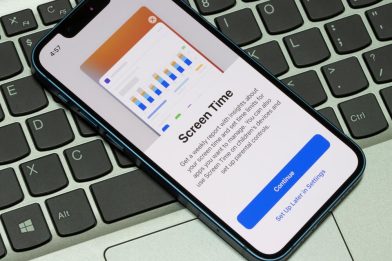

Research shows that too much screen time can affect sleep, physical activity, and social skills.
In today’s digital world, understanding recommended screen time by age is essential for parents seeking to balance technology with healthy childhood development.
Contents:
Key Terms Explained
Screen time is not a blanket term. Distinguishing between types of screen use allows for more informed and practical decisions about limits and routines.
| Terminology | Explanation |
| Screen time | Any time spent using electronic devices such as TVs, computers, tablets, or smartphones. |
| Recreational screen time | Time spent on devices for entertainment rather than educational purposes. |
| Educational screen time | Device use aimed at learning or skill development, like reading apps or online lessons. |
| Non-educational screen time | Activities such as watching TV, playing video games, or scrolling social media. |
| Video chatting | A unique exception; considered safe even for toddlers as it supports social interaction with family, unlike passive entertainment. |
Screen Time vs Recreational Screen Time
Not all screen use is created equal. Recreational screen time is linked to reduced physical activity and potential problems with sleep if excessive, whereas educational screen use can promote learning, language, and creativity when balanced with offline activities.
Educational vs Non-Educational Screen Time
Parents should encourage high-quality content and co-viewing where possible. Avoid solo use for toddlers, and limit non-educational screen time. Research shows that passive viewing (TV, YouTube, or social media) is more likely to contribute to eye strain and behavioural issues than interactive or educational screen use.
Video Chatting Exception
Video chatting with family or caregivers is treated differently from recreational screen time because it supports contingent social interaction, which is foundational to children’s learning and relationship building.
Unlike passive viewing of TV or prerecorded videos, video chat allows real‑time back‑and‑forth exchanges that mirror natural conversation. Research shows that this kind of interactive screen use can help children learn language and social‑emotional skills, especially when adults respond in ways that are sensitive and engaging.
During the COVID‑19 pandemic, video chat became a vital tool for maintaining close family ties when in‑person interaction was limited by lockdowns and social distancing measures. For many families, frequent video interactions with grandparents and other relatives helped sustain emotional connections across distances.
Studies of preschool‑aged children indicate that children can learn from and respond to contingent interaction via video chat, including comprehending stories and engaging in dialogue that supports vocabulary and comprehension skills in ways comparable to live interaction.
This emerging evidence suggests that, when used thoughtfully and interactively, video chatting can contribute to meaningful social engagement and language development, making it qualitatively different from other types of screen use that do not involve responsive communication.
Recommended Screen Time by Age Group
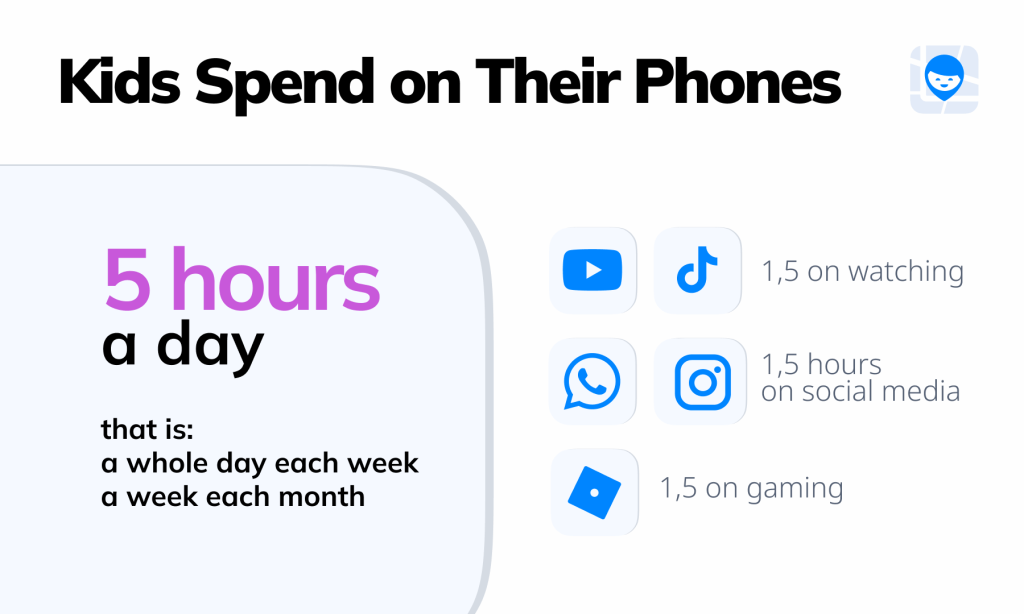
Findmykids research data, 2024
The American Academy of Pediatrics recommended screen time limitations by child’s age, reflecting differences in developmental needs, attention capacity, and the role screens play at each stage of childhood.
| Age | Screen Type | Hours a Day | Rules |
| 0–18 months | Any (except video chatting) | 0 | Zero screen time recommended; co-view video chat only |
| 18–24 months | High-quality educational apps | Up to 1 | Introduce digital media slowly, co-view, avoid solo use |
| 2–5 years | Educational / recreational | 1 | Less is better, co-view, short sessions |
| 6–12 years | Educational / recreational | 1–2 | Set routines, encourage family activities, monitor content |
| 13–18 years | All types | No universal limit* | Focus on quality/context, maintain autonomy and boundaries, set social media rules |
⠀
* While there is no strict hour-by-hour limit for teens, research shows that many adolescents spend far more time on screens than is considered ideal for health. U.S. teens average about 8 hours and 39 minutes per day on entertainment screen media alone (not including schoolwork). Studies consistently show that teens use digital media more heavily than younger children, particularly smartphones, social platforms, video content, and gaming.
Health experts commonly suggest aiming for no more than 2–4 hours of recreational screen time per day outside of schoolwork to help maintain balance.
Higher levels of daily use—especially 4+ hours per day—have been associated with increased risks of anxiety, depression, behavioral concerns, and shorter sleep duration, partly because excessive screen time can displace physical activity and disrupt healthy sleep routines.
How Much Screen Time Is “Too Much”
Exceeding healthy child’s screen time limits isn’t just about the hours on a device; it’s about how screen use affects your child’s well-being. It’s important to watch out for warning signs to avoid any negative long-term impact.
| Sign | Explanation |
| Sleep problems or late-night device use | If your child struggles to fall asleep, wakes frequently at night, or uses a device late into the evening, screen time may be interfering with natural sleep cycles. Blue light from electronic devices can suppress melatonin and delay sleep onset, especially in older children and teens. |
| Eye strain, headaches, or physical complaints | Extended use of screens, computers, or tablets can cause eye fatigue, blurred vision, or tension headaches. Watch for complaints of sore eyes after hours a day of recreational screen time or excessive TV watching. |
| Reduced interest in physical activity or other activities | Kids who spend long periods on devices may skip family activities, outdoor play, or hobbies. If your child prioritises screen use over exercise, friends, or real-life exploration, it may be time to reassess their total screen time. |
| Mood swings, irritability, or social withdrawal | Behavioural changes, such as irritability when devices are taken away, difficulty engaging with other children, or withdrawal from social interactions, may indicate dependence on screen-based entertainment. |
| Difficulty focusing on schoolwork or homework | Excessive screen use can disrupt attention, reduce the ability to complete time learning, and make children less able to concentrate on homework and other educational tasks. |
It’s important to remember that screen time guidelines are not one-size-fits-all. While recommendations from trusted sources such as the American Academy of Pediatrics and the World Health Organisation (WHO) provide helpful benchmarks, your child’s temperament, age group, environment, and family routines all play a role.
Ultimately, too much screen time is determined by the impact on your child’s physical health, sleep, mood, and daily functioning, rather than a rigid number. Observing these signs early allows parents to adjust routines, balance educational vs non-educational screen time, and encourage healthy habits that support long-term growth and well-being.
What’s important: One-number rules cannot account for differences in environment, sociocultural factors, and family habits. Systematic reviews show multiple correlates of screen time effects, including parental involvement, household rules, and quality of content.
Too Much Screen Time Checklist for Parents

kuprevich / Freepik.com
Not all screen time is harmful, but it becomes a concern when it starts affecting sleep, physical activity, mood, or daily routines. This checklist helps you to evaluate your child’s screen time balance. For each item, mark whether the behaviour applies to your child, then add up the total to see where your family stands.
How to use the checklist:
- Go through the checklist items and check each that regularly applies to your child.
- Total your score and see where your child falls on the scale.
- Use the guidance above to adjust routines, limits, or content as needed.
Sleep & Routine
- Uses screens late at night or before bed
- Has trouble falling asleep or staying asleep
- Keeps a device in their bedroom overnight
Physical Health
- Complaints of eye strain, headaches, or neck pain
- Rubs eyes or blinks frequently after screen use
- Spends long hours a day sitting in front of screens
Physical Activity & Balance
- Chooses screens over physical activity
- Shows little interest in outdoor play or hobbies
- Skips family activities because of screen use
Mood & Behaviour
- Becomes irritable or upset when screens are limited
- Shows mood swings linked to screen access
- Withdraws from friends or other children
Learning & Focus
- Struggles to focus on homework or schoolwork
- Rushes tasks to return to a device
- Has difficulty sustaining attention without screens
Habits & Boundaries
- Uses screens without clear time limits
- Exceeds recommended screen time for child’s age group
- Screen use replaces sleep, movement, or real-life interaction
Score Guide for Parents
| Score | What it Means | Advice for Parents |
| 0–3 | Your child’s screen use is generally balanced. | Keep following current routines. Maintain screen-free zones and encourage variety in daily activities. |
| 4–6 | Your child may be spending a little too much time on screens. | Review screen-free times, ensure co-viewing, and balance educational vs recreational screen use. Consider adjusting weekday limits slightly. |
| 7–10 | Screen time is starting to impact your child’s well-being. | Implement clearer routines, enforce screen-free zones, limit recreational screen use, and encourage physical activity and offline social interaction. |
| 11+ | Screen use is likely excessive and could be affecting sleep, mood, or daily functioning. | Take a closer look at all device use, set firm boundaries, co-view content, introduce consistent schedules, and consider consulting a medical professional if behavioural or sleep issues persist. |
⠀
This system helps parents identify early warning signs of excessive screen use and make gradual, manageable changes.
Practical Household Rules That Work at Any Age
Managing screen use doesn’t have to feel like a constant battle. By establishing clear routines and consistent boundaries, parents can help children enjoy technology safely while still making time for sleep, physical activity, and family connection. These practical household strategies provide a framework that works for all ages, helping families set limits in a way that feels fair, predictable, and manageable.
Screen-Free Zones
Creating screen-free areas in the home is one of the most effective ways to manage device use. Dinner tables should remain device-free to encourage family conversation and real-life interactions, while bedrooms should be off-limits for screens to protect sleep.
It can help to replace passive screen use during long car journeys with audiobooks, music, or conversation, keeping children engaged in the world around them rather than absorbed in a device.
Settings and Parental Controls
Technology itself can support healthier screen habits—when families use the right tools. Most modern devices already include built-in parental controls, and additional apps can provide deeper insights and more flexible management options.
iPhone and iPad
Apple’s Screen Time provides daily and weekly reports, lets you set app limits, schedule device downtime, and filter content. These tools give an overview of app usage and help enforce routines, but they don’t track location, provide detailed usage by category, or allow flexible app blocking.
Android
Android devices feature Digital Wellbeing and Google Family Link. These allow parents to view app usage, set screen time limits, block or approve apps, and schedule bedtime routines. Family Link can also show your child’s location and allow remote device locking. However, monitoring is limited for teens over 13, and controls cannot block all apps flexibly or track detailed usage by category.
Findmykids: Smarter, Data-Driven Screen Management

Findmykids app
Findmykids goes beyond simple time limits by giving parents detailed behavioral insights and flexible control options.
Detailed Usage Statistics
Parents can view:
- Screen time for today, yesterday, and the past 7 days
- Time spent in specific apps
- App usage grouped by category, with clear visibility into what type of content dominates (games, social media, video, etc.)
- App activity by location—for example, whether apps were used at school, at home, or elsewhere
This helps parents understand patterns, not just totals. For example, a child may spend only two hours on a phone—but if most of that time is spent on social media late at night, that’s important context.
Flexible App Blocking Options
Findmykids allows parents to:
- Block all distracting apps permanently
- Block specific apps permanently
- Block selected apps temporarily (for example, during school hours or bedtime)
- Block all entertainment apps overnight
- Set scheduled restrictions (e.g., every weekday from 9 a.m. to 2 p.m.)
Findmykids’ analysis shows that more than 86% of children use their smartphones between 11 p.m. and 5 a.m. This pattern appears across nearly all age groups—from preschoolers to older teens.
Blocking distracting apps before bedtime or during school hours helps protect sleep and focus without banning devices entirely.
More Than Screen Time Control
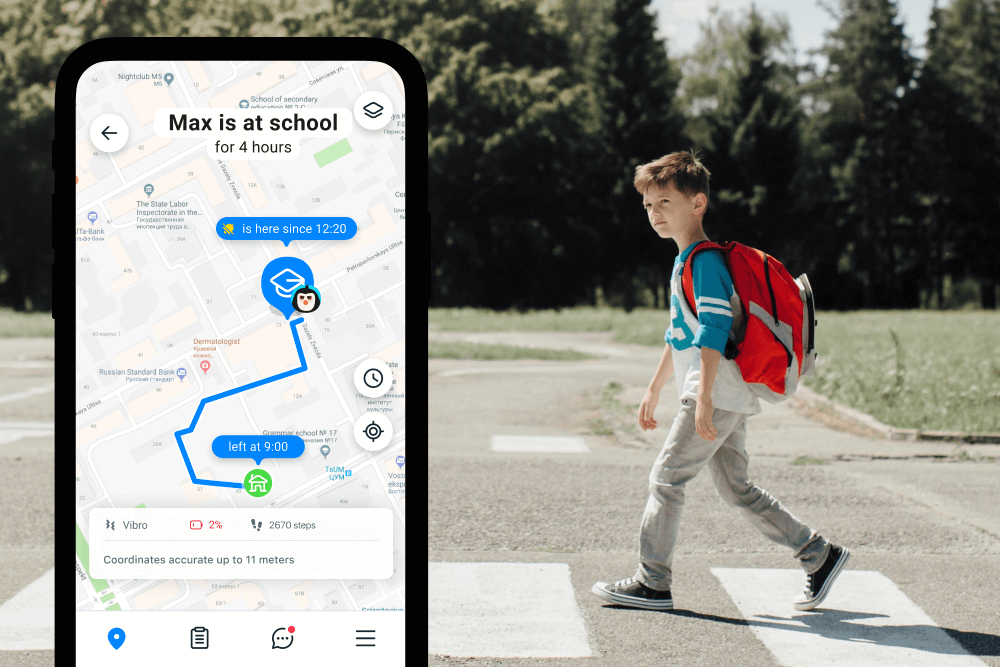
Findmykids app
Findmykids is not just about limiting screen time. It provides a broader safety ecosystem:
- Real-time GPS tracking
- Location history
- Safe zones with entry/exit alerts
- Loud signal to locate a misplaced phone
- Emergency SOS button
- Ambient sound monitoring
- Low battery notifications
Findmykids combines screen time management, app monitoring, and real-world safety in a single solution, helping parents enforce healthy habits, protect children outside the home, and maintain peace of mind.
Start using Findmykids today to monitor screen time, block distractions, and safeguard your child both online and offline.
Weekends vs. Weekdays
Child’s screen time can be managed differently depending on the day of the week. On weekdays, limiting recreational screen use ensures children complete homework, remain physically active, and follow consistent routines.
Weekends may allow slightly more flexibility, but screens mustn’t replace family activities, outdoor play, or social interactions. Clear communication about these distinctions reduces confusion and helps children understand expectations.
Sleep-First Rule
Protecting sleep is essential when managing screen use. Screens should be turned off at least 30–60 minutes before bedtime, and devices should be kept out of the child’s bedroom entirely. This helps children wind down and ensures uninterrupted rest.
Pairing this rule with quiet routines, such as reading or talking, reinforces healthy habits and signals that screens are a tool, not a replacement for essential daily routines.
For a detailed guide on setting limits and practical strategies to reduce screen time without conflict, see our full article: How to Reduce Screen Time for Kids.
How to Set Limits Without Constant Conflict
Screen time strategies should evolve as children grow, reflecting their changing abilities, independence, and social needs. By tailoring limits and guidance to each child’s age group, parents can help children develop healthy habits, stay safe online, and balance screen use with learning, play, and real-life interactions.
Young Child (0–5 years)
| Strategy | Benefit |
| Keep sessions short; co-view educational content | Supports language development, learning, and engagement; reduces risk of excessive screen exposure. |
| Integrate screen use into routines | Helps children know what to expect, making screen time predictable and less likely to disrupt daily activities. |
| Use playful interaction to balance screen and real-life activities | Encourages physical activity, social skills, and imaginative play alongside digital learning. |
Older Children (6–12 years)
| Strategy | Benefit |
| Set app and device limits | Prevents overuse, encourages self-regulation, and ensures time for homework, sleep, and physical activity. |
| Encourage family activities and reward systems | Reinforces positive habits, strengthens family connection, and balances screen time with real-life interactions. |
| Discuss the appropriate use of social media and online games | Promotes online safety, responsible decision-making, and healthy social interactions. |
Teens (13–18 years)
| Strategy | Benefit |
| Maintain autonomy + boundaries; allow decision-making but set clear rules | Builds responsibility, independence, and critical thinking about digital habits. |
| Privacy restrictions on social media platforms | Protects online safety, encourages responsible sharing, and reduces exposure to harmful content. |
| Emphasise the sleep-first rule, responsible screen use, and balance with offline life | Supports mental health, sleep quality, and a healthy balance between online and offline activities. |
Guiding Children in a Digital World

Roman Samborskyi/Shutterstock
Managing screen time effectively is not about enforcing strict numbers or rigid schedules; it’s about creating balance, promoting high-quality engagement, and guiding children to use technology thoughtfully.
Across all ages, parents can foster healthy habits by co-viewing content, incorporating family activities, and using reward systems to encourage positive screen use instead of relying solely on enforcement. The sleep-first rule—turning devices off 30–60 minutes before bedtime and keeping screens out of bedrooms—helps protect rest and supports overall well-being.
Consistency is key: limits should be predictable, age-appropriate, and adjusted thoughtfully between weekdays and weekend days, while children are encouraged to balance educational and recreational screen time. Emphasising high-quality content over sheer quantity ensures that screen use contributes to learning, creativity, and social connection rather than replacing them.
By combining these strategies with research-backed guidance from the American Academy of Pediatrics, World Health Organization, and Centers for Disease Control and Prevention, parents can help children navigate the digital world safely.
Thoughtful limits, household rules, and intentional engagement allow technology to become a tool that supports growth, fosters strong social connections, encourages physical activity, and reinforces the routines that help children thrive both online and in real life.
FAQs
What is the recommended screen time by age?
For babies under 18 months, avoid screen media except video chatting. Ages 2–5: aim for about 1 hour/day of high-quality content. For ages 6+, focus on balanced limits that protect sleep, activity, and school time.
Does video chatting count as screen time?
It still counts as screen use, but many guidelines treat video chatting as an exception for very young children because it can support real social interaction with trusted adults.
What’s the difference between total screen time and recreational screen time?
Total screen time includes school and homework on devices. Recreational screen time is entertainment—videos, games, social media, and scrolling. Most limits target recreational screen time.
Should kids have zero screen time?
For infants (especially under 1 year), many guidelines recommend no screen time. For toddlers and preschoolers, the goal is limited, high-quality content with adult involvement—not unlimited access.
How can parents set screen time limits that work?
Create clear household rules, such as screen-free bedrooms and dinner tables, set daily app limits, and keep devices out of the child’s bedroom at night. Review child’s screen time reports weekly and adjust rules as needed, focusing on balance rather than strict enforcement. Using tools like Findmykids helps parents stay informed with detailed app usage statistics, location insights, and flexible app-blocking options—so you can guide your child toward healthy digital habits while keeping them safe both online and in the real world.
References
- Impact of Screen Time on Development of Children, Subhranshu Sekhar Kar, Rajani Dube, Bellary Kuruba, Manjunatha Goud, Qonitah Syadida Gibrata, Adlen Adnan El-Balbissi, Tasnimm Ahmad Al Salim, and Rand Nedal Mohammad Al Khaled Fatayerji. Children, 2025
- Impact of Screen Time on Children’s Development: Cognitive, Language, Physical, and Social and Emotional Domains, Panjeti‑Madan & Ranganathan. Multimodal Technologies and Interaction, 2023
- Preschoolers Benefit Equally From Video Chat, Pseudo-Contingent Video, and Live Book Reading: Implications for Storytime During the Coronavirus Pandemic and Beyond, Caroline Gaudreau, Yemimah A. King Rebecca A. Dore Hannah Puttre Deborah Nichols Kathy Hirsh-Pasek, Roberta Michnick Golinkoff. Frontiers Phycology, 2020
- Effects of screentime on health outcomes in children and adolescents: A systematic review of reviews, Stiglic, N., & Viner, R. M. BMJ Open, 2019.
- Implications of video chat use for young children’s learning and social–emotional development: Learning words, taking turns, and fostering familial relationships, Aaron R. Glick, Fauzia S. Saiyed, Katia Kutlesa, Kristine H. Onishi, Aparna S. Nadig. WIREs Cognitive Science, 2022
- Average Amount of Screen Time for Children and Young Adults, AAP, 2025
- To grow up healthy, children need to sit less and play more, Tarik Jasarevic. World Health Organization, News, 2019
- Melatonin suppression and sleepiness in children exposed to blue-enriched white LED lighting at night, Sang-Il Lee, Kouhei Matsumori, Kana Nishimura, Yuki Nishimura, Yuki Ikeda, Taisuke Eto, Shigekazu Higuchi, PubMed, 2018
- How Teens and Parents Approach Screen Time, Pew Research Center, 2024
- Excessive Screen Time is Associated with Mental Health Problems and ADHD in US Children and Adolescents: Physical Activity and Sleep as Parallel Mediators, Ying Dai, Na Ouyang, arXiv, 2025
- Video Calls as a Replacement for Family Visits During Lockdowns in Aged Care: Interview Study With Family Members, Ryan M Kelly, Yushan Xing, Steven Baker, Jenny Waycott, PubMed, 2023
Cover image: pch.vector / Freepik.com
Проверьте электронный ящик