
Recent studies suggest that the average age at which a child is first exposed to pornography on the internet is just 11 years old. This shocking figure highlights a massive issue: the internet is an incredible library, but it does not come with a built-in “children’s section.”
For most parents, handing a smartphone or laptop to a child brings a specific, gnawing anxiety. There is always the worry that they might stumble onto adult content by accident, or out of growing curiosity. This is the exact fear that drives thousands of families to search for how they can block Pornhub and other explicit adult sites.
Filtering the web is not about being a controlling, helicopter parent; instead, it’s about safety. It is about creating a space where a child’s curiosity does not lead to harmful exposure before they are ready. This guide covers practical strategies to block access to inappropriate content, looking deep into how to secure devices, browsers, and routers so parents can breathe a little easier.
Contents:
- What Is Pornhub, and Why Parents Want to Block It
- How Kids Access Pornhub (Even If You Think They Don’t)
- The Five Layers of Porn Blocking
- How to Block Pornhub on Different Devices
- Enforcing SafeSearch on Google and Bing
- Browser Extensions and Third-Party Apps
- How to Block Pornhub at the Router or Network Level
- Why Blocking Pornhub Alone Is Not Enough
- Talking to Your Child About Porn
- FAQs
What Is Pornhub, and Why Parents Want to Block It

AndrewFall / Shutterstock.com
Pornhub is one of the largest and most accessible porn websites online. It hosts millions of videos containing sexually explicit content. Unlike walking into an adult store, there are no effective age checks on the web. A curious ten-year-old is often just one click away from hardcore pornography.
Parents are right to be worried. Exposure to adult content at a young age is not just a moral issue; it is a developmental one.
Side Effects of Watching Pornhub and Other Porn Sites
Medical professionals and child psychologists have raised serious concerns about the impact of unrestricted porn consumption on developing brains.
- Dopamine Desensitization: Porn sites trigger high levels of dopamine. Over time, the brain may desensitize to this, requiring more extreme content to get the same chemical “hit.” This cycle can potentially lead to porn addiction.
- Unrealistic Expectations: Mainstream porn often portrays aggression or lack of consent as normal. Children may internalize these scripts, leading to confusion about what healthy relationships and consent actually look like.
- Mental Health Links: Studies suggest a correlation between heavy consumption of explicit content and increased rates of anxiety, depression, and social isolation in adolescents.
- Distorted View of Intimacy: Constant exposure to adult websites can commodify sex, detaching the physical act from emotional intimacy and respect.
How Kids Access Pornhub (Even If You Think They Don’t)
Many parents assume that simply enabling Google Safe Search is enough. But children are often more tech-savvy than guardians realize and can easily find a workaround.
Browsers and Incognito Mode
Most standard browsers (Chrome, Safari, Edge) offer an “Incognito” or “Private” mode. When this is used, the browser does not save the history. It allows teens and tweens to visit porn websites without leaving a trace, giving parents a false sense of security.
Social Media Links
Platforms like X (formerly Twitter) and Reddit often contain mixed content sites. A child might be scrolling through gaming news, but a single click on the wrong link can redirect them to adult content sites.
Messaging Apps
Porn links are frequently shared in group chats on WhatsApp, Discord, or Telegram. Even if the home network blocks the site, the content can often be viewed directly within the app’s preview window.
Shared Devices
A child might use an older sibling’s laptop or a family iPad where parental control settings were overlooked. If adults use a device without restrictions, it becomes an open door for kids.
The Five Layers of Porn Blocking
There is no single “magic button” to block everything at once. The most effective form of protection relies on a “Swiss Cheese” model, stacking different layers to cover every hole:
- Device-Level: Built-in limits on phones and tablets.
- Browser-Level: Enforcing Safe Search and extensions.
- Account-Level: Family Link or Apple Family Sharing.
- Network-Level: Router controls for the whole house.
- Communication-Level: Teaching the child what to do if filters fail.
How to Block Pornhub on Different Devices
Blocking porn hub requires different steps depending on the hardware. Here is how to configure the settings for the most common gadgets.
How to Block Pornhub on iPhone and iPad
Apple’s built-in “Screen Time” feature is the most effective way to block adult content on mobile devices, as it is integrated at the system level.
Step-by-step guide:
- Open Settings on the child’s device.
- Tap Screen Time. If off, tap Enable Screen Time.
- Select This is My Child’s iPhone.
- Set a Screen Time Passcode. This prevents the child from reverting settings.
- Tap Content & Privacy Restrictions and toggle it ON.
- Tap Content Restrictions > Web Content.
- Choose Limit Adult Websites.
This forces Safari to filter explicit sites.
To be 100% sure Pornhub is blocked, add a specific block:
- Under the Limit Adult Websites section, look for the Never Allow list.
- Tap Add Website.
- Type pornhub.com.
- Repeat for other known porn sites.
Read more: How to Block Porn on iPhone: Protecting Your Child’s Online Safety.
How to Block Pornhub on Android Devices
On Android devices, Google’s Family Link allows parents to remotely monitor their child’s device.
Setting it up:
- Install Google Family Link on the parents’ phone.
- Install the companion app on the child’s device and sign in.
- Open the app on the parent’s phone and select the child’s profile.
- Tap Manage Settings > Google Chrome.
- Select Try to block explicit sites.
For stricter control: If filters miss things, choose Allow approved sites only. This blocks the entire internet except for specific websites that the parent approves (like Wikipedia). This is extreme but effective for younger children.
How to Block Pornhub on Computers (Windows & Mac)
Windows Computers: Microsoft Family Safety offers protection for Windows 10 and 11.
- Create a separate Child user account (do not use Admin).
- Log in to the Microsoft Family Safety dashboard via a browser.
- Select the child’s profile.
- Go to Content Filters > Web and Search.
- Turn on Filter inappropriate websites and searches.
- Add pornhub.com to the list of blocked sites.
Related: Windows 10 Parental Controls: A Definitive Handbook for Parents.
Mac Computers: The process mirrors iOS devices.
- Go to System Settings > Screen Time.
- Choose the child’s account.
- Choose Content & Privacy > Content Restrictions.
- Under Access to Web Content, choose Limit Adult Websites.
- Click Customize to add pornhub.com to the Restricted list manually.
How to Block Pornhub on Gaming Consoles
Parents often forget that gaming consoles are simply computers with full web browsers. If a phone is locked from certain sites or taken away, a child might switch to the PlayStation or Xbox to browse.
On PlayStation 5:
- Go to Settings > Family and Parental Controls.
- Select Family Management > Parental Controls.
- Select the child’s account.
- Scroll to Web Browsing and set a restriction. You may need to subscribe to a Trend Micro service on older devices, but newer controls allow blocking the browser entirely.
On Xbox Series X/S:
- Download the Xbox Family Settings app on your phone.
- Connect the child’s account.
- Go to Settings > Content Restrictions.
- Change Web Filtering to Block Mature Content or Blocked to disable the browser entirely.
More helpful parents’ guides: How to Block Porn on Kids’ Devices.
Enforcing SafeSearch on Google and Bing
Search engines are the gateway to the web. If a child searches for “porn,” the results page itself can display explicit images before they even click a link.
Google SafeSearch:
- Go to google.com/safesearch.
- Turn the Explicit results filter to ON.
- Critical step: If you are logged in as a parent, you can lock this setting so the child cannot toggle it off.
Bing SafeSearch:
- Go to Bing.com and click the menu (three lines) > SafeSearch.
- Set it to Strict.
- This blocks explicit text, images, and videos from search results.
Remember, this only works on the specific browser where you set it. Using a porn blocker at the router level (discussed below) enforces this more broadly.
Related: Exploring the Best Safe Search Engines for Kids.
Browser Extensions and Third-Party Apps
Findmykids app
Sometimes built-in settings are not enough. Parents can install a specialized porn blocker extension. These work on browsers like Chrome, Firefox, or Edge. These apps analyze page content in real-time. They block sexual content before it loads.
Read more: 5 Easy Methods How To Block Porn on Chrome.
The weakness of extensions: Tech-savvy kids can easily uninstall these extensions. Or, they might just download a different browser (like Opera or Brave) to bypass the filter completely. Extensions are useful, but they should not be the only line of defense.
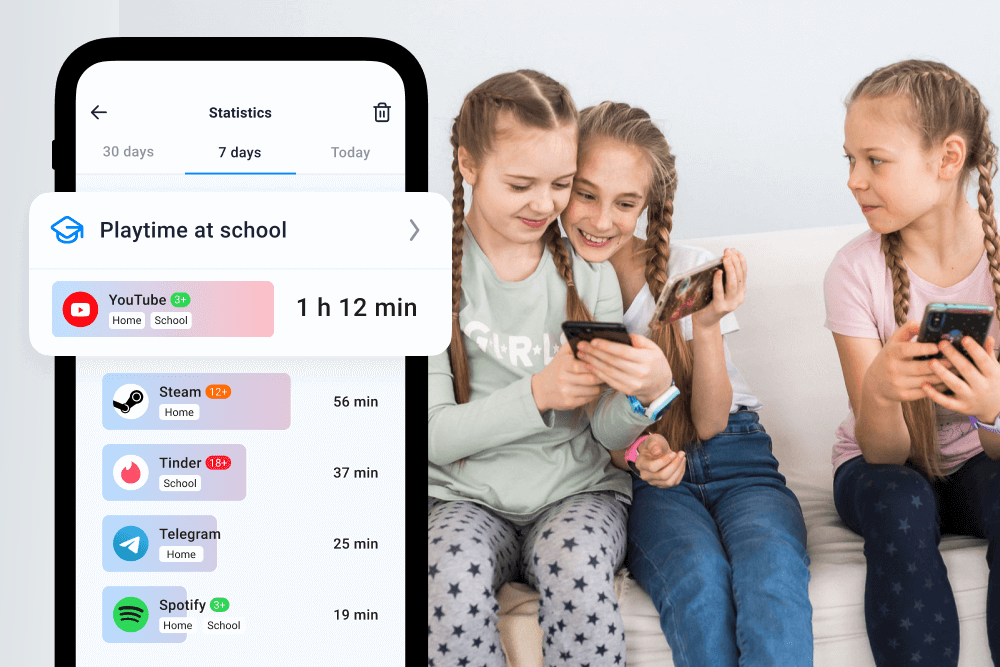
For more durable protection, usage monitoring apps are valuable. Apps like Findmykids and Kids360 offer a safety net.
- Kids360: This app allows parents to set time limits on specific apps. It can also block access to dangerous categories or porn sites. If a child tries to download a new browser to bypass filters, the parent gets an alert and can block that new app instantly. With Kids360, parents can also:
- Block adult (18+) websites across the device
- Set schedules for device use
- Monitor screen time
- Adjust restrictions as the child grows
- Findmykids: While primarily for location, it helps parents monitor app usage statistics. This ensures that screen time is being used for games or study rather than browsing adult websites or accessing forbidden apps. With Findmykids, parents can additionally:
- Block apps and restrict access to adult (18+) websites
- See which apps a child uses most often
- Combine digital supervision with real-time location tracking
- Receive notifications when your child leaves home or arrives at school
- Stay connected at all times with Sound Around and Loud Signal features
Together, Findmykids and Kids360 help parents move beyond simple browser filters and create safer, more reliable digital boundaries for their children—both online and offline.
Download Findmykids or Kids360 for free to protect your child from unsafe content and support healthier screen habits!
How to Block Pornhub at the Router or Network Level
Blocking content on each device individually is time-consuming. It is also easy to miss a device (like that old Kindle or iPod Touch). A more efficient method is to block porn at the router level. This stops porn from loading on any device connected to the home Wi-Fi.
The easiest way to do this is to change DNS settings.
What is DNS? Think of DNS as the Internet’s phonebook. When you type “[suspicious link removed]”, the DNS looks up the number to connect you. A “Family Safe” DNS simply removes the numbers for porn sites from the book. If the router can’t find the number, it can’t load the page.
How to configure DNS on your touter:
- Find your Router Address: On a connected computer, open a browser. Type 192.168.1.1 or 192.168.0.1 into the address bar. If these don’t work, check the sticker on the back of your router for the “Default Gateway” or “Admin IP.”
- Log In: Log in by entering the username and password (also found on the sticker, unless you changed them).
- Find DNS Settings: Look for a tab labeled “Internet,” “WAN,” or “Basic Settings.” You will see fields for “Primary DNS” and “Secondary DNS.”
- Enter Family-Safe DNS: Replace the existing numbers with a free filtering service. OpenDNS FamilyShield is a popular choice:
- Primary DNS: 208.67.222.123
- Secondary DNS: 208.67.222.123
- Save and Restart: Click save and reboot the router.
Now, any request to load porn websites will be intercepted. The DNS provider will block it. This provides a blanket of protection for the entire network, including guests who join your Wi-Fi.
Why Blocking Pornhub Alone Is Not Enough

myboys.me/Shutterstock
Installing a porn blocker is a great first step, but it isn’t foolproof. The internet is fluid.
- New Sites: Parents might block Pornhub, but thousands of new adult sites with inappropriate content launch yearly. Blacklisting feels like Whac-A-Mole.
- VPNs: Older teens use VPNs to hide traffic from the router, bypassing DNS settings.
- Peer Sharing: No filter stops a friend from showing a video on the school bus.
This is why technical solutions must be combined with education.
Talking to Your Child About Porn
The goal is to move from total control to a relationship of trust. If a child accidentally sees obscene content, they should feel safe telling their parents. They should not hide it out of shame or fear of punishment.
- Start Early: Do not wait for the “incident.” Have age-appropriate chats about how the internet has both good and bad things.
- Explain the “Why”: Tell them that parental controls are not there to ruin their fun. They are there to protect their brain from images they are not ready for yet. Frame it as a health issue, just like not eating junk food all day.
- Stay Calm: If you find porn on their device, avoid panic. Panic creates secrecy. Approach it with curiosity. Ask questions like “What did you see?” and “How did it make you feel?” rather than yelling.
For more guidance on handling this difficult conversation, read this helpful resource: Child Saw Porn: What To Do.
Keeping children safe from explicit content is one of the hardest challenges for modern parents. It requires a combination of technical tools and open communication.
You can make the internet much safer by combining a few different methods. Instead of relying on just one tool, use smartphone filters and router limits together. No porn blocker is perfect. However, these steps effectively lower the risk and allow kids to explore online without the constant worry that they will stumble into pornography.
FAQs
How to block Pornhub on iPhone?
To block pornhub on an iPhone, go to Settings. Tap Screen Time and then Content & Privacy Restrictions. Turn it on. Tap Content Restrictions, then Web Content. Select Limit Adult Websites. You can also add specific websites (like pornhub.com) to the Never Allow list for extra security. For additional peace of mind, parents can use Findmykids to block apps and restrict access to adult (18+) websites.
How to block adult content on Android?
Use the Google Family Link app. Open the child’s account. Manage settings for Google Chrome. Select “Try to block explicit sites.” This filters out most adult content from search results and browsers. For tighter security, select “Allow approved sites only.”
To strengthen protection, Findmykids can be used alongside system settings to block inappropriate apps and websites, monitor screen time, and help parents notice risky behavior early—even outside the browser.
Can I block Pornhub on my router?
Yes. Log in to your router settings via a web browser (usually 192.168.1.1). Look for Parental Controls or Access Restrictions. From there, you can blacklist specific websites like Pornhub. Or you can switch your DNS to a family-safe service.
What’s the best DNS for blocking porn?
OpenDNS FamilyShield is a highly rated free option. Change your router’s DNS settings to 208.67.222.123. This will automatically block inappropriate websites at the network level.
Do browser extensions really work?
Browser extensions are effective at real-time filtering. But they have a weakness. Kids can often uninstall them. They can also open an Incognito window to bypass them. These tools work best when paired with device-level restrictions that prevent uninstalling apps.
Why filters aren’t 100% effective?
Filters rely on lists of known adult websites. New sites appear every day. Mixed content sites, like social media, are also hard to block completely without blocking the whole platform. Also, tools like vpn domains can bypass these blocks.
What’s the safest free method?
The safest free method involves two steps. First, use the built-in parental control settings on the device (Screen Time or Family Link). Second, use a filtered DNS like OpenDNS on your home network. This covers both mobile data and Wi-Fi access without a subscription cost.
Cover image: chomplearn / Shutterstock.com
Проверьте электронный ящик