A report from the Pew Research Center reveals that nearly 60% of teenagers have faced some form of cyberbullying or harassment online. This reality is scary enough on its own. It becomes even harder to manage or accept when apps add tools that wipe the evidence.
Instagram Vanish Mode does exactly that. It allows messages to disappear the moment they are viewed. This creates a digital blind spot that rightfully worries parents.
This guide breaks down how the feature works and the specific risks for teens. It also provides clear steps to disable Vanish Mode, keeping lines of communication open, visible, and safe.
Contents:
- What Is Instagram Vanish Mode?
- How Does Vanish Mode Work?
- Benefits of Using Vanish Mode
- How to Enable Vanish Mode
- How to Disable Vanish Mode
- What Happens When You Turn Vanish Mode On/Off?
- Is Instagram Vanish Mode Safe for Kids?
- Troubleshooting: Vanish Mode Won’t Turn Off
- Supporting Digital Safety Beyond the Instagram App
- FAQs
What Is Instagram Vanish Mode?

mundissima/Shutterstock.com
Instagram Vanish Mode is a privacy setting inside the app that changes how you chat. It allows users to send temporary messages, photos, and videos that disappear automatically. In a normal conversation, chat history is saved until you manually delete it. With Vanish Mode, everything disappears as soon as it is viewed and the chat is closed.
Think of it like having a conversation in an empty room. Once you walk out the door, those words are gone forever. This feature was created to rival Snapchat’s disappearing messages, bringing that same temporary privacy to one-on-one chats on Instagram.
How Does Vanish Mode Work?
Vanish Mode is not a separate app. It is a mode that works as a toggle inside the Instagram app. It creates a temporary overlay over an existing chat thread.
Where It Works (and Where It Doesn’t)
Vanish Mode on Instagram does have limits. It works exclusively for one-on-one chats. For it to work, both people must have the updated app on their phones.
There is also a simple safety barrier built in. You can only use this feature with people you follow or have already chatted with. This prevents random strangers from using Vanish Mode to contact you out of the blue.
Vanish Mode in Group Chats
A frequent question from parents is whether this works in larger circles. The answer is no. Vanish Mode is strictly limited to direct, two-person messages. It cannot be utilized in group chats or threads with multiple users.
Vanish Mode vs Disappearing Media vs “Unsending”
It’s easy to confuse Vanish Mode with other disappearing content tools on Instagram. While they may seem similar, they serve different purposes and work in different ways. Here’s a quick comparison to help parents understand how they differ:
| Feature | Vanish Mode | Disappearing Photos/Videos in DMs | Unsend/Delete Message Options |
| What it does | Makes messages disappear after seen/closed | Sends photos/videos that vanish after view | Removes specific messages from chat |
| Where it works | Private chats only, not the public feed | Direct Messages (DMs) | Direct Messages (DMs) |
| How to activate | Swipe up in a chat | Select camera icon in DM | Long-press message, select unsend/delete |
| Who can see | Only chat participants | Only recipients | Only chat participants |
| Affects the Instagram feed? | No, does not affect your public feed | No, does not affect your public feed | No, does not affect your public fee |
Benefits of Using Vanish Mode
It often worries parents. However, Vanish Mode does have legitimate uses for privacy-conscious adults.
- Privacy for Sensitive Info: It is useful for sharing information you do not want saved. This includes things like a Wi-Fi password or a surprise party idea.
- Digital Clutter Control: It prevents old messages from clogging up your inbox.
- Security: If someone steals your phone, they cannot read disappearing messages that have already been viewed.
How to Enable Vanish Mode
Activating the vanish mode feature is surprisingly easy. You do not need to dig through complex settings menus. It works with a single gesture right inside your chat window.
- Open the Instagram app on your mobile device. This works on both an iPhone and an Android phone.
- Tap the Messenger icon in the top right corner to view your chats.
- Open an existing chat or start a new conversation.
- To turn on Vanish Mode, place your finger at the very bottom of the chat screen.
- Simply swipe up toward the middle of the screen.
- You will see a message saying Swipe up to turn on Vanish Mode. Keep holding and swiping until the circle icon turns blue.
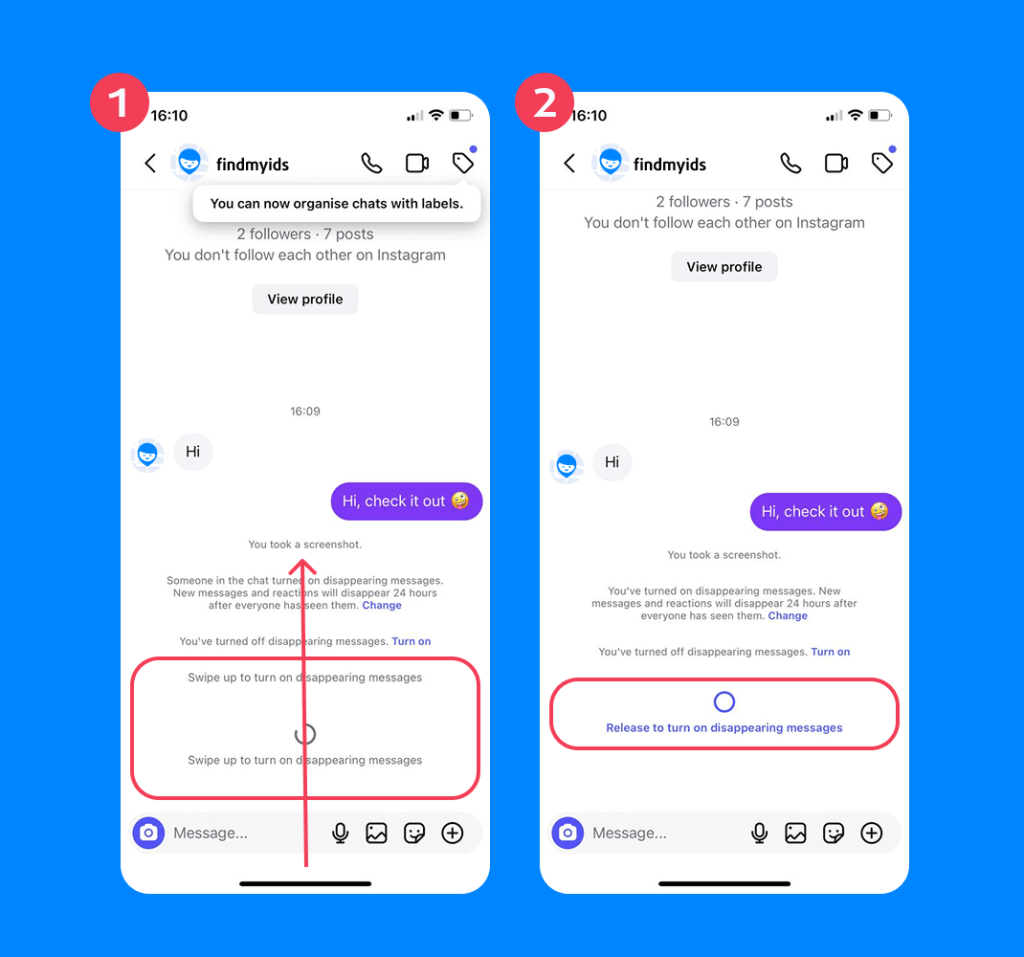
- The screen will turn black or dark gray. The words “Vanish Mode” will appear at the top.
How to Disable Vanish Mode
If a parent discovers their child is using the Vanish Mode feature, there is no need to panic. You can switch just as easily as it was turned on, bringing the chat back to normal instantly.
- Open the chat where Vanish Mode is active. You will know it is active because the background will be black.
- Place your finger at the bottom of the chat window.
- Simply swipe up again.
- You will see the message Release to turn off Vanish Mode.
- Let go of the screen. The interface will return to the normal conversation view with a white or light background.
What Happens When You Turn Vanish Mode On/Off?
When you turn on Vanish Mode, the interface changes to a dark theme. This visually signals that the conversation is now temporary. The old messages from your standard chat are not deleted; however, they are just hidden while the mode is active.
When you disable Vanish Mode, the dark overlay disappears. Your permanent chat history reappears exactly as you left it. Any messages sent while in Vanish Mode will be gone forever. They cannot be recovered by the user or the app.
Does Instagram Notify Screenshots?
Yes. One important safety feature is the screenshot notification. If a user takes a screenshot or screen recording while in Vanish Mode, Instagram will notify the other person immediately. But do not trust this completely. People can always use a second device to take a photo of the screen (Which is not detectable).
Is Instagram Vanish Mode Safe for Kids?
For teenagers, disappearing messages can feel fun and low-pressure. For parents, they signal secrecy.
Safety & Privacy: What Parents Should Know
The primary risk is that Vanish Mode bypasses parental monitoring. If a parent checks a child’s phone, they will see no record of what was said in a chat that has this feature turned on. This opens a door to dangerous behavior.
Potential risks parents should know about:
- Predators: Malicious users prefer messaging apps with disappearing features. They use them to groom victims without leaving evidence.
- Bullying: Kids may say hurtful things knowing the evidence will vanish.
- False Security: Teens often forget that data is never truly gone. Screenshots and external cameras can capture anything.
Signs Vanish Mode Might Be a Problem
Since you cannot directly see messages sent in Vanish Mode, parents need to look for behavioral clues. These signs may suggest your child is hiding something:
- Hiding the screen: Watch if they instantly lock their phone or swipe away an app the moment you walk into the room.
- Nervousness around notifications: Notice if they get jumpy or defensive every time their phone buzzes.
- Unexplained mood swings: They might seem sad or withdrawn after being online, even though their chat history looks perfectly normal.
- Defensiveness: If simple questions like “Who are you chatting with?” are met with anger or silence, it might mean they’re hiding something.
Troubleshooting: Vanish Mode Won’t Turn Off
Sometimes users find that Vanish Mode gets stuck. Other times, they struggle to exit the mode.
- Force Close the App: Swipe the Instagram app away completely. Then reopen it to reset the session.
- Update the App: Ensure you have the latest version from the App Store or Google Play Store.
- Check the Other User: If the other person keeps sending messages in Vanish Mode, the chat may default back to it. Ask them to disable it on their end as well.
Supporting Digital Safety Beyond the Instagram App

Findmykids app
Knowing how to turn off Vanish Mode on Instagram is helpful. But this relies on you constantly checking their phone, and it’s impossible to watch over your child’s shoulder 24/7. This is where dedicated safety tools become essential.
Findmykids offers a layer of safety that goes beyond simple blocking. Unlike Instagram, which focuses on social connection, Findmykids is designed purely for child safety. It allows parents to monitor app usage statistics. You can see exactly how much time is spent on social media apps like Instagram.
If a child is spending hours on Instagram late at night, Findmykids provides that insight. Vanish Mode is usually turned on when parents are in bed. Findmykids directly addresses this, allowing you to schedule downtime. You can simply block social apps at bedtime, making sure the phones are used safely.
Other helpful features include:
- Real-time location tracking to know where your child is at any moment.
- Route history to see where your child has been throughout the day.
- Safe zones to set boundaries and receive alerts when kids enter or leave specific areas.
- A loud signal to quickly locate a child’s phone when needed.
- Sound Around to listen to the environment around the device for added safety.
By combining these features, Findmykids helps create a comprehensive safety net, giving parents peace of mind without being intrusive.
Download Findmykids today and keep your child safe, both online and in the real world!
Keeping Teens Safe with Disappearing Messages
Vanish Mode might be great for privacy, but unfortunately, it creates a blind spot for parents. While adults have the sense and maturity to handle disappearing chats, teenagers need more accountability to stay safe online.
You are not powerless here. Knowing how to disable the feature and spotting the red flags puts you back in control. When you combine open communication with a safety net like Findmykids, you ensure that technology remains a positive part of their life rather than a constant source of worry for both you and them.
FAQs
Is Vanish Mode safe for teenagers?
It comes with real dangers. Because messages disappear, the evidence is removed. This makes it easier for teens to hide bullying, inappropriate photos, or chats with strangers. It is crucial to talk to them about these specific risks.
Does Vanish Mode delete messages on both sides?
Yes. When the chat window is closed, the messages vanish for both the sender and the recipient.
Can parents see Vanish Mode messages?
No. Once the messages disappear, they are gone from the device. Parental monitoring apps cannot retrieve disappearing messages that have already been deleted.
Can I recover old messages sent in Vanish Mode?
No. Once the session ends, the data is wiped from the servers. There is no way to retrieve messages sent in this mode.
Do messages vanish if I don’t close the chat?
No. The messages remain visible as long as the chat window is open. They only disappear once the chat is closed or you switch off the mode.
Does Instagram notify if you screenshot Vanish Mode?
Yes. Instagram sends a notification in the chat if a screenshot or screen recording is taken while Vanish Mode is active.
How to turn off Vanish Mode on Instagram?
To turn off Vanish Mode, open the chat with the dark background. Place your finger at the bottom of the screen and swipe up until you see the “Release to turn off” message. The chat will return to white; that is how you know it has been successfully turned off.
Can I disable Vanish Mode permanently?
Unfortunately, no. Instagram does not have a setting to permanently turn this feature off. You have to disable it manually each time or use a monitoring app to keep an eye on their screen time.
Why can’t I use Vanish Mode?
Vanish Mode has strict rules. It only works in one-on-one conversations with people you are already connected to. You cannot use it in team chats or with new accounts you haven’t messaged before. Also, make sure your app is fully updated to the latest version.
Does Vanish Mode work on computers?
No. Currently, Vanish Mode is a mobile-only feature. It is designed for the Instagram app on iPhone and Android devices. It does not work on the desktop web version.
Проверьте электронный ящик