
Are your kids asking to download the messaging app Telegram, or perhaps they’re using it already? Whether they’re just starting out in the world of instant messaging or have been using an alternative app, such as WhatsApp, the question “Is Telegram safe?” is likely to be on your mind. Keep reading for the information you need to make an informed decision.
Contents:
- What Is Telegram and How Does It Work?
- Is Telegram Safe?
- Privacy Features and Security Issues of Telegram
- Potential Risks for Kids on Telegram
- Comparing Telegram to Other Messaging Apps
- Tips for Parents: Keeping Kids Safe on Telegram
- Tools That Help Parents Stay Connected Safely
- FAQs
What Is Telegram and How Does It Work?
freepik / Freepik.com
Telegram is an instant messaging app launched in 2013. Like many other messaging apps, it allows users to send text messages, make voice and video calls, have group chats, send stickers, share files, and more. Telegram’s Channels, meanwhile, are used to broadcast messages to a wide audience, and can be either public or private.
There are some important things that parents should be aware of, however. For example, this platform enables secret chats and self-destructing messages. Plus, the Telegram bots active on the app could compromise privacy.
The Telegram app is free to download and use. To create an account, Telegram asks for a phone number. There is a paid service option, which gives subscribers access to additional features such as larger file upload limits and faster downloads, but the free tier offers access to the most popular functions.
Is Telegram Safe?
So, how safe is Telegram for kids? The messaging app does offer a range of security features. Telegram encrypts messages, applies end-to-end encryption to secret chats, and supports two-factor authentication to help protect user accounts.
However, there are also important concerns parents should be aware of. Only secret chats are fully end-to-end encrypted, the way Telegram stores data raises privacy questions, and the presence of Telegram bots can expose children to potential risks. Taken together, these factors mean that Telegram may pose certain dangers for young users—making parental awareness especially important.
Privacy Features and Security Issues of Telegram
Let’s take a closer look at Telegram’s privacy practices and the kind of data the platform collects from Telegram users. This is important not only from a privacy standpoint, but also in terms of security—especially when it comes to data breaches, exposure of sensitive information, and the risk of phishing attacks or other online scams.
According to Telegram, the platform does not use collected data to show users ads and only stores information necessary for its operation and security. This includes basic account data such as the phone number used to sign up, a username, profile name, and photo. As a cloud-based messaging app, Telegram stores photos, videos, messages, and documents from users’ cloud chats on its servers. At the same time, secret chats are protected with end-to-end encryption and are not stored on Telegram’s servers.
Video calls are another key concern for parents. As with secret chats, Telegram applies end-to-end encryption to voice and video calls to help keep conversations private.
Telegram uses a custom encryption protocol in which encryption keys are not stored in one place, but split across different jurisdictions. However, this level of protection applies only to secret chats, not regular chats. The platform also offers a proxy feature that can mask users’ IP addresses, providing an additional layer of privacy.
Potential Risks for Kids on Telegram

Rawf8.com / Freepik.com
Easy Access for Underage Users and Lack of Parental Controls
According to Telegram, the platform should only be used by those aged sixteen and over. However, a lack of rigorous verification processes makes it relatively easy for younger children to create a Telegram account. Further, there are no built-in parental controls on Telegram, which means kids could be exposed to inappropriate or explicit content.
Disappearing Messages and the Risks of Secret Chats
Telegram offers a secret chat feature that is a potentially serious risk to kids. Secret chats with self-destructing messages are one of the reasons for the app’s popularity, but come with real dangers. Even if you’re keeping an eye on your child’s private chats, they may receive or send messages you never knew existed, due to their automatic deletion after a set time. Disappearing messages aren’t stored on Telegram’s servers, so there’s no way to find out what they contained.
Relaxed Content Moderation and Exposure to Strangers
It’s also important for parents to know that, unlike other messaging apps, Telegram has a very relaxed moderation policy, so content that may get removed from other platforms might be allowed on Telegram. As well as viewing (or being sent) age-inappropriate content, this also puts kids at more risk of being contacted or connected with potentially ill-meaning strangers.
Bots, Data Collection, and Scam Risks
Finally, the active bots and the information Telegram collects could pose a risk to users’ personal and sensitive data, and increase the risk of phishing scams and other online cons. Should Telegram be hacked, these details could easily fall into the wrong hands.
Comparing Telegram to Other Messaging Apps
If you’re still not sure whether or not to let your kid use Telegram, it may be helpful to compare the platform to other secure messaging apps.
→→→
| Messaging App | E2EE Default? | Group Chat Privacy | Metadata Exposure | Built-in Parental Controls | Age Rating* | Best For |
| Telegram | No (only Secret Chats) | No E2EE for large groups | Moderate | None | 16+ (self-stated) | Casual conversations |
| Yes | E2EE for all group chats | Moderate | None (via device only) | 13+ | Sensitive & casual | |
| Signal | Yes | E2EE for all group chats | Minimal | None | 13+ | Highly sensitive chats |
| Facebook Messenger | No (E2EE only in Secret Chats) | No E2EE for group chats | High | Limited (via Meta tools) | 13+ | Casual conversations |
| Snapchat | No (limited E2EE, not by default) | No E2EE for group chats | High | Yes (Family Center) | 13+ | Ephemeral social messaging |
| Discord | No | No E2EE for servers or group chats | High | Limited (content filters, Family Center) | 13+ | Communities & gaming chats |
*Age ratings are based on platform policies and app store guidelines and may vary slightly by country.
End-to-end encryption (E2EE) means that only the people communicating can read the messages—not the app itself, hackers, or third parties. For parents, this is a double-edged sword: it protects children’s data from breaches, but also means parents and platforms can’t easily see what’s happening inside chats.
Let’s start with WhatsApp. Like Telegram, this messaging platform allows users to send messages, make voice and video calls, and take part in group chats. Unlike Telegram, however, there is no secret chat option—although users can enable disappearing messages. When it comes to security features, WhatsApp deploys end-to-end encryption for all messages, whereas only secret chat messages (plus voice and video calls) are end-to-end encrypted on Telegram. Like the Telegram app, WhatsApp doesn’t incorporate any built-in parental controls.
Signal is often considered the gold standard when it comes to secure messaging. It uses end-to-end encryption by default for all chats and calls, including group conversations, and collects minimal user data. This makes it a strong choice for privacy-conscious adults and teens. However, for parents, Signal presents a familiar challenge: there are no built-in parental controls, and due to its strong encryption, monitoring a child’s activity is practically impossible. In other words, Signal is excellent for privacy, but not particularly parent-friendly.
Moving onto Facebook Messenger—while messages sent via this platform can be encrypted, users have to manually turn on encryption for every individual message, something kids are likely to forget to do. There’s a version of Messenger designed for young users, which incorporates parental control tools. These allow parents to, among other things, manage kids’ contacts and friends’ lists, monitor their activity on the app, and set the days and times they can use the platform.
Turning our attention to the popular messaging app and social platform Discord, which is geared specifically to the gaming community. Users can chat with other members of a public server and send and receive private direct messages via either text or voice and video channels. The latter is used to talk and stream in real time. It’s important for parents to know that Discord does not use end-to-end encryption for messages, although video and voice calls are protected. The platform also incorporates a range of privacy and security settings via its Family Center. Parents can use these to control who can send their child messages or friend requests, and view their kid’s servers and who they’re messaging.
Finally, Snapchat is one of the most popular messaging apps among teens. It poses similar risks to Telegram with disappearing messages and hidden content, making it very hard for parents to keep an eye on what kids are doing on the platform. These features put kids at risk of viewing inappropriate content and cyberbullying. Unlike Telegram, Snapchat has a Family Center designed to help parents keep their kids safe when using the app.
Tips for Parents: Keeping Kids Safe on Telegram
If you choose to allow your kid to use Telegram, it’s important to take steps to keep them as safe as possible. Use the simple guide below to activate the platform’s privacy and security features.
Step 1
Limit the personal details that your child can share.
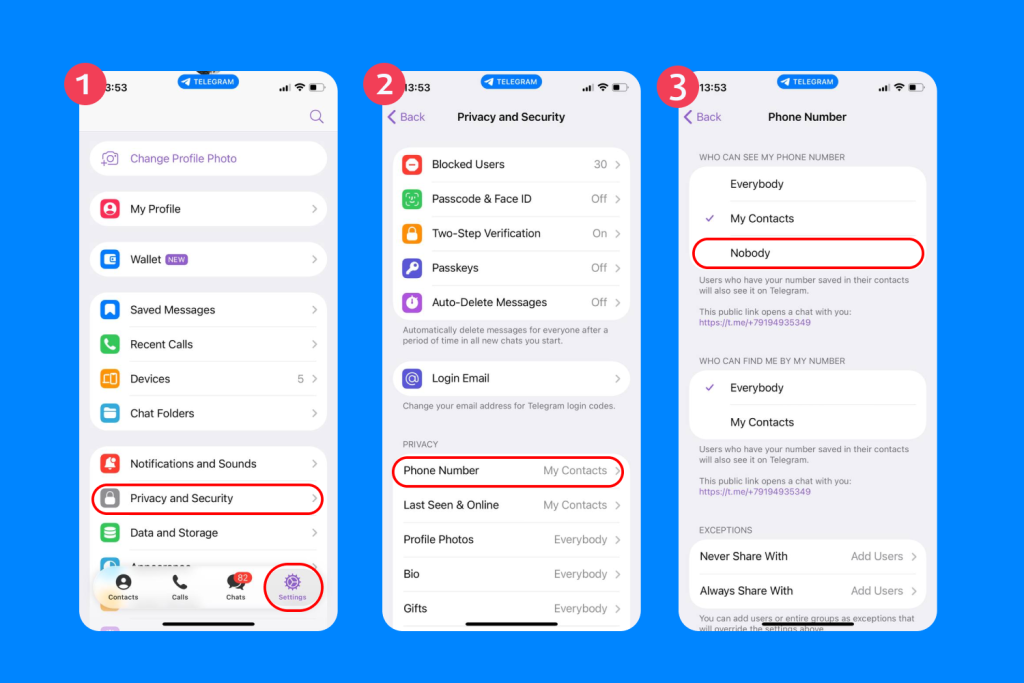
- Open Telegram and head to Settings, then Privacy and Security.
- From here, select Phone Number, then Who Can See My Phone Number, and choose Nobody.
- Next, go to Contacts, then Find People Nearby, and Stop Showing Me Nearby.
Don’t forget to remove personal information from your kid’s profile picture or bio to keep Telegram safe, as far as possible.
Step 2
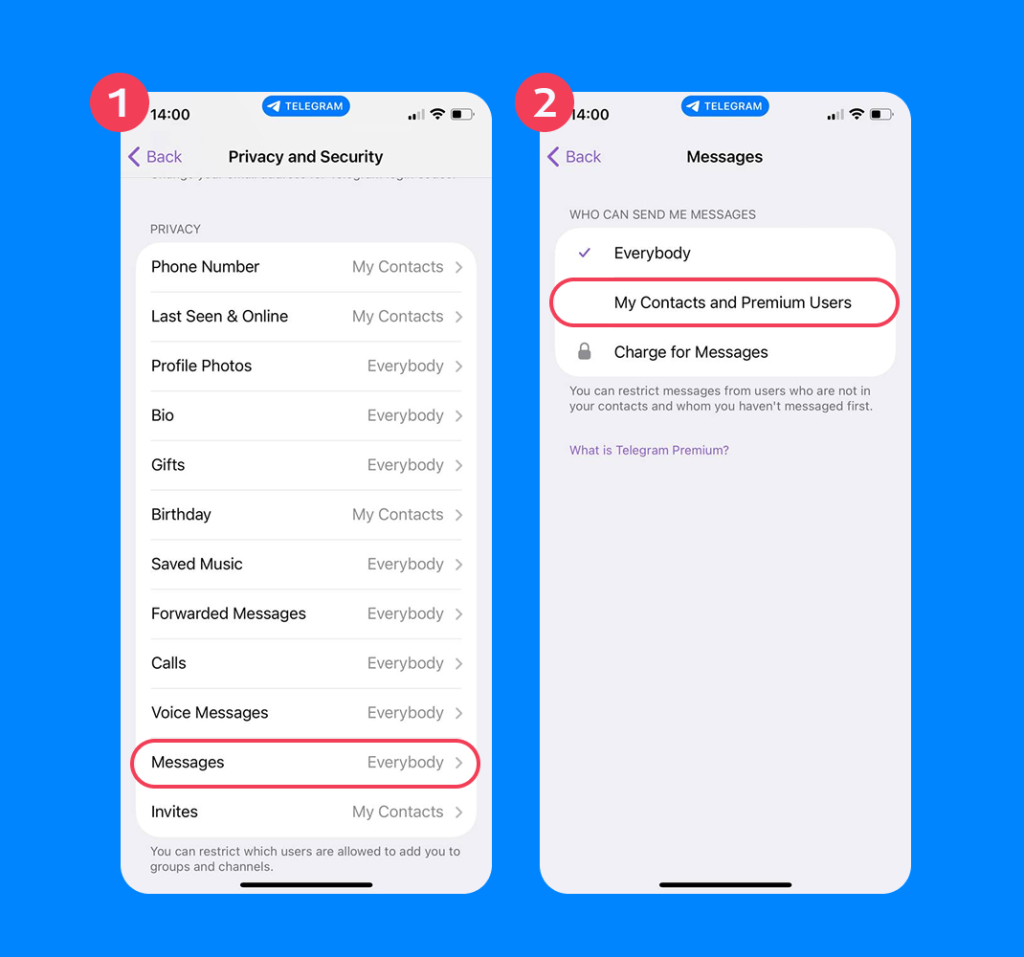
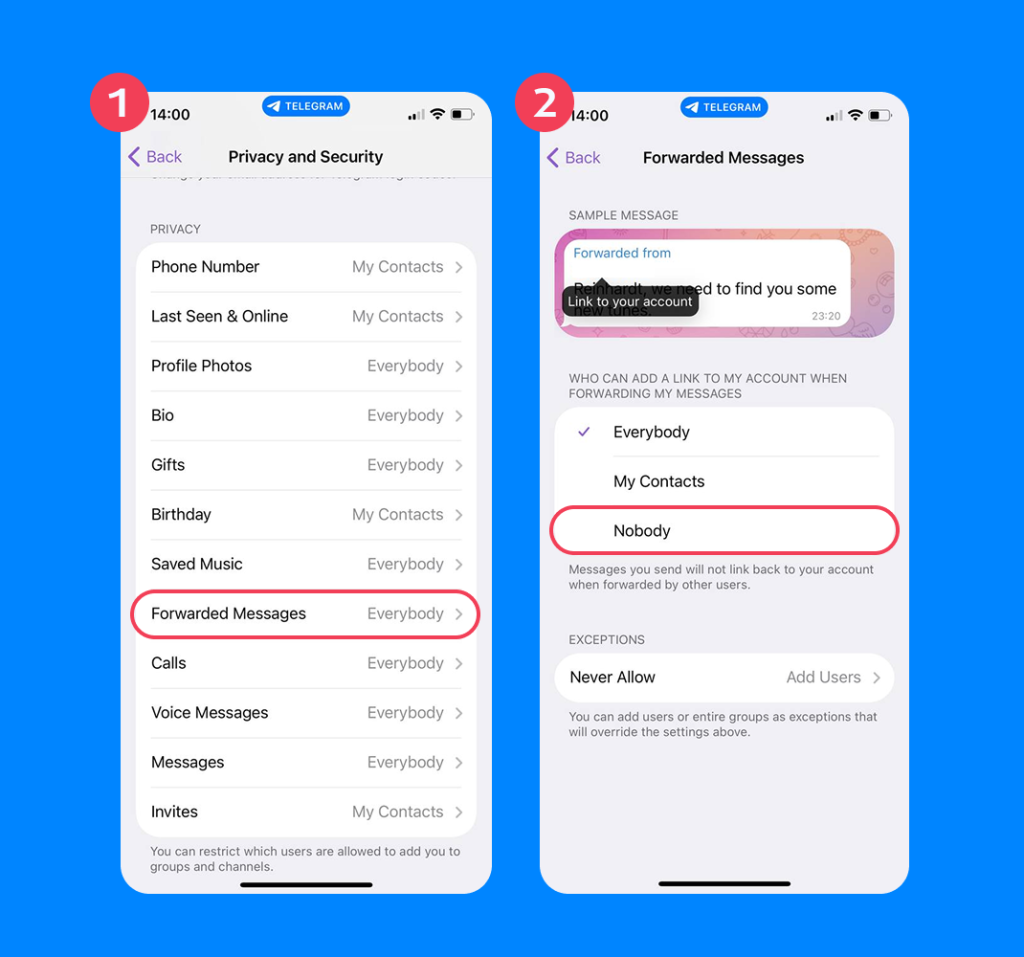
Via Privacy and Security, you can also restrict who can contact your child on Telegram, whether this is via messages, group invites, or calls.
- Choose Who Can Message Me, then select My Contacts.
- Next, click on Who Can Call Me and choose My Contacts.
- Now, click Who Can Add Me to Groups and select My Contacts.
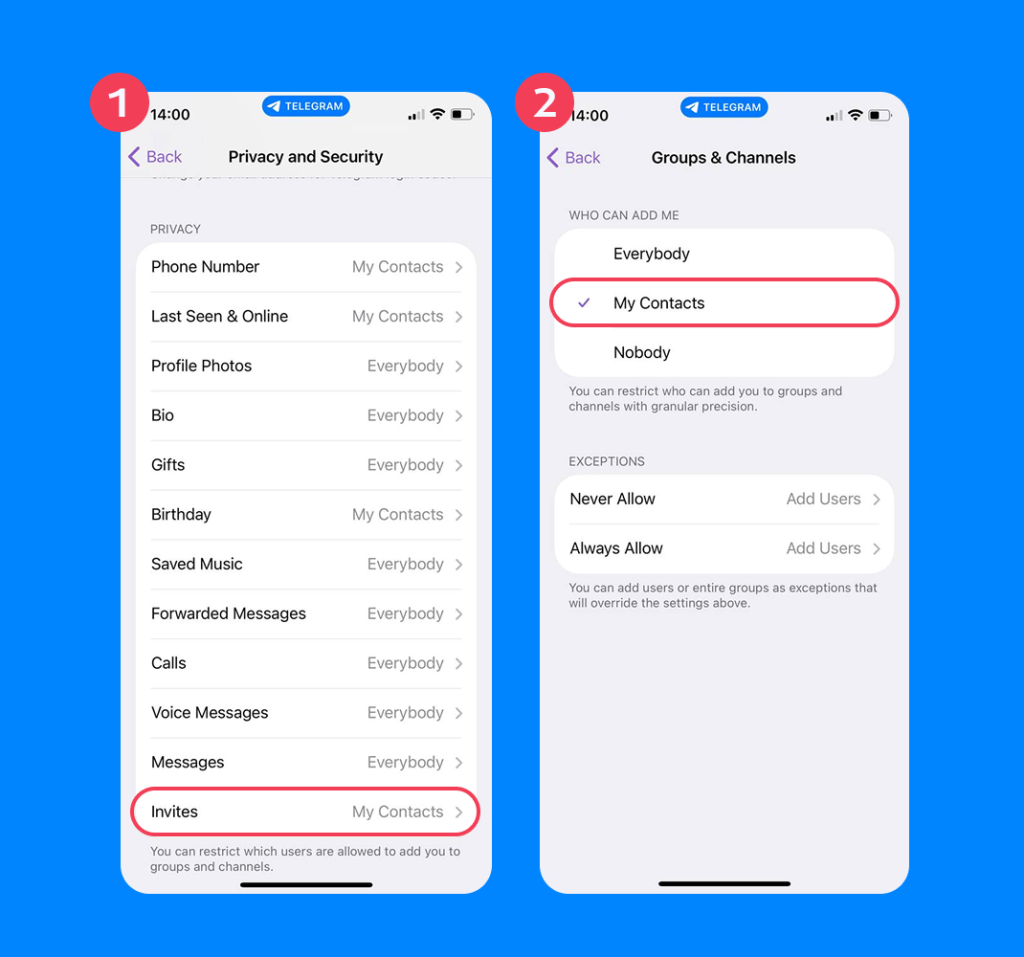
- Finally, click Forwarded Messages Visibility and choose Nobody or My Contacts.
Step 3
To help ensure your child doesn’t come across (or be sent) inappropriate content, it’s vital to encourage them to avoid public channels or groups. To this end, keep a close eye on their Joined Channels list to check for any containing adult or offensive material.
You can use Telegram’s Report option to block spam channels.
- Tap Channel, then More, then Report.
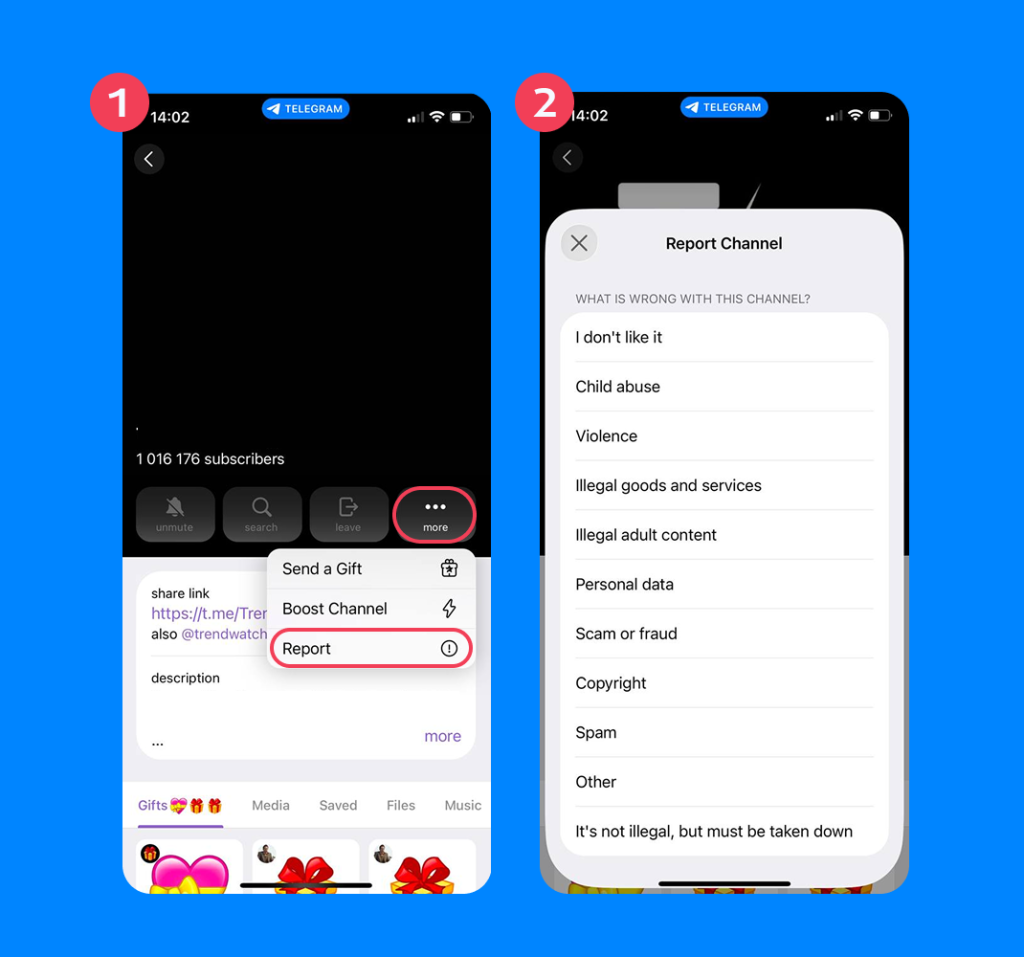
- Finally, select Pornography, Scam, or Violence.
Step 4
Enable two-step verification to help keep your kid’s Telegram account safe from hackers.
- Go to Settings.
- Then Privacy and Security.
- Click Two-Step Verification.
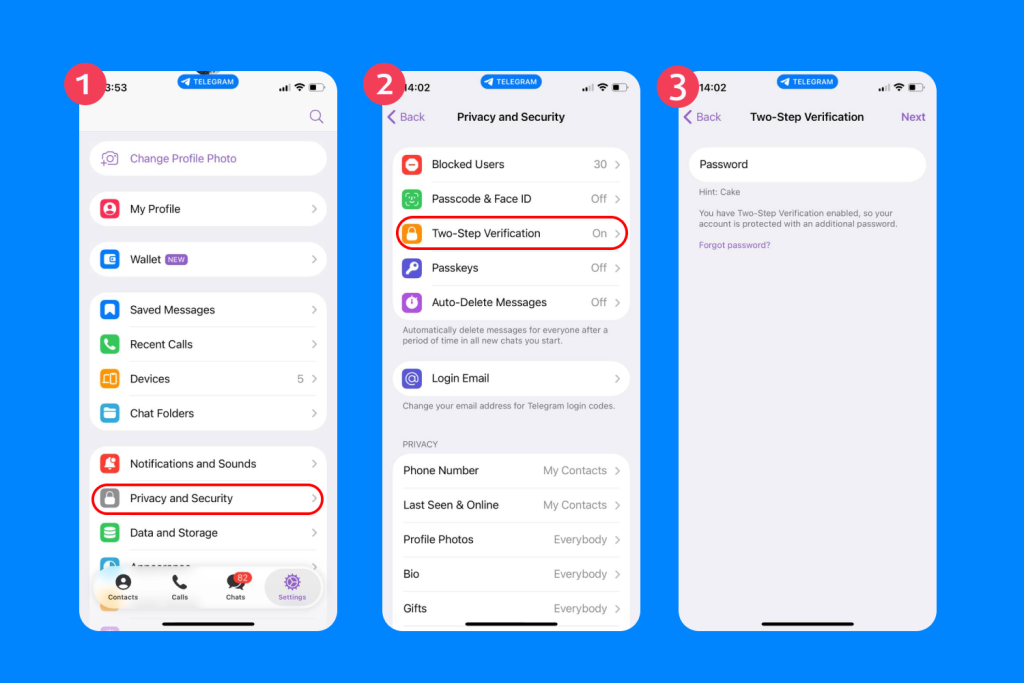
You’ll be asked to create a unique password and recovery email.
Step 5
Disable contact syncing—otherwise your kid’s Telegram profile will be viewable to everyone in their phone’s address book, even if these people are casual acquaintances or unknown to them.
- Head to Settings, then Privacy and Security.
- Choose Sync Contacts. From here, toggle Off.
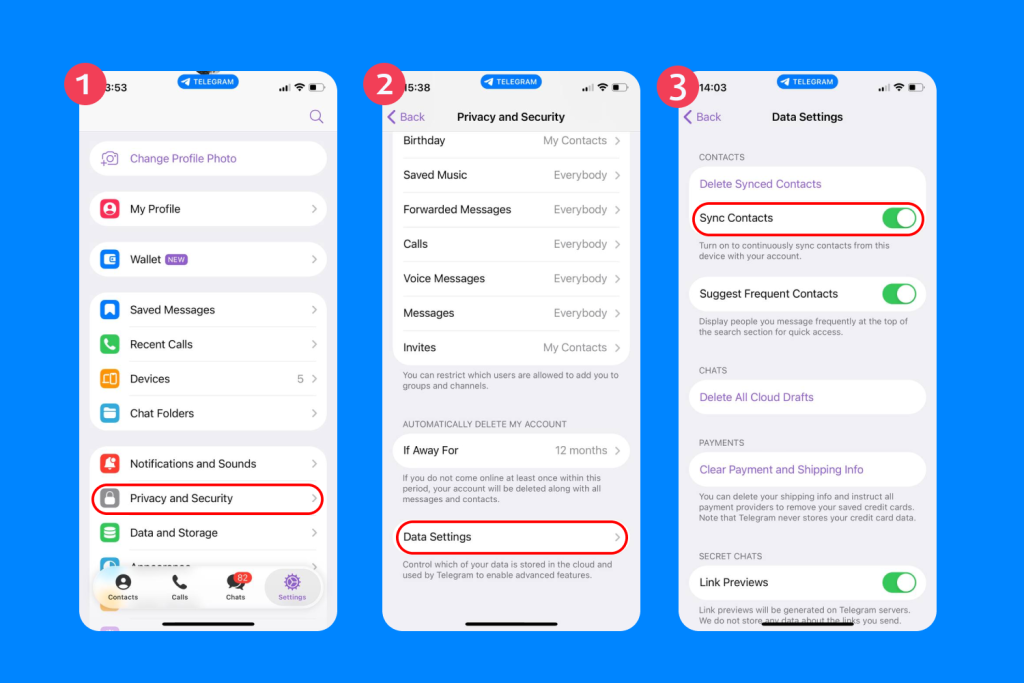
One of the best ways to keep kids safe online—both on Telegram and when using the internet in general—is to nurture an atmosphere of open communication at home.
This means talking with children, in an age-appropriate way, about the dangers of the digital world and the simple steps to take to avoid them. Discuss the importance of privacy, not sharing personal information, and what to do should something happen online that makes them upset or uncomfortable. Modeling good online habits yourself is very powerful, too, including making plenty of time to put down a screen to properly connect with your child.
Tools That Help Parents Stay Connected Safely

Findmykids app
As we touched on above, Telegram’s privacy and security processes don’t incorporate any built-in parental controls. This means that it could pose a serious risk to kids, exposing them to contact from strangers or inappropriate content, such as that which is offensive, explicit, or concerned with illegal activity.
As well as taking the steps above, it’s a good idea to use a third-party parental control app, such as Findmykids, to help make Telegram safer for kids. This app allows you to set time limits on screen time and keep an eye on what your child is up to online.
And if you decide that you don’t want your child to use Telegram at all? Use Findmykids to block it entirely. Already being used by thousands of parents, the app aims to promote personal growth and development, and create a healthy screen-real life balance.
Want to make your child’s digital world safer today? Try Findmykids and take control of your child’s screen time and app use—in just a few taps.
Helping Parents Make an Informed Decision on Telegram
A popular app that allows users to chat with others, get involved with groups, and send private, disappearing messages, parents may be wondering just how secure the Telegram platform is. Generally speaking, Telegram isn’t suitable for children and younger teens. The secret chat features make it impossible to be entirely sure about the sort of messages your child is receiving (or sending), while the platform’s default encryption settings are not as robust as those of alternative apps. Only secret chats are end-to-end encrypted, whereas WhatsApp, for example, end-to-end encrypts all your messages.
If you do decide to allow your child to use Telegram, it’s advisable to use a high-quality parental control app like Findmykids to monitor how your kid is using the app and take steps to restrict access as necessary.
FAQs
Is Telegram safe?
The Telegram app offers several security features, but Telegram’s security has some limitations. While Telegram encrypts messages between your device and its servers, only Secret Chats are end-to-end encrypted. Telegram uses its own proprietary MTProto encryption protocol, which is not open-source. This means independent security experts and security researchers cannot fully evaluate its effectiveness. Additionally, Telegram’s server-side code is closed-source, restricting external review and potentially increasing vulnerabilities. Telegram has also faced criticism for its lack of transparency regarding its privacy and security practices.
Does Telegram have end-to-end encryption?
Telegram uses end-to-end encryption for secret chats and voice and video calls. However, the platform does not use this encryption method for regular chats.
What are secret chats?
Secret Chats are a feature in the Telegram app that provides end-to-end encryption for messages. This means only you and the recipient can read the messages, and not even Telegram can access them. Secret Chats also offer additional privacy features like self-destructing messages.
Are Telegram groups encrypted?
Telegram groups are not end-to-end encrypted. Messages in groups are encrypted between your device and Telegram’s servers, but are stored on the server and not protected by end-to-end encryption. Only Secret Chats offer this higher level of security.
Does Telegram collect IP addresses/phone numbers?
Yes, Telegram collects your phone number during registration and may log your IP address as part of its operations. This information is used for account management and security purposes.
Does Telegram mask users’ IP addresses?
Telegram incorporates a built-in masking feature that serves to hide users’ IP addresses. This helps preserve privacy and adds to the security of messages and data.
Are Telegram bots safe?
Telegram bots can provide useful features, but they are not covered by E2EE and may have access to your messages. Use caution when interacting with bots and only use those from trusted sources.
How to enable two-factor authentication?
To enable two-factor authentication in the Telegram app, go to Settings > Privacy and Security > Two-Step Verification. Follow the prompts to set up an additional password for extra account protection.
Is Telegram safer for kids than Facebook Messenger?
Telegram doesn’t feature any built-in parental controls, making it a potential risk for children. Messenger Kids from Facebook, however, is designed for young users and features a range of tools parents can use to help keep their kids safe when using the platform.
Cover image: user5391341 / Freepik.com
Проверьте электронный ящик