
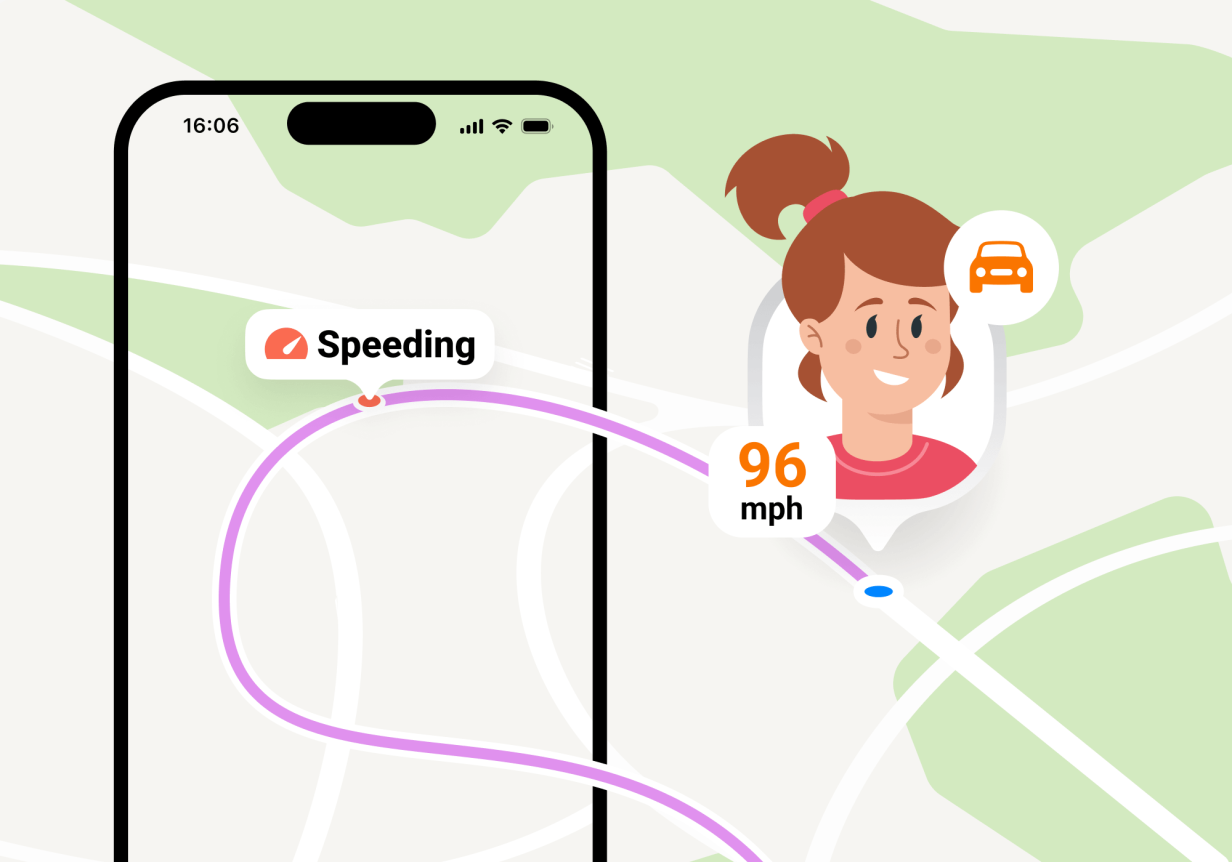
Tracking your child’s location is a standard part of parenting in today’s modern age with parental control apps. But knowing where your child is in real time and understanding where they’ve been or how they arrived is another piece of the parenting puzzle.
Parents can’t constantly check their phones to see their child’s location. Nor can they always call their children to ask where they are. That’s why Findmykids has introduced the new Driving Reports feature! You have more control and knowledge about your child’s routes, how they got to their destination, and whether they arrived safely (this is especially useful for new teen drivers!)
In this guide, we’re diving into the Driving Reports feature, including how to use it, what information is available to parents, and real-life scenarios of how parents use it.
What Is Driving Reports?
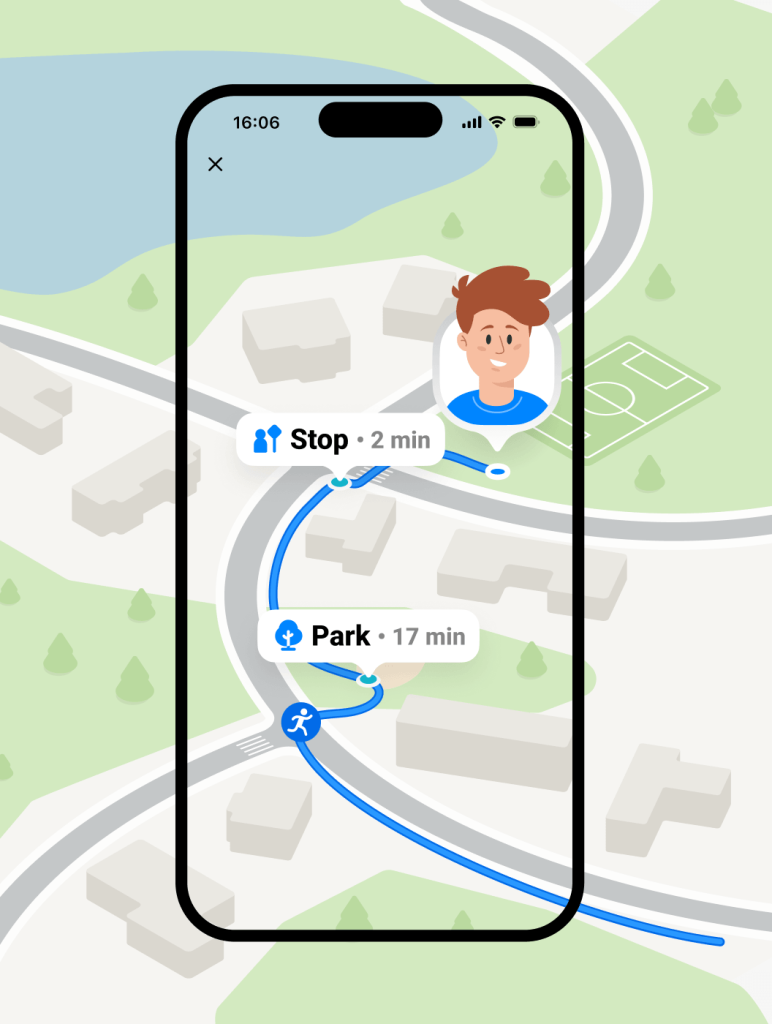
Driving Reports is a new, exciting feature in the Findmykids app that automatically records your child’s movements and displays them as clear, easy-to-read routes. It collects information such as the child’s starting point, end point, which path they took, and how far they traveled.
This feature is a game-changer for parents of new teen drivers. Handing over the car keys for your teen to drive around town requires a lot of trust. But with Driving Reports, parents can see exactly where their teen takes the car and how safely they drive.
The app’s algorithm considers harsh acceleration and braking, sharp maneuvers, and maximum speed to determine whether the drive was safe or not. Parents can understand how their new teen driver is handling having this new responsibility, and if restrictions need to be imposed.
However, Driving Reports isn’t just useful for families with teen drivers. It can also give parents peace of mind when they are the ones driving their child around, helping them review routes and trips afterward. The feature is equally valuable when children travel by car or public transportation on their own or with friends.
What Parents Actually See
With the new Findmykids design, parents have an easy-to-read route history of where their child has been and other details.
Route Timeline
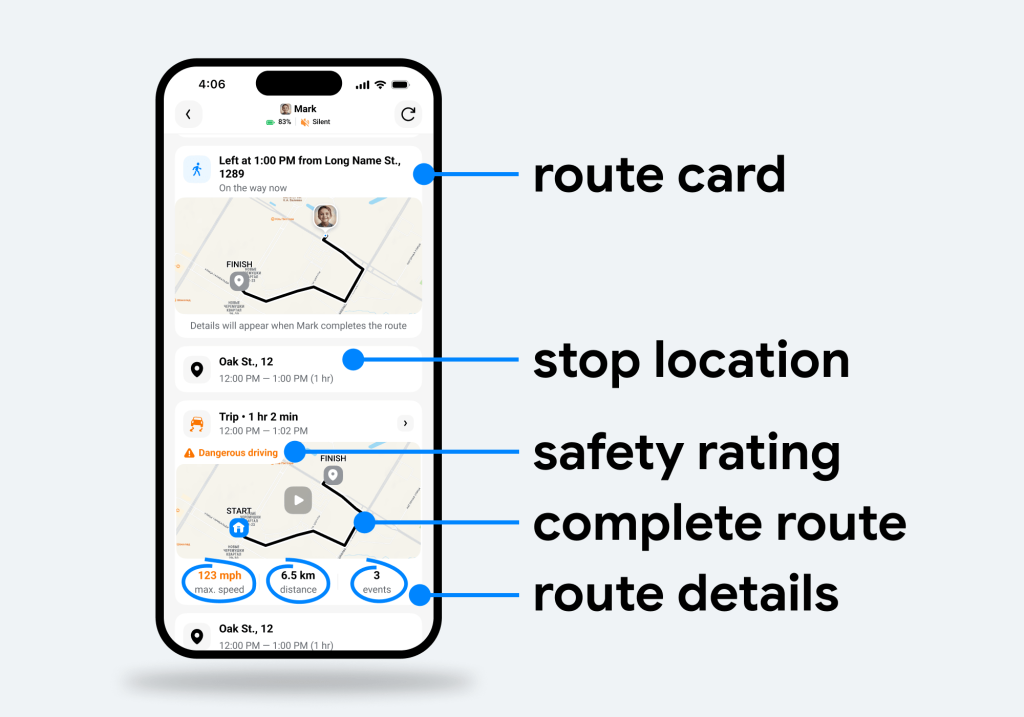
Parents can see a detailed, chronological route history of their child’s movements. Each route is displayed as a separate card that can be opened for more detailed information*.
On the preview, parents can see the route, maximum speed, distance traveled, and the number of events on the route, if there are any. Currently, events are based on the maximum speed reached during the trip and are used to flag potentially unsafe driving (marked with red bullets). Future updates will expand event detection to include harsh braking, rapid acceleration, and possible crashes, giving parents an even clearer picture of their child’s driving habits.
*The route itself and location history are available to all users. Additional route insights and driving events are included as part of Findmykids’ premium features.
Interactive Map
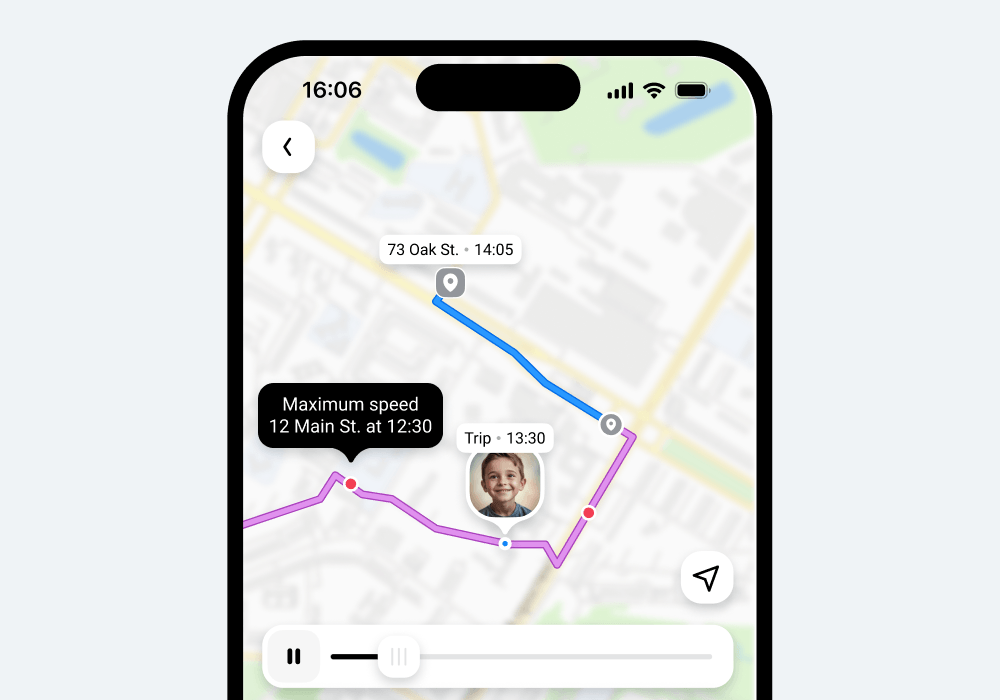
The route details screen includes an interactive map that shows the exact path your child took, including clear start and end points. Different segments are marked depending on how they traveled—on foot, by car, or by public transport.
Parents can explore the route in detail, replaying the journey step by step with timestamps to see where their child was at any specific moment. For added convenience, parents can also generate and share an image or animation of the route with family members or friends. These visual summaries are created directly on the device, allowing families to easily save or share important journeys.
Route Details
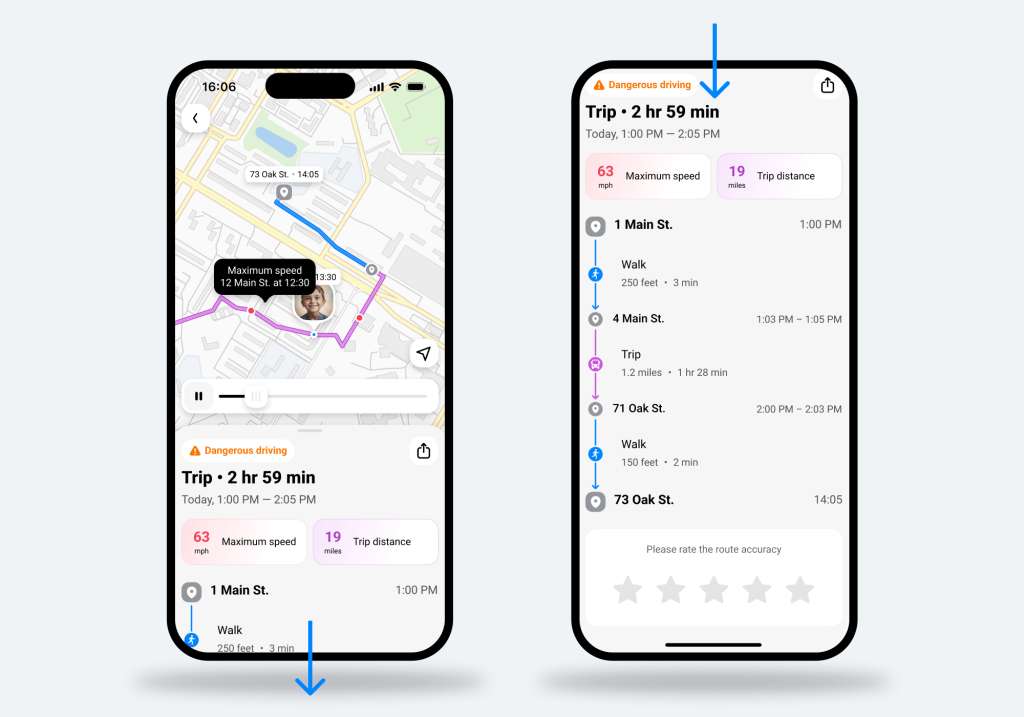
Inside each route card, parents can open a full breakdown of a specific trip. This section shows the start and end time of the route, total duration, and a detailed split of how the child traveled—on foot or by transport—with time and distance for each segment.
It also includes all stops along the route, with information on how long the child stayed at each location.
Maximum Speed
Whether your teen has just gotten their license or is heading out with a friend who is driving, Driving Reports records the maximum speed while recording a route. This feature allows parents to determine whether the driver is following speed limits and is a safe driver.
Moreover, with the interactive map, parents can see exactly where on the route the maximum speed was met. This information provides more context and can help parents make better decisions about rules for their children.
Distance Traveled
In the route summary, parents can see how far their child traveled on that route. Paired with the maximum speed feature, this provides more perspective about safe driving and where the driver hit the maximum speed. It’s very different to reach 100 kilometers per hour on a highway from reaching that speed on a city street just 2 kilometers away.
Route Playback
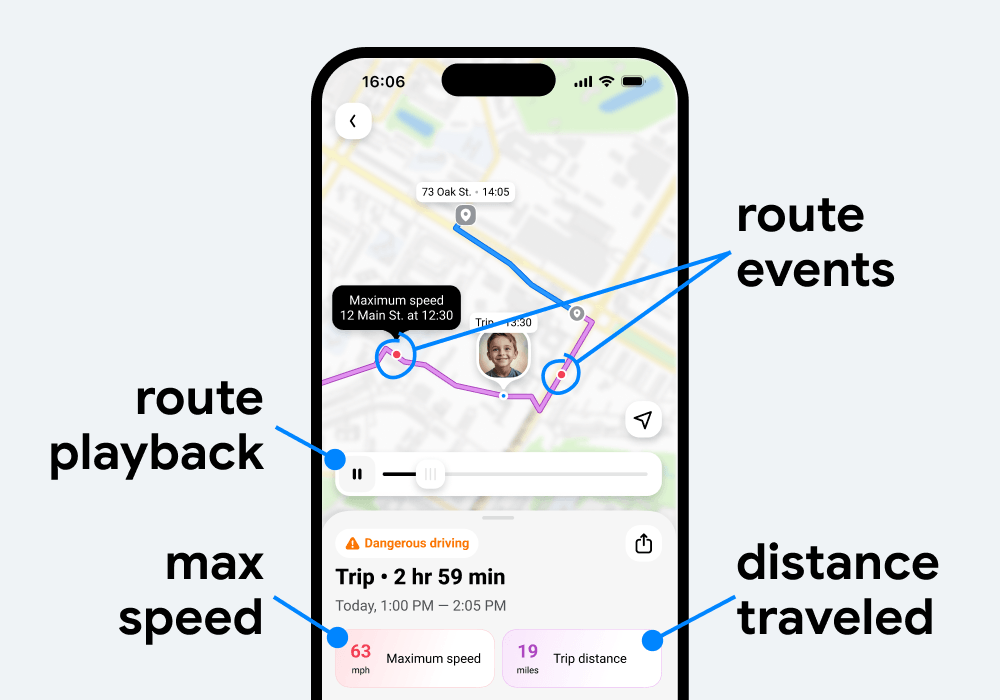
Parents can replay their child’s route like a video with the route playback feature. They can see the exact path their child took on the map to better understand how they move from one place to another.
Why Driving Reports Matter
Seeing your child’s location in real time is helpful, but understanding where they have been gives parents a much clearer and more complete picture. Route history, along with key details such as distance traveled and maximum speed, helps provide valuable peace of mind. Parents can better understand their child’s movements without needing to constantly check the app or reach out.
The purpose of the Driving Reports feature is not control, but context. It helps parents interpret their child’s daily movement patterns and feel more confident about their safety and independence.
With Findmykids, Driving Reports can also support stronger trust between parents and children—especially for families with new teenage drivers. In today’s digital world, that kind of trust is often one of the most important parts of parenting.
How to Use Driving Reports on Findmykids
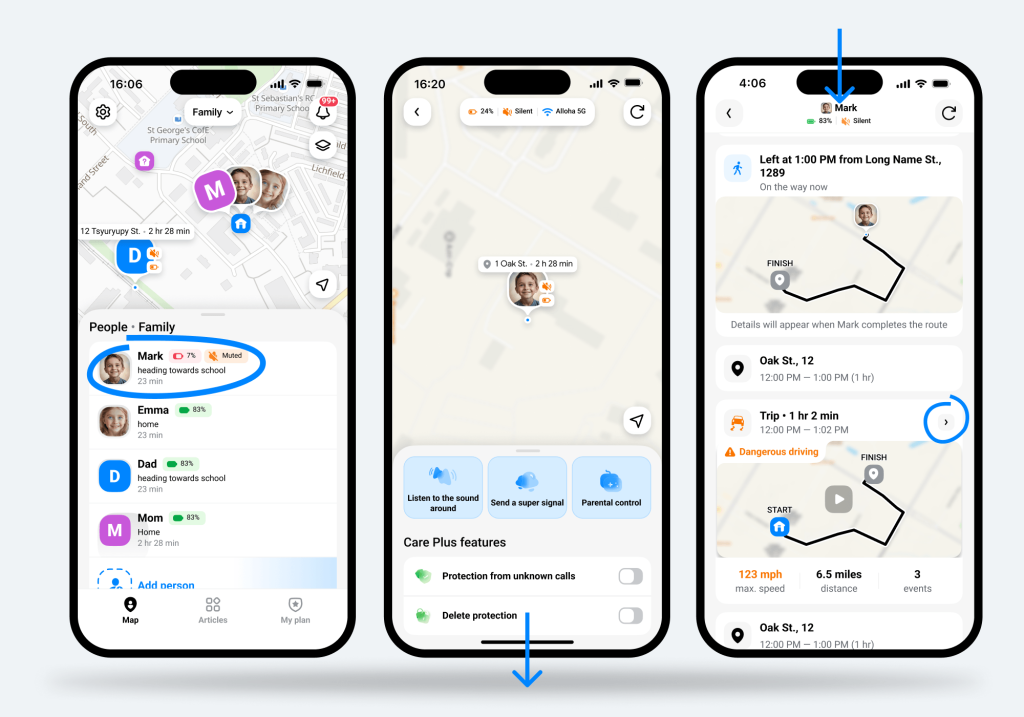
The Driving Reports feature on the Findmykids app is especially easy to use with the intuitive app design. Follow the steps below to use Driving Reports:
- Open the Findmykids app.
- Select your child’s profile—or the profile of another family member or friend whose route you want to view.
- Scroll down the feed and сheck the route timeline.
- Tap the route card you’re interested in.
- Check trip details to see the maximum speed, distance, and transport method.
- The route playback starts automatically, replaying the journey as a video on the map.
This route information is extremely useful for parents who want to be intentional about the rules and conversations they have with their children.
Driving Reports in Everyday Life
How exactly can parents use the Driving Reports feature in everyday life? Below are a few examples of how parents find peace of mind and understand their child’s movements with the feature:
- New Teen Driver and Speeding: Your teen has just obtained their license and wants to drive around on their own. Parents can now see the exact route they take, the maximum speed, where it happened, and whether their driving was safe overall.
- Parents as Drivers: Driving Reports can also be useful when parents themselves are driving with their child in the car. It helps review shared trips afterward, understand routes taken together, and reflect on driving behavior in everyday family travel.
- Evening Routes: When your daughter wants to go out with friends for the evening, you can track her route, see how far she traveled and how fast, and replay the route she took. This can provide peace of mind and ease any anxiety.
- Observe Route Behavior: Some parents review their child’s route timelines and patterns to better understand where they go, how they get there, and if they are traveling at a safe speed. This information is easily accessible and doesn’t require lecturing or questioning the child, which can lead to arguments.
- Information for Busy Parents: Parents are busy, whether they’re at work, running errands, or taking care of the house. Having the route history allows parents to access information about their child’s movements at any time. There is no need to check in with your child or make sure you open the app at the right time.
Overall, Findmykids and the new Driver Reports feature can be easily integrated into daily life. And when parents use it as a way to better understand their child instead of constant surveillance, it can build trust, open the door to honest conversations, and help parents guide their children to developing independence and confidence.
Get Valuable Insight About Your Child’s Movement with Findmykids
Letting your children go off on their own can be overwhelming and nerve-racking for parents, especially for those with new teen drivers. Unlike other location-tracking apps that only share real-time locations, Findmykids keeps a detailed record of your child’s route history. But that’s not all… each route contains valuable insights into how your child traveled, the route’s maximum speed, and the distance traveled.
Having this information readily available can help parents observe and understand how their child moves and whether they’re doing so safely. It also opens the door to honest conversations and helps parents set appropriate boundaries for their children.
Download the Findmykids app today to use the Driving Reports feature and keep your children safe as they develop confidence and independence!
Проверьте электронный ящик