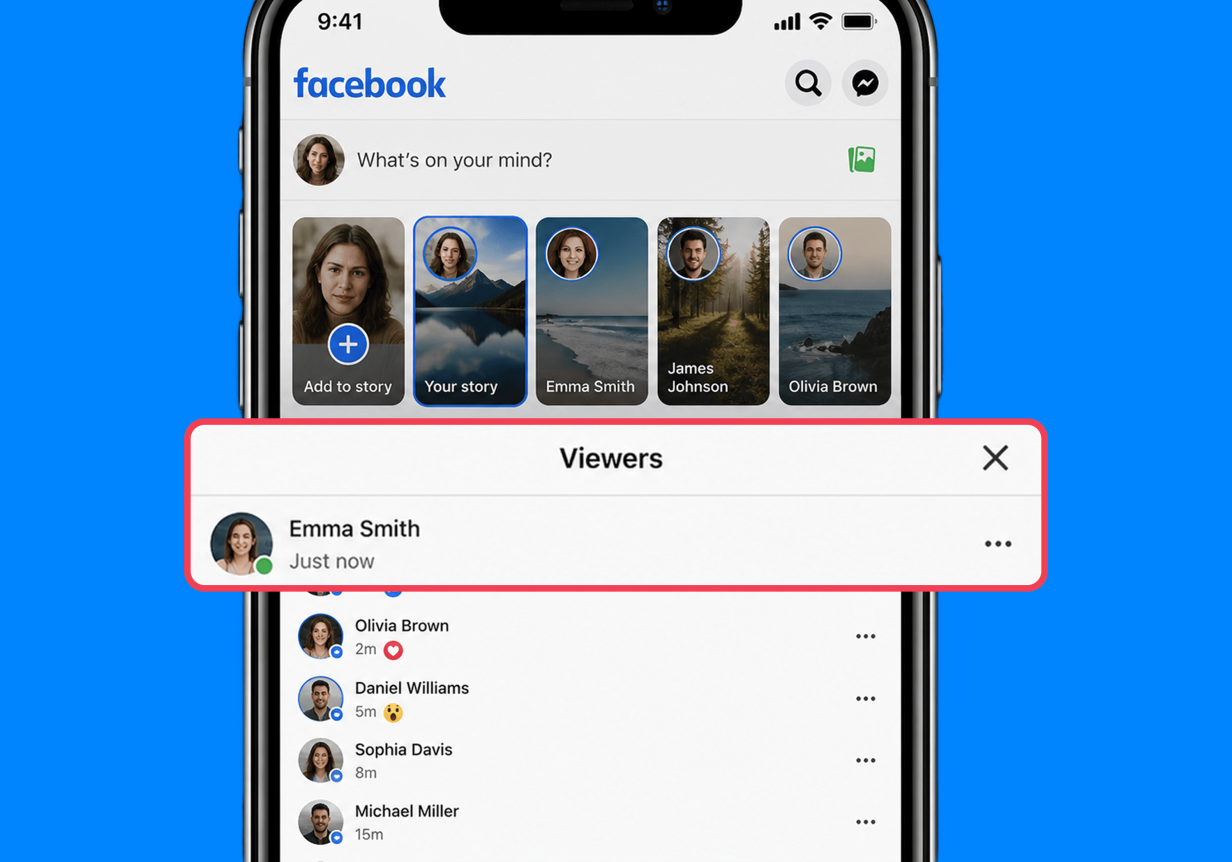
Facebook story viewer is a feature that allows users to see who has viewed their stories. If your child shares a photo, video, or text post to their story, other people can publicly see and interact with it during its 24-hour live window.
according to U.S. data from 2024, approximately 40% of kids aged 8–17 who use social media are on Facebook. But when kids and teens start posting Facebook stories, many parents wonder—who can actually see them?
It’s scary to think about anyone and everyone knowing what your child is up to, especially if they’re sharing personal details or tagging their location. In this article, we’ll explain exactly how the Facebook stories work and how to protect your child from unwanted story views and contact.
Contents:
What Is Facebook Story Viewer?
Facebook stories are photos, videos, or text posts that disappear 24 hours after the poster has shared them.
Facebook story viewer is the feature that allows people to see what your child has posted to their story. If you’ve used Facebook, you may have noticed that sharing a “story” is different from creating a post that appears on your profile page and in other people’s feeds.
Facebook’s built-in story viewer list allows you to see which accounts have interacted with or left a comment on your story. Only the poster can see this list.
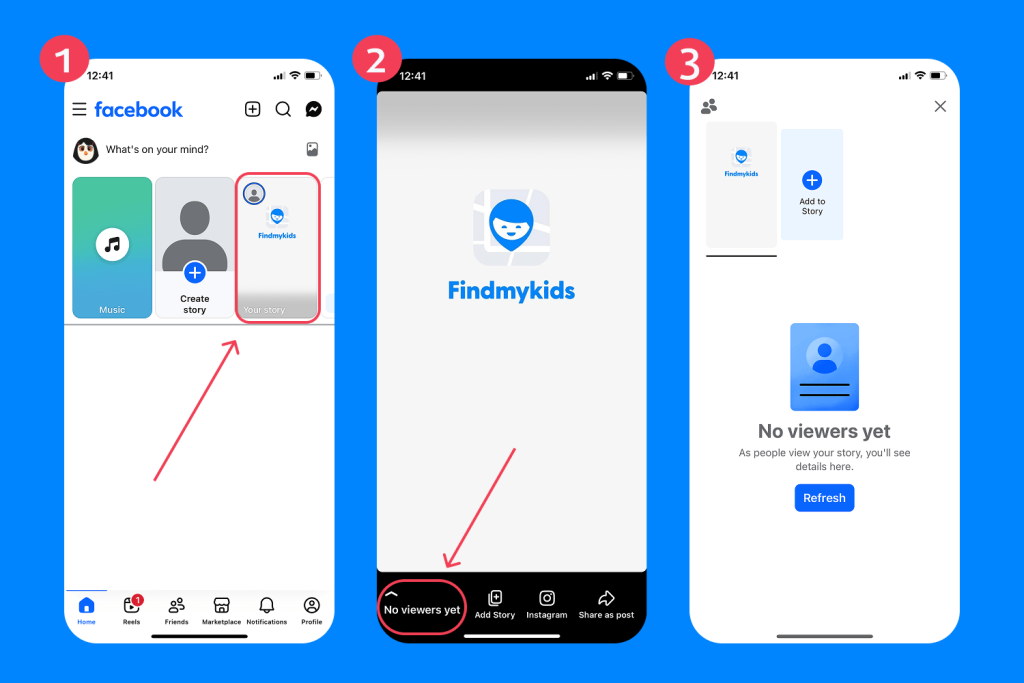
To check who has viewed your child’s Facebook story post, you’ll need to log into their account and open the story at the top of their Facebook News Feed. Navigate to the bottom left-hand corner of the screen, tap the eye icon, and you’ll see a list of the profile names and icons of everyone who viewed the post.
How Facebook Story Views Work
Facebook Stories may seem temporary, but they can still reveal a lot about a child’s online activity and digital boundaries. Many parents assume stories are only visible to close friends, when in reality, the audience depends entirely on the privacy settings attached to the account and the story itself. That’s why it’s important to understand not only who can post and view stories, but also how visibility, viewer lists, and story archives actually work on Facebook.
Who Can See Your Child’s Facebook Stories?
If your child’s Facebook story settings are set to Public, the images, videos, and text they share on their stories can be seen by:
- Followers—anyone who “follows” their profile
- All Facebook friends
- Anyone at all who uses Facebook or Messenger, even if they are not “Friends”
- Off-Facebook users, looking up content in search engines like Google
If your child’s story settings are Private, this means story posts can only be seen by:
- Facebook friends—anyone your child has explicitly agreed to be “Friends” with on the platform, by either sending or accepting a Friend Request
In this case, your child’s story posts cannot be viewed by the general public or by people outside their friends list. There is also a Hide Story From feature that allows users to exclude specific people from seeing individual stories, even if they are already added as friends.
Can You See Exactly Who Viewed a Story?
Facebook allows users to check exactly who viewed a story while it is still active. To do this, your child can tap on Your Story and open the Viewers list (or tap the eye icon). This will display the accounts that viewed the story.
For parents, this feature can be a useful reminder that stories are not anonymous interactions. Children and teens often pay close attention to who watches their content, which can sometimes affect self-esteem, social pressure, or online behavior.
Can Other People See the Viewer List?
No. On both Private and Public accounts, the viewer list remains private and can only be seen by the person who posted the story.
This means other users cannot check whether someone viewed a story unless they are the creator of that post themselves.
How Long Do Facebook Stories Last?
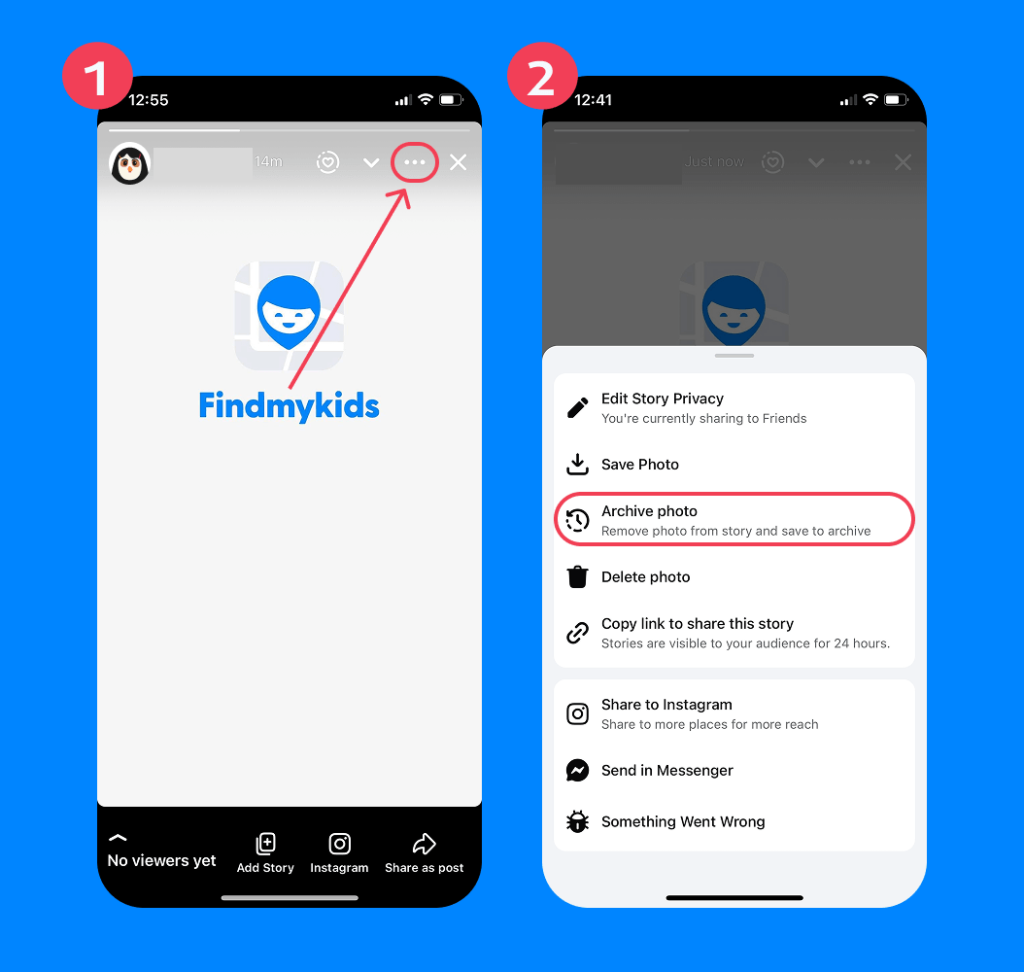
Facebook Stories stay visible for 24 hours before disappearing automatically. However, that does not always mean the content is gone permanently.
Your child can save stories to their private story archive by going to Story Archive in their profile settings and toggling on Save to Archive.
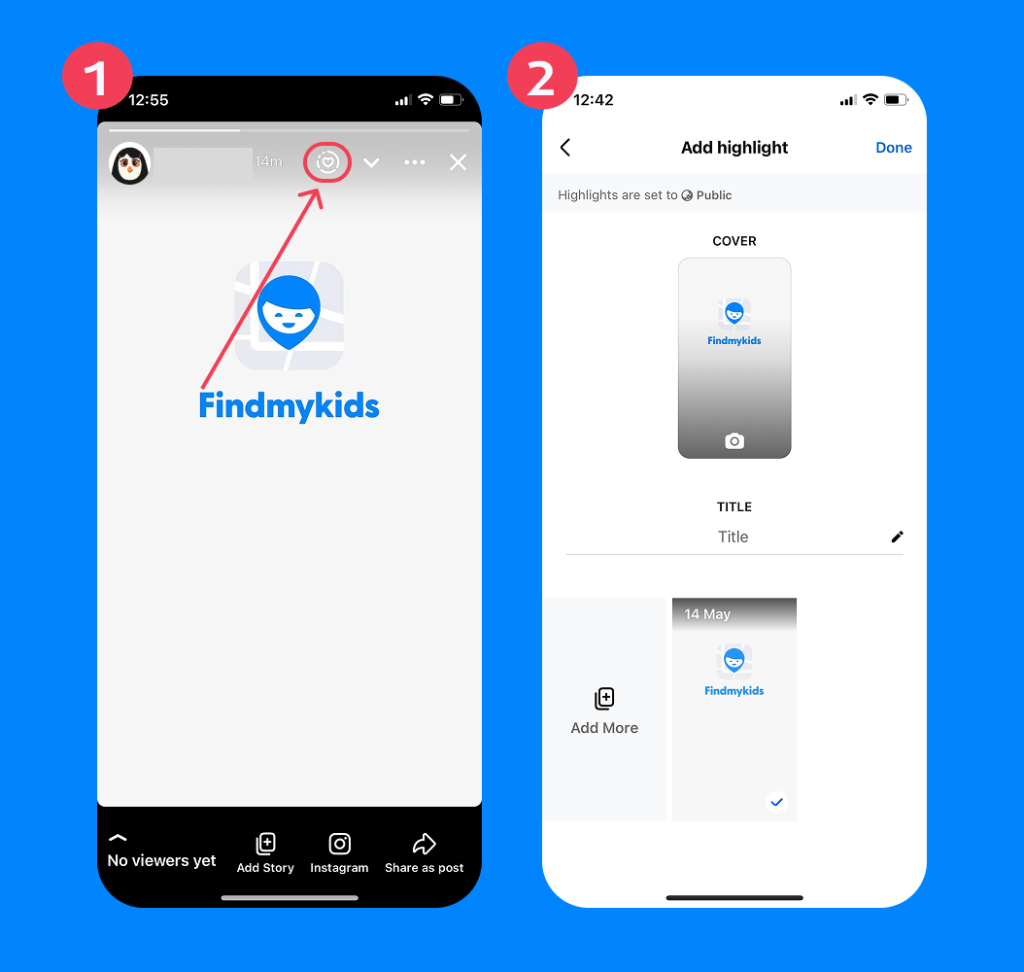
They can also pin specific stories as Highlights so they remain visible to their Friends and followers after the 24-hour live window has passed.
Because of this, it’s helpful to remind children that even “temporary” posts can continue existing online far beyond a single day—especially if screenshots, reposts, or archived copies are involved.
Can Someone View Facebook Stories Anonymously?
Now, here comes the complicated part. Third-party Facebook story viewer tools, like PeekViewer and mSpy, allow people to visit your child’s profile and watch public stories anonymously without logging into their own Facebook account. This means they won’t appear in Facebook’s story viewer list.
Some of these services advertise themselves as ways to watch stories anonymously or enable anonymous viewing and anonymous browsing. In many cases, users are asked to paste a profile URL into the tool to supposedly gain access to public stories without revealing their identity.
Can Someone Download Facebook Stories?
Yes. Even though Facebook Stories are designed to disappear after 24 hours, other users can still save them. People may take screenshots, screen recordings, or use third-party downloader tools to copy public stories without the creator’s permission.
Are Facebook Story Viewer Tools Safe?
Third-party Facebook story viewer tools are not officially affiliated with Facebook, and many violate Facebook’s terms of service. Often, they are scam sites in disguise.
It’s important to note that your child’s stories can only be seen by anonymous viewers if their settings are Public. Private stories cannot be watched anonymously.
If your child is on Facebook, they may be tempted to use external tools to look at someone else’s story anonymously, for example, out of curiosity or interest in what people they know—but aren’t friends with—are doing.
For safety reasons, you should teach kids not to use external tools, downloads, or extensions that ask for their Facebook username and password—especially ones littered with ads. These are often scam sites that will deliver malware and corrupt their device.
Facebook Story Risks Parents Should Consider
Even when stories disappear after 24 hours, the risks connected to them often do not. Because stories feel temporary and casual, children and teens may share things more impulsively than they would in a permanent post. At the same time, the fast-paced nature of stories can make it harder for parents to notice problematic interactions or privacy issues before something spreads further.
That’s why understanding how Facebook Stories work is only one part of the conversation. Parents should also be aware of the social and safety risks that can come with everyday story posting.
If your child is posting stories to Facebook, there are a few risks you should keep in mind:
- There’s no parental control feature that lets you approve a story before your child posts something. You can only see their story after it has already been published.
- Kids manage their own visibility settings on Facebook Stories. This means they may accidentally reveal personal details about their location, daily routines, school, hobbies, or friend group—especially if their account or stories are set to Public.
- Even within approved Friends lists, viewer lists can create social pressure. Some children become overly focused on who viewed their story, how quickly people reacted, or whether certain classmates watched it at all. Over time, this can affect self-esteem, anxiety levels, and online behavior.
- Other users can screenshot, screen record, or repost stories without permission. Even though Facebook Stories disappear after 24 hours, copies of the content can continue circulating long afterward.
- Public stories may attract unwanted attention from strangers. Because public Facebook Stories can sometimes appear beyond a child’s immediate friend circle, they may expose children to unsolicited messages, spam accounts, or inappropriate contact attempts.
- Stories can also unintentionally reveal patterns about a child’s offline life. Repeated location tags, school uniforms, recognizable streets, or routine posting times can give strangers more information than children realize they are sharing.
For this reason, it’s important to regularly review your child’s Facebook privacy settings together and talk openly about what is safe to post online—even in content that is designed to disappear quickly.
How Findmykids Helps Parents Stay Aware of Social Media Use
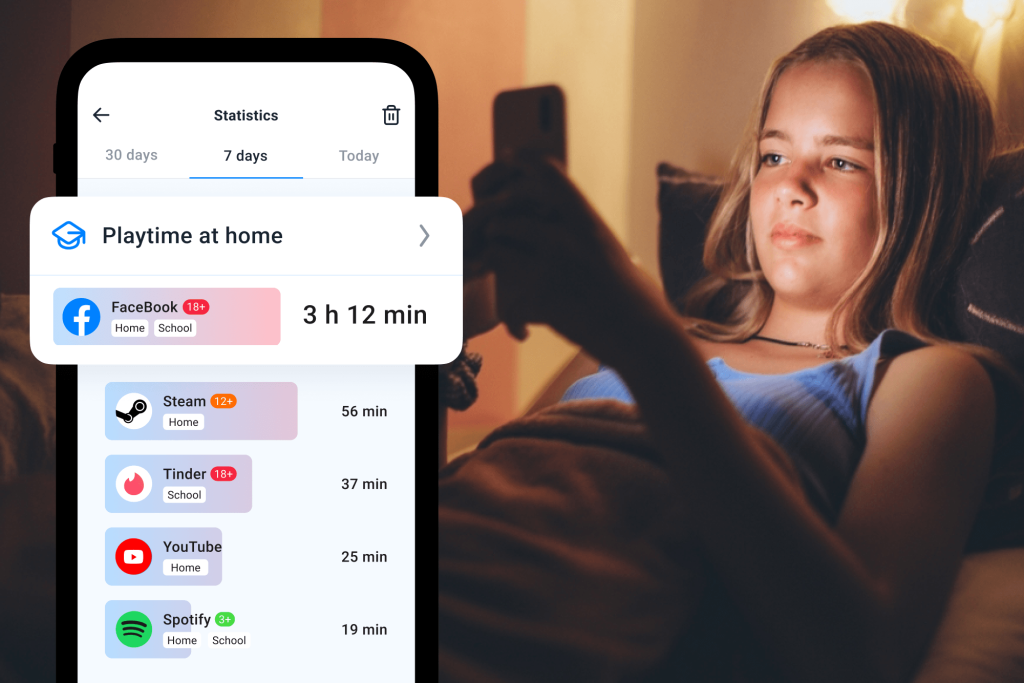
Findmykids app
Facebook’s story viewer list is a great feature if you’re interested in who is watching your child’s content. However, it fails to provide any other data on the time your child spends on the app or who they’re talking to.
This is where parental control tools like Findmykids can help parents stay more aware of their child’s digital habits without constantly checking their phone manually.
Findmykids gives parents a clearer picture of how children use social media and other apps throughout the day. The app provides real-time usage insights and allows adults to temporarily or permanently block distracting or unwanted apps when needed—including Facebook, games, or messengers.
With Findmykids, parents can:
- See which apps their child uses most often
- Monitor overall screen time and app activity
- Temporarily block apps like Facebook or games
- Notice sudden spikes in social media usage
- Reduce distractions during schoolwork or bedtime
- Stay more aware of potential cyberbullying or unwanted online contact
- Check the child’s real-time location for offline safety
- Send a Loud Signal if the child does not answer calls or messages
These features can be especially super helpful for parents trying to make sense of sudden behavioral changes connected to social media use.
Download Findmykids today for free to get the peace of mind you need regarding your child’s online and offline safety!
It’s easy to register and set up monitoring on your child’s device:
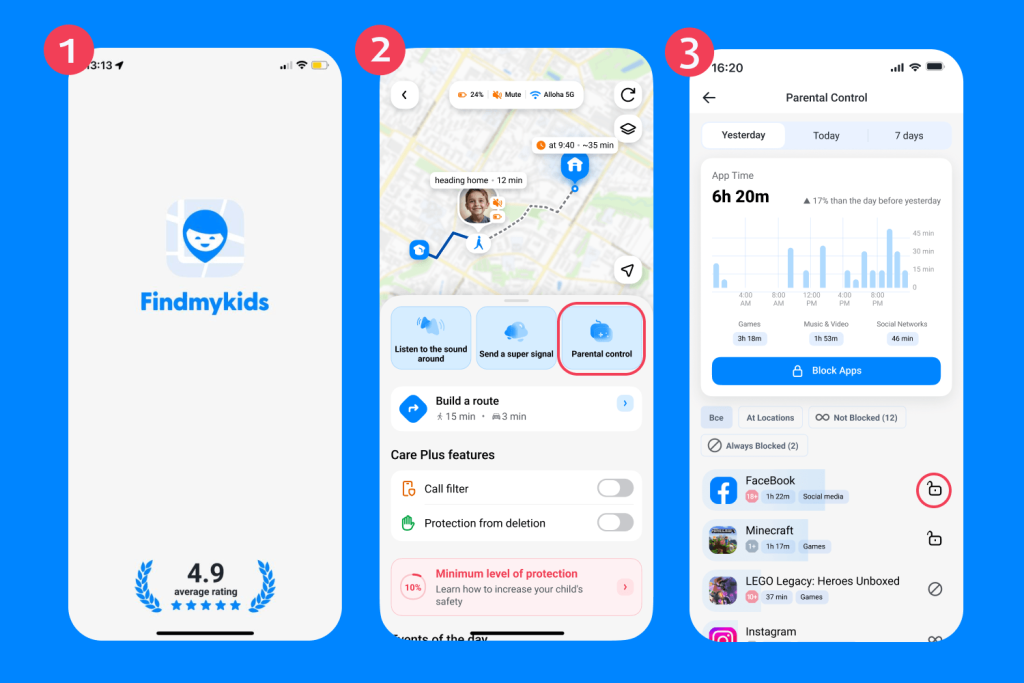
Findmykids app
- Download the Findmykids app.
- Follow the instructions for linking your child’s phone (it’s a five-minute process).
- Open the app on your phone.
- Choose the child’s profile.
- Tap Parental controls.
- Block all apps temporarily/permanently, or choose Facebook from the list.
Using parental controls is not about spying on children—it’s about helping families build healthier digital habits and creating safer online experiences together.
How to Change Facebook Story Privacy Settings
Because Facebook Stories can sometimes be viewed by far more people than children realize, privacy settings matter a lot. The good news is that Facebook allows users to control who can view their stories.
Here’s how to change your child’s Facebook Story privacy settings:
- Open the Facebook app.
- Tap the Menu icon (three horizontal lines).
- Go to Settings & Privacy → Settings.
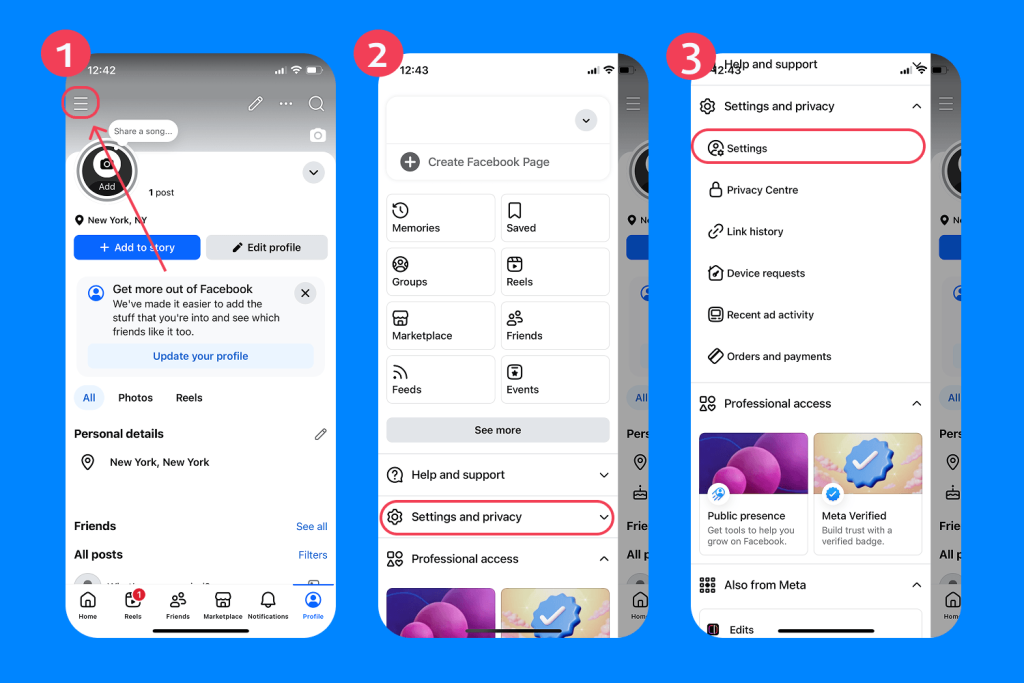
- Scroll to Audience and Visibility.
- Tap Stories.
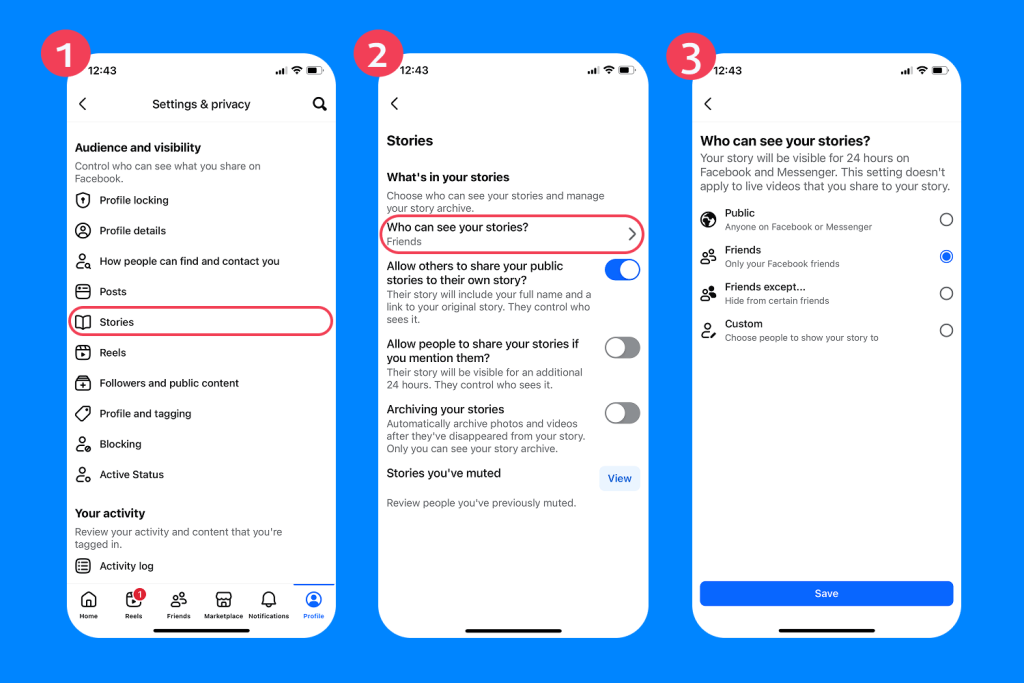
- Choose who can view stories:
- Public — anyone on or off Facebook
- Friends — only approved Facebook friends
- Custom — hide stories from specific people
It’s also a good idea to review additional privacy settings together, including:
- Who can send friend requests
- Who can message your child
- Whether the profile appears in search engines
- Location sharing and tagging permissions
- Story archive and Highlights visibility
Read more: Does Facebook Have Parental Controls? A Practical Guide for Parents.
Keeping Your Child Safe on Facebook — Is It Possible?
Because social media is designed for frequent engagement, it can be difficult to find a healthy balance for your children while keeping them safe from cyberbullying, unwanted contact, and inappropriate content.
But with strict oversight and ongoing communication, it is possible to keep your child safe on Facebook. Remember to set their profile to Private, speak to them honestly and openly about their social media use, and monitor their digital footprint with an app like Findmykids.
FAQs
What is a Facebook story viewer?
The Facebook story viewer is the feature that lets people see photos, videos, and text posted to your Facebook story.
Does Facebook show everyone who viewed your story?
Yes. Unless they are not friends with you, are blocked, or are using anonymous browser tools.
Can you see how many times someone viewed your story?
No. Facebook only shows the name of each viewer once in the list. You can’t see the exact number of times someone has viewed your story.
Can you see story viewers after the story disappears?
Yes, but only if you have the Story Archive feature enabled.
Can someone see if you screenshot a Facebook story?
While apps like Snapchat do send screenshot alerts, Facebook does not notify the person if you take a screenshot or recording of their story after watching anonymously.
Can I see who viewed my Facebook story?
Yes. To see who has viewed your child’s Facebook story post, log into their account and open the story at the top of their Facebook News Feed. Tap the eye icon in the bottom left-hand corner of the screen, and you’ll see a list of the viewers’ profile names and icons.
Can I watch Facebook stories anonymously?
You can only view public profile stories anonymously by using third-party Facebook story viewer tools that hide your identity, and these are not safe or recommended.
Can a tool show private Facebook stories?
No. There are no legitimate tools that show Facebook stories from a private account. Any site or app that claims to offer this is a scam.
Cover image: generated by ChatGPT / OpenAI
Проверьте электронный ящик