
Instagram is one of the most popular apps among teens, but it can expose them to adult or sexualised content inappropriate for their age. As technology becomes more and more a part of young life, parents need to understand how to protect their children while also teaching digital citizenship.
This guide explains how Instagram handles sensitive material, why teens still encounter it, and practical strategies to help parents block adult content on Instagram effectively while supporting their child’s autonomy.
Contents:
How Instagram Treats Adult & Sensitive Content in 2026
Instagram says it aims to create a safe community by enforcing its community standards. These rules are designed to remove posts that include explicit content, adult nudity, or direct depictions of sexual activity.
However, there is a large category of sensitive content that does not fully break the rules but may still be inappropriate for teens. This includes images that feature see-through clothing, suggestive poses, or content that may be considered upsetting, such as people fighting and other images that depict violence. It can also include posts trying to sell regulated goods like vaping products, pharmaceutical drugs, and other adult products.
To manage this grey area, Instagram has recently introduced a “Teen Account” option, with tighter sensitive content control over their feed, explore tab, and search results.
For a teen account, settings are now automatically defaulted to a PG-13 mode, and new accounts for younger users also default to stricter filters. This means the app will remove graphically violent content and mentions of certain regulated products, although some previously limited content may still appear depending on how it is categorised.
Even with these features activated, teens may still encounter content that may be offensive or upsetting. The Instagram app does not remove all borderline material. Instead, it reduces how often such content appears.
Why Kids See Adult Content on Instagram
Many parents become aware of the issue when something unexpected appears in their child’s feed in the first place, often through content shared by others rather than something their child actively searched for. Even with filters in place, teens can still come across adult content for several reasons.
- The Instagram app uses machine learning designed to show more content based on behaviour. If a teen watches certain videos, likes a post, or pauses on particular images, the algorithm will continue to recommend similar content. Over time, this can lead to more sensitive content appearing in their feed.
- Content is not only delivered through the main feed. The explore tab, hashtag pages, and search features can result in posts that are outside a teen’s usual interests. Even if a teen does not actively search for inappropriate material, they may encounter it while browsing.
- Borderline content refers to material that may be harmful but is legal and remains within platform rules. This can include misogynistic, racist, or sexualised posts. The BBC documentary Inside the Rage Machine reported that Meta, Instagram’s parent company, has permitted increased visibility of such content within feeds as part of efforts to compete with rival platforms.
- Teens are naturally curious. Research shows that adolescents are more likely to explore identity and relationships online, which can include exposure to sexualised content.
Read also: Is Instagram Safe for Kids to Use: What Parents Need to Know.
Method 1 — the Most Reliable: How to Block or Limit Instagram Using the Findmykids app
If your goal is to consistently reduce exposure to adult or inappropriate content, relying only on Instagram’s internal settings may not be enough. A dedicated parental control app offers a more stable and comprehensive solution.
What is Findmykids?

Findmykids app
Findmykids is a parental control app designed to help families manage screen time, monitor app use, and create safer digital habits. Unlike platform-specific tools, it works across apps and devices. This gives parents more control over what their child can access, including the ability to block or limit the Instagram app entirely if needed.
How Findmykids works on iOS
On iPhone, Findmykids works through system-level restrictions, which means the control is applied to the device itself rather than individual apps.
With it, you can:
- Block all non-system apps at once (permanently) — including Instagram and other social media
- Restrict access to 18+ websites to reduce exposure to adult content
- Block in-app purchases to prevent accidental spending
This approach doesn’t allow selecting individual apps or setting timers, but it provides a more rigid and harder-to-bypass level of protection, especially useful when you need to fully limit access to social media.
How to set it up:
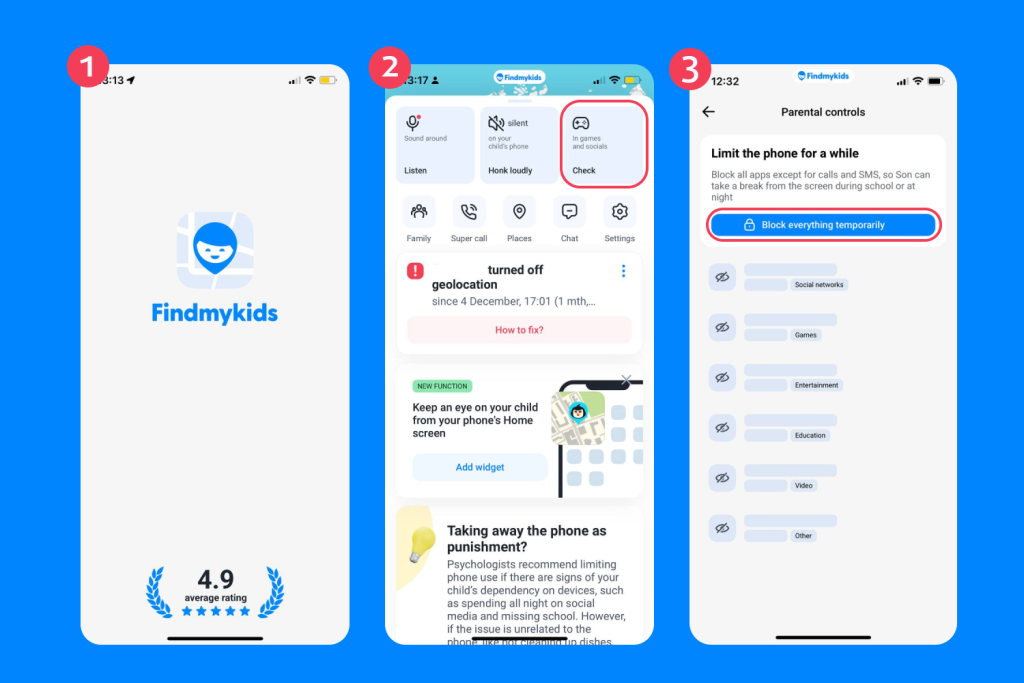
Findmykids app
Download the app → follow the simple steps to connect your child’s device (it usually takes about 5 minutes) → open the Parental controls (or In games and social in previous versions) section → Block all apps permanently.
How Findmykids works on Android
On Android devices, Findmykids provides more flexibility in how you manage app usage.
You can:
- Block Instagram (or any app) completely
- Set a timer to limit app usage
- See how much time your child spends on apps and where they use them
- Track overall device activity
This helps reduce exposure not only within Instagram but across other apps where similar content may appear.
How to set it up:
Download the app → follow the simple steps to connect your child’s device (it usually takes about 5 minutes) → open the Parental controls (or In games and social in previous versions) section → Block all apps temporarily/permanently or choose Instagram from the list.
Why This Works Better Than Instagram Settings
Instagram’s built-in controls only affect what happens inside the app. But children can still encounter similar content elsewhere or switch between platforms.
Findmykids works at the device level, helping you limit access to apps and manage screen time more broadly.
Additional Features That Support Safety
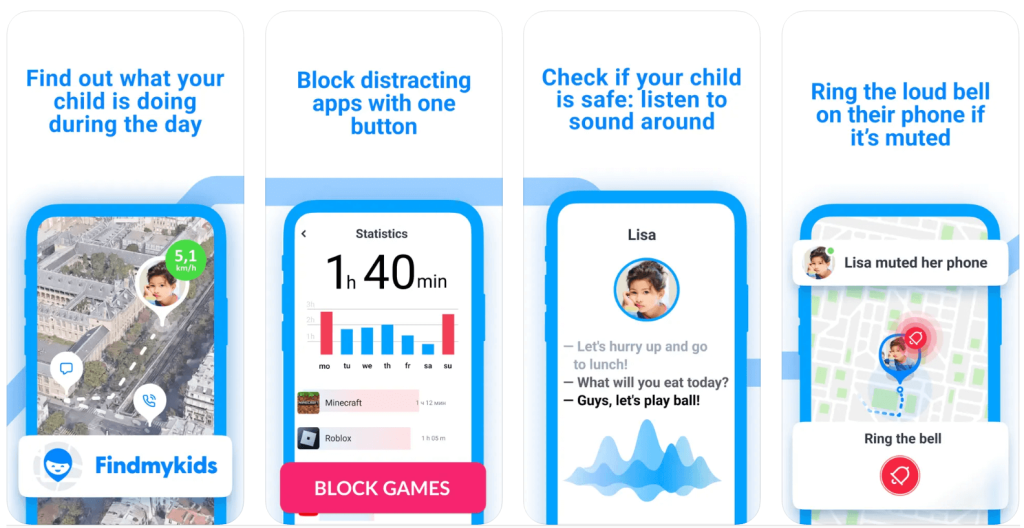
Findmykids app
In addition to app controls, Findmykids includes features that help parents stay aware of their child’s safety and environment:
- Real-time location tracking — see where your child is at any moment.
- Safe zones (geofencing) — get notified when your child enters or leaves specific places.
- Loud signal — send a loud sound to your child’s phone, even if it’s on silent.
- Sound Around — listen to the surrounding environment to understand what’s happening nearby (Android only).
Together, these features provide a more complete picture—helping parents not only limit risks, but also respond quickly when something seems off.
Try Findmykids to limit access to Instagram, reduce exposure to inappropriate content, and stay informed about your child’s digital habits—all in one place!
Method 2: Use Instagram Built-In Features
Instagram does provide several tools that can help reduce exposure to sensitive content. These are worth using, especially when combined with other methods.
Instagram Sensitive Content Control
The Sensitive Content Control feature is central to managing what appears in a user’s feed and Explore page.
To access it:
- Open the Instagram app.
- Go to your Instagram profile.
- Tap the top right menu.
- Select Settings.
- Tap Content Preferences.
- Tap Sensitive Content.
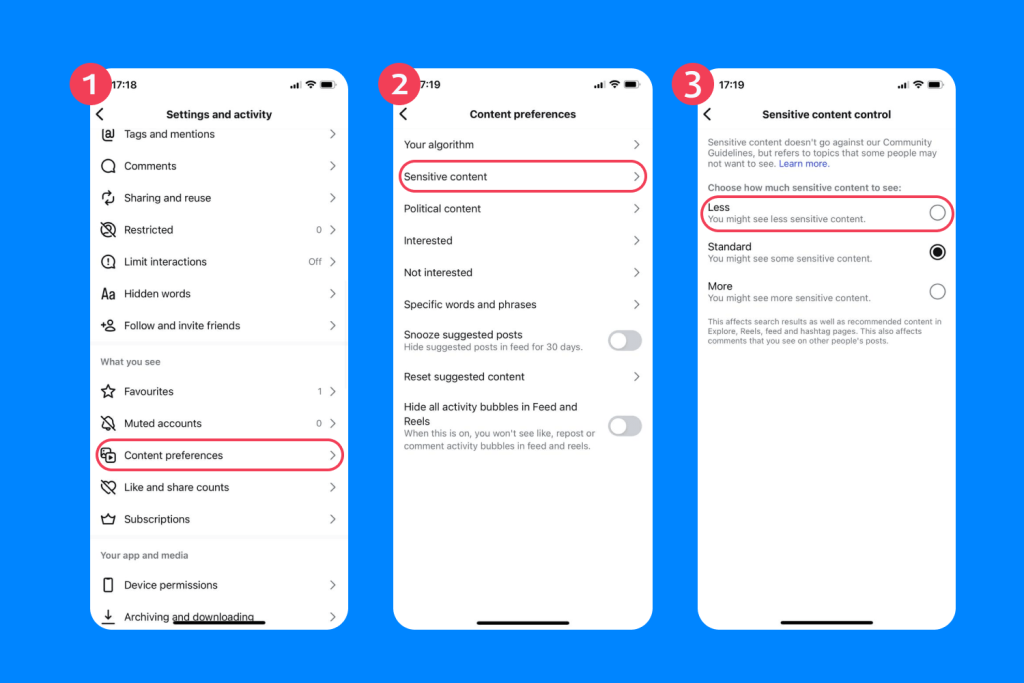
From here, you can choose how much sensitive content is shown. Available options:
- More — See more posts and more content marked as sensitive (18+ only)
- Standard/Limit — Default setting; hides some content that may be considered upsetting
- Less — Strongest filter; aggressively hides sexual, suggestive, and graphically violent content
Choosing “Less” will remove some content that may depict violence, adult products, or suggestive images such as see-through clothing.
For a teen account, theoretically, this setting is now automatically defaulted to a stricter level, and changing it to allow more adult content may require a guardian’s permission.
Instagram will automatically limit a profile to a teen account if its AI identifies consistent user behaviours indicating they are underage, such as posts wishing them a Happy 16th Birthday.
Keep in mind that this feature reduces but does not remove content entirely.
Private Account Settings
Switching to a private account gives more control over who can view and interact with your child’s profile. To enable this:
- Go to Settings.
- Tap Account privacy.
- Toggle Private account.
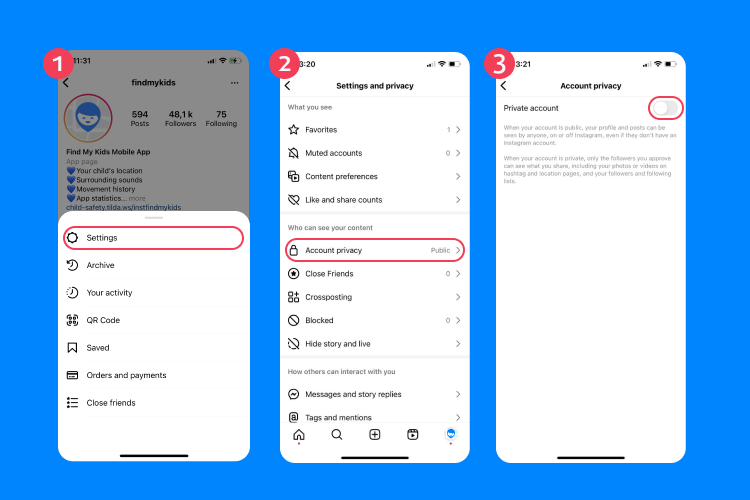
This limits exposure from unknown users and reduces the likelihood of inappropriate messages or comments.
Hidden Words and Comment Filters
Instagram allows you to filter offensive comments and message requests. You can block specific words or phrases, automatically hide comments similar to ones reported, and filter message requests. This helps remove content that may be offensive or upsetting in comment sections.
To set this up:
- Go to Settings.
- Find Hidden words.
- Add custom filters.
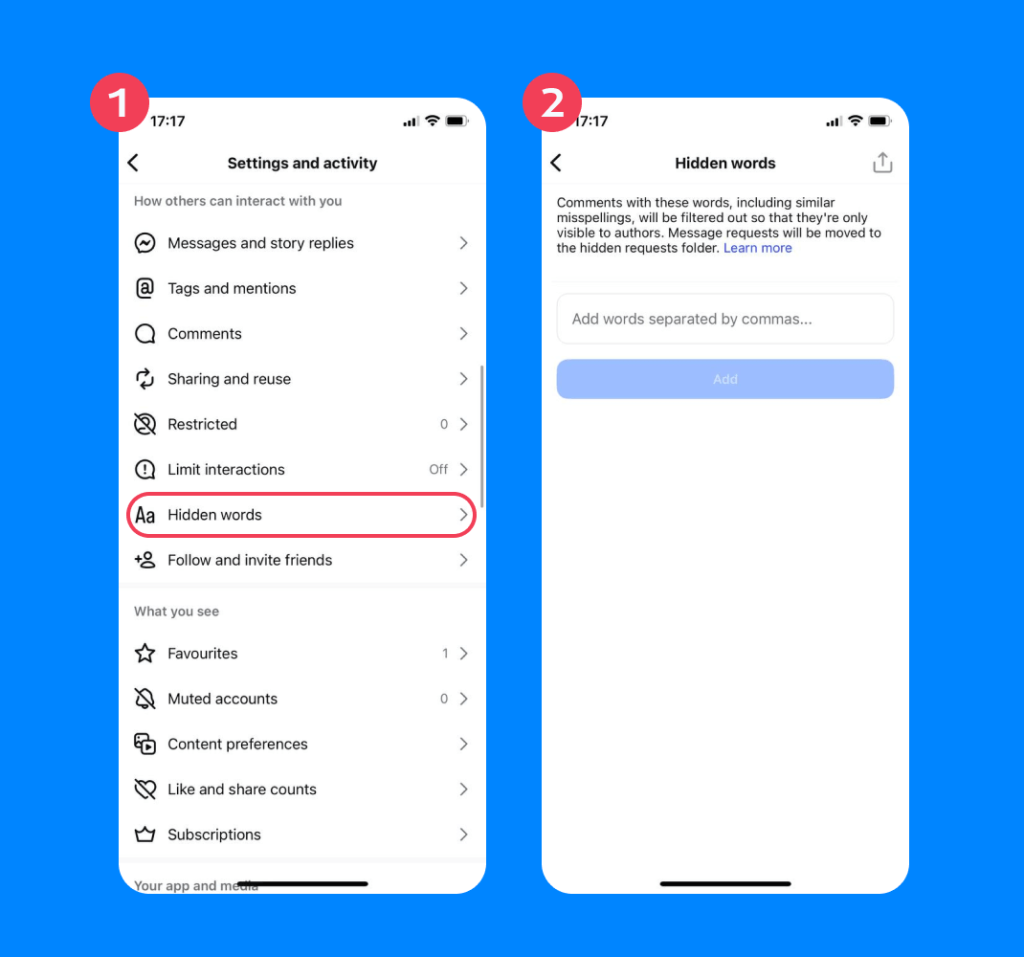
This can reduce exposure to sexually explicit language or harmful interactions.
Parental Supervision Tools
Instagram offers supervision features that allow parents to oversee a teen’s account.
With supervision, parents can:
- See how much time their child spends on Instagram
- View the list of accounts they follow and are followed by
- Receive notifications about important setting changes
Parents cannot read private messages, but they can monitor general activity and safety settings.
How to set it up:
- Open Settings → Supervision.

- Send an invitation to the teen.
- Accept it from the teen’s account to link profiles.

These features are helpful but still rely on the platform’s internal controls.
If you want a step-by-step walkthrough with screenshots of all Instagram safety settings—including privacy options, and supervision tools—check out our detailed guide on how to set up Instagram for your child’s safety.
Limitations of Instagram Controls
Even with all these settings enabled, it’s important to understand what they can and cannot do. Instagram’s tools are designed to manage exposure, not eliminate it.
| Limitations | Implications |
| They do not fully block adult content | Some posts with suggestive images or themes can still appear in the feed or explore areas, even when stricter settings are enabled |
| Teens can sometimes change settings | A child may adjust their account preferences and increase exposure without a parent being aware, especially without supervision tools in place |
| Algorithms may still recommend borderline material | The app may continue to show more posts about vaping products, pharmaceutical drugs and sexual activity based on viewing behaviour, even if the original content was only briefly engaged with |
| Content that may be considered upsetting can still appear | Posts involving themes like people fighting or distressing imagery can still be shown because they do not always breach platform rules |
⠀
In practice, this means Instagram can reduce risks, but it cannot fully protect a child from inappropriate content on its own.
Method 3: Use Device, Browser, and Network Filters to Block Porn Beyond Instagram
To create a safer environment, it helps to extend protection beyond a single app.
Device-Level Controls
Most devices include built-in parental controls. Screen Time on iOS has additional features that allow you to block adult websites and restrict app downloads. Digital Wellbeing and Family Link on Android offer similar options. These tools can block porn and restrict access to content across apps and browsers.
Browser Filters
Installing safe browsing filters can prevent access to adult websites. This works across platforms, including the Reddit app, and can help limit exposure to videos that would typically fall under higher or inappropriate movie ratings.
Find guides on how to block websites in Safari, Chrome, or Firefox.
Network-Level Filters
Some internet providers allow you to filter content at the router level. This means restrictions can be assigned to specific devices connected to the home network. You can identify their device and block adult websites, filter search results, and restrict access to certain categories, adding another layer of protection, especially for younger teens.
Helping Your Child Navigate Instagram Safely and Limit Sensitive Content
Research shows that overly restrictive approaches to children’s online activity can increase secrecy, resistance, and risk-taking rather than reducing harm, while more collaborative approaches are linked to safer behaviours online.
This means talking openly about what they might see, helping them understand why some content is inappropriate, and encouraging them to come to you if they find something upsetting. Teens are more likely to respond positively when they feel trusted and supported rather than monitored without explanation.
Instagram can be a positive space for creativity and connection, but it is not designed specifically for children. Its systems are built to maximise engagement, which means offering users more content that keeps them scrolling.
By combining platform settings, parental controls, and open communication, you can significantly reduce the chances that your child will encounter adult content. If you want consistent protection, tools like Findmykids provide a more dependable way to block and manage access across platforms, not just within Instagram.
FAQs
How to manage sensitive content on Instagram?
Go to your Instagram profile, tap the top right menu, open Settings, then find the Sensitive content control option under Account. Choose Less to limit sensitive content. For a teen account, stricter controls may already be automatically defaulted.
How do I permanently block adult websites on my teen’s iPhone?
Use Screen Time in settings to block adult websites. You can also install parental control apps like Findmykids for more control. Combining device controls with network filters is the most effective approach.
Read more: How to Block Websites on iPhone Without Stressing Your Child.
How do I stop my child from seeing certain content on Instagram?
Tap on a post, select Not interested, and adjust the Sensitive content control setting. You can also unfollow accounts and use hidden word filters to remove content that may be offensive.
How do I stop my child from seeing adult content?
Use a combination of tools: adjust Instagram settings, enable Sensitive content control, use parental control apps like Findmykids, and apply device and network filters.
No single method is perfect, but layering these approaches can significantly reduce exposure.
Related: Helpful Parents’ Guide: How to Block Porn on Kids’ Devices.
References
- Instagram Community Standards
- Adolescents’ exposure to explicit sexual content on digital media: a quantitative, cross-sectional study, Semen Sebsbie & Anteneh Tsegaye. International Journal of Adolescence and Youth, 2025
- Meta and TikTok let harmful content rise after evidence outrage drove engagement, say whistleblowers, Marianna Spring. BBC News, 2026
- Parental Digital Mediation According to the Age of Minors: From Restraint and Control to Active Mediation, Rebeca Suárez-Álvarez, Tamara Vázquez-Barrio and Belinda de Frutos-Torres. Social Sciences, 2022
vector-hub / Freepik.com
Проверьте электронный ящик