
Parents face a massive challenge trying to navigate digital safety today. Finding the right balance between healthy screen time and absolute restriction is tough. Knowing exactly how to protect personal information online requires constant vigilance and education. The reality is that digital footprints start forming very early. In fact, research shows that companies collect an astonishing 72 million data points on the average child by the time they turn 13.
This guide breaks down the real risks and offers actual steps to secure a child’s digital life.
Contents:
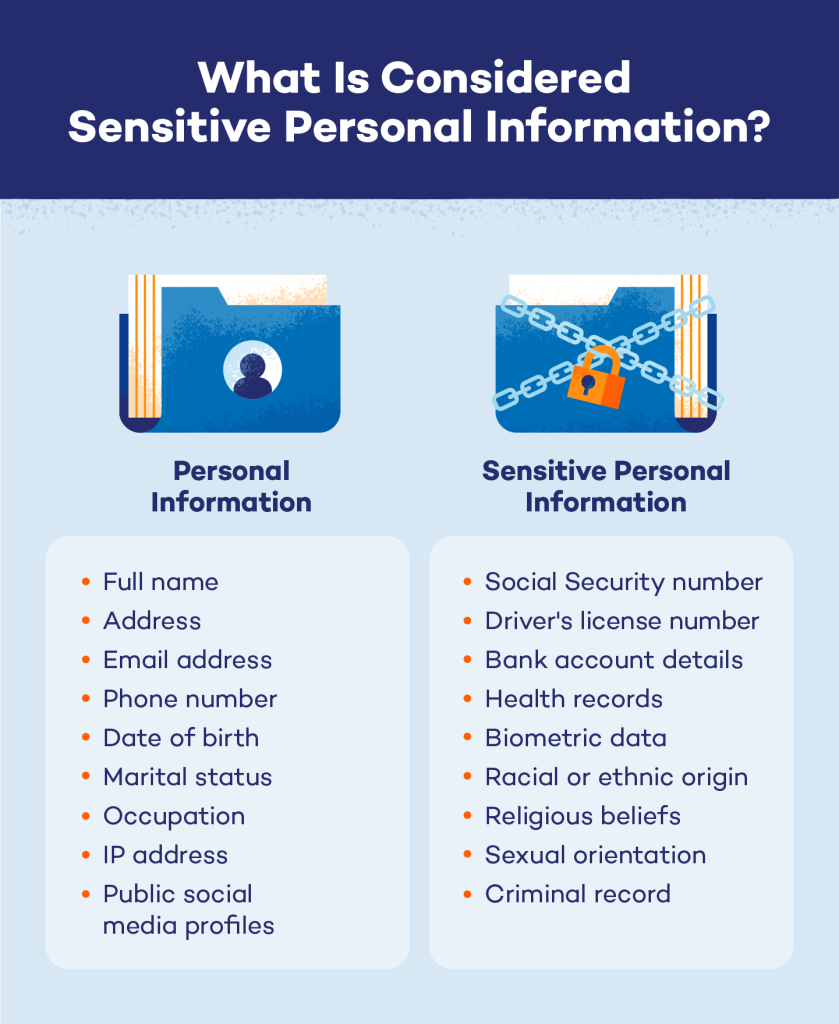
What Counts as Personal and Sensitive Information?
Credit: malware.news
Most adults understand why handing over bank details is a terrible idea. Kids, on the other hand, frequently share sensitive information without realizing the danger. A simple social media bio can actually cause massive trouble. Cyber criminals actively hunt for these tiny digital breadcrumbs across the web.
Think about a full name listed right next to a home address or a phone number. This combination gives scammers an absolute goldmine. They also look for a mother’s maiden name or a driver’s license number. Even seemingly harmless personal details matter when strangers try to piece together a fake profile.
A birth date or a school mascot might seem completely innocent to a teenager. Yet, major companies use these exact facts to verify a customer’s identity over the phone. If scammers manage to get this data collected, they can easily take over online accounts. Identity theft almost always begins with just one or two leaked facts.
Basic account logins are highly sought after by hackers. They frequently buy and sell these credentials on the dark web. These groups also target financial records and credit card numbers. Unfortunately, children might type this exact data directly into a malicious website to unlock a fake game or prize.
Everyday shopping preferences are also highly valuable to a modern business. Retailers track browsing habits to build detailed advertising profiles on their users. When scammers gain access to this behavioral data, they use it to create highly customized tricks.
A Quick Parent Checklist: What to Talk About With Your Child
Before the next app download or social media signup, it helps to have a simple conversation. Make sure your child understands that the following details should never be shared publicly or with strangers online:
- Full name combined with home address or phone number
- Account logins and passwords (even with “friends”)
- Driver’s license or any government ID numbers
- Mother’s maiden name or answers to security questions
- Financial information (bank account numbers, credit cards, payment apps)
- Personal details often used for verification—date of birth, school name, employer, school mascot, graduation year
- Photos of school IDs, boarding passes, or documents in the background of selfies
- Location data in real time (live location tags, check-ins while alone)
A good rule of thumb to teach kids: If this information could help someone pretend to be you, access your money, or find you in real life, it doesn’t belong online.
Common Ways Kids’ Information Is Exposed

New Africa/Shutterstock.com
Children rarely hand their personal data to criminals on purpose. Mistakes usually happen through casual internet browsing or playing games.
- Oversharing: Oversharing on social media remains a massive issue for younger generations. Kids might inadvertently post a photo showing their home address or school uniform in the background.
- Facebook: Social media platforms like this often ask people to add a phone number for ease and convenience, or even ask for a school name to complete a profile page. Unfortunately, a public page makes this data visible to anyone on the internet. Friends of friends can easily include strangers with bad intentions.
- Messaging apps: Chat groups and gaming lobbies present another serious risk. Predators often use public chat rooms inside popular video games to find targets. They start with friendly conversations and gradually ask for private information. A child might share their phone number just to join a team text group.
- Weak Passwords: Weak passwords are a major security issue. Many teenagers reuse the same password for multiple sites. If one server is breached, every account is at risk. Hackers test stolen passwords across sites to gain access.
- Unknown links: Clicking on these is incredibly dangerous for any user. A malicious website can install malware on a mobile device or tablet. This software silently tracks browsing habits in the background. It steals data without the user ever noticing.
Tips for Protecting Personal Information
Protecting personal information online requires various layers of security working together.
- First, teach children to follow privacy rules online before posting anything. Review the security settings for every app they download, and especially for the apps they use daily. Ensure their profiles are set to private immediately when the profiles are created.
- Next, every family member must tackle the login problem directly. Everyone needs strong passwords to stay safe on the internet today. A good password contains random words, numbers, and unusual symbols. Never use a pet’s name or a birth year to secure online accounts.
Since remembering complex codes is difficult, a password manager can be used to easily and safely store passwords. Software like this stores every login safely behind heavy encryption. - Another very important step is to alwaysturn on two-factor authentication during the login process. It usually requires a temporary code sent directly to a mobile device. Two-factor authentication stops hackers dead in their tracks.
Even if criminals steal a password, they cannot log in without the physical phone nearby. This is a simple step that protects online accounts from almost any online attack. Families must enable two-factor authentication whenever possible. - Regular maintenance is also important to protect your privacy long-term. Clear out temporary internet files often to remove tracking history. Browsers like Microsoft Edge get massive amounts of tracking data collected over time. Deleting this history limits how much sensitive information companies can gather.⠀
Parents should teach kids how to clear their browser cache regularly. Taking control of data collection is an important step to protect your privacy and your online identity.
Internet Safety Tips for Kids & Must-Have Rules for Every Parent and Your Guide to the Digital Footprint Checkers.
Educate on Red Flags
Software alone cannot prevent every digital problem on the web. Children must learn to spot danger themselves before they click. Discuss phishing scams and strange messages frequently to build their awareness. Education is the absolute best way to prevent identity theft.
Criminals constantly invent new ways to trick internet users into making mistakes. Teach children to watch out for these specific warnings:
- Messages demanding an urgent password reset or account verification.
- Strangers in games asking for a home address or personal details.
- Emails from unknown companies containing strange links.
- Websites asking for a mother’s maiden name to grant access.
- Online forms requesting more personal details than necessary.
- Friends sending uncharacteristic links on Facebook.
- Unsecured sites without a padlock symbol in the browser.
Related: Virtual Friendship: How to Keep the Child Away from Dangerous Encounters on the Internet?
Secure Your Child’s Device

Findmykids app
The actual physical device needs protection just as much as theaccounts. A computer or phone acts as a gateway to the entire family network.
- Always install software updates the moment they become available. Automatic updates patch security holes before hackers can exploit them.
- Be careful when connecting to public Wi-Fi at coffee shops or airports. It is dangerous to visit sites on the same network as strangers. Cyber criminals can easily intercept data transmitted over an unsecured connection. If possible, use cellular data when you are away from your home network instead.
- Using private browsing modes offers a little extra privacy online. It stops the browser from saving a history file or temporary Internet files locally. However, parents should note that it does not hide activity from an internet provider or a visited website.
- Parents also need a dependable tool for complete oversight of their children’s online activities. That’s where Findmykids becomes essential.
Findmykids removes the uncertainty of the digital space and gives parents real peace of mind. It provides accurate location awareness without feeling overly intrusive, helping you know exactly where your child is throughout the day.
Findmykids tracks devices securely and reliably, sending instant alerts if a child leaves a designated safe zone, like a school or sports practice. This means you don’t have to constantly check in—the app notifies you when something changes.
Beyond physical safety, the app gives parents visibility into what’s happening on the device itself. With detailed app usage statistics, you can see how much time is spent on different apps and identify potential risks early. If certain platforms become problematic, parents can use app blocking and customizable white list settings to limit access only to approved contacts.
For urgent situations, features like Sound Around and built-in SOS signals provide an extra layer of reassurance, allowing you to react quickly if something feels wrong.
Findmykids acts as a bridge between digital security and real-world safety. It supports your child’s independence while giving you the tools to protect their personal information, reduce online risks, and step in when necessary.
Download Findmykids today for free and turn online safety from a constant worry into a system you can rely on!
The Fast Security Checklist
Families can take immediate action to secure their network without spending hours on setup. Use this checklist to start protecting personal information today. Taking these steps reduces the risk of identity theft significantly.
| Security Task | Action Required | Priority Level |
| Passwords | Create a password manager account for the family. | High |
| Authentication | Enable two-factor authentication on all online accounts. | High |
| Social Media | Update the security settings on every social media page. | High |
| Browsing | Delete old accounts and temporary internet files. | Medium |
| Device Safety | Install Findmykids on the child’s mobile device. | High |
| Protection | Run a malware scan on the family computer. | Medium |
| Education | Talk to children about spotting phishing scams. | Ongoing |
⠀
Building Safe Digital Habits
Security is never a one-time setup that you can simply forget about. Instead, it requires constant attention and open conversations at home. Families must talk about internet risks without creating panic or fear. Children need to feel completely safe talking about an online mistake to an adult.
For instance, if a child clicks a bad link, they should tell an adult immediately. In return, adults need to remember that punishing them will only make them hide future mistakes from you. Using protective services like Findmykids makes monitoring much easier and less stressful. Ultimately, education and reliable software create a strong defense against cyber criminals.
Taking steps to protect your online presence is a continuous task. The internet changes quickly, and new threats appear constantly. A careful approach ensures a safe online experience for everyone involved. With the right advice and tools, families can enjoy the web without constantly fearing identity theft.
FAQs
Tero Vesalainen/Shutterstock.com
What are the best tips to secure data?
Start by limiting what gets shared publicly on social media platforms. Use strong passwords for every single website and service you use. Enable two-factor authentication to stop hackers from accessing sensitive accounts. Educate children about the danger of phishing scams and malicious links. Consider using a parental control tool like Findmykids for an added layer of protection and visibility.
What’s the best way to prevent identity theft?
Guarding sensitive information is always the best defense. Never share a driver’s license or financial records on a public page. Keep an eye out for popular scams and use a reliable password manager. Always verify the source before providing private data to any business.
Should I use a password manager?
Yes, this software is highly recommended by top security experts everywhere. It creates and stores complex passwords securely behind strong encryption. It successfully stops users from repeating codes across multiple sites. This limits the total damage if a single company suffers a massive data breach.
What is two-factor authentication, and why do I need it?
Two-factor authentication adds a mandatory extra security step during login. It requires a password and a secondary code to grant account access. This code is usually sent directly to a phone or email address. It stops criminals from gaining access even if they manage to steal a password.
Cover image: mdjaff / Freepik.com
Проверьте электронный ящик