

Kids and teens use multiple apps to chat with friends, but one of the most popular is Facebook Messenger, with more than 194 million users in the United States alone. Connected to their Facebook profile, people can send messages, call, and even video chat with other people who have a Facebook account.
But as with any parent, you may be curious about what your child or teen is chatting about with friends through these apps. In fact, many begin to wonder if it’s possible to see deleted messages to get more insight into what their children are talking about.
In this post, we’re explaining how to see deleted messages on Messenger and how different methods work to recover them. Plus, we’ll discuss why deleted messages matter and how parents can talk to their kids about them.
Key Takeaways
- Deleted Messenger messages usually cannot be recovered once they are permanently removed from an account.
- Archived chats are different from deleted chats because they are only hidden from the inbox and can usually be found again in Messenger.
- Notification history, Facebook data downloads, and Secure Storage may show limited information, but none guarantee access to deleted messages.
- If a child deletes messages, stay calm and focus on online safety and open conversations instead of assuming the worst right away.
Contents:
Can You See Deleted Messages on Messenger?
The short answer is no, you cannot see deleted Facebook Messenger messages once they have been deleted from the account. According to Meta, Facebook’s parent company, messages are permanently removed when deleted.
However, it is possible to hide messages so the chat does not appear on the account by archiving them. This simply puts the chat into a folder so it does not appear in the main list of chats. You can retrieve these messages simply by going into the archive folder.
Another way someone can delete Facebook messages is directly in a chat for a specific message. They can make the message disappear for everyone in the chat. The chat remains available, but the message is no longer there.
What Happens When Someone Deletes or Unsends a Message?
A couple of things happen when someone deletes or unsends a message:
- Delete for You:If you delete a message just for you in a chat, then it removes the chat from your device, but the other participants can still see it on their devices.
- Delete for Everyone: You can delete a message from both sides of the chat, so it is no longer available to anyone.
- Deleted Conversation: You can delete the entire chat from your account, but it is still available on the other person’s account.
Possible Ways to Recover Deleted Messenger Messages
Archived Conversations
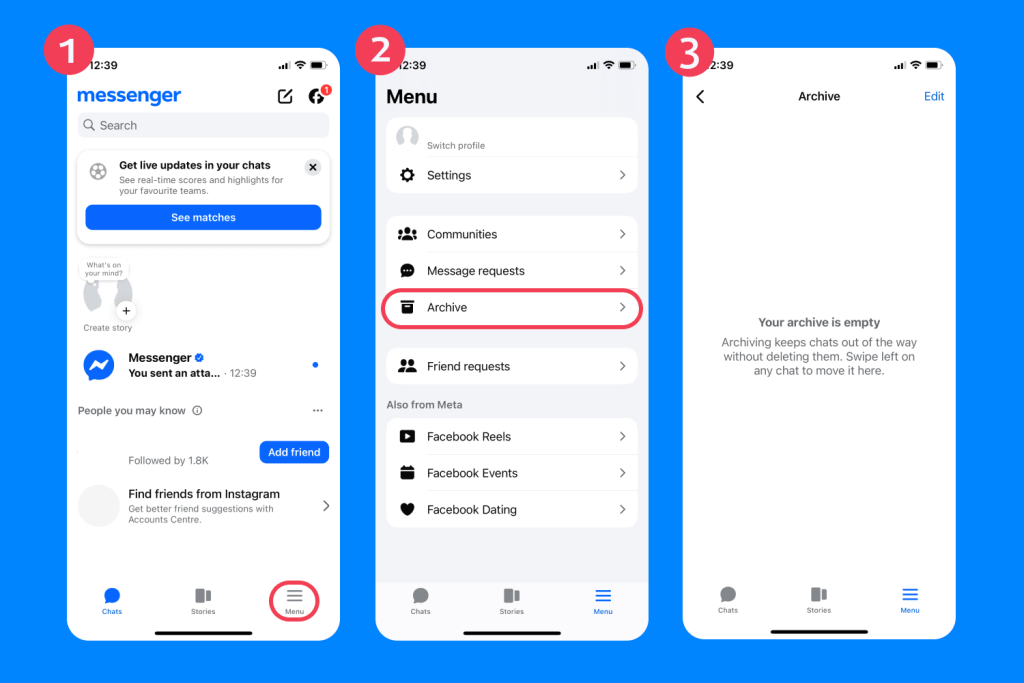
To retrieve messages that have been archived, follow the steps below:
- Open the Messenger app.
- Tap the Menu icon.
- Tap Archive.
- Look through the list of archived conversations.
- Tap the conversation you want to open.
You can also search the archive folder for chats if you suspect a particular person.
Facebook Account Data Download
While you cannot recover deleted messages by downloading your Facebook information and account data, you can get a history of your chats that are still available. For unsent messages, it may show up that the message was unsent, but you cannot see what that message said.
To download your Facebook account data, follow these steps:
- Open Facebook Settings & Privacy.
- Select Settings.
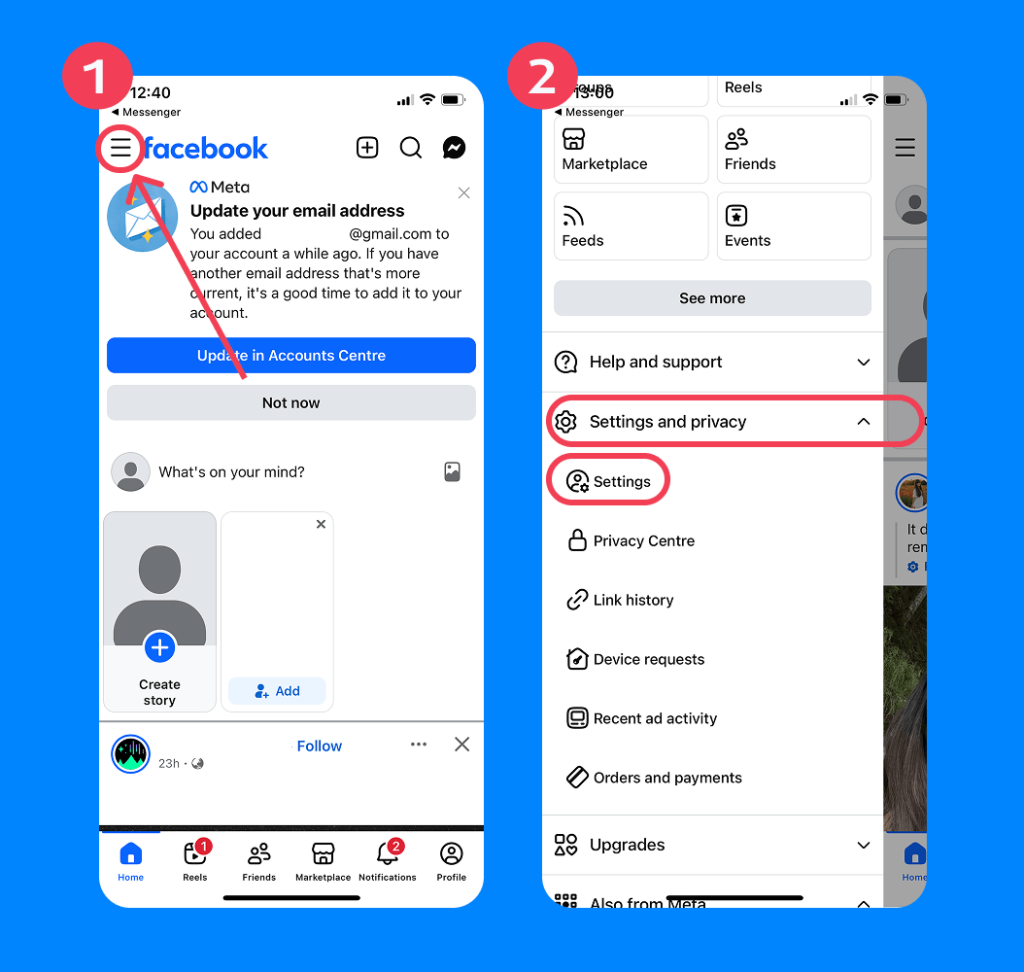
- Go to the Accounts Center.
- Select Your Information and Permissions.
- Choose Export your Information.
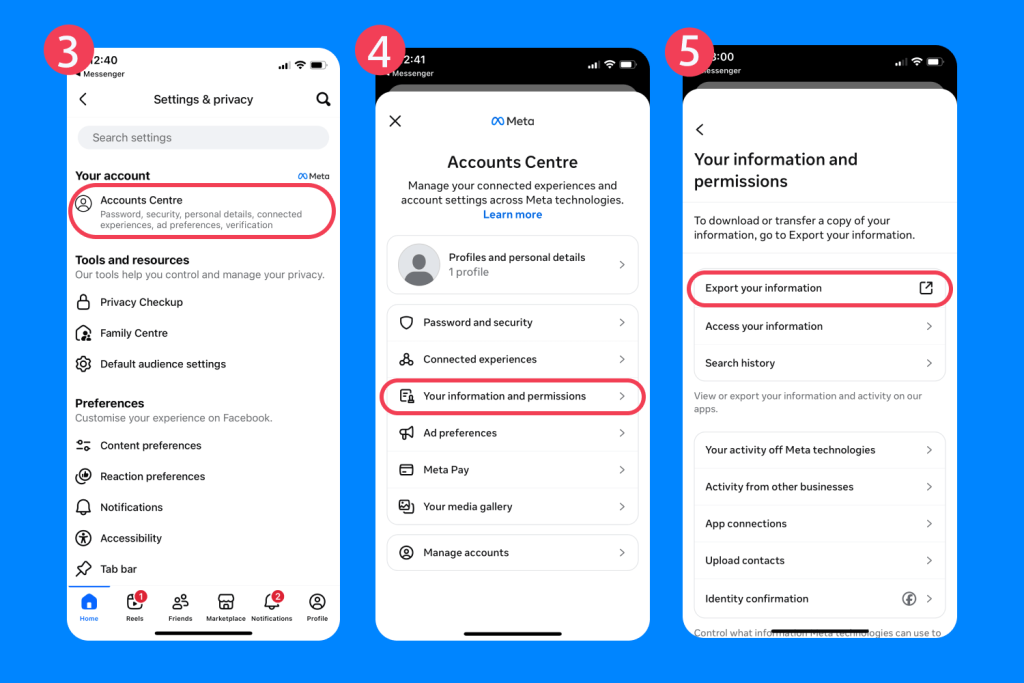
Findmykids app
- Select the Facebook profile you want.
- Choose Specific types of information.
- Select Messages.
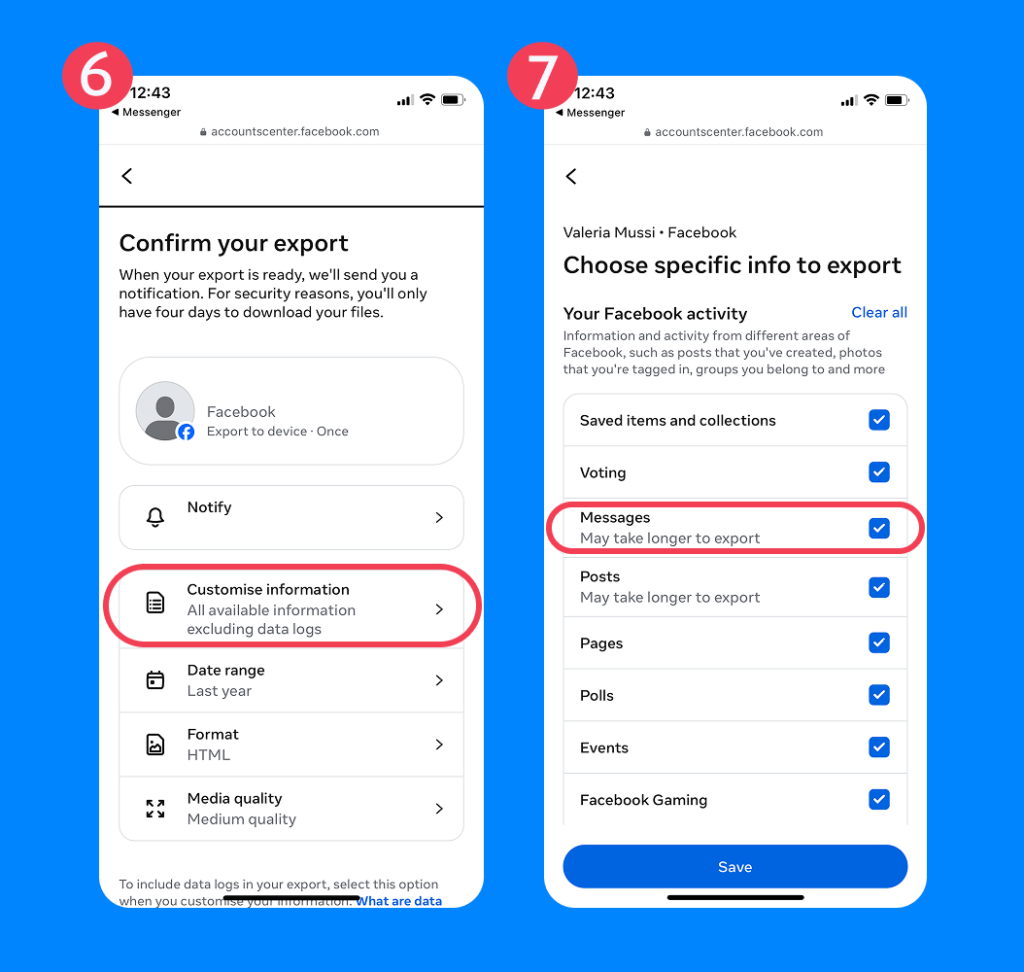
- Choose the date range you want to check.
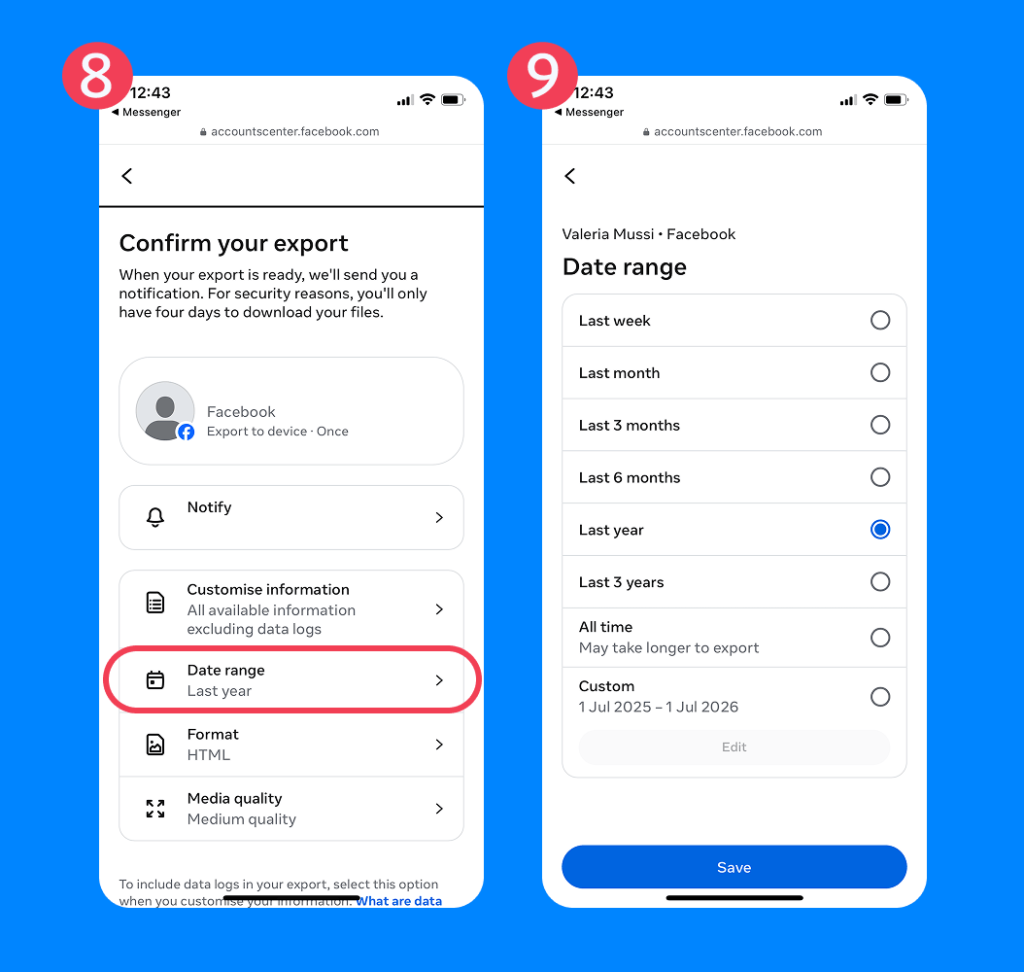
- Choose a file format like HTML or JSON.
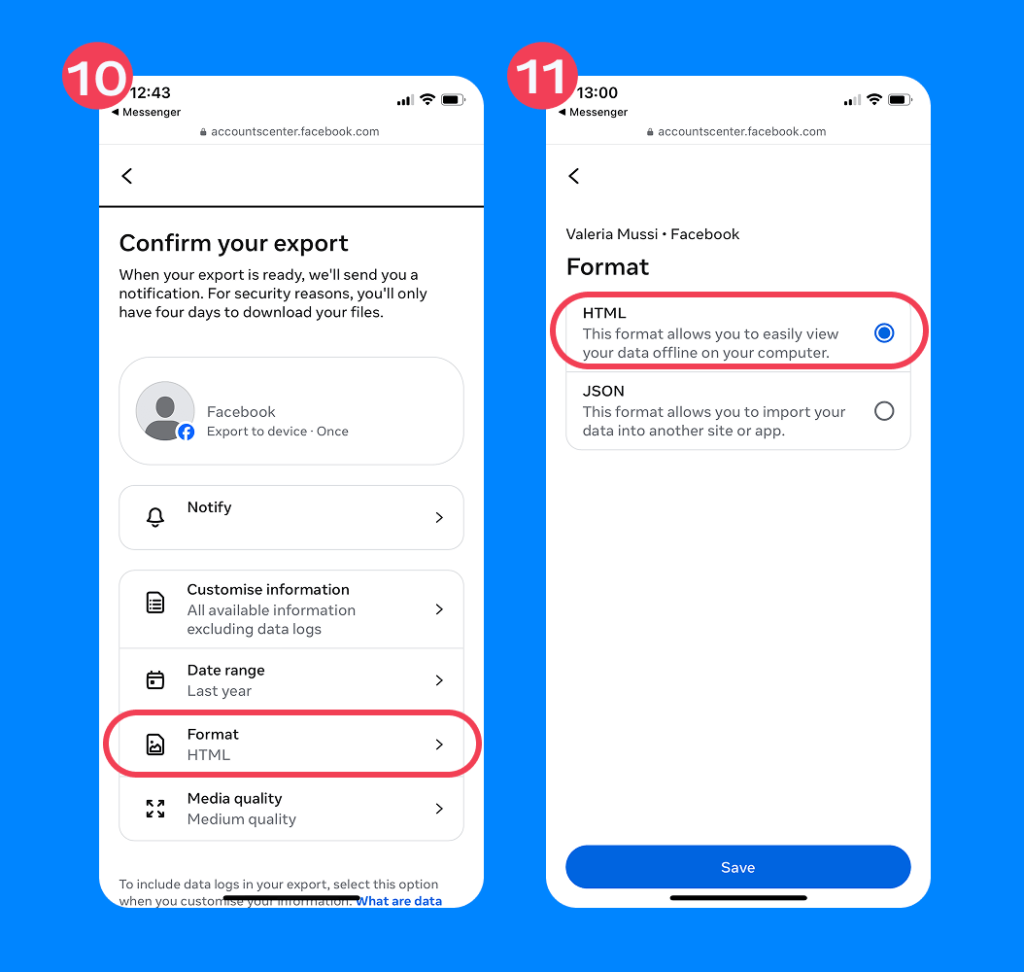
- Create the file request.
- Download the file and unzip it in your downloads.
- Open the Messages folder to find the chat history.
Device Backups
You might think that getting a device backup will recover deleted messages, but it likely will not. Since the messages are tied to the Facebook or Messenger account and not stored on the device, it does not retrieve deleted messages. This is helpful if you need to recover important conversations on another device. However, if you accidentally deleted them, you cannot recover them. It’s a good practice to regularly back up your device.
Notification History
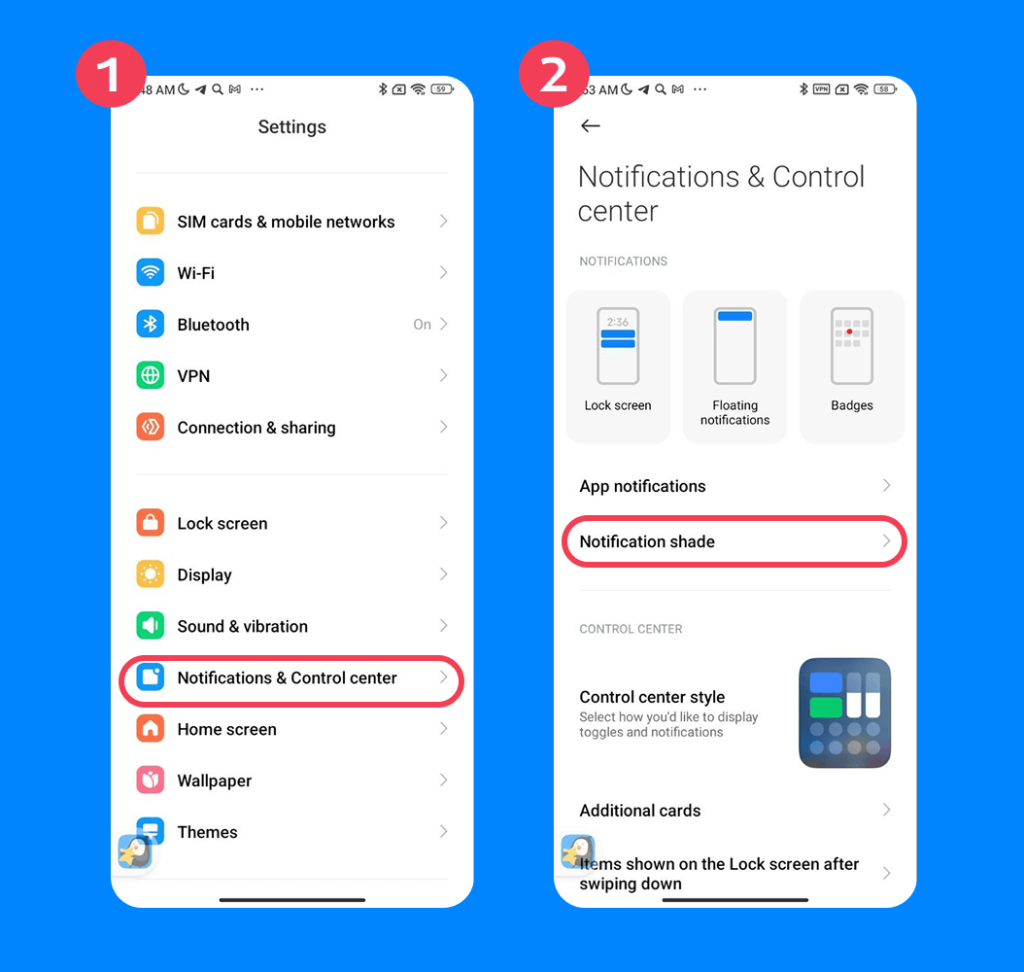
Checking the notification history of a Facebook account will show a preview of a message, but only if it was not deleted. You cannot recover the message if it was eventually deleted.
To access notification history on Android, follow these steps (the exact names and locations of these settings may vary depending on your device manufacturer):
- Open Settings.
- Tap Notifications.
- Tap Notification History.
- Turn on Use Notification History if it is not enabled.
- Look under recent notifications for Messenger.
- Check whether the message preview still appears.
Note: On Redmi devices (MIUI / HyperOS), Notification History may be available under Settings → Notifications & Control Center, but in some versions the feature is missing or hidden. Even when enabled, it only stores new notifications and does not recover deleted messages.
This method is not available on iOS devices.
Another way to see sent messages could be to check your child’s email notifications. Some users have Facebook settings that send an email notification with a preview every time they receive a message.
Ask the Other Person
It could be possible to get a deleted chat or message from the other person involved. For example, if your child deleted an entire chat with someone and you know who they were talking to, you could ask that person for a copy of the messages. It is also possible to see deleted messages in that specific chat that your child removed from their device. However, if you want to see a message that was deleted for everyone in the chat, it will not be available.
Messenger Secure Storage and Encrypted Chats
Messenger uses end-to-end encryption with their Secure Storage feature for personal messages and calls. This means that these messages can only be read on the sender’s and recipient’s devices. They are not stored in Meta’s servers in plain text that you can read.
With Secure Storage, it is possible to get your messages on another device, but only if you know the PIN associated with the account. For example, if you get a new phone and download Facebook Messenger, you can enter your PIN or sign in to your account to get all your messages.
The only thing is that it will not recover deleted messages. This will only bring back active or archived chats.
Methods That Usually Do Not Work
While the above methods are used to recover old chats or access archived conversations, they don’t usually bring back deleted texts. That means parents might turn to other sources, like what we have listed below. Unfortunately, these are extremely unreliable methods and not recommended:
- Third-Party Recovery Tools:These tools often claim they can restore deleted Messenger messages, but they cannot access messages that Meta has permanently removed from an account. Many are unreliable and could even put the user’s Facebook login, vital info, or device security at risk.
- Spy Apps and Hidden Monitoring: Spy apps do not recover old deleted Messenger messages. At most, they may try to capture future activity after installation, which raises serious privacy and consent concerns.
- Random “Facebook Recovery” Services: Services that promise to recover deleted Facebook or Messenger chats are often misleading. If deleted messages are no longer available through Messenger, archived chats, account data, or secure storage, an outside service cannot bring them back.
- Accessing Someone Else’s Account: Logging into another person’s account without permission is not a legitimate recovery method. It violates privacy, may break platform rules, and could be illegal.
Parents: Why Deleted Messages Matter
Deleted messages matter to parents because they can create gaps in a child’s online safety picture. A missing chat may be harmless, like clearing clutter or avoiding embarrassment, but it can also hide bullying, grooming, threats, risky meetups, or pressure from peers.
Parents shouldn’t assume the worst, but they should understand what deleting a message means and what it cannot reveal. The goal is not to spy on your kids’ conversations, but instead to build trust and teach them safe online practices.
Why Teens Delete Messages and What Parents Should Do If a Child Deletes Messages
Findmykids app
Teens may delete messages for many reasons, and not all of them are dangerous:
- Clear clutter or old conversations
- Hide embarrassing jokes, crushes, or conflicts
- Avoid getting in trouble
- Protect a friend’s privacy
- Cover up bullying, risky behavior, inappropriate videos or photos, or unsafe contact
If a child deletes messages, parents should stay calm and avoid jumping straight to punishment. Start with a conversation about online safety, trust, and expectations. Ask open questions, look for changes in mood or behavior, and set clear rules around privacy and honesty.
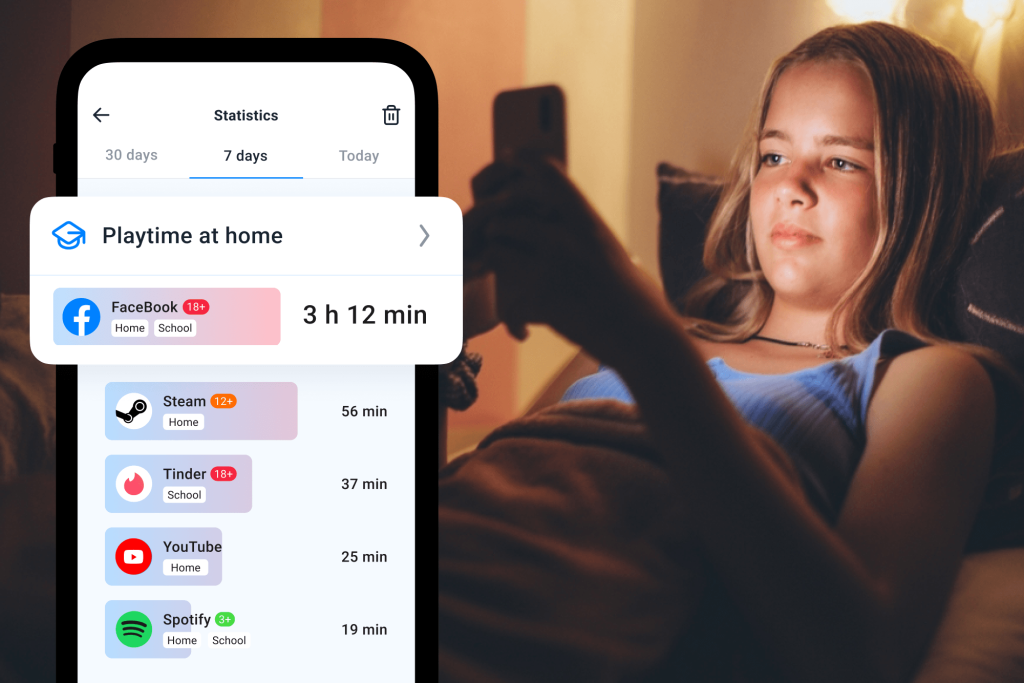
One of the most helpful apps for protecting kids online is the Findmykids app. While children’s texts or messages are not visible to parents, they can gain insight into which apps they spend the most time on and at what time of day. Plus, with real-time location tracking, they can see where their teen uses certain apps.
Ultimately, deleting messages is a normal part of growing up for many teenagers. The important question is not whether a child deletes messages, but why. A combination of open communication, clear family boundaries, and age-appropriate digital safety tools gives parents a much better understanding of their child’s online life than trying to recover every deleted conversation.
Keep Your Children’s Online Communication Safe
While it is virtually impossible to recover deleted Facebook Messenger messages, there are ways to retrieve archived chats or see a notification history with message previews on Android devices.
The main thing about allowing your child to communicate through Facebook Messenger is to set rules and boundaries. Let them know that they should not share personal information or chat with strangers online. This is the first step. The next is to download a parental control app like Findmykids to see how your child uses their phone and what apps they spend the most time on.
FAQs
Can I see deleted messages on Messenger?
No, you cannot see a deleted message on Messenger if it was permanently deleted for everyone in the chat.
How do I recover archived Messenger chats?
To recover archived chats in the Messenger app, tap the profile icon and select Archived chats. You can also get archived chats when you download your Facebook data through the Account Center.
Can Facebook data download recover deleted Messenger messages?
No, downloading your Facebook data does not recover deleted Messenger messages. However, it can show you archived chats.
Can the other person still see a chat I deleted?
Yes, if you delete an entire conversation from your account, the other person still has the conversation on their account. However, if you delete a specific message for everyone in the chat, they cannot see it.
Sources & References
- Facebook Messenger Statistics 2026: The Real Engagement Story, SQ Magazine, 2026
- Delete Messages or Chats on Messenger, Facebook Help Center
Cover image: TinaJi / magnific.com
Проверьте электронный ящик