









The internet gives children access to a huge amount of information, from school resources to videos, games, and social communities. But not everything they find online is suitable for their age. Search results can lead to explicit content, misleading information, or websites with unsafe links and ads. That’s why many parents look for child-friendly search tools that make exploring the web safer.
KidzSearch is one such option. It filters search results and offers educational resources and entertainment designed for young users. But how well does it protect children, and what should parents know before making it their child’s go-to search engine? Let’s take a closer look.
Key Takeaways
- KidzSearch is a free, kid-friendly search engine that uses Google SafeSearch and additional filters to help protect children from inappropriate online content.
- It’s more than just a search engine. Kids can explore educational games, watch curated videos, get homework help, and interact in moderated online communities.
- KidzSearch offers a safer browsing experience, but it isn’t foolproof. Inappropriate content, ads, and potentially unsafe external links can still slip through.
- Parents can customize certain safety features, including private messaging restrictions and search history controls.
- For better online protection, combine KidzSearch with parental control tools like Findmykids to manage screen time, block inappropriate apps, and restrict in-app purchases.
Contents:
What Is KidzSearch?
Credit: Kidzsearch.com
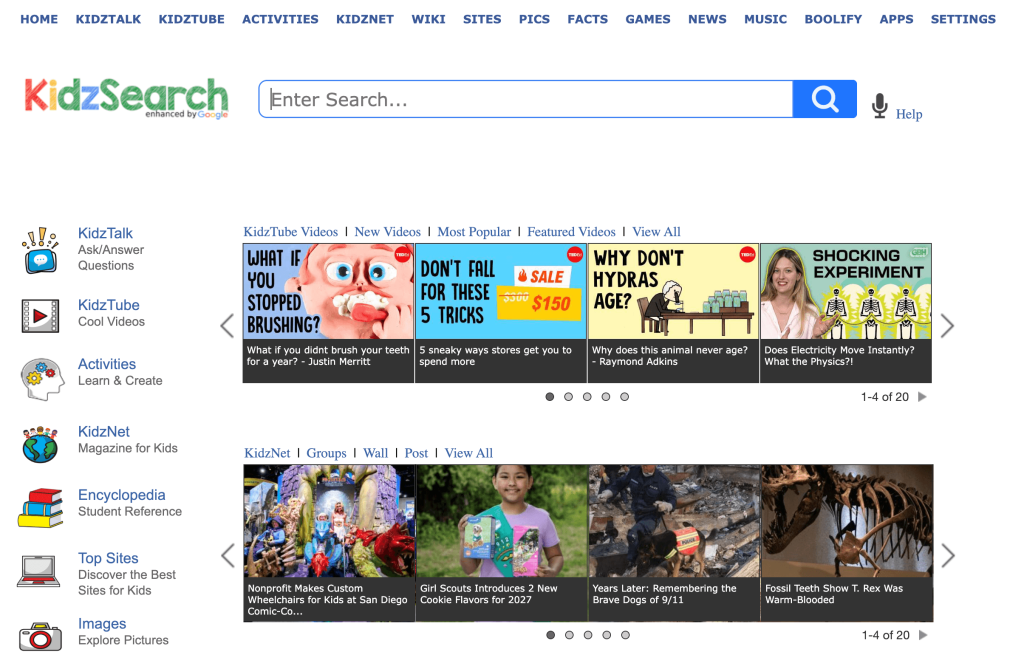
KidzSearch is a free, child-friendly search engine that helps children explore the internet safely by filtering content and keywords and prioritizing educational websites. It uses Google’s search technology with additional filters to prevent children from encountering inappropriate websites, images, and videos.
It’s more than just a search engine for kids, though. KidzSearch also offers educational games, homework help, kid-friendly news, and curated videos.
How Does KidzSearch Safe Search Work?
KidzSearch uses Google SafeSearch technology to filter search results, excluding inappropriate adult content and blocking certain terms and websites constantly. However, KidzSearch takes that technology a step further.
The search queries that do show up prioritize educational and student-relevant websites over unreliable or inauthentic ones. Additionally, when kids use the search bar, it offers age-appropriate autocomplete suggestions and spelling corrections.
What Can Kids Do on KidzSearch?
The KidzSearch platform offers more than a conventional search engine. Its kid-friendly design offers safe search features, games, learning resources, and age-appropriate entertainment.
Search for Homework and School Projects
When researching for homework and school projects, kids can use KidzSearch to find educational websites, articles, images, and information. Since the search engine prioritizes student-friendly results and offers autocomplete suggestions, it helps kids find exactly what they’re looking for. Public and private schools often encourage students to use KidzSearch when researching homework and projects.
Watch Videos on KidzTube
With KidzTube, kids can watch handpicked, age-appropriate videos about educational topics, entertainment, science, and more. These videos are selected to provide a safer alternative to browsing YouTube directly, and the library is updated constantly.
Play Educational Games
Kids have always loved playing computer games, and with the Activities and Games features on KidzSearch, they can access entertaining and educational games. Through these free activities, they can practice math, reading, problem-solving, and other academic skills.
Explore KidzTalk and KidzNet
If you’re opposed to your children having social media pages on Instagram and Facebook, KidzSearch offers a great alternative. It also acts as a safe social platform, offering two moderated online communities:
- KidzTalk: A question-and-answer platform where children can ask for homework help, share ideas, discuss interests, and respond to others.
- KidzNet: A kid-friendly online magazine and community where children can explore articles, share content, and interact with other members.
All of the content on these platforms is reviewed to ensure a safe environment.
Discover Other Learning Resources
KidzSearch also offers additional resources for kids to find fun facts, dive deeper into topics they’re interested in, and even learn how to use search engines safely. These resources include:
- Boolify: Children learn and practice how to get the most out of online research, building their tech skills and digital literacy.
- Wiki: A free encyclopedia with over 200,000 kid-friendly articles to help them learn about various topics
- Facts: Kids can find daily fun facts about history, holidays, vocabulary, and random topics to nurture their curiosity and introduce new topics.
Is KidzSearch Safe for Kids?
KidzSearch is much safer for kids compared to general search engines like Google or Bing. Even with Google SafeSearch, KidzSearch takes it a step further to ensure it shows only age-appropriate content. That includes videos, photos, articles, websites, and games. It’s an entire ecosystem designed for safe online browsing for children.
The community features are also strictly moderated by human moderators. They look for inappropriate content and personal details and remove or block posts.Children can participate in some community activities without registering, while an account provides access to additional features. Parents can also turn off the ability for kids to message other users privately.
However, parents should understand that some inappropriate content may slip through the filters—no filtering feature is perfect. While the search results are filtered, external sites could still contain unsafe content, ads, or links. In image results, inappropriate pictures may also slip through the filters.
Additionally, KidzSearch does show ads, including Google ads in search results. Teach your child to recognize advertisements and avoid unfamiliar links, such as promoted affiliate links. This is also an important skill when they navigate to external sites.
Keep these points in mind, but overall, KidzSearch is the safer option for online browsing.
What Parental Controls Does KidzSearch Offer?
Credit: Kidzsearch.com
KidzSearch gives parents some control over what children can access within the platform. However, the available settings depend on whether your child uses the website or the KidzSearch app.
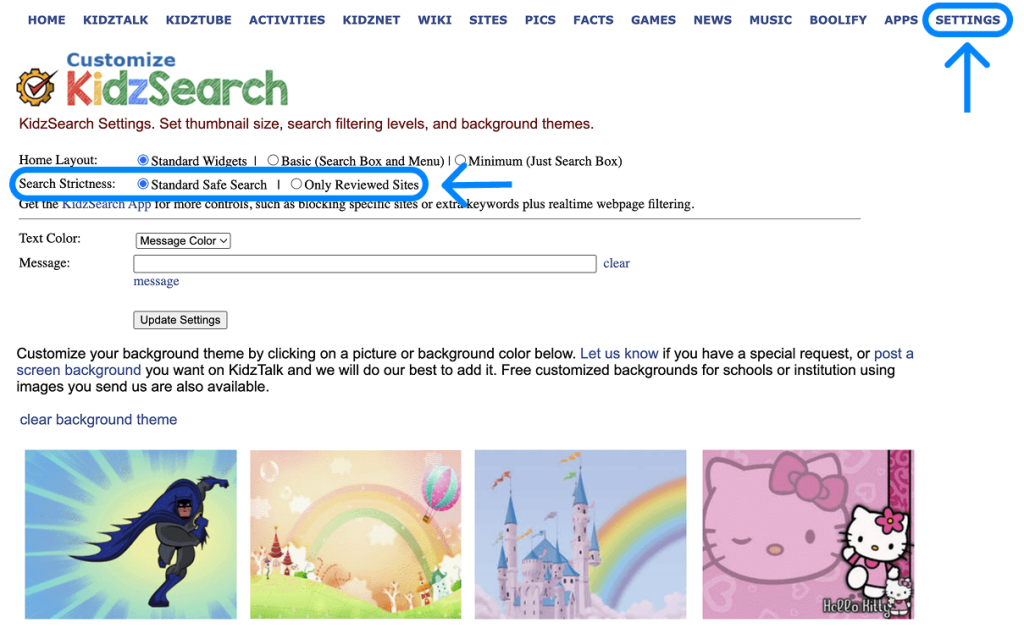
On the website, parents can open the Settings menu and choose between the standard Safe Search filter and a stricter option that limits results to reviewed editorial websites. This can help narrow the range of content children see when they search.
The KidzSearch app offers additional controls, including:
- Custom Website and Keyword Blocking: Add specific websites and search terms to the block list.
- Search History Monitoring: Review your child’s browsing history within the KidzSearch app.
- YouTube Filtering: Choose standard safe search, limit videos to YouTube Kids, or block YouTube entirely.
- Settings Protection: Lock safety settings to prevent children from changing them.
- Real-Time Page Filtering: Apply additional filtering as children browse websites.
To access these options, open the Settings section in the KidzSearch app. Some settings may require a parent-managed account or password protection.
Parents should also know that these controls apply to the KidzSearch environment. They don’t automatically restrict access through other browsers or apps on the device.
How to Set Up KidzSearch for Your Child
Setting up KidzSearch is free and takes just a few minutes. There are a couple of different ways you can set it up:
- Visit the KidzSearch Website: Go to KidzSearch.com, and your kids can start browsing for free without a registered account.
- Set KidzSearch as the Default Search Engine: In browser settings, set KidzSearch as the default. You can find instructions for setting this up in various browsers here.
- Install the KidzSearch App: Download the free app on an iPhone, iPad, Android device, or Amazon Fire tablet.
Is KidzSearch Enough to Keep Kids Safe Online?
KidzSearch can make online research and browsing safer, but it cannot protect children across their entire digital environment. Its filters apply to searches and content within the platform, while children can still access other websites, apps, games, and social media. It also doesn’t give parents a complete picture of how much time their child spends on their device or which apps they use most.
That’s why it’s worth combining a child-friendly search engine with device-level parental controls. Built-in tools like Apple Screen Time and Google Family Link can help parents manage app access, set usage limits, and restrict certain websites. Dedicated parental control apps can offer additional monitoring and safety features.
The right combination depends on your child’s age, device, and online habits. The goal isn’t to block everything, but to create reasonable boundaries and give children room to explore the internet while knowing that appropriate safeguards are in place.
How Findmykids Helps Parents Go Beyond Safe Search
Findmykids app
While KidzSearch can help children find age-appropriate information online, safe search is only one part of keeping kids safe in the digital world. Parents also need to understand how their children use their devices, set reasonable boundaries, and help them develop healthy screen habits.
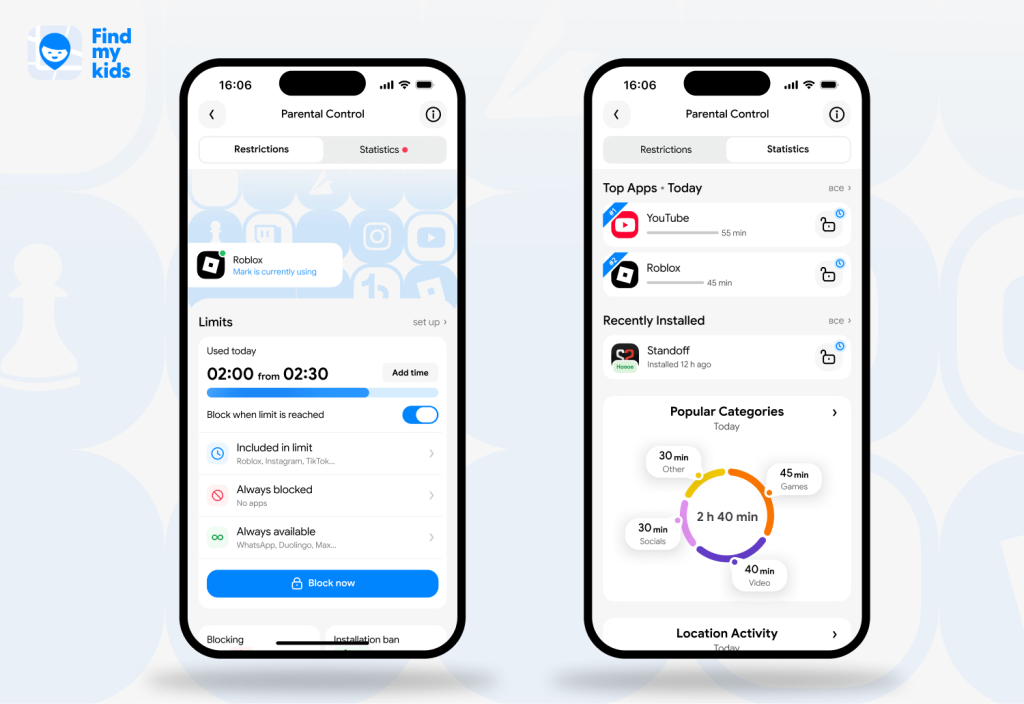
That’s where Findmykids comes in. It’s a family safety app that combines parental controls with location tracking and safety features. Parents can manage their child’s device remotely, stay informed about their digital habits, and keep in touch when they’re away from home. Setup takes just a few minutes.
Findmykids offers several tools to help parents manage their child’s screen time and online activity:
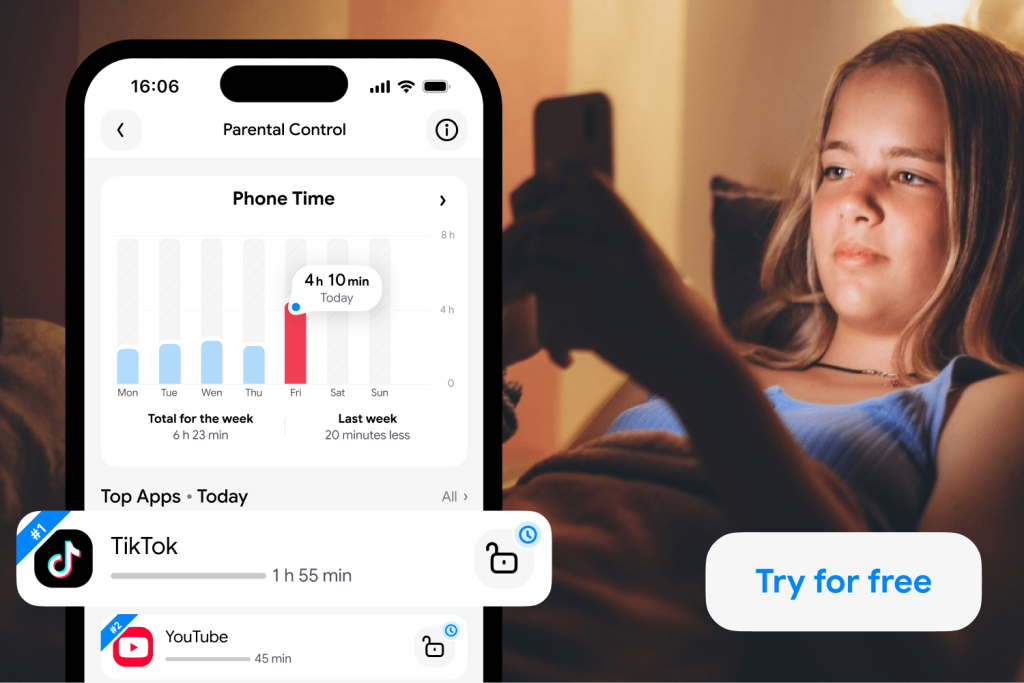
- App Usage Statistics: See how much time your child spends on individual apps and categories, such as games and social media. Daily and weekly reports help you spot usage patterns and identify apps that may need attention.
- Screen Time Limits: Set daily screen time limits to help children balance device use with other activities.
- Scheduled App Blocking: Set times when apps should be automatically blocked, such as during school hours, bedtime, or family time.
- 18+ Content Blocking: Restrict and block all websites and apps that are not age-appropriate.
- Remote Blocking: Enable remote blocking of apps (except essential features like phone, maps, and camera) directly from your phone.
- Block In-App Purchases: Require authorization before your child can purchase items or digital products in apps.
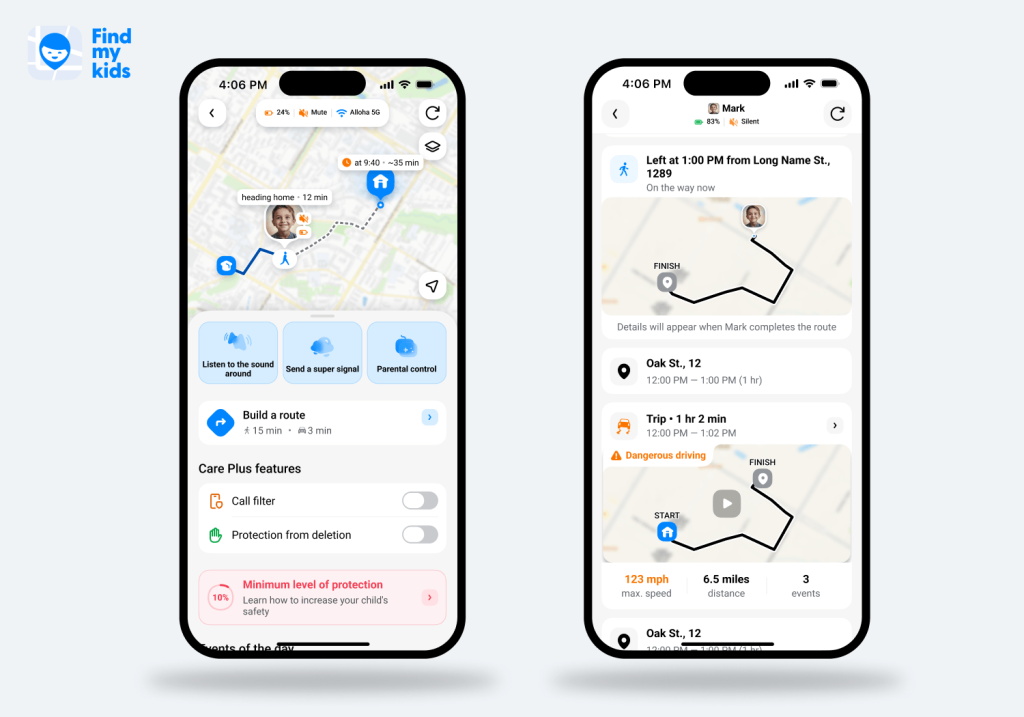
Findmykids also helps protect children beyond the screen. Parents can check their child’s real-time location, review their location history and routes, and receive notifications when they arrive at or leave important places, such as school or home. If a child needs help, they can send an SOS alert directly from their phone. Parents can also use the Supersignal to send a loud alert to their child’s device, even if it’s on silent mode. On supported Android devices, the Sound Around feature lets parents hear what’s happening near their child’s phone when they have safety concerns.
Findmykids app
Findmykids works with both Android and iPhone, although some parental control and safety features depend on the child’s operating system.
With free plans available, families can choose the features that best fit their needs. Download Findmykids right now to help your child build healthier digital habits and stay safer both online and offline!
Findmykids app
KidzSearch Alternatives: What Else Can Parents Use?
KidzSearch isn’t the only tool that can help parents create a safer online environment for their children. However, not all alternatives serve the same purpose.
| Tool | Main Purpose | What Parents Should Consider |
| KidzSearch | Child-oriented search and learning platform | Filtering, educational resources, ads, and external links |
| Findmykids | Family safety, location, and supported-device app-usage insights | Complements content filtering; it is not a child-safe search engine |
| Google SafeSearch | Filters explicit results in Google Search | Must be configured appropriately; does not cover every online activity |
| Kiddle | Child-focused search experience | Check current availability, filtering approach, and limitations |
| Safe Search Kids | Child-oriented search tools and filtered results | Verify current features and the scope of filtering |
| Device-level Parental Controls | Restrict apps, websites, and device use | Settings and coverage depend on the operating system |
⠀
As the table shows, these tools aren’t direct replacements for one another. KidzSearch and Kiddle focus on child-friendly search, while Google SafeSearch filters explicit results in Google Search. Device-level parental controls offer broader restrictions across apps and websites. Findmykids complements these tools with app usage insights on supported devices, remote app blocking, and physical safety features such as location tracking and SOS alerts.
Related: Protecting Innocence Online: Exploring the Best Safe Search Engines for Kids.
Is KidzSearch Worth Using?
KidzSearch is definitely worth using alongside other parental control tools like Findmykids. It offers age-appropriate content filtering to help ensure safe online searches when your child is researching school projects, exploring topics that interest them, or simply playing games or watching videos online.
When parents combine KidzSearch with Findmykids to set screen time limits and block inappropriate websites and apps, they can provide multi-layer protection for their children’s online activities.
If you found this article helpful and informative, share it with another parent looking for a safe search solution for their child’s internet use.
FAQs
Is KidzSearch really safe for kids?
KidzSearch is designed to make online searches safer for children. It combines Google SafeSearch technology with its own content filtering to help keep explicit and inappropriate material out of search results. It also prioritizes age-appropriate results and educational websites, making it easier for children to explore the web in a more child-friendly environment.
What age is KidzSearch appropriate for?
KidzSearch is appropriate for children ages 10 and up, according to Common Sense Media. However, the Terms and Conditions/Privacy Policy state that users must be at least 13 years old to sign up for accounts and participate in community forums.
Is KidzSearch safer than Google?
Yes, KidzSearch is safer than Google because it implements the SafeSearch filters and additional layers of content filtering for websites, videos, games, and images.
Is KidzSearch free?
Yes, KidzSearch is free to use. Children do not need to sign up for an account to access the search engine.
Does KidzSearch have parental controls?
Yes, KidzSearch has parental controls to further enhance content filtering and safe search. For example, parents can disable the private messaging feature, set custom blocklists for certain websites, track search history logs, and disable history deletion.
Sources & References
- Parent’s Guide to KidzSearch.com, Common Sense Media
- KidzSearch, K12 Internet Resource Center
- Browser Plugin, KidzSearch
- Terms and Conditions/Privacy Policy, KidzSearch
Cover image: Magnific / Magnific.com