Did you know that children spend an average of 5 hours in front of a screen? As parents, you can’t help but wonder what your child is doing on their phone while they’re lounging on the couch or alone in their room. Are they staying safe while online? What apps are they spending the most time on?
You can now solve this mystery with Findmykids’ new feature, App Usage Report. Parents receive valuable insights into how their children use their phones and which apps they’re on, and learn how to approach the “screen time” conversation with them.
In this guide, we’ll review exactly how the App Usage Report works and why parents are turning to Findmykids to keep their kids safe online.
What Is the App Usage Report?
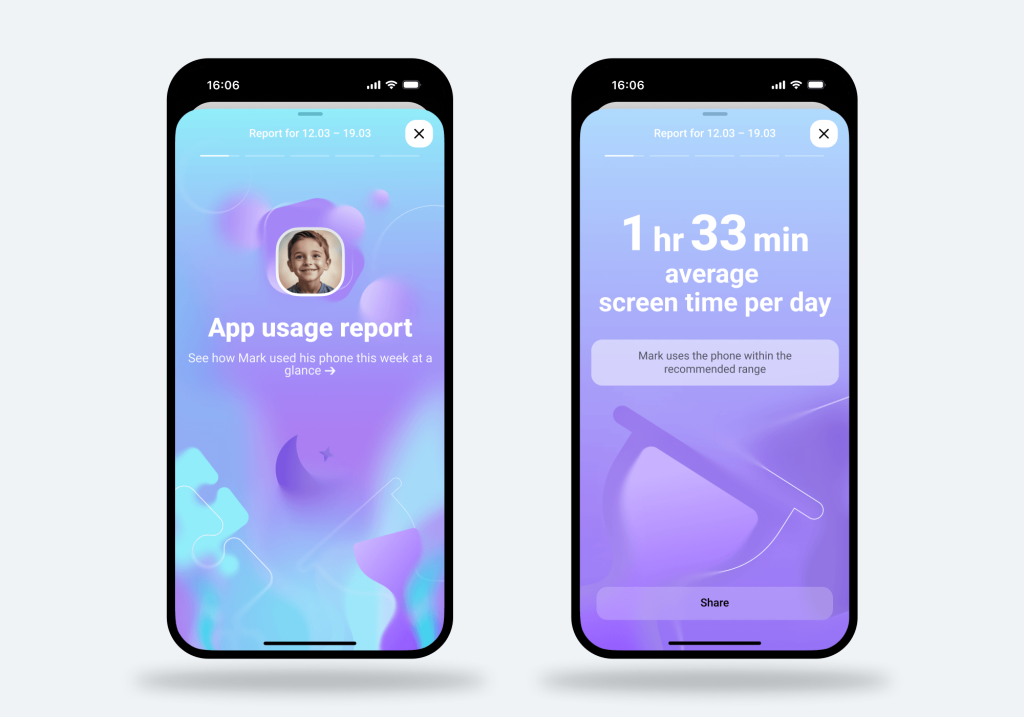
The App Usage Report feature in Findmykids provides a weekly analysis of how a child spends time on their device*. This raw data transforms into clear insights that help parents gain a true understanding of their child’s digital habits.
The main benefit parents get from the App Usage Report is the ability to compare their child’s screen time with that of other children their age and with their own usage over time. Parents can see whether their child spends more or less time on certain apps compared to peers, and how their habits have changed since the previous week.
This added context helps parents better understand patterns, making it easier to decide whether to set stricter screen time limits or whether their child is developing healthy digital habits.
The report is generated automatically every Saturday at 11:00 a.m. according to the parent’s local time, making it easy to regularly review changes in screen time and app usage throughout the week.
*It’s important to mention that the App Usage Report is only available if the child has an Android device at this time.
What the App Usage Report Includes
The App Usage Report gathers and compares screen time and phone usage to previous weeks. This is great insight for parents to see whether their child is spending more or less time on their phone or certain apps.
The main activities tracked in the weekly insights include:
- Increase or decrease in screen time
- Activity shifts in app categories
- Changes in night-time phone sessions
- Time spent in the most-used app
Below is an overview of what exactly the App Usage Report shows parents in the Findmykids app.
Average Daily Screen Time
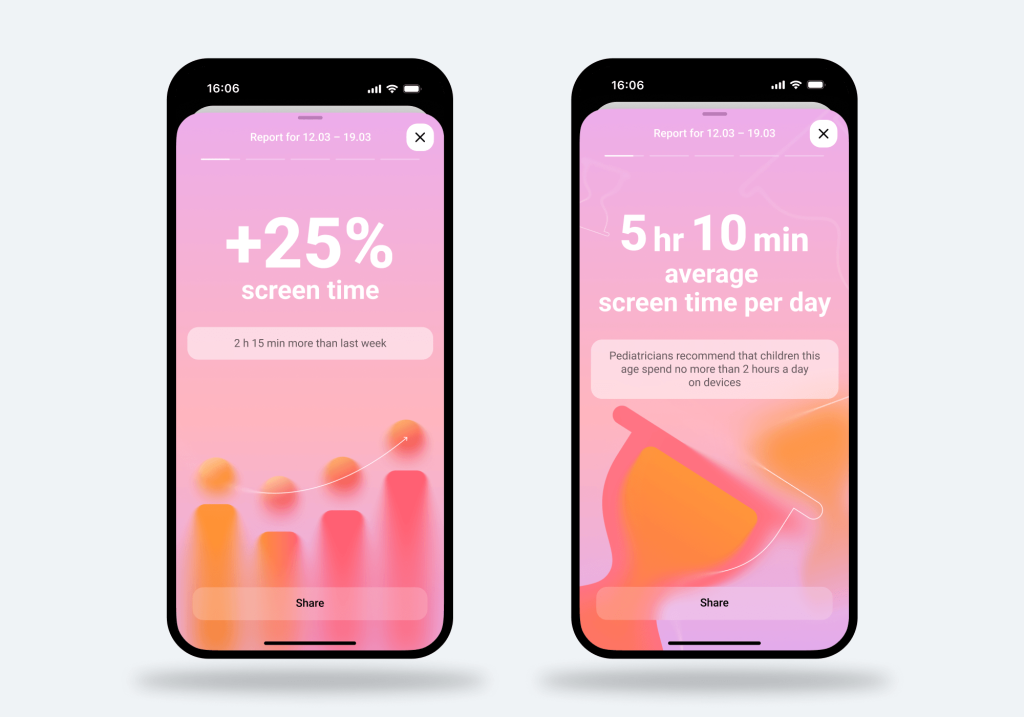
Aside from the weekly insights, parents can see how much time their child spends on their phone per day. Additionally, the App Usage Report will compare this time to other children of the same age. This means parents quickly understand whether their child’s phone usage is in line with, above, or below the average screen time for a child their age.
Night-Time Activity after 11 PM
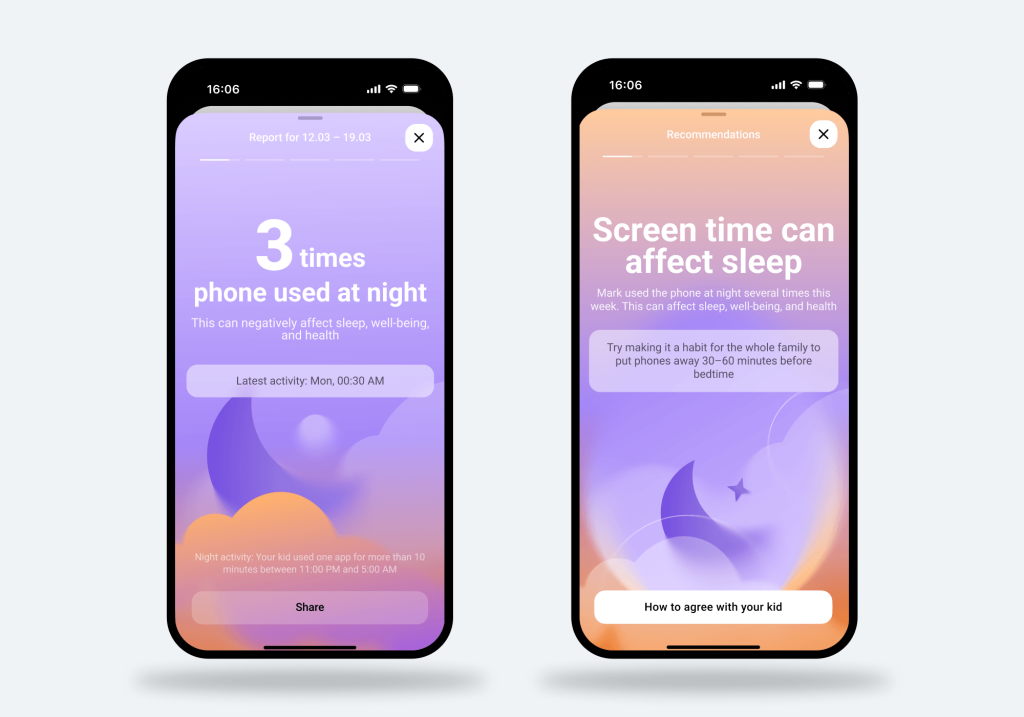
Some parents consider taking their child’s phone away at night to prevent them from using it. But if you allow your child to sleep with their phone, then the nighttime activity feature is extremely insightful.
Parents receive a report showing the number of times their child used their phone between 11:00 PM and 5:00 AM and whether that number was higher or lower than the week before. This information provides more insight into whether the child may have sleep issues and whether it’s time to limit phone usage at night.
Most-Used Categories and Apps
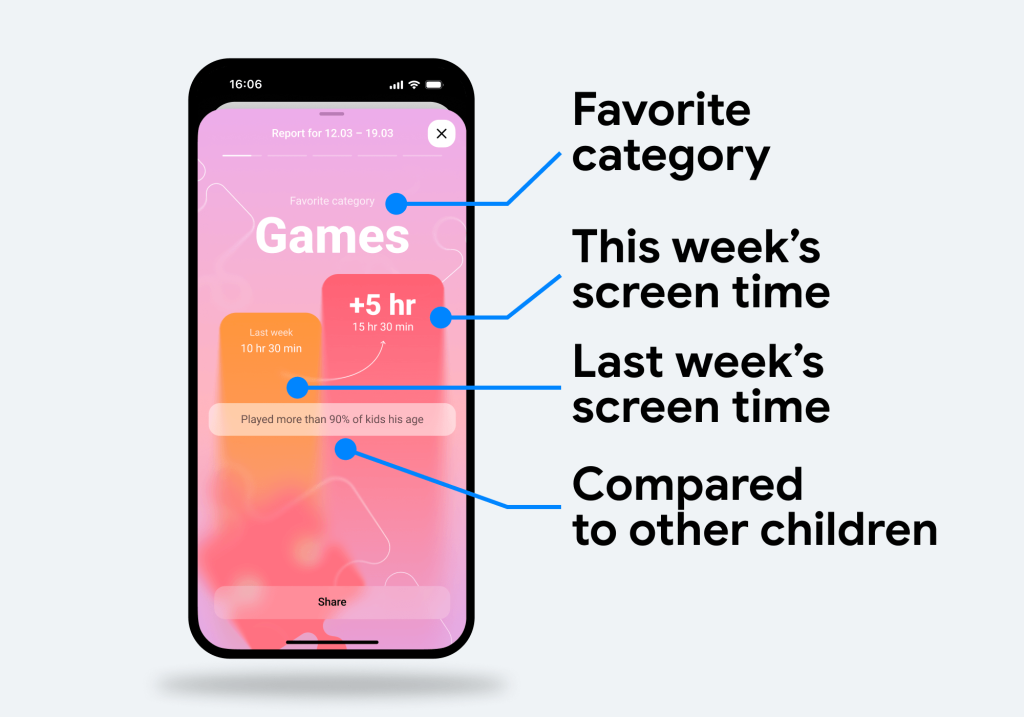
If you’ve ever wondered what exactly your child is doing on their phone, the App Usage Report will tell you. It shows parents which apps their child uses the most and which app categories they spend the most time in, such as games, entertainment, or social media.
Recommendations for Parents
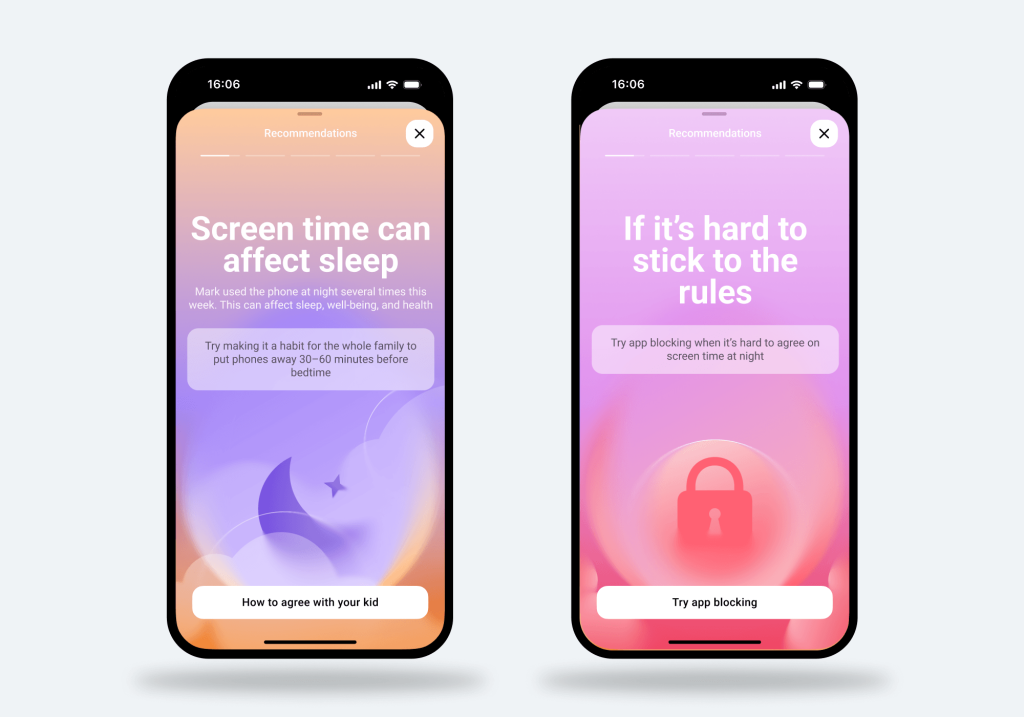
There isn’t always a right answer when it comes to parenting, especially in the digital age. However, with the App Usage Report, parents receive tailored recommendations based on their child’s screen time and phone usage. These recommendations come in the form of practical tips and short expert-led articles created by parenting and child development professionals.
This advice can include:
- How to discuss screen time rules
- How to agree on breaks from games
- When it may be appropriate to use app blocking
Thanks to the app, parents will receive advice on next steps based on their child’s actual app usage and digital habits. They aren’t alone in making these decisions, allowing them to feel confident in their decision to limit screen time or address digital behaviors.
How to Access the App Usage Report
With the Findmykids app’s intuitive design, it is easy to access the App Usage Report. There are two simple methods:
- Open the main page and tap View under the Weekly Summary.
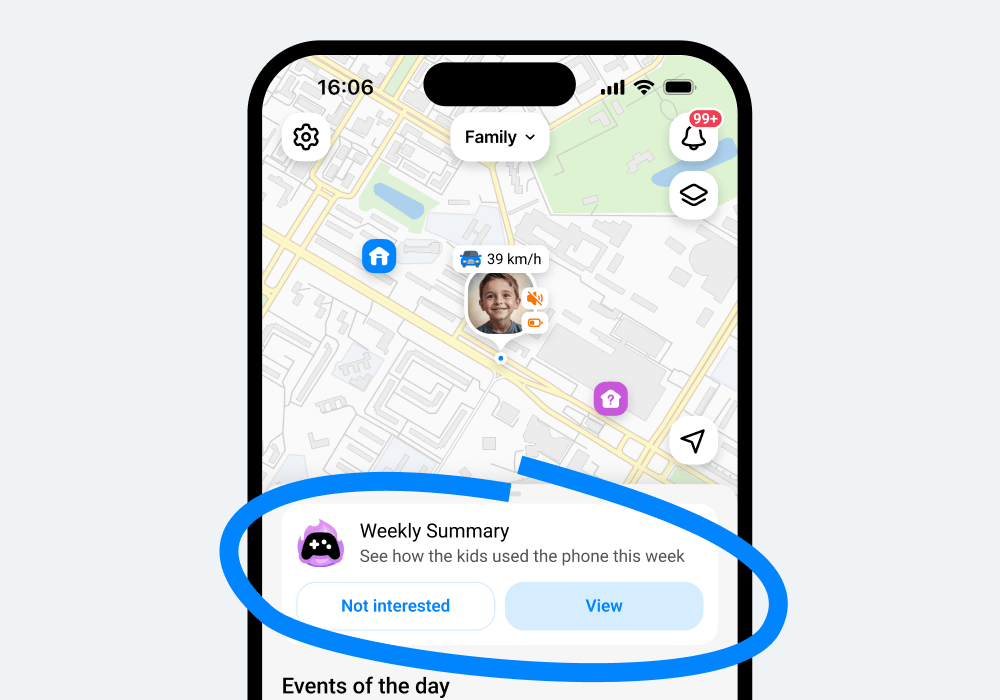
- In the Messages section (the bell icon on the map), tap View report in the Weekly Summary notification.
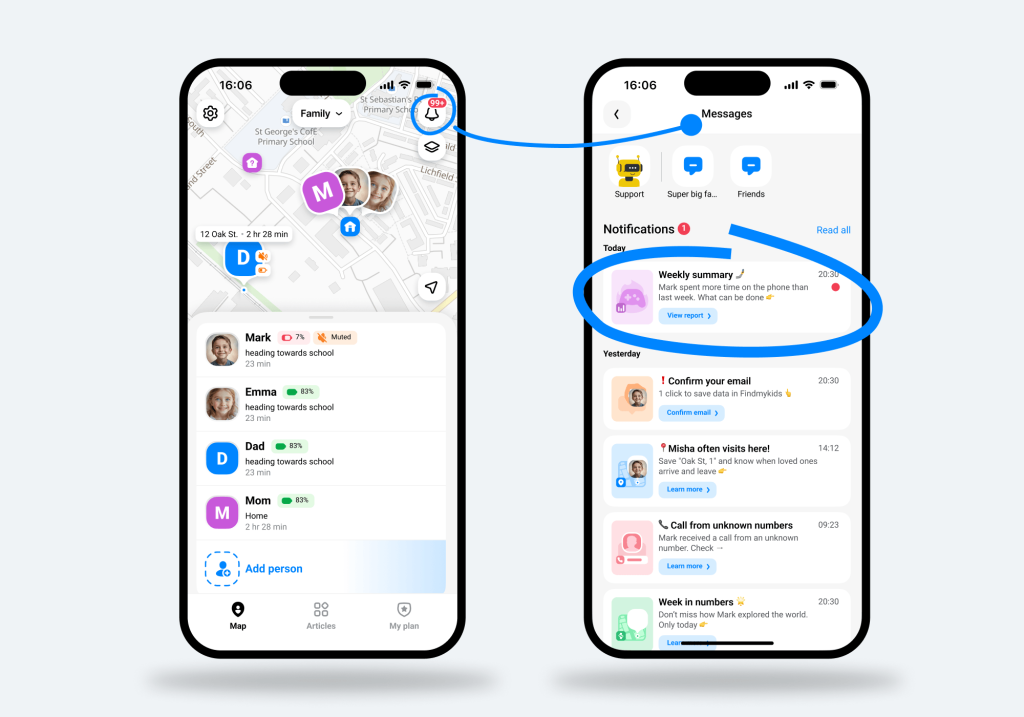
In just seconds, you will have a full breakdown and analysis of your child’s phone and app usage.
What We’re Learning From Kids’ Screen Time Patterns
Most parents don’t think in dashboards or product features—they think in everyday moments: “Is my child on their phone too much?” or “Is this still normal?”
Looking at aggregated anonymized data from families using the Findmykids App Usage Report, a clearer picture begins to emerge. Across all recorded usage alerts, children’s screen habits tend to cluster into a few familiar patterns:
- Social media has become the default downtime activity. The largest share of alerts—about 36%—comes from children spending more than two hours a day on social media apps such as Instagram, TikTok, and similar platforms. For many families, this reflects how easily “just checking something” turns into extended scrolling.
- Late-night phone use remains widespread. Roughly 23% of alerts relate to children using their phones at night, when they are expected to be offline. For parents, this is often one of the first signs that boundaries around screen time are starting to shift.
- Gaming continues to shape daily routines. About 11% of alerts show children spending more than two hours a day playing mobile or video games. While gaming is often part of social interaction and relaxation, it can quickly extend beyond intended limits.
- Video content fills the in-between moments. Another 15% of alerts reflect extended viewing of short-form and streaming content on platforms like TikTok, Instagram, or YouTube. These apps are designed for continuous engagement, which makes time harder to track.
- For some children, screen time accumulates across the day. Nearly 15% of alerts indicate children spending more than four hours a day across apps overall. This often isn’t a single long session—but rather multiple small ones that add up quickly.
For many families, the challenge today is less about whether kids are online and more about understanding how that time is distributed—and when it begins to interfere with sleep, focus, or balance.
Awareness is often the first step, not toward stricter control, but toward clearer conversations about healthy boundaries in a digital world.
Get Valuable Insight into How Your Child Uses Their Phone with the App Usage Report
With the growing presence of digital devices in children’s daily lives, it can feel difficult for parents to understand exactly how much time their child spends on their phone—and how that time is actually used. The App Usage Report feature in Findmykids helps close this gap by giving parents clear, meaningful insights into their child’s digital habits, while supporting healthier boundaries over time.
Importantly, this is not just about visibility—it’s also about action. Alongside understanding usage patterns, parents can use App Blocking tools to limit access to specific apps when needed. This helps them not only see what is happening on the child’s device but also gently guide their digital environment in a more balanced direction.
Beyond App Usage Report and App Blocking, Findmykids also offers a set of safety features designed for everyday peace of mind. These include real-time location tracking, route history, and safe zones that notify parents when a child arrives or leaves designated areas. The app also includes Sound Around, which allows parents to hear the child’s surroundings when needed, a Loud Signal to help reach a child who may not notice their phone, and an SOS button for moments when immediate attention is required.
Are you ready to better understand your child’s digital habits—and stay more connected to their daily world? Explore the App Usage Report in the Findmykids app today.
Проверьте электронный ящик