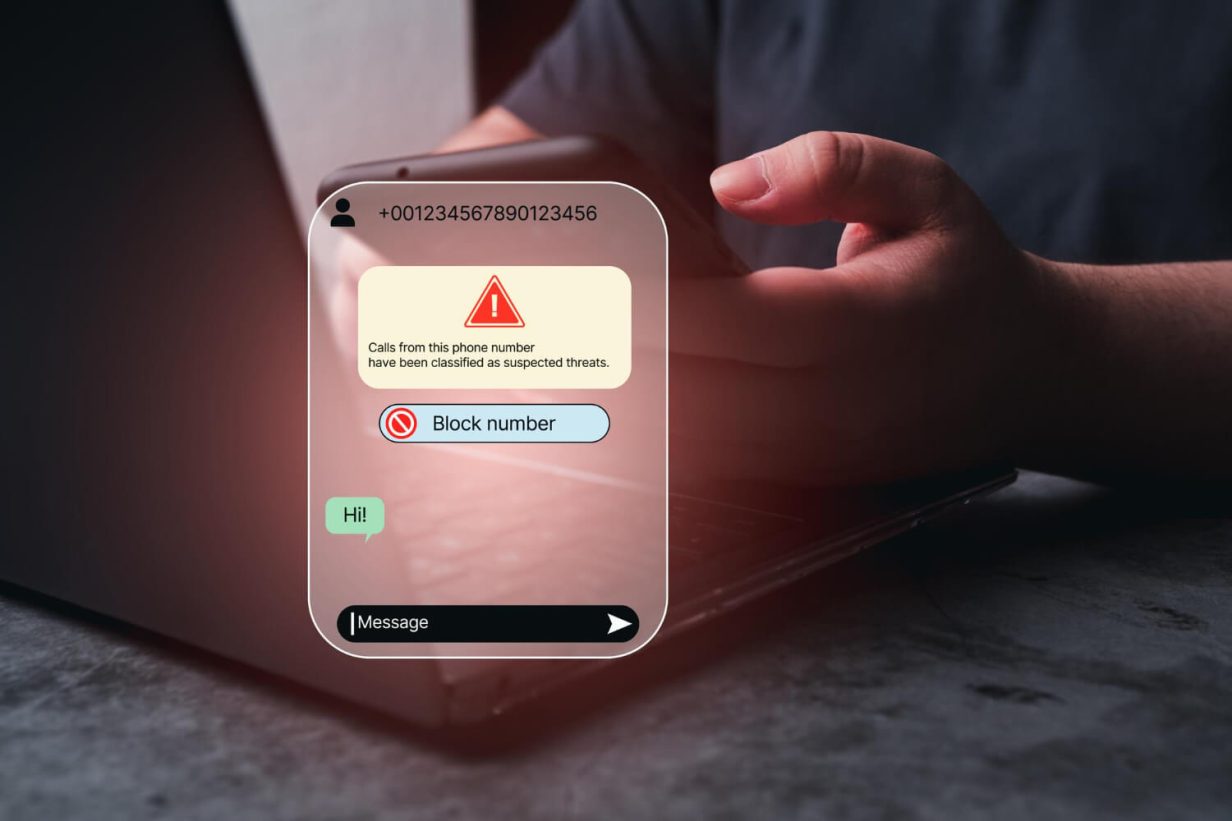
Many parents find themselves Googling “how to block a number on iPhone” because, unfortunately, kids can receive calls or messages from unknown numbers just like everybody else.
The data backs this up. A 2024 study found that 1 in 3 kids are contacted by strangers or receive unknown calls or messages on their mobile devices. Of course, unwanted calls can also come from peers or people our children know.
In this article, we’ll show you how to quickly block phone numbers on an iPhone, as well as how to protect your child from unwanted contact in the long term with more robust controls and blocking features.
Contents:
How to Block a Number on iPhone: Quick Steps
There are a few ways to block a number on an iPhone:
- From the Recents tab
- From Messages or Contacts
- From FaceTime or Settings
- Through Mail
To block a number from your child’s recent calls list, open the Phone app, tap Recents, and tap the “i” info icon that appears next to the phone number you want to block. Scroll down, and tap Block this Caller.
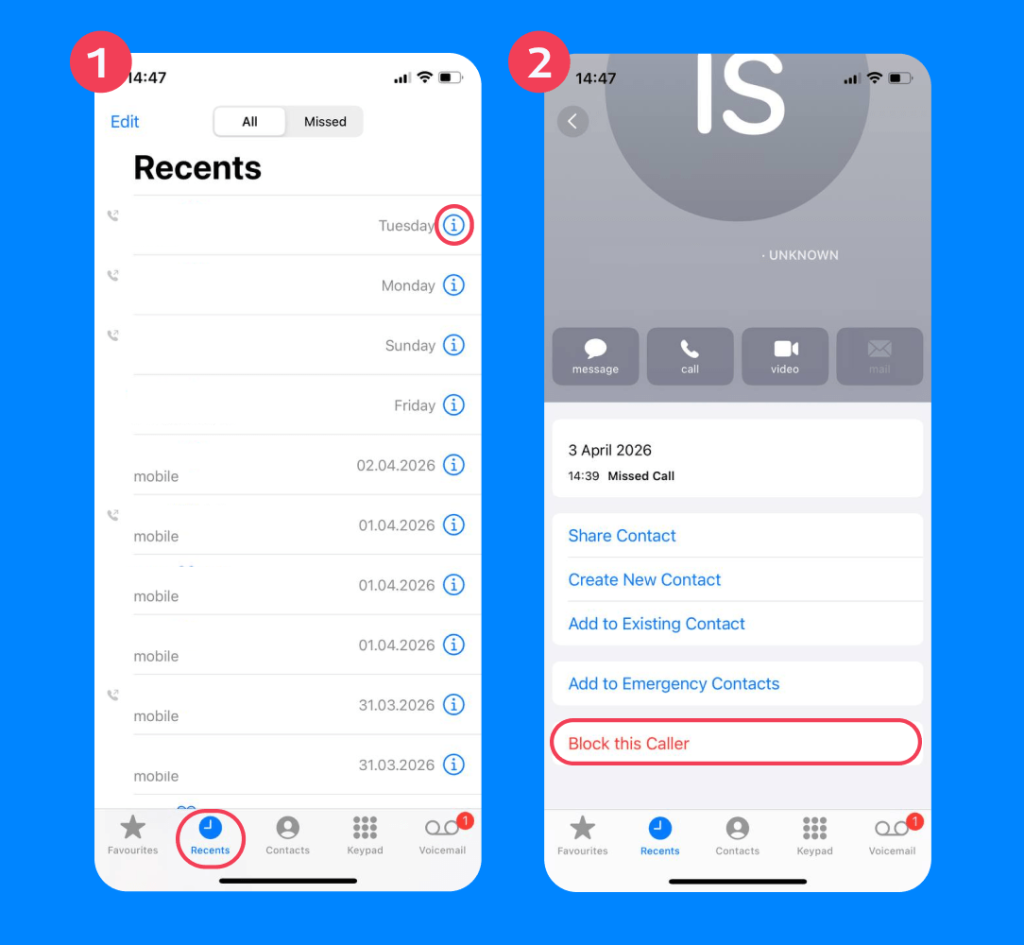
Doing this prevents any incoming phone calls, texts, and FaceTime calls from that number. A blocked number can still leave a voicemail, but your child won’t be notified. This is the best method to silence unknown callers.
How to Block a Phone Number Through Messages
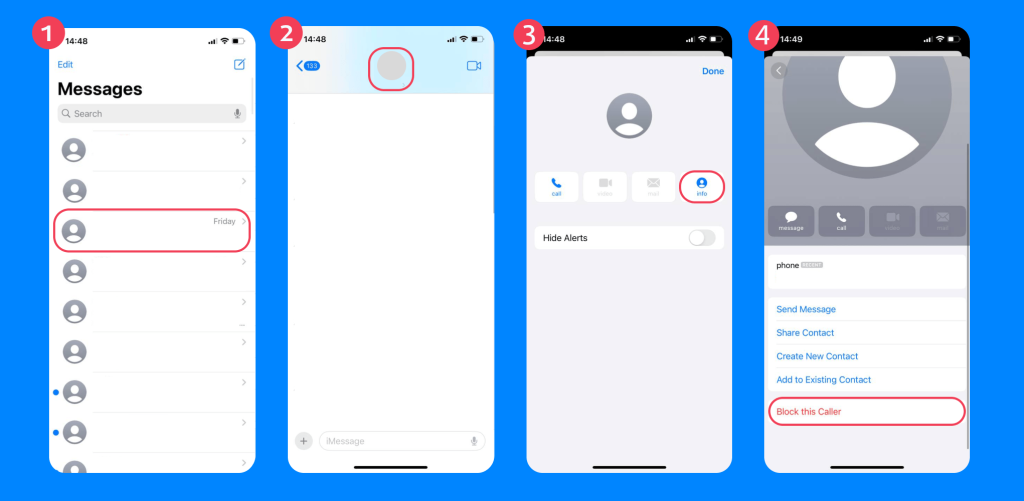
To block someone who has recently sent your child an iMessage, open the Messages app, select the conversation, tap the contact name/number for that person at the top of the screen, and select the Info button. Scroll down and select Block this Caller.
How to Block a Phone Number Through Contacts
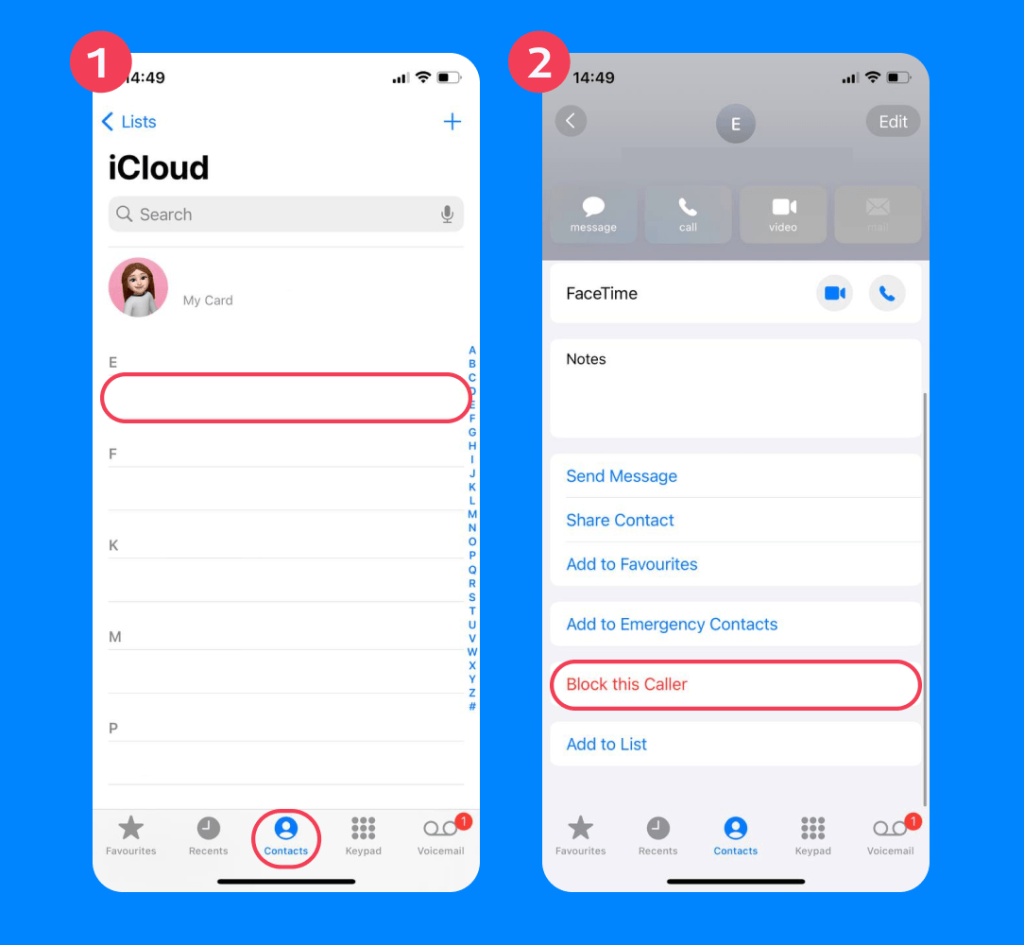
To block an existing contact, open the Contacts app, select the person you want to block, scroll down, and tap Block this Caller.
How to Block Phone Numbers Through FaceTime or Settings
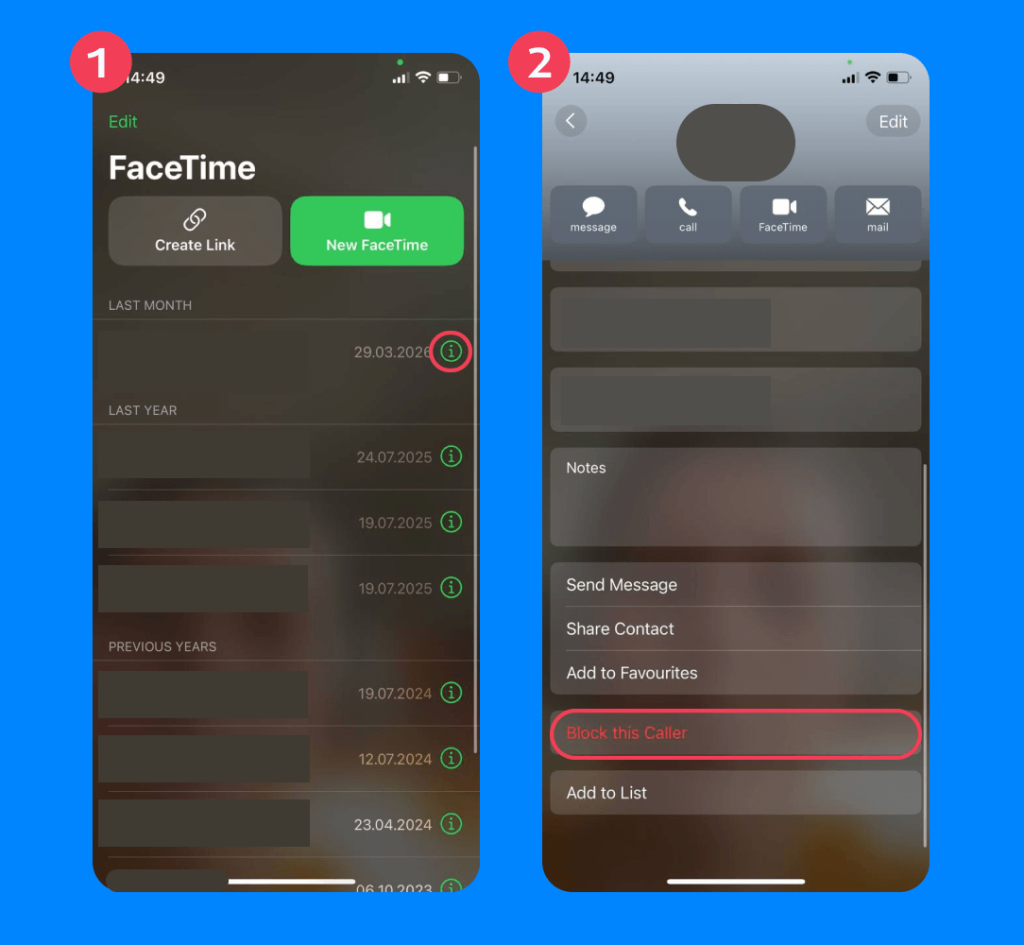
You can also block a number on iPhone through FaceTime (by selecting the “i’ icon and finding the Block this Caller option in the FaceTime app) or via Settings, if the number is not saved in your child’s phone.
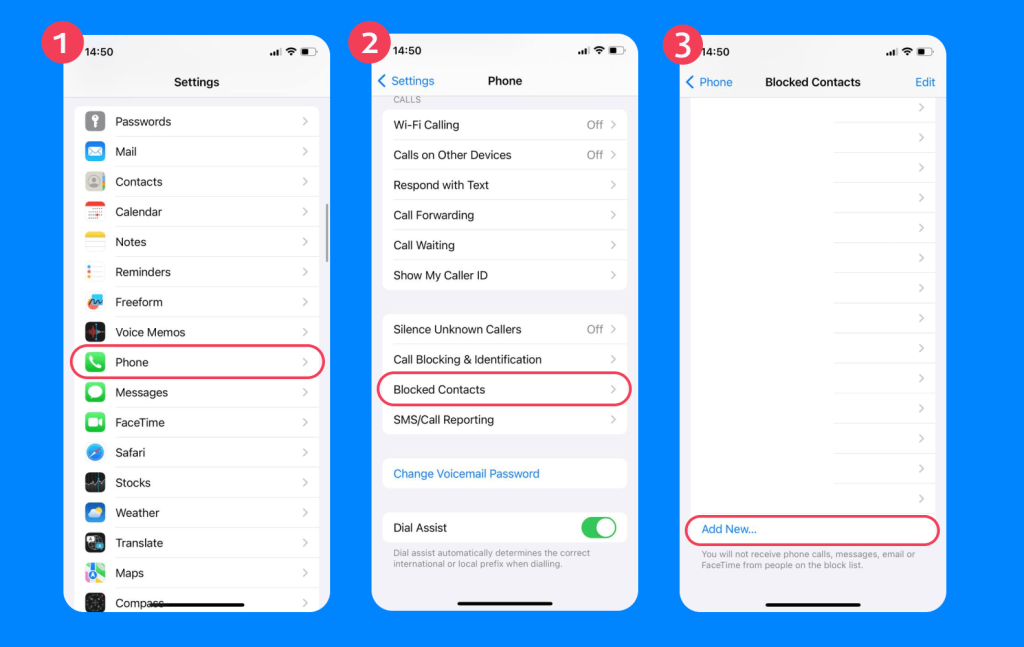
To block the number through your child’s phone Settings, go to Settings → Phone → Blocked → Contacts → Add New and type in the number you want to block.
How to Block a Phone Number Through Mail
You can also block entire contacts (phone numbers and email addresses) through the Mail app. To do this, tap the Mail app and open the email from the contact you want to block. Tap the contact at the top of the screen and select View Contact Card. From here, you can select Block this Contact.
The Mail app may also give you an option to Report Junk, so if the sender contacts your child again, their email will go straight to the Junk or Bin folder.
How to See, Unblock, and Manage Blocked Contacts
There may be times when you want to see, manage, or even unblock contacts on your child’s iPhone. You can do this through the Settings app.
Navigate to Settings on the home screen, then select Apps → Phone → tap Blocked Contacts.
You’ll be able to see a list of all the blocked numbers on your child’s phone. You can also add new numbers to the block list, edit the block list, or unblock contacts—all you need to do is swipe left and tap Unblock.
What Happens When You Block a Number on iPhone?
When you block a number on an iPhone, calls go directly to voicemail, and text messages are never delivered. Your child won’t get notifications for any voicemails left by the blocked person, and the blocked person’s messages won’t come through.
The blocked person won’t be notified that they’ve been blocked, but their messages will remain undelivered. On an iPhone, this usually means text message bubbles will remain green instead of blue, and there will be no “Delivered” alert under the message.
If your child is in a group chat with the blocked person, the blocked person’s messages will not appear in the group chat for the blocker, but they will show for others.
Important: Blocking on iPhone Does Not Block on WhatsApp
Many kids use WhatsApp rather than iMessage to communicate, but iPhone blocking does not automatically block the same contact on WhatsApp. You must also manually block the contact via WhatsApp’s settings to prevent them from calling you or messaging you there.
If the person is known to your child (i.e., not spam calls or contact from an unknown number), you will also need to block them on any other apps your child uses, such as Snapchat or TikTok.
Related: Blocking Unknown Callers — A Guide for 2026 and Beyond.
Blocking a Number Isn’t Everything: Limitations of Hitting “Block”
Blocking a number is a quick and easy way to manage contact from an unwanted source, but it’s not the best or most foolproof way. While blocking numbers on your child’s phone prevents direct calls and texts from appearing (as well as FaceTime calls), it has several limitations, including:
- Access to voicemail. Messages go to a separate “Blocked” mailbox once you tap Block Caller, but they are still stored on your child’s phone.
- The ability for the blocked person to bypass the block.
- Repeated contact from new or spoofed numbers.
- Contact from alternative channels, such as Facebook Messenger or WhatsApp.
- Restricted storage capacity for blocked numbers on older devices.
To ensure your child stays safe from unwanted communication, it’s a good idea to look beyond simple number blocking and use additional tools to manage their digital environment.
Additional Safety Tips for Parents
There are plenty of ways to remotely or directly control your child’s device settings to filter content and shield them from unwanted calls, texts, and social media connections. These include:
- Family Sharing via Screen Time: Use Apple’s built-in parental controls to oversee their communication habits, block specific apps and websites, and create limits for things like online gameplay and video calls.
- Communication Limits: Using your Apple device with Family Sharing enabled, you can choose who your child can contact and receive phone calls from (i.e., Contacts Only) and set stricter limits during Downtime (such as only parents or emergency contacts).
- Communication safety features: Apple automatically enables safety features for under-13s, including content filtering. Your child’s iPhone should detect and blur photos or videos that contain nudity or sensitive content received through Messages, AirDrop, or FaceTime before your child views them.
- Additional tools like Findmykids: Additional child safety tools can provide an added layer of protection and oversight.
How Findmykids Helps Parents Go Beyond Blocking
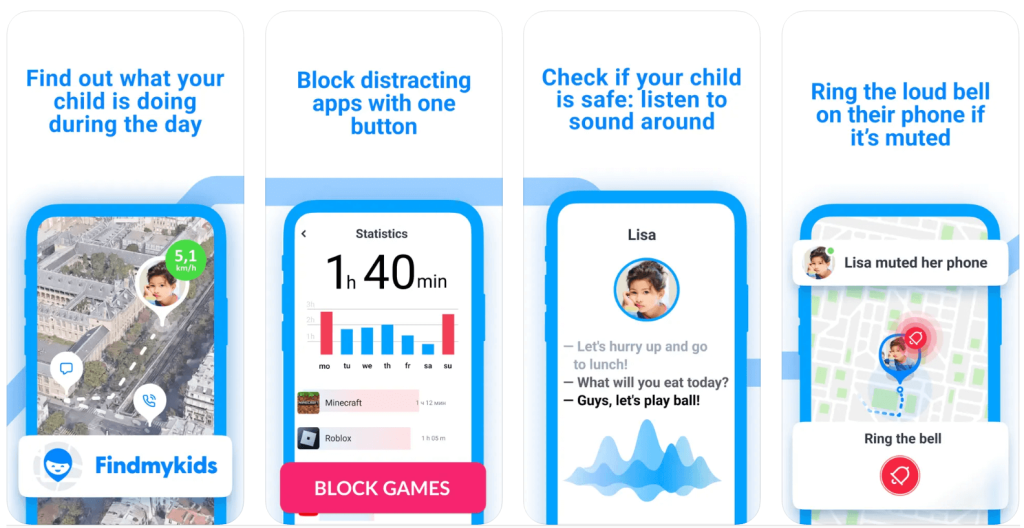
Findmykids app
Findmykids is a parental control and GPS tracking app designed to give parents peace of mind and oversight. It allows you to track your child’s real-time location and route history, as well as their online habits and communication trends.
If communication becomes risky, parents can temporarily restrict access to all messaging apps, giving you time to individually block on specific platforms, work out a plan, and give your child a breather.
Findmykids also lets you block 18+ websites and prevents exposure to inappropriate content. It can also prevent in-app purchases, providing you with an additional financial safety layer.
If you’re worried about your child or teen when they’re out and about, Findmykids can reassure you by providing movement notifications, accurate real-time location, and the ability to override silent mode on your child’s device. Your child can also send SOS signals if they need you to come and collect them.
Parenting in the digital age isn’t just about blocking phone numbers—it’s about knowing when to step in and when to let go. Findmykids gives you the tools to do both: set clear boundaries, stay connected, and respond when it really matters. Try Findmykids for free and see how it works for your family!
Blocking a Number on iPhone is Simple, but It’s Not a Perfect Solution
As you can see, blocking calls on an iPhone is relatively straightforward. Whichever way you come at it, hitting “Block this Contact” will prevent that person from messaging, calling, or FaceTiming your child—but it’s not a perfect solution.
These days, tech-savvy kids can find ways around iPhone number blocks. They could also contact your child from a different number, or on an alternative platform such as WhatsApp or Facebook Messenger.
If you want to protect your child from unwanted contact, it’s best to consider a multi-pronged approach. Use Apple’s blocking feature, alongside Family Sharing and a more robust, long-term solution like Findmykids.
FAQs
How do you block a number on an iPhone without them knowing?
To block someone, find their contact name/number through Recents, Messages, or the Phone and select the “i” info button as before. Scroll down and tap Block this Caller.
The contact won’t be notified that you’ve blocked them, but their calls will go straight to voicemail, and their messages will remain undelivered.
Will a blocked number know I blocked them?
Not directly, but they will be able to guess you’ve blocked them if their calls and texts aren’t coming through.
How to permanently block a number on iPhone?
To block someone, find their contact name/number through Recents, Messages, or the Phone and select the “i” info button as before. Scroll down and select Block this Caller.
This is not a permanent block. You can unblock the contact any time through Settings → Apps → Phone → Blocked Contacts. If you want to permanently prevent someone from contacting your child, you could contact their phone provider and confirm you wish to add this number to their block list. You may also wish to get the authorities involved if your child is being stalked or harassed.
How do you block a number to make it private?
If you want to call someone without showing your number, you can go to Settings → Apps → Phone → Show My Caller ID and toggle it off. This will block caller ID when you make outgoing calls.
Cover image: UveElena / Freepik.com
Проверьте электронный ящик