The hugely popular game Fortnite has a range of built-in parental controls that allow parents to choose how their child plays and interacts with others, both on Fortnite and other Epic games and experiences. It’s important that parents know how to also disable parental controls on a child’s account, whether this is because their kid has gotten old enough to play without restrictions, or to prevent their child from deactivating the parental controls settings. To learn everything about how to turn off or adjust parental controls on Fortnite, keep reading.
Contents:
- Why Fortnite Has Parental Controls – and What They Can Do
- Step-by-Step Guide to Turn Off Parental Controls
- Creative Mode with Restricted Features
- Safety Tips for Parents When Disabling Controls
- Alternative to Full Disabling: Adjusting Settings Instead
- FAQs
Why Fortnite Has Parental Controls – and What They Can Do
Fortnite parental controls play an important role. They mean a child can play Fortnite more safely, by allowing parents to put restrictions on who their child can interact with in the game, and prevent them from making in-app purchases. These controls let parents set age-related restrictions to manage what experiences their child can access in Fortnite and the Epic Games Store. Parents can choose, via parental controls, whether or not their child can access Creative Mode and Unreal Editor for Fortnite, too. They can also block friend requests and set time limits via the game’s parental controls to manage how much time kids spend playing Fortnite and using Unreal Editor.
Fortnite has an overall PEGI rating of 12, although some of the experiences within the game, such as Rocket Racing and Lego Fortnite, have lower age ratings. The game can be played on a range of consoles, including PlayStation 4 and 5 consoles, Xbox 1, Nintendo Switch, iOS and Android devices, and desktop computers.
As with so much in the digital world, when it comes to what kids can access online, it’s about balancing freedom and safety. As children grow and develop, the parental controls and restrictions you’ve set will likely need to be changed. For example, content restrictions may need to be altered to reflect your kid’s growing maturity.
Read also: Fortnite Age Ratings and Parental Reviews: Is It Safe for Your Child?
Step-by-Step Guide to Turn Off Parental Controls
How to turn off parental controls on Fortnite? It’s a straightforward process to disable or adjust these settings. Simply follow these instructions:
- Log in to your Epic Games account and navigate to the Epic Account Portal. From here, you can manage your child’s game settings.

- To access parental controls in Fortnite, head to the main menu, select the gear icon in the top right corner, and choose Parental Controls.
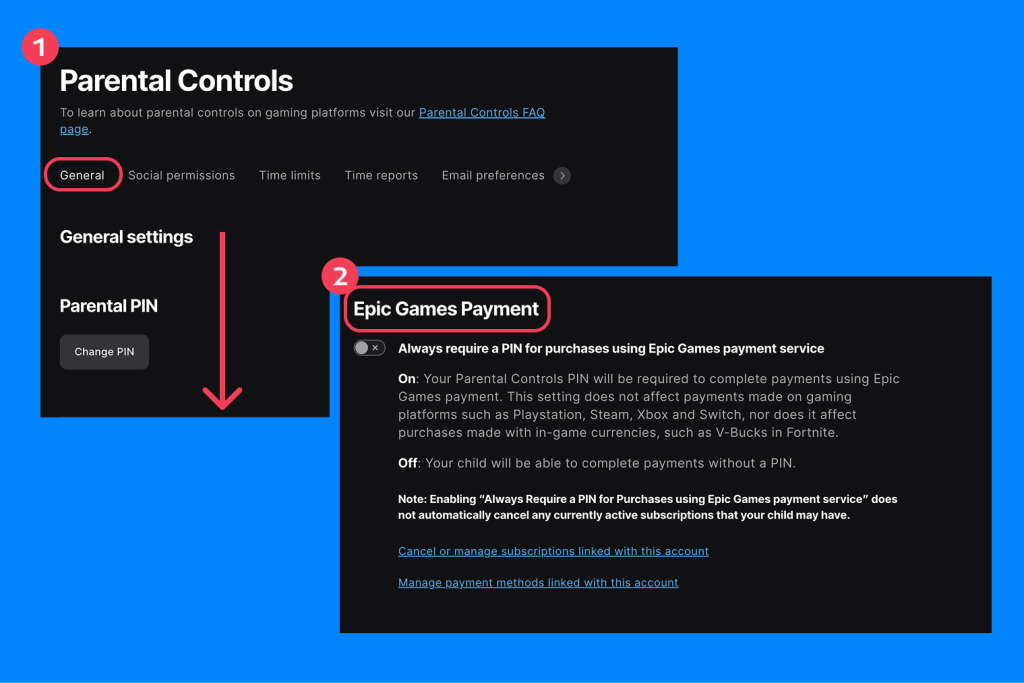
- If parental controls aren’t already enabled, you’ll be prompted to create a 6-digit PIN. This PIN is required to change settings related to features like voice chat, text chat, and purchases.
- From here, you can enable, disable, or adjust a range of parental control settings.
Via the parental controls, you can configure settings as follows:
- Restrict or enable text chat by moving the toggle to On or Off.
- Set voice chat to Friends only or Everybody.
- Disable or enable in-game purchases, or require a PIN.
- Set age-related content restrictions.
Confirm and save any changes you make to apply them across devices using the same Epic account.
Parents should note that, if they turn off voice chat in one of Epic’s games, their child may still be able to access voice chat using the chat system built into their console. It’s therefore vital to check platform-level settings, whether they are playing on PlayStation, Nintendo Switch, Xbox, Windows 10, Google Play, or iOS.
Creative Mode with Restricted Features
Creative mode by Epic Games is part of Fortnite and allows players to create and publish their own experiences. Access to Fortnite Creative can be restricted via the Parental Controls menu. To enable full access, simply turn this setting to On. Once this is done, your child is able to design experiences and games in Fortnite and can join their friends while designing experiences.
It’s important for parents to note that when using Creative mode, children may interact with user-generated content that has not been age-rated or fully moderated. In addition, players can create and share their own content—including text—that may be visible to others they collaborate with.
Safety Tips for Parents When Disabling Controls

Findmykids app
If you choose to remove parental controls on your child’s account, it’s vital to be aware of the potential dangers of providing full access to Fortnite. These tips can help:
- Monitor your child’s online interactions carefully and regularly. If they’re using voice chat or text chat, be mindful of who they’re talking to.
- Consider setting limits on the amount of time your child spends on the game or using certain features, such as Fortnite Creative. This could be part of a wider discussion on device usage, screen time, and striking a healthy screen-real life balance.
- Have open, regular communication about the dangers of the online world, and those relating specifically to Fortnite. For example, speak about dealing with messages from strangers and friends’ requests in general. Ensure your child knows they can come to you if anything has happened in the game that has made them feel uncomfortable or upset.
- Be flexible. You may remove parental controls on Fortnite and then discover that some (or all) need to go back on. Or you may decide to remove some controls, but keep others, such as purchase limits, or the need for parental approval to access certain features.
- A third-party parental control app can help kids stay safer if you remove parental controls from the game. The Findmykids app is a great option that allows you to monitor what your kid is up to online, set screen time limits, and view details of app usage. This tool also allows you to block certain apps or websites entirely, for ultimate peace of mind.
Alternative to Full Disabling: Adjusting Settings Instead
As we mentioned above, you may prefer to adjust the parental control account settings for your child on Fortnite, rather than disable them completely, and there are plenty of options to do this. You could also choose to only allow your child to have access to the game via a cabined account.
Cabined accounts provide a tailored experience designed to be inclusive and safe for younger players. Players who indicate they are under 13 upon signing up to Fortnite will automatically be given a cabined account, and parental consent will be needed to allow full access to certain features or games that have not previously been accessed.
In a cabined account, the following features are among those disabled:
- Purchasing items with real money
- Communicating with other players via free text chat or voice chat
- Downloading games not owned by Epic
- Push notifications or email marketing
- Recommendations based on past player activity
- Custom display names
Turning Off Parental Controls in Fortnite — and When Alternatives May be a Better Idea

JJFarq/Shutterstock.com
Kids typically always push for more freedom and, as they grow and change, you may be wondering if it’s the right time to turn off parental controls on Fortnite, and maybe even the other online experiences they access. As part of making this decision, it’s vital to be aware of the dangers and to consider carefully whether your child is ready for this step. For example, are you sure they’re prepared for unfettered access to content that could, for example, be explicit or feature mature language? Without parental consent required, is there a danger that they will make excessive online purchases? If no gaming time limits are put in place, will they still connect with the real world?
If you’re unsure, then it may be worth keeping the parental controls activated for now. Or, if you choose to disable them, use a third-party parental control app like Findmykids to monitor what your kid is up to online and just how much time they’re playing. Hitting the perfect balance between control, care, and freedom is tricky, but it’s possible.
FAQs
How to get rid of Fortnite parental controls?
To disable the parental controls on Fortnite, head to the Epic Account Portal, where the parental control settings can be found. From here, you can adjust or turn off parental controls.
How do I turn off parental controls?
To turn off parental controls or adjust parental control restrictions, log in to your Epic Account Portal and navigate to the parental controls menu. To turn off parental controls on a PlayStation console, open the Fortnite app, go to the Settings menu (by pressing the Options button), and enter your passcode when prompted. Now select Disable and confirm.
Why do I suddenly have parental controls on Fortnite?
When signing up for an Epic Games account, if a player indicates they are younger than thirteen, their account will automatically have parental controls applied. These cabined accounts have restricted features, such as who players can interact with, and in-game purchases.
How to get rid of time limits in Fortnite?
To disable time limits in Fortnite, parents can modify this setting via the Parental Controls section of their Epic Games account or through Fortnite’s main menu.
Cover image: Rokas Tenys/Shutterstock.com
Проверьте электронный ящик