














You’ve probably heard about all of the different types of location-tracking apps parents use to keep tabs on their child’s real-time location. In fact, it’s more common than you might think, with 86% of parents using them, but finding the right location-tracking tools for your family can feel a bit overwhelming.
Between installing apps, paying for subscriptions, and learning how to use them, parents can end up feeling frustrated and ultimately wondering whether they can use a mobile number tracker with Google Maps to see their child’s location. It makes sense. Google Maps is familiar and has more than 2 billion users, but is it effective for tracking your child’s location?
Key Takeaways
- It is possible to track a phone through Google Maps with the user’s permission. They will share a link with you and set how long they want to share their live location.
- There are multiple location-tracking methods parents can use to see where their child is. These include dedicated parental control apps like Findmykids or built-in location sharing services.
- Several technologies are used to track a phone’s location, including GPS, Wi-Fi, Bluetooth, and cellular towers, to provide accurate location data.
- Always check local privacy laws and get permission from the person whose location you want to track.
Contents:
Can You Track a Mobile Number with Google Maps?
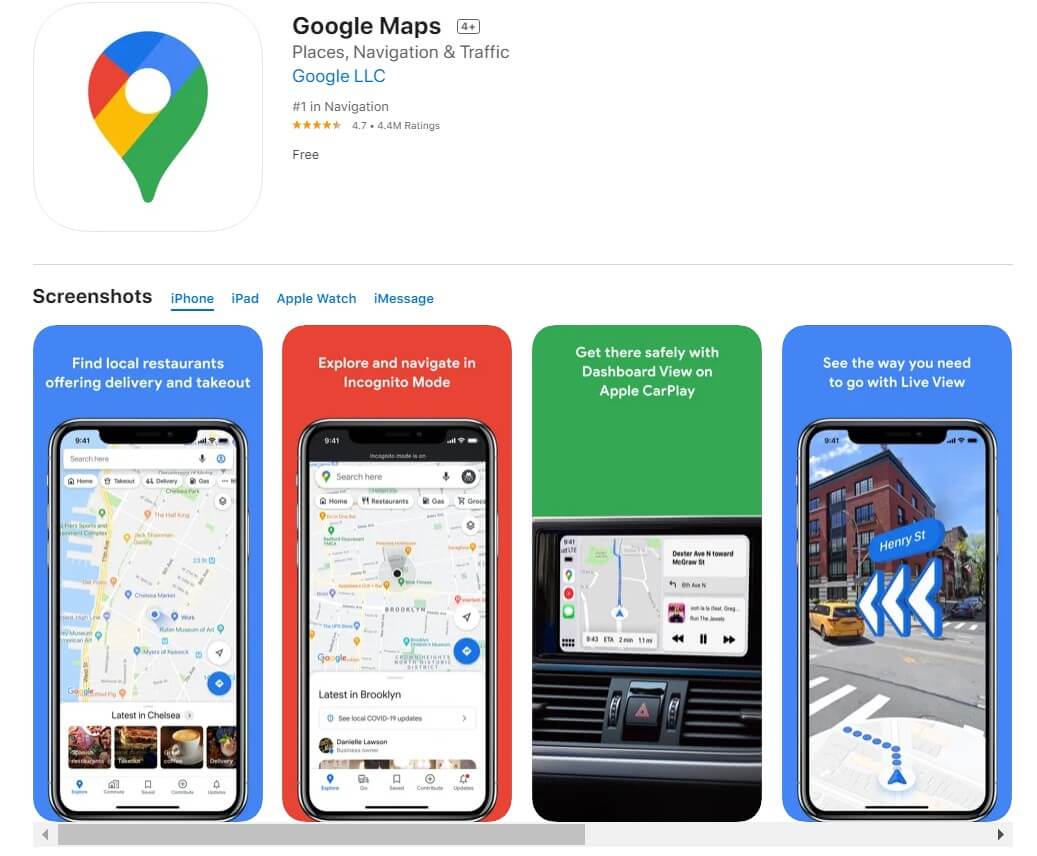
Credit: App Store
Technically, you cannot track a mobile number with Google Maps. Instead, you can track a target device’s location through a Google Account using Google Maps.
Here’s how it works: Through Google Maps, your child can share their location with you, sending a unique link to their phone number or email address. You can then see their real-time location on Google Maps.
The big thing here is that you need consent from the person you’re tracking. You cannot simply enter a phone number and track it on Google Maps.
How Phone Location Tracking Actually Works
If you want to find a phone, there are several ways its location can be determined. The important distinction is that a phone number is mainly an identifier, not a location signal. In everyday situations, location sharing through a Google Account or a parental control app is usually what allows someone to see where a device is.
Behind the scenes, the phone can use several different signals to work out its location. Most location services combine them to improve accuracy:
- GPS: GPS uses satellites to help your phone figure out exactly where it is. This is usually the most accurate way to track a phone, especially when you’re outdoors.
- Wi-Fi Positioning: Your phone can also use nearby Wi-Fi networks to help pinpoint its location. This is especially helpful indoors or in busy areas where GPS may not work as well.
- Cell Towers: Phones are constantly connecting to nearby cell towers. These towers can help estimate where the phone is, although the location may not be as precise as GPS.
- Bluetooth: Bluetooth can help estimate a phone’s proximity to nearby devices or Bluetooth beacons. It is usually used for short-range location tracking.
- Phone Sensors: Smartphones have built-in sensors that can tell when the phone is moving, which direction it’s going, and sometimes even changes in elevation. These sensors can supplement other location signals and improve location estimates.
Safe Ways to Track a Family Member’s Location
If Google Maps is your starting point, you already have one simple option: Google Maps Location Sharing lets a family member share their real-time location with you, and you can then see it directly on the map. But it is not the only way to keep track of a child’s location. Depending on what you need, you can use Google Maps, a dedicated parental control app, your phone’s built-in location tools, or location sharing in popular apps.
Here are some of the safest options and how to set each one up.
Method 1: Use Google Maps Location Sharing
Google Maps has a simple location-sharing feature that lets children show their parents exactly where they are in the app. The only things you need are a Google account and Google Maps installed on your phone.
When your child shares their location on Google Maps, parents can see where they are and, in some cases, their phone’s battery percentage. Parents can also receive alerts about when their child arrives or leaves a specific location.
How to set it up:
- Open Google Maps on your child’s phone and make sure they’re signed in to their Google Account.
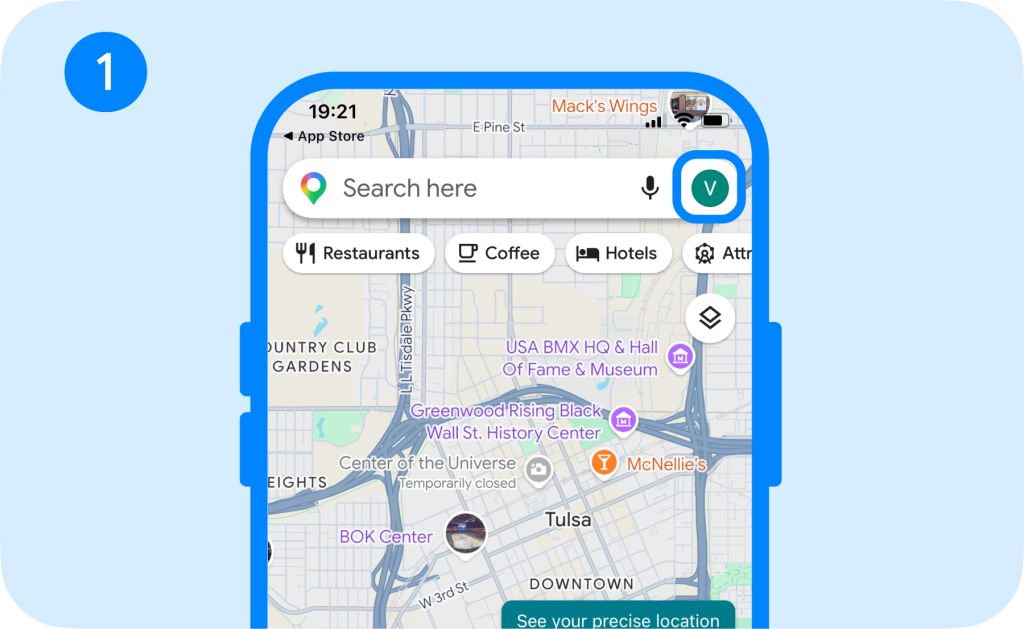
- Tap their profile picture.
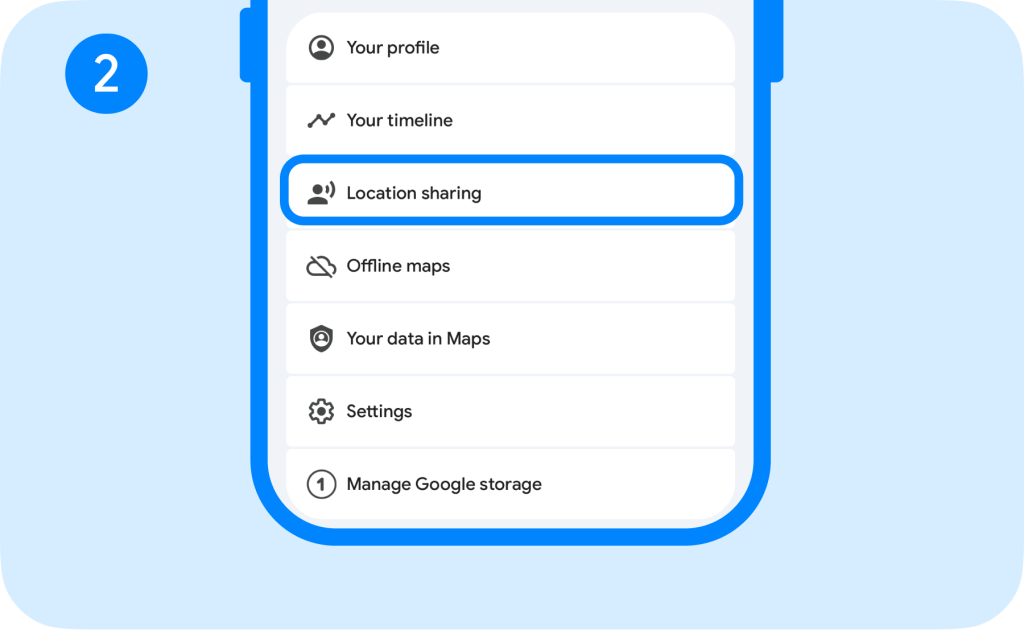
- Choose Location sharing.
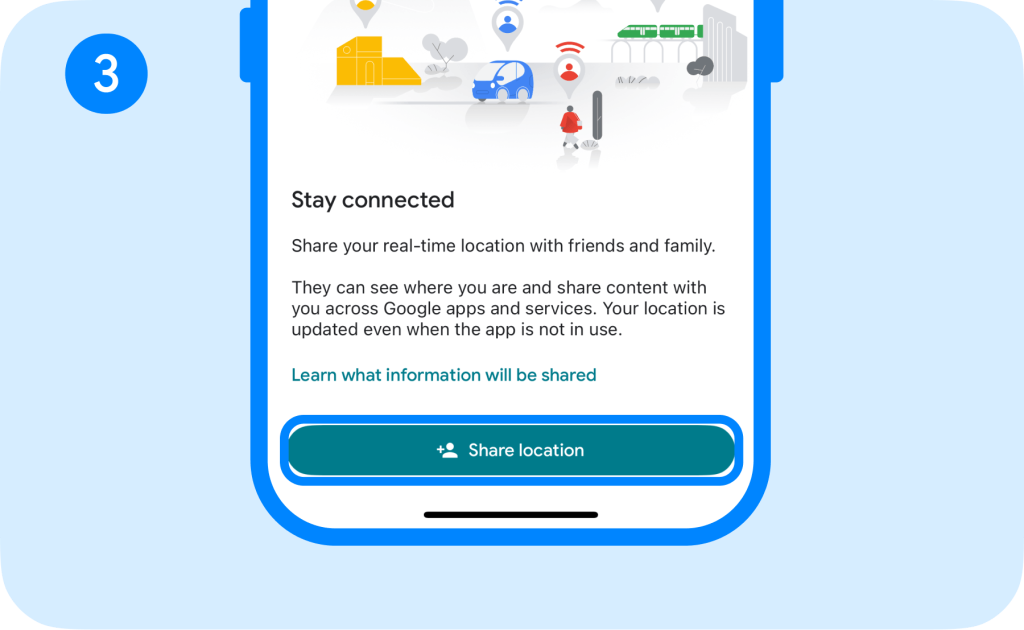
- Tap New share / Share location.
- Choose how long the location should be shared and select the person you want to share your location with.
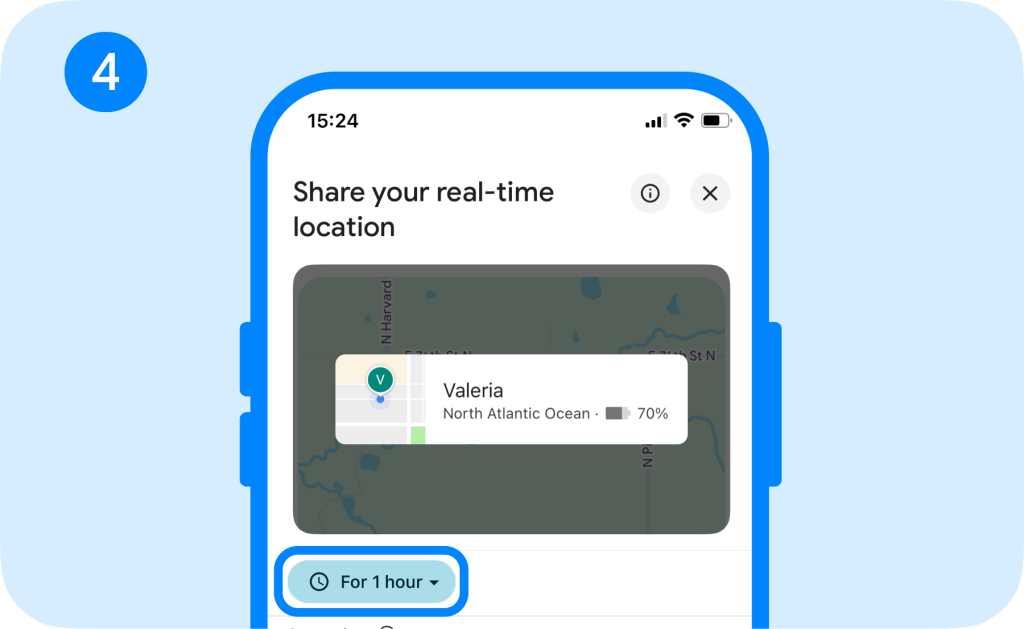
- If you don’t have a Google Account, your child can copy the sharing link and send it to you instead.
- Open Google Maps on your phone and go to Location sharing to see their location.
However, it’s important to know that your child can stop sharing their location at any time. Since Google Maps isn’t necessarily a location-tracking tool, there are no parental controls to prevent your child from turning their location off or changing location permissions.
Related: How to See Someone’s Location on Google Maps.
Method 2: Try the Findmykids App
For parents who want a comprehensive parental control app with location-sharing features, Findmykids is the answer. Parents get ultimate control over their child’s device, seeing exactly where it is, where they have been, and even how they use their phone.
This app is designed to do more than see your child’s location—it’s designed to protect your child both online and in the real world.
Getting started takes less than 5 minutes:
- Install the app on your phone and your child’s phone.
- Create your parent account and link it to your email address.
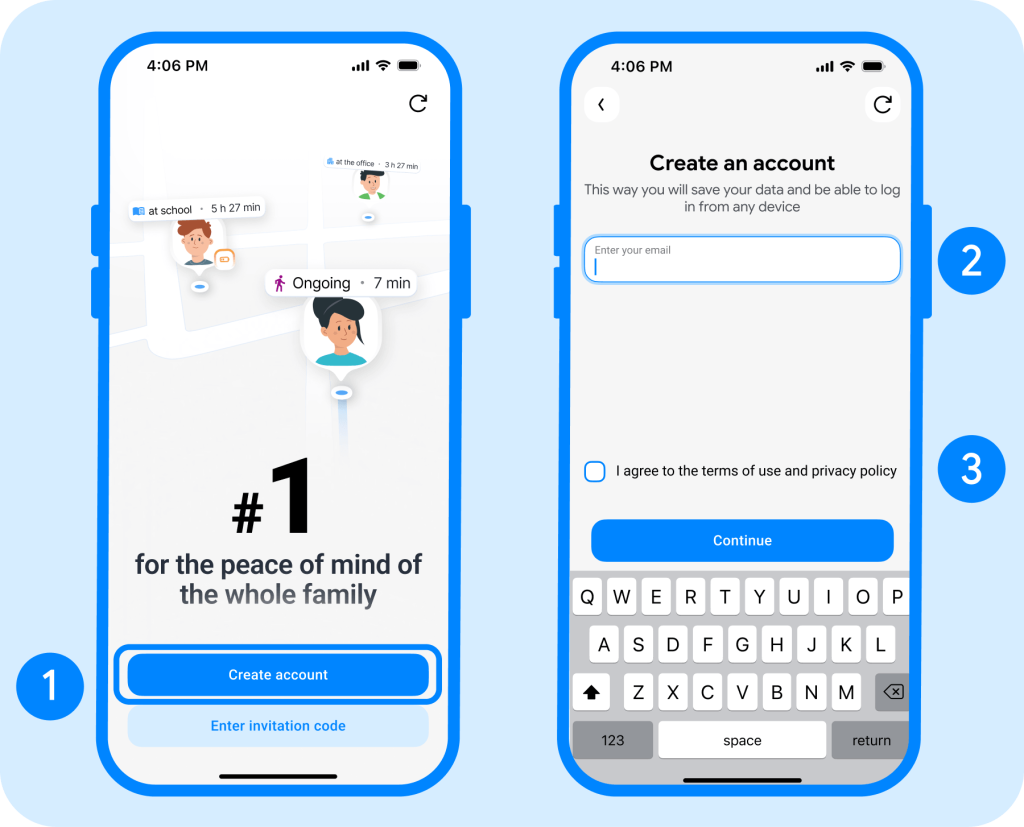
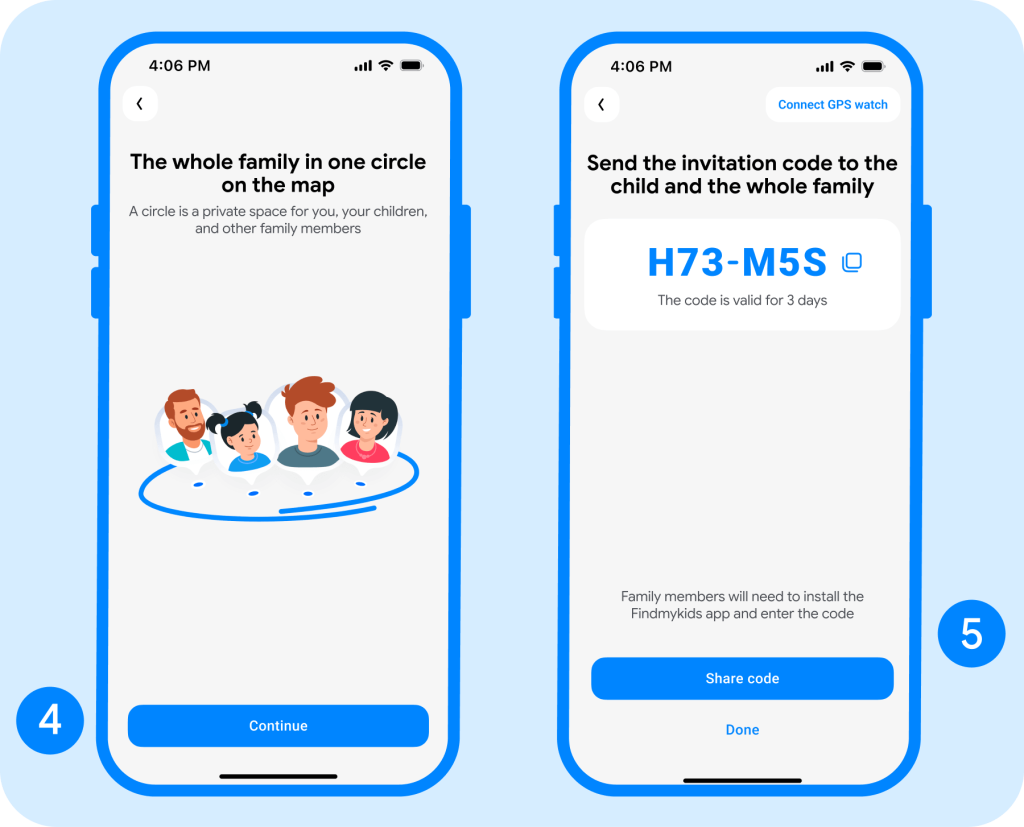
- Create your first family circle and invite your child using a link or invitation code.
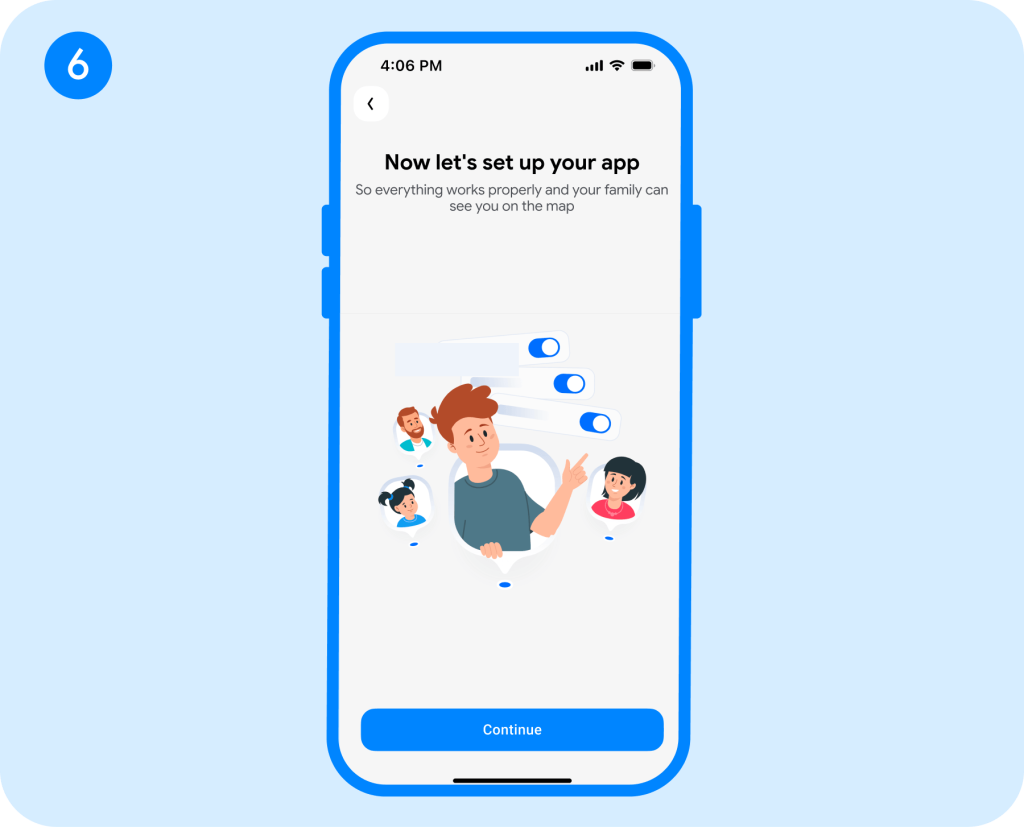
- Grant the required permissions on both phones so Findmykids can track location and provide safety features correctly.
- Add your child’s key places, such as home and school, to receive notifications when they arrive or leave.
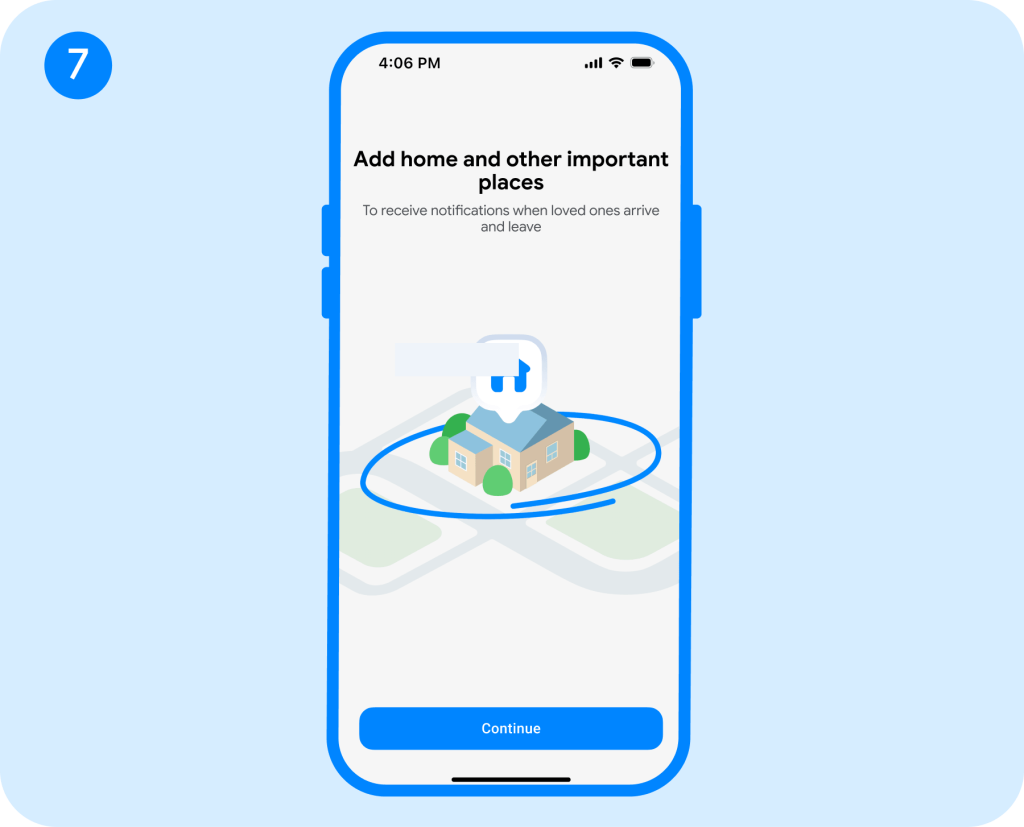
- Open your child’s profile to see their current location on the map and start using the app.
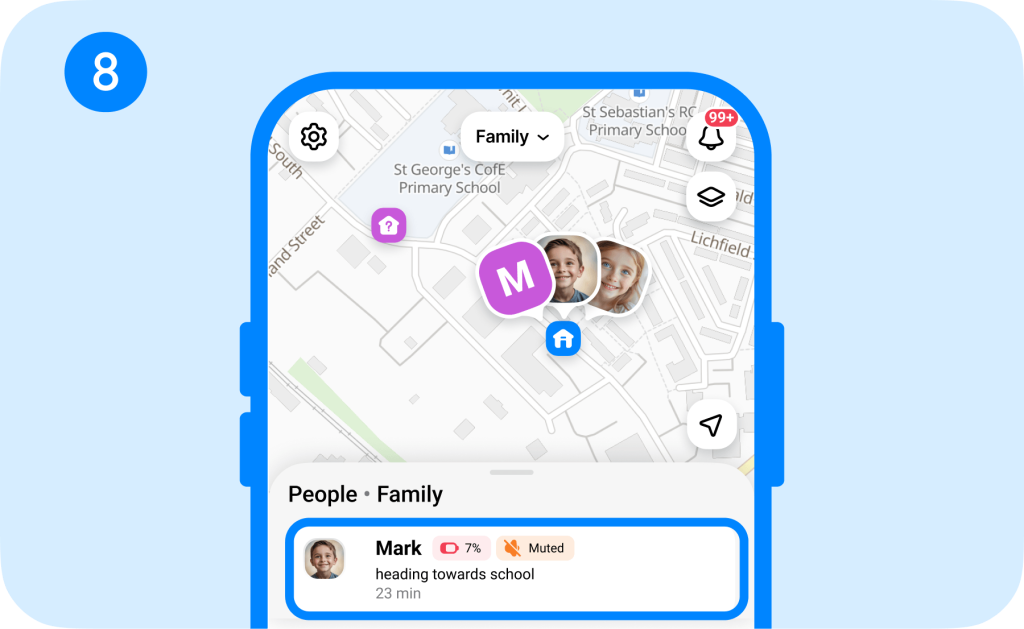
Some of the standout parental control features on Findmykids include:
- Real-time location: See your child’s real-time location on an easy-to-use map.
- Route history: Review where your child has been and how they moved from place to place.
- SOS button: If your child is in danger, they can push the SOS button to send you an emergency alert with their location.
- Sound Around: Through your child’s phone’s microphone, you can listen in and hear what is going on around them if they aren’t picking up the phone.
- Loud Signal: Send a loud alert to your child’s phone even when it is on silent mode to get their attention.
- Driving Reports: For new teen drivers, receive reports about their driving habits, including average speed and a safety rating.
- Parental Control Tools: Set screen time limits, view usage statistics, and block or restrict apps to help your child build healthy digital habits.
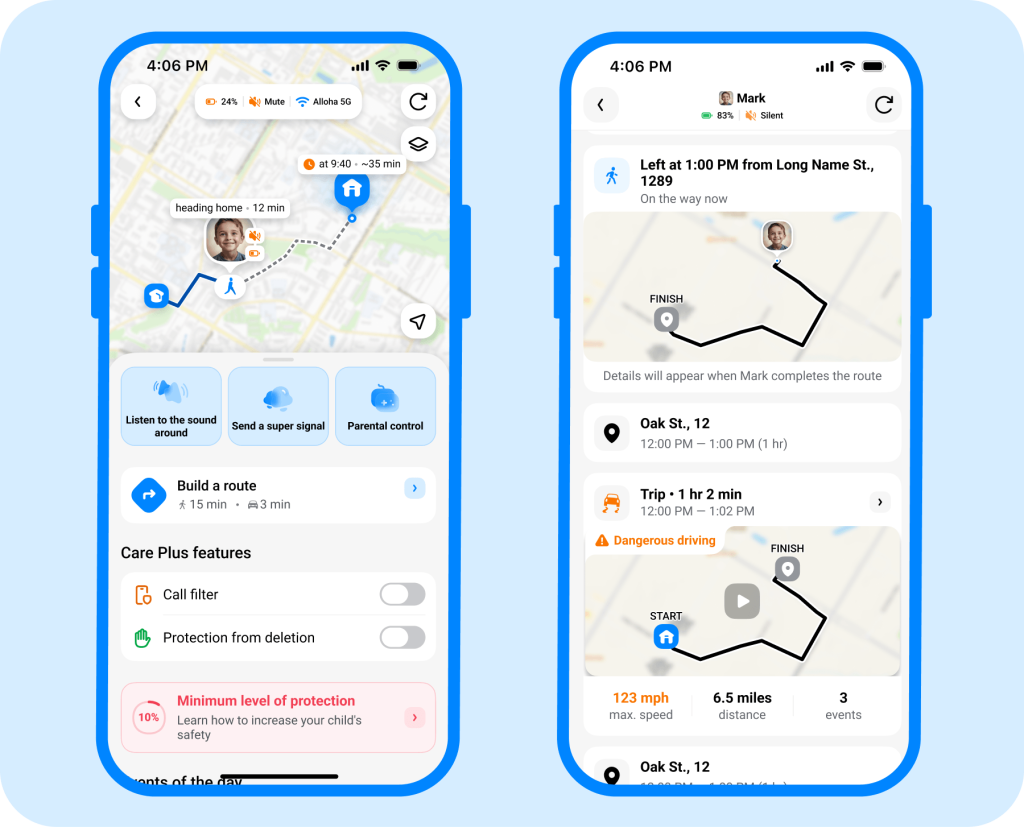
Findmykids is easy to use and always coming out with new features to keep your kids safe. Plus, if you have multiple children, you can see their locations displayed on a single map.
If you want location tracking to be part of a broader safety system, Findmykids gives you more than a map. You can check your child’s location and routes, set up safe places, and use additional parental control and safety features from one parent app. Try Findmykids for free and see which tools work best for your family!
Method 3: Open Built-In Device Find Tools
iOS and Android devices have built-in location-tracking tools that allow users to share their location with friends and family.
For android, users have Google’s Find Hub where they can share their phone’s location and also find their device if it becomes lost. Devices such as phones, tablets, headphones, and device trackers can use Find Hub.
How to set it up on Android:
- Open Find Hub.
- Tap People at the bottom of the screen.
- Tap + or Share location.
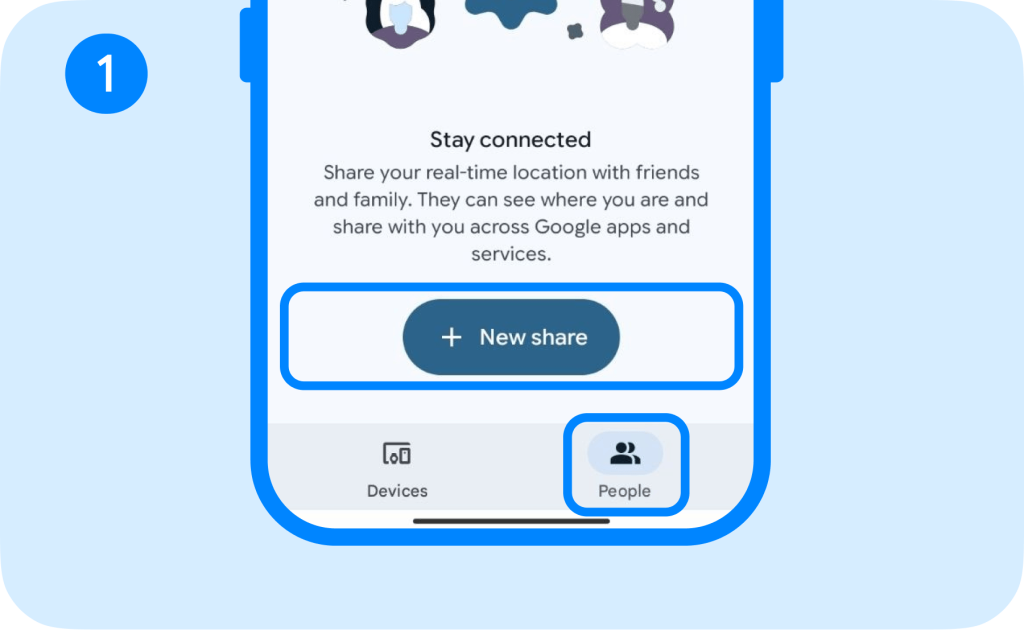
- Choose how long you want to share the location.
- Select the family member you want to share the location with, or send them the sharing link.
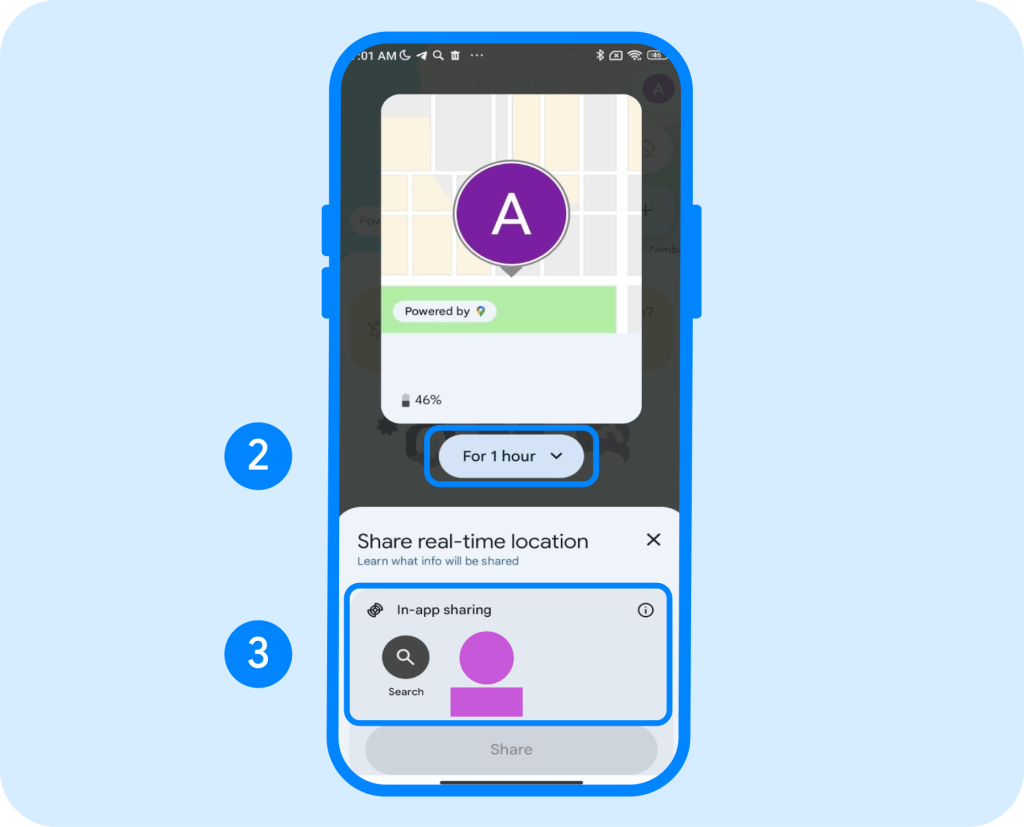
- If available, set arrival or departure notifications for saved places.
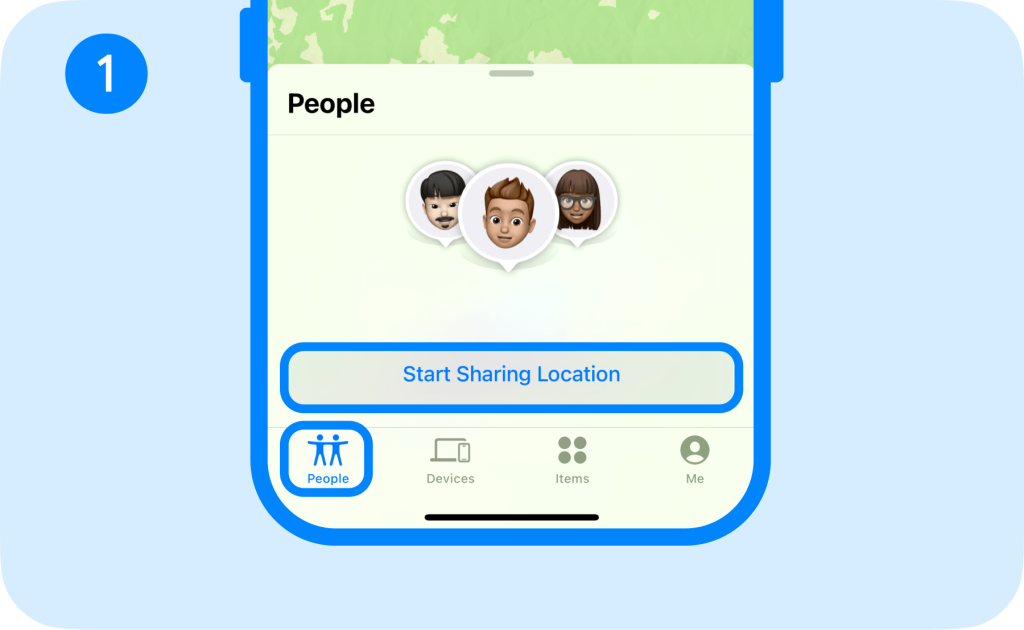
For iOS users, there is Find My, which allows you to track any Apple device and share your location with friends and family. This is ideal for locating lost devices and seeing other people’s locations.
How to set it up on iPhone:
- Open Find My on your child’s iPhone.
- Open the People tab.
- Choose Share My Location / Start Sharing Location.
- Select your contact and follow the prompts.
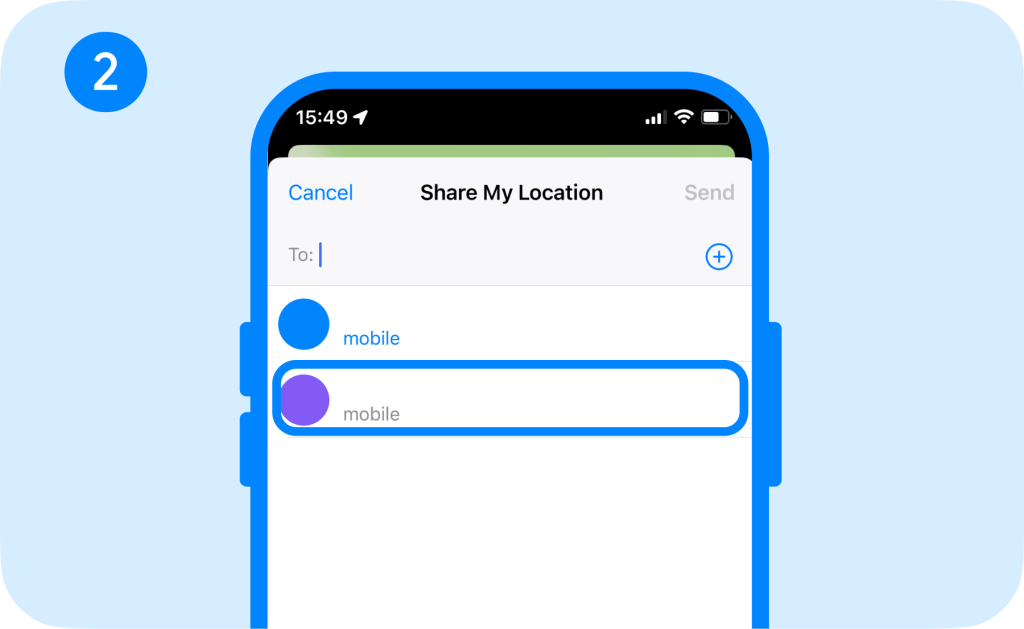
- You can then view the shared location in Find My and set location notifications when available.
While these built-in location trackers offer fairly accurate pinpoints, they aren’t designed with parents in mind. In fact, they are most used for locating lost phones. However, they can still be helpful for parents who want to track their child’s location without the bells and whistles of a parental control app.
Method 4: Check Popular Social Apps
Some social media platforms and apps allow users to share their location with friends and followers. However, these aren’t necessarily location-tracking features. Instead, they share their last known location or tagged location when they post something. These apps include:
- Snapchat: Snap Map lets users share their location with contacts in the app. It can update only when the user is logged in and opens Snapchat, or it can update constantly in the background.
- Facebook Messenger: When chatting with someone on Facebook Messenger, you can share your current location in the messages. It will not track your location, though.
- Instagram: Users can tag locations in their posts and Stories, but the app will not track a user’s location. However, their posts can come up to strangers if they search the tagged location.
- WhatsApp: This encrypted messaging app allows users to send their current location or temporarily share a live location in messages.
If you’re concerned about your child using social media and sharing their location, you can always turn this off in their privacy settings if it is enabled.
Can a Website Track a Phone Without App Installation?
Yes, a website can access your phone’s location through a Geolocation API, but for legal reasons the user must give the website permission to track them. This usually appears as a pop-up that says “Allow this website to use your location?”
However, if you want to track someone’s phone without installing an app, you can do so through a website like Google Maps. But if you want location-sharing technology with higher accuracy and focused on parental controls, downloading a dedicated app like Findmykids is much more effective.
Legal, Ethical, and Privacy Considerations
Before you track someone’s live location, always check local privacy laws. Each state, and sometimes cities, has its own laws governing how someone can use mobile phone trackers. Ultimately, the best way to track a phone’s live location is to obtain the user’s consent. In fact, most location-sharing apps require permission to share location data with another person.
Find the Right Location-Tracking Method for Your Family
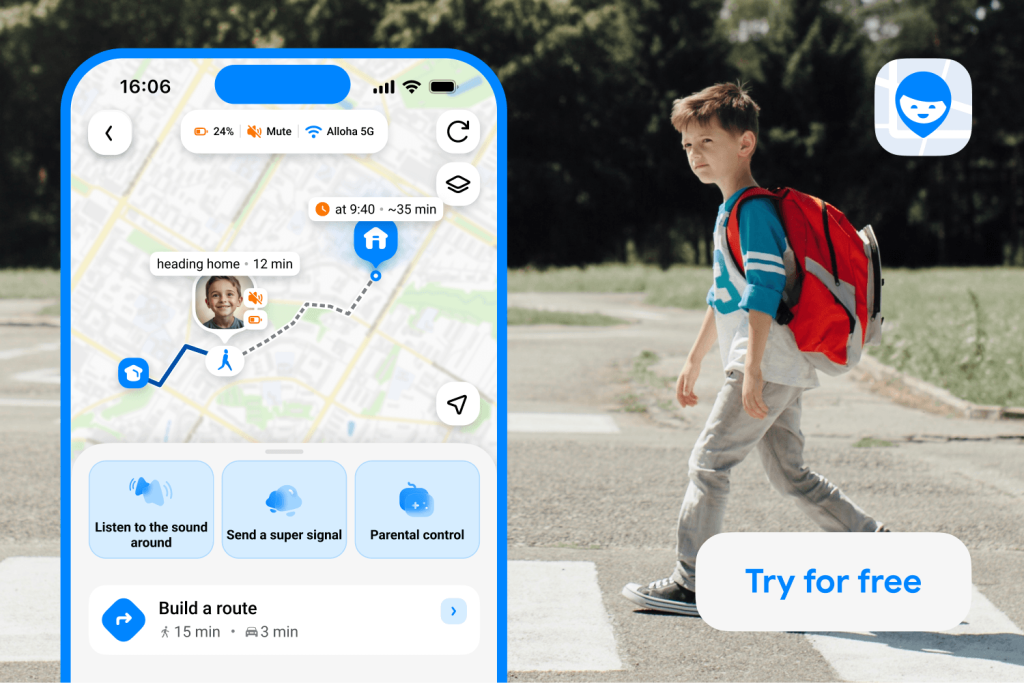
Findmykids app
Each option can be useful, but they are designed for different situations. Google Maps and social apps are convenient when someone simply wants to share their location, while Find My and Find Hub are particularly useful for locating devices and sharing locations within their respective ecosystems. A dedicated parental control app goes further by combining location tracking with features designed specifically for keeping children safe.
| Feature | Findmykids | Google Maps | Find My / Find Hub | Social & Messaging Apps |
| Real-time child location | ✅ | ✅ With location sharing | ✅ With location sharing | ⚠️ Depends on the app |
| Location history & routes | ✅ | ⚠️ Limited | ⚠️ Limited | ❌ |
| Safe-place notifications | ✅ | ✅ Arrival/departure alerts | ✅ Location notifications | ❌ |
| Parent-focused safety features | ✅ | ❌ | ❌ | ❌ |
| SOS / emergency signal | ✅ | ❌ | ❌ | ❌ |
| Loud signal when phone is silent | ✅ | ❌ | ❌ | ❌ |
| Screen time & app monitoring | ✅ | ❌ | ❌ | ❌ |
| Works across iPhone & Android | ✅ | ✅ | ⚠️ Ecosystem-dependent | ⚠️ App-dependent |
| Multiple children in one family account | ✅ | ⚠️ Location sharing | ⚠️ Family features vary | ⚠️ App-dependent |
| Best for | Child safety & parental supervision | Simple location sharing | Finding devices & family location sharing | Occasional location sharing |
⠀
The main advantage of Findmykids is that location tracking is only one part of the experience. Parents can combine real-time location, routes, safe-place alerts, SOS and Loud Signal with other child-safety tools in one app.
So, if the goal is simply to share a location, Google Maps or a built-in device tool may be enough. If you want location tracking to be part of a broader child-safety setup, Findmykids brings those tools together in one parent-focused app.
FAQs
Can I track a phone number on Google Maps for free?
Yes, you can view someone’s location on Google Maps for free if they choose to share it with you. However, the person you want to track must share their location with you through Google Maps. They can also set how long they want to share their location.
Can Google Maps locate a phone without permission?
No. Google Maps does not let you track someone’s live location without their participation. The person must share their location with you through Google Maps.
Can I find a lost phone by its number if location is off?
Usually no, you can’t locate a phone just by entering its number if the location services are off. The best way to do this is through built-in location-tracking apps, such as Find My for iOS or Find Hub for Android.
How accurate is a phone’s live location on Google Maps?
Google Maps’ live location sharing is fairly accurate, pinpointing a device to within about 20 meters (about 65 feet). However, accuracy can become worse if someone is in a building, underground, or surrounded by tall buildings in a city, and it can take several minutes to update. This can vary by region.
Does a mobile number tracker require installation?
Most mobile number tracker apps require installation unless you use a built-in location-sharing feature like Find My or Find Hub. It is usually not possible to simply enter a phone number into a location service and track the mobile device.
Sources & References
- Spying on Your Kids: 96% of Parents Track Their Children’s Online Activities [SURVEY], All About Cookies, 2026
- Google Maps Statistics 2026: Hidden Growth Secrets, SQ Magazine, 2026
- Understanding How Smartphone Location Tracking Works, Medium, 2024
- Share Your Real-Time Location with Others in Google Maps, Google Maps Help
- Stay In Touch With the People Who Matter, Android
- Private Use of Location Tracking Devices: State Statutes, NCSL, 2022
Cover image: simikov-vitaliy / magnific.com
Проверьте электронный ящик