















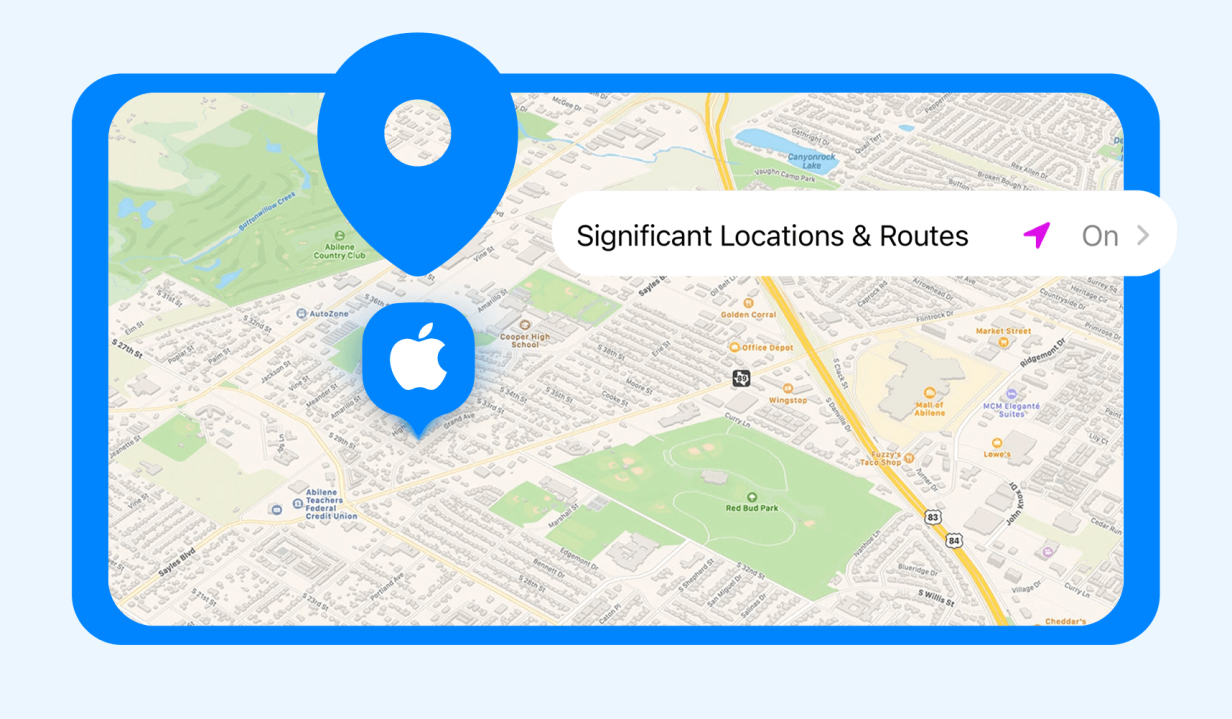
Did you know that your iPhone collects data about places that you frequently visit to personalize your experience for features like Maps, Photo Memories, Visited Places, Journal, and parked-car information? It’s a feature called Significant Locations, and the information is end-to-end encrypted, meaning even Apple can’t see the places you visit.
But once parents learn about the Significant Locations feature on iPhone, they may wonder how it works and whether it’s a reliable way to keep track of where their kids spend time. In this article, you will learn what Significant Locations is, how it works, and what tools parents can use to track their child’s location.
Key Takeaways
- Significant Locations helps your iPhone learn frequently visited places and routes, but it is designed for personalization, not real-time tracking.
- You can find Significant Locations through Settings, while Apple Maps’ Visited Places offers a clearer look at places you’ve recently been.
- Significant Locations does not provide a complete timeline, and some places may be missing or recorded incorrectly.
- With real-time location, route history, place alerts, and parental safety tools, a dedicated app like Findmykids is much more useful for keeping children safe and connected.
Contents:
How to See Frequently Visited Places with Findmykids
Findmykids is a real-time location-tracking and parental control app that more than 3 million parents use to keep their children safe. The app shares a child’s precise location with parents, including the route they took to get there. But one standout feature is the Places section.
What Is the Places Feature on Findmykids?
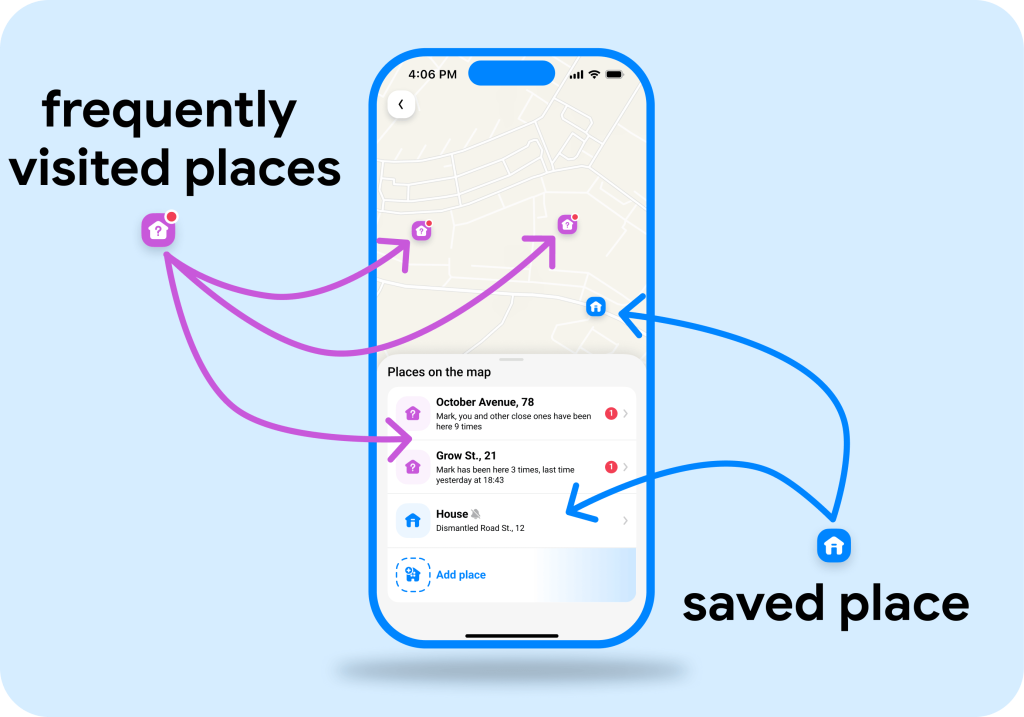
The Places feature on Findmykids has two components: saved places like school or home and frequently visited places.
Saved places are locations that matter to your family, such as Home, School, or a sports club. Parents can add these places to the map and set notifications for when their child arrives or leaves. This makes it easier to know when a child gets to school or heads home without constantly checking the map.
Frequently visited places are locations the app identifies based on the child’s movement patterns. This could be a friend’s house, an after-school activity, a favorite park, or another place they visit regularly. You don’t have to add every location manually—the app can help surface places that appear frequently in your child’s routine.
For more detail, each location can have its own Place Card. It brings together information about visits to that place, including visit history, events, and notification settings. On supported Android devices, Place Cards can also show app usage statistics for the time your child spent there.
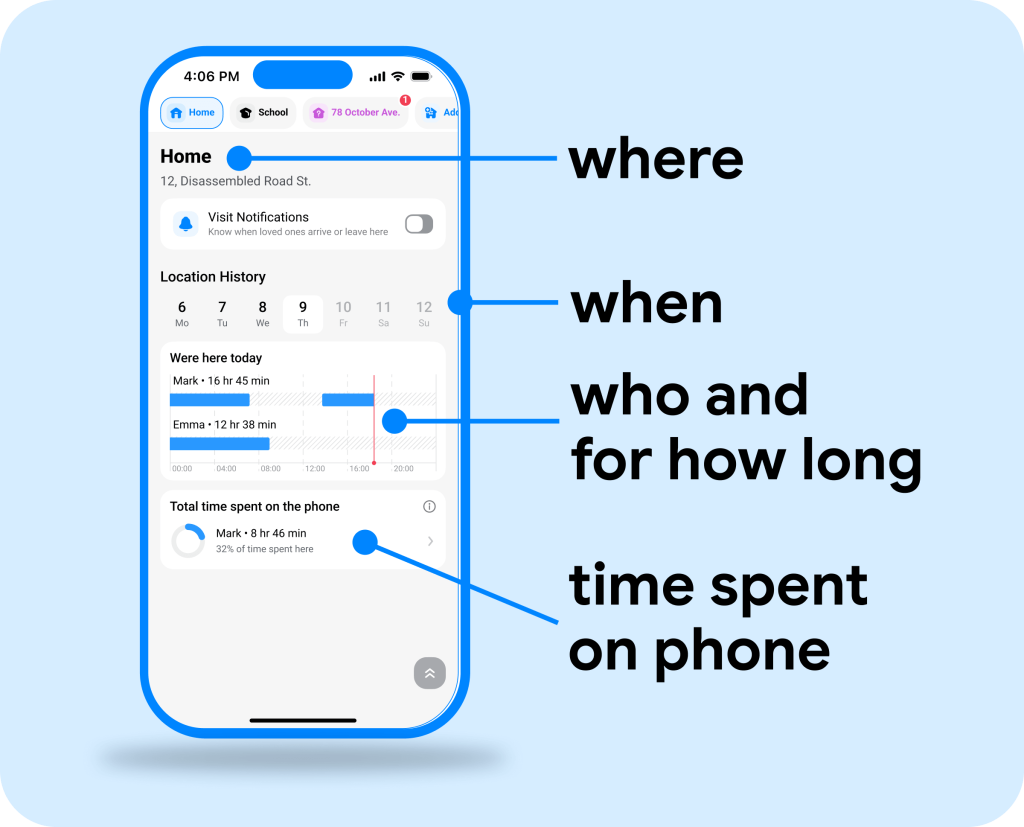
Together, these features give parents more context around their child’s everyday routine—not just a dot on the map, but a clearer picture of where they spend time and how their usual day looks.
How to Find Frequently Visited Places in Findmykids
Getting started is simple. Once you connect your child’s device, you can open the Places section and see saved and frequently visited locations.
- Install Findmykids on your phone and on your child’s device.
- Create your account and follow the setup instructions.
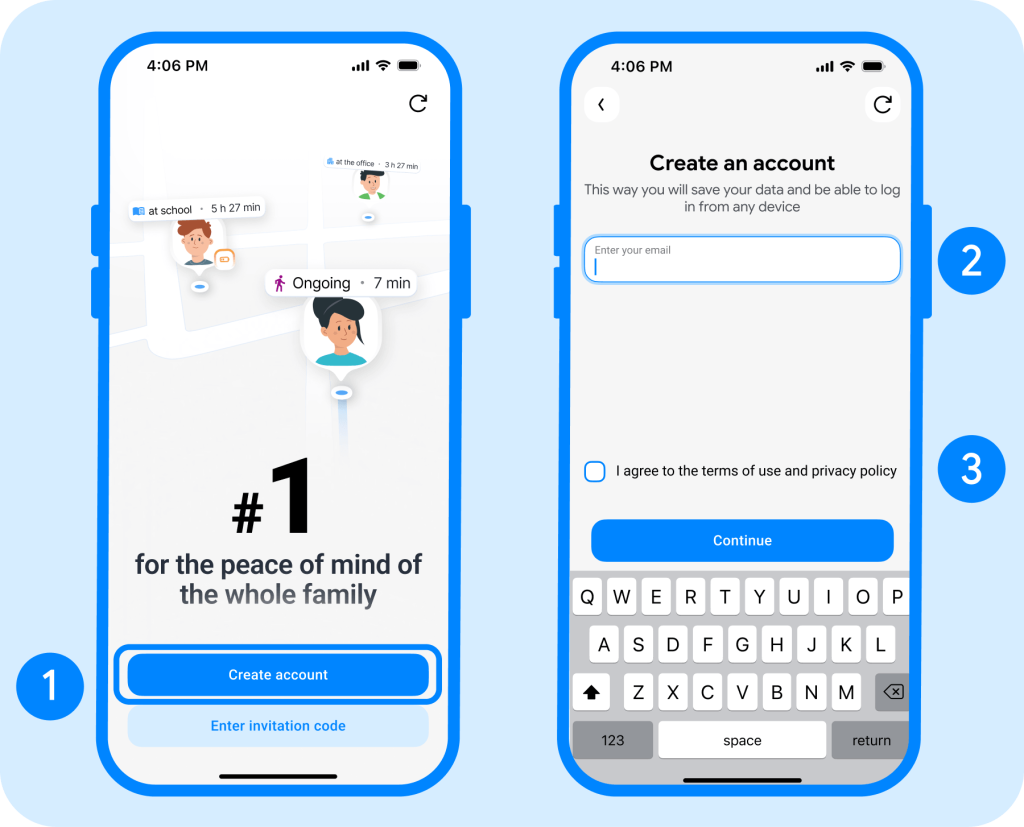
- Connect your child’s device using the invitation code shown in the app.
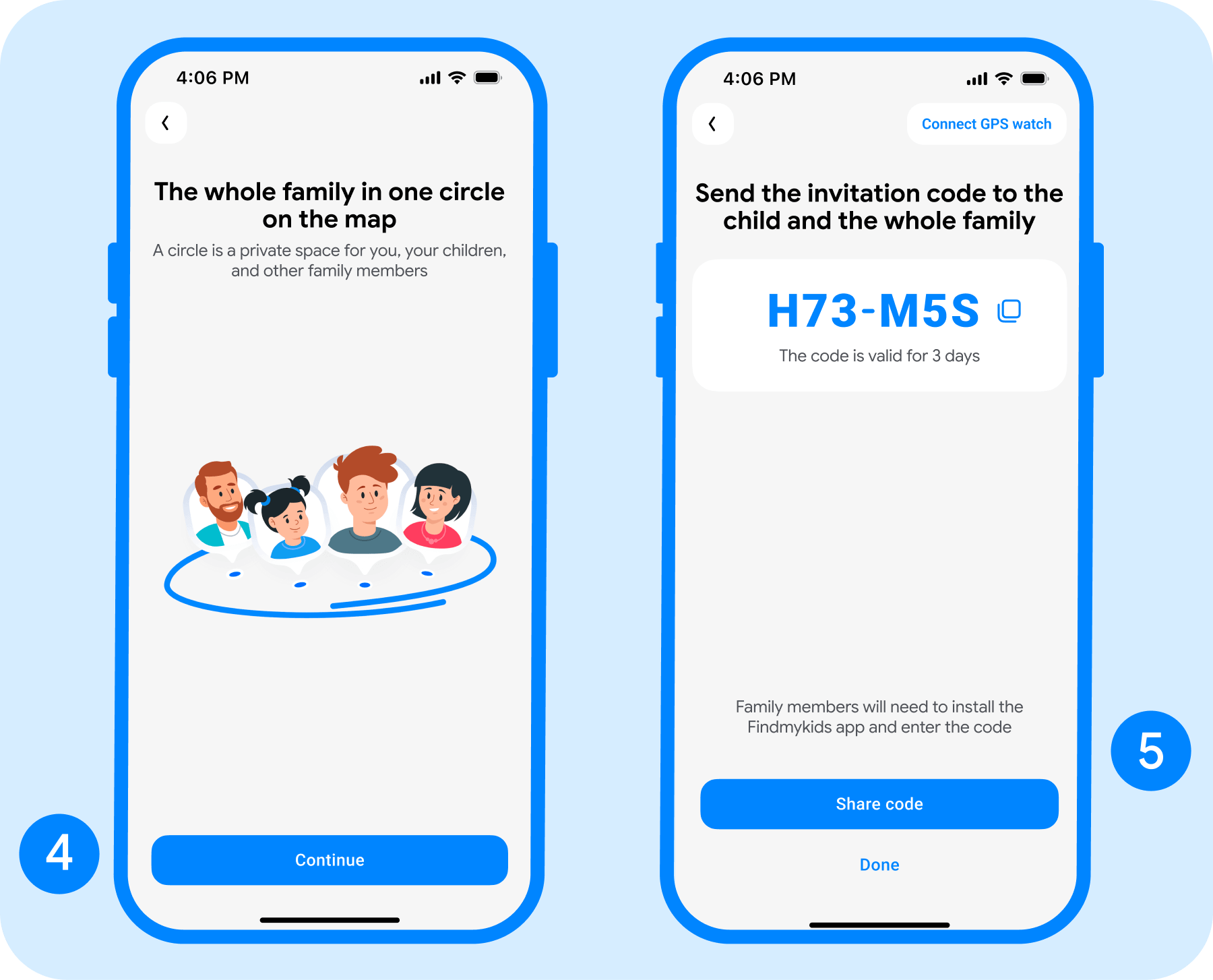
- Allow location access on your child’s device so Findmykids can track their location and identify visited places.
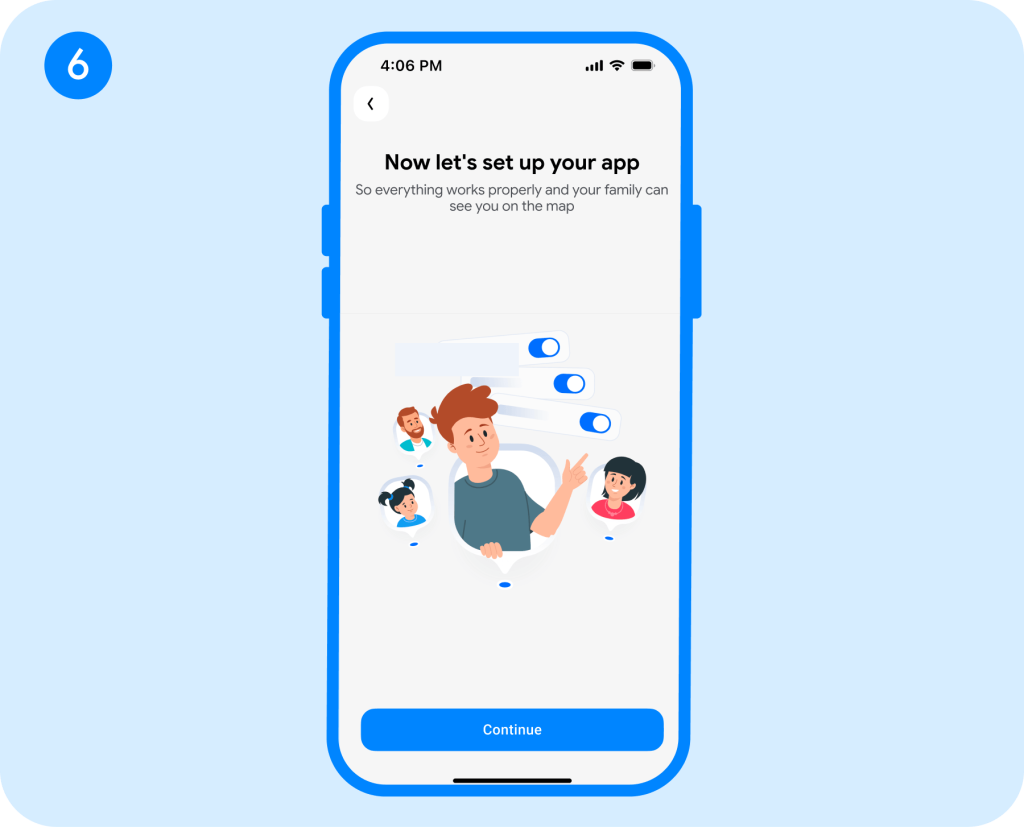
- Open the Findmykids app on your phone once the devices are connected.
- Open Settings by tapping the gear icon in the top-left corner.
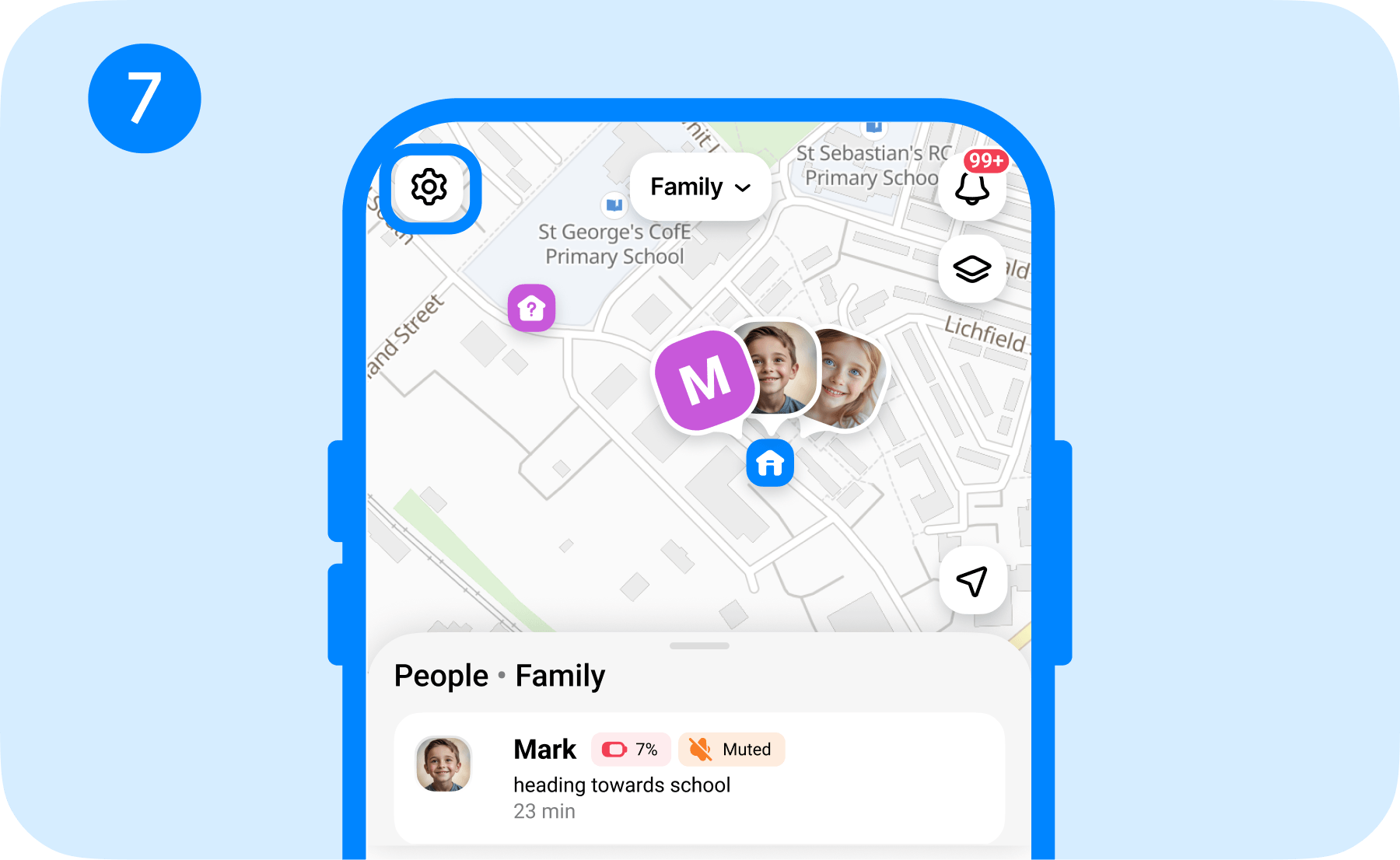
- Choose Places from the settings menu.
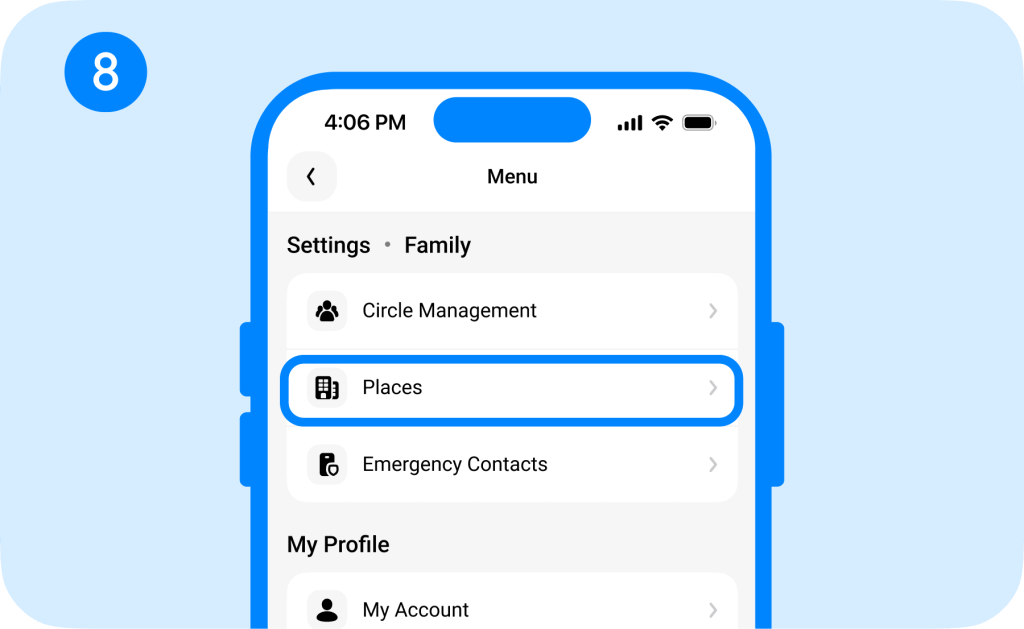
- Tap a place to open its Place Card and view available visit history, events, notifications, and other details.
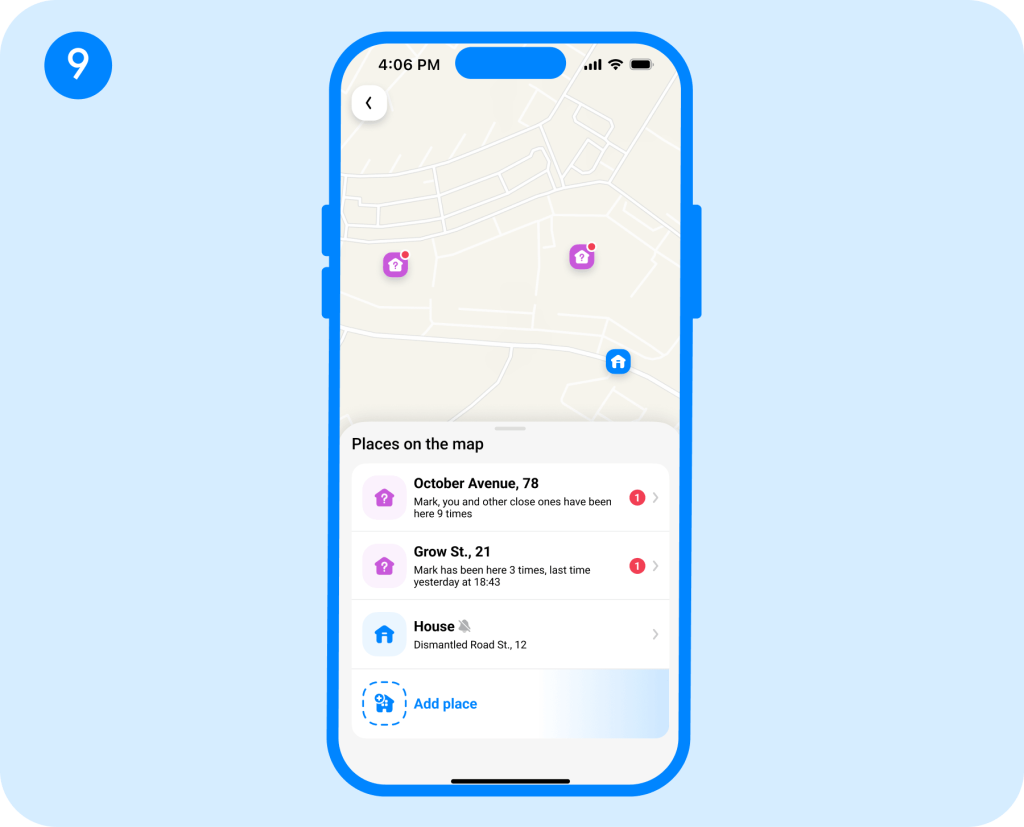
- You can also pick a location on the map or create a new saved place.
If you want to keep an eye on an important location, such as school or home, you can also save it and enable arrival or departure notifications.
Additional Safety Features
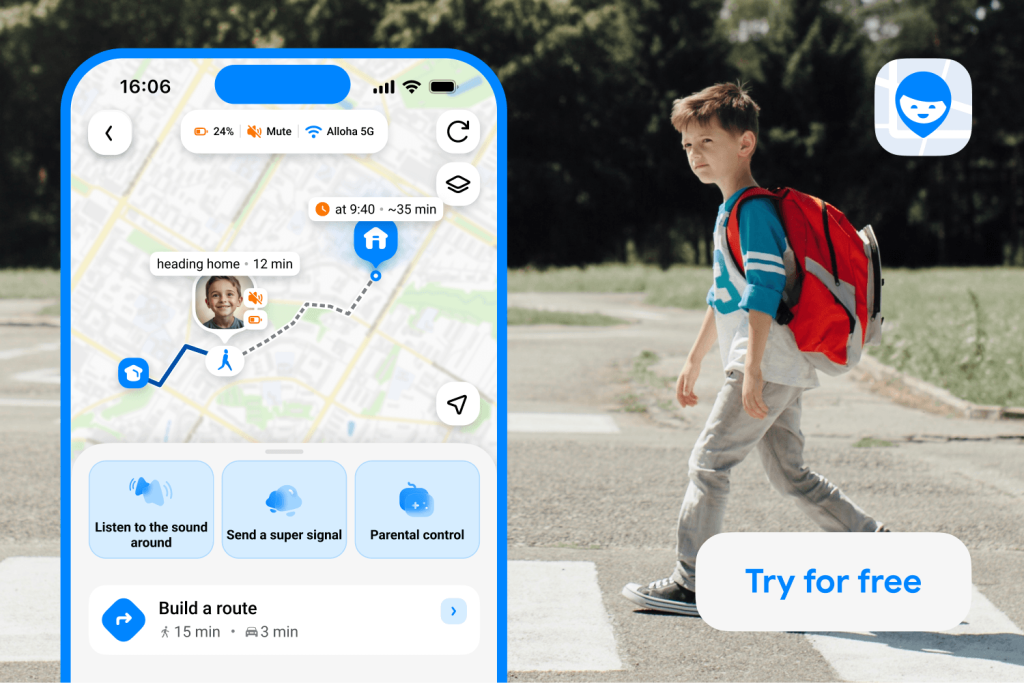
Findmykids app
Findmykids offers more than just a list of frequently visited places; it’s an all-in-one parental control app that keeps children safe both in the real world and online. Some of the most used features include:
- Real-Time Location:See your child’s current location and follow their movements throughout the day.
- Route History: Review your child’s previous routes and see where they have been.
- Route Cards: View detailed information about each trip, including the route, distance, duration, and other trip details.
- Loud Signal: Send an audible alert to your child’s phone even when it is on silent.
- Screen Time Limits: Set limits on app usage and schedule when certain apps are available.
- 18+ Content Blocking: Restrict access to adult-rated websites and apps on supported devices.
- SOS Button: Let your child send an emergency alert with their location when they need help.
Parents choose Findmykids because of its comprehensive parental controls. In just seconds, they know where their child is, where they have been, how they got there, and how they spent their time there.
For parents, this provides peace of mind and relieves the anxiety of allowing children more freedom. If their child doesn’t pick up the phone, they don’t need to panic. Instead, they can check to see where their child is. And if they really need their child’s attention, they can use the Loud Signal to make sure their child hears their phone.
Want more than just a location pin? Try Findmykids to keep track of your child’s location, routes, places, and daily activity—all in one app.
What Are Significant Locations on an iPhone?
Significant Locations is a feature on iPhone that keeps track of places and saves locations you frequently visit. As you go about your daily routine, your iPhone works in the background, collecting location data of where you visit most, such as home, work, school, restaurants, or activities. It uses GPS, Bluetooth, and Wi-Fi networks to identify these places. This information is then synced with iCloud-connected devices that your Apple ID is signed into.
For example, this feature can be helpful if you’re trying to remember a restaurant you visited previously and want to find it on the map again. It can also be used to make location-based suggestions and even for predictive traffic routing in Maps. Or it’s used to create better Memories in your Photos app, reminding you of past trips or events.
However, Significant Locations are designed for the iPhone owner, not for family tracking. The information isn’t shared with family members through Family Sharing, so a parent can’t simply open their own iPhone and see their child’s Significant Locations. To view this information, you’d need access to the child’s device and the relevant settings or Apple Account.
It’s also important not to confuse Significant Locations with a complete location history. The feature is mainly used by Apple to personalize services such as Maps, Calendar, and Photos. iPhone can also keep a separate record of Visited Places, but that is still a record of places the device owner has visited—not a tool for parents to monitor a child’s movements or see their routes throughout the day.
How to Find Significant Locations on iPhone
If you’re wondering how to find your Significant Locations on iPhone, there are a couple of ways to do so.
Find Significant Locations & Routes in Settings
It’s simple to find your Significant Locations in Settings. Simply follow these steps:
- Open the Settings app.
- Tap Privacy & Security.
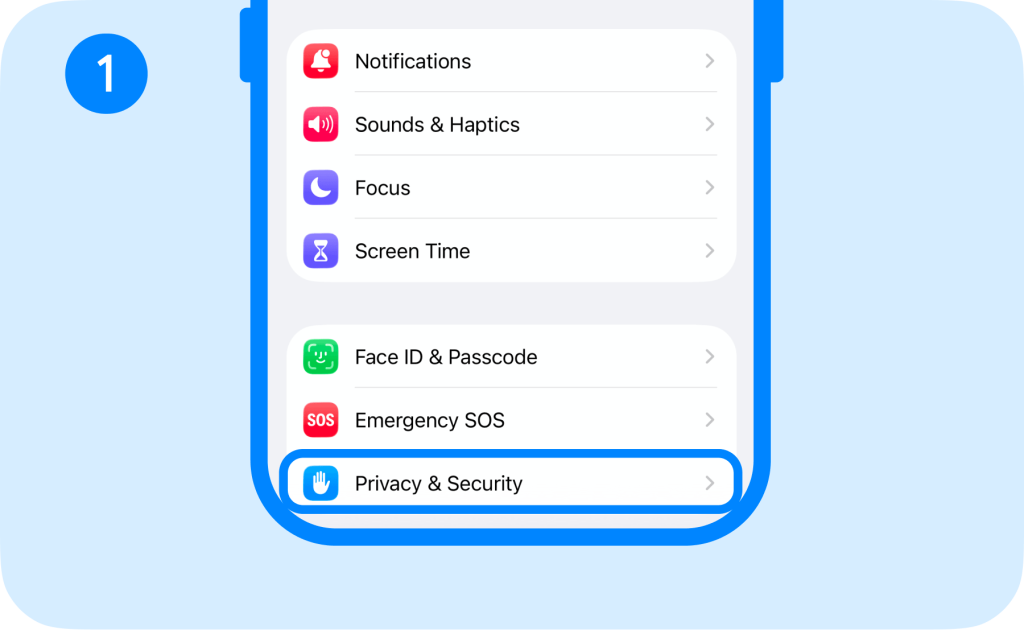
- Select Location Services.
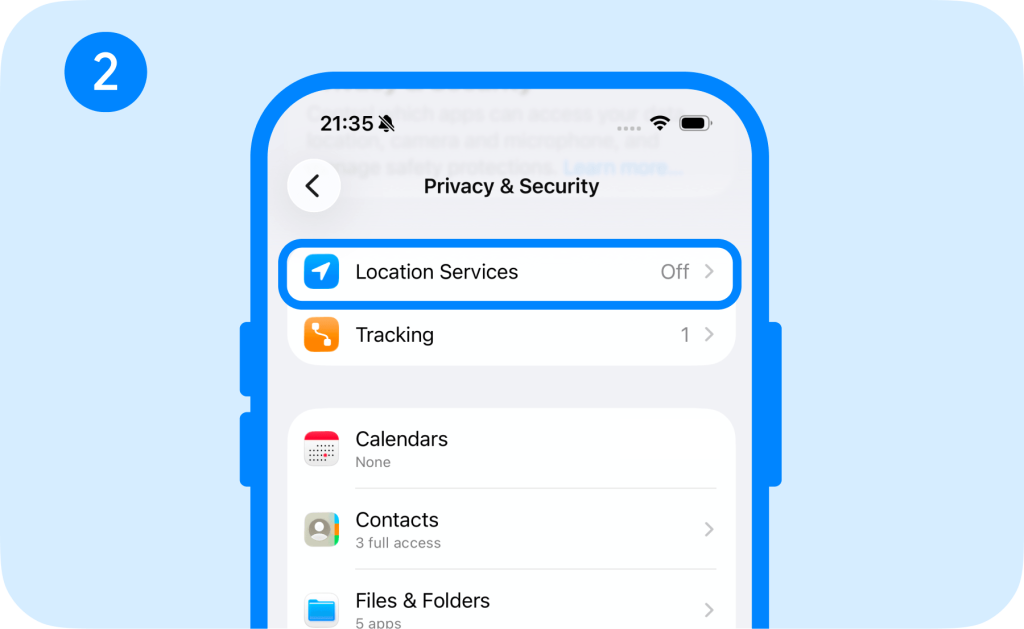
- Scroll down to System Services.
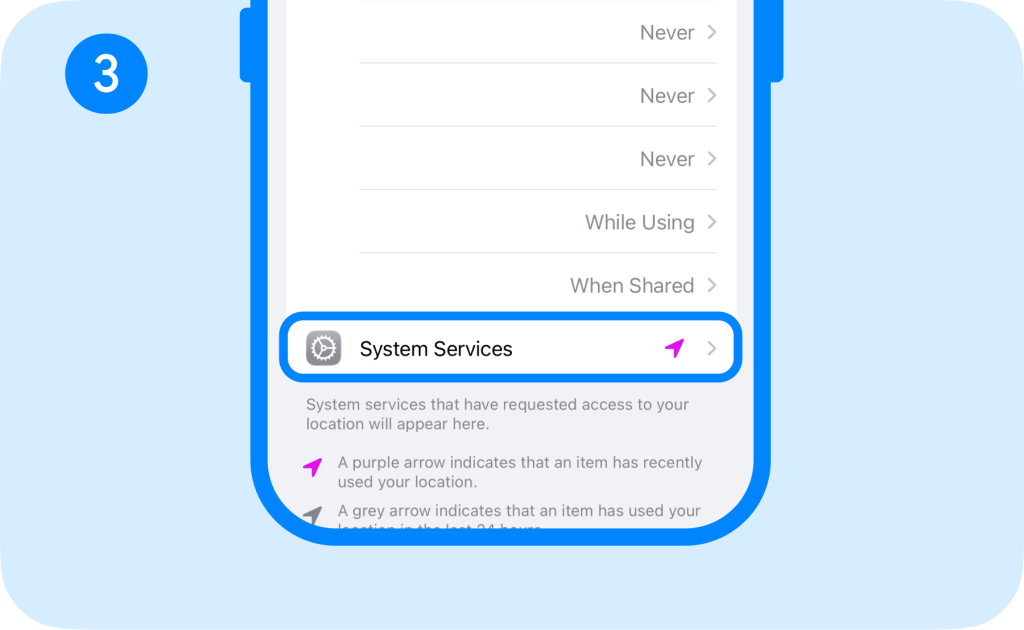
- Tap Significant Locations & Routes.
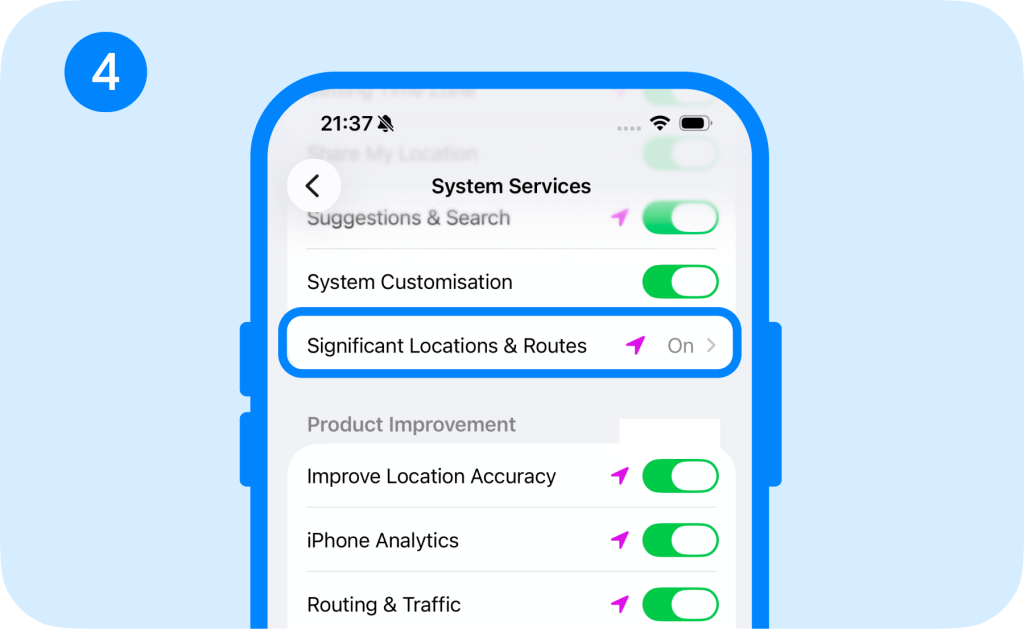
You may need to authenticate with Face ID, Touch ID, or your iPhone passcode to access this information.
The section lets you view the locations and routes your iPhone has identified as significant.
This is also where you can turn off permission for full access to Significant Locations & Routes if you don’t want your iPhone to collect this data.
View Detailed History Through Visited Places
With iOS 26, Apple Maps has a section called Visited Places that records places you’ve visited. To access this, follow these steps:
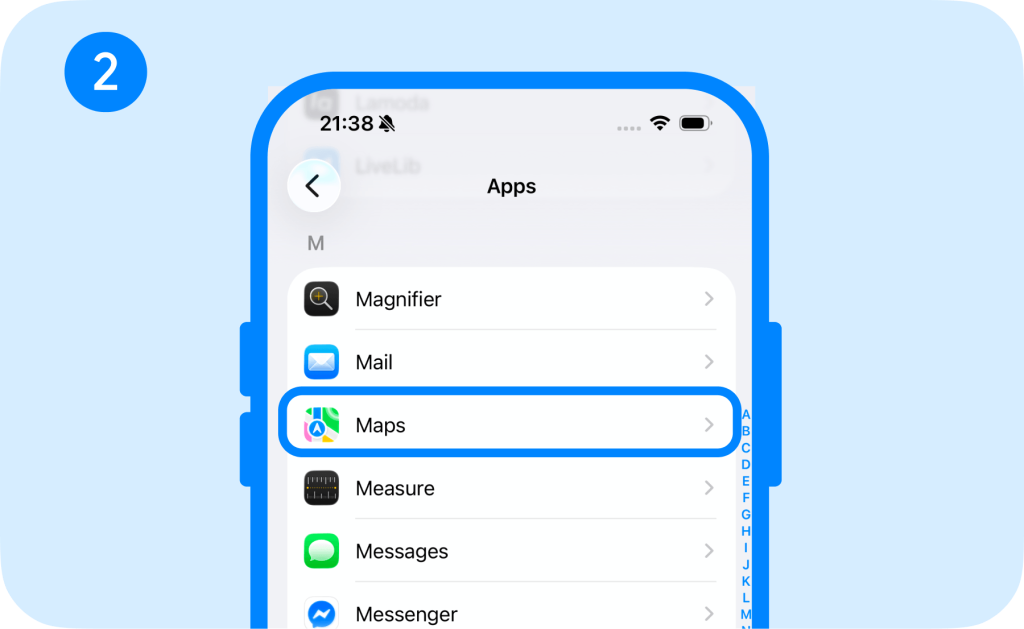
- Open Settings → Apps.
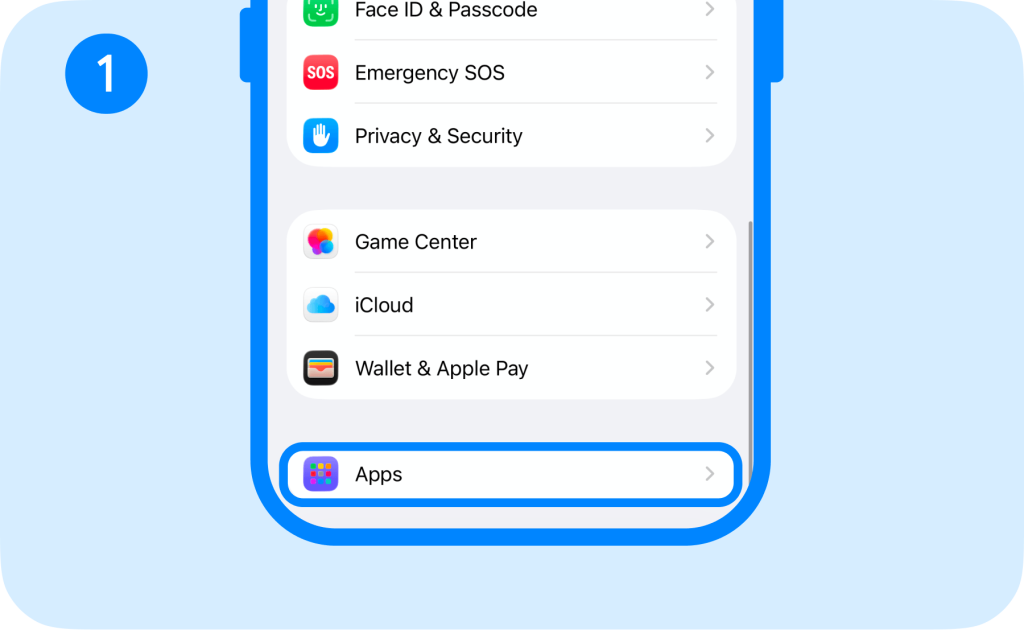
- Tap Maps.
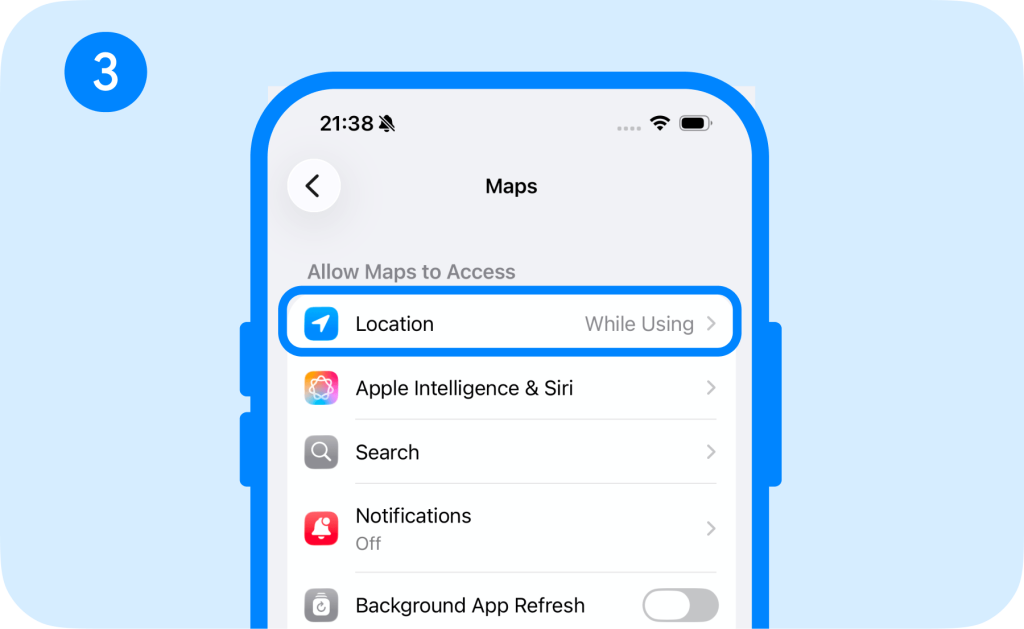
- Tap Location.
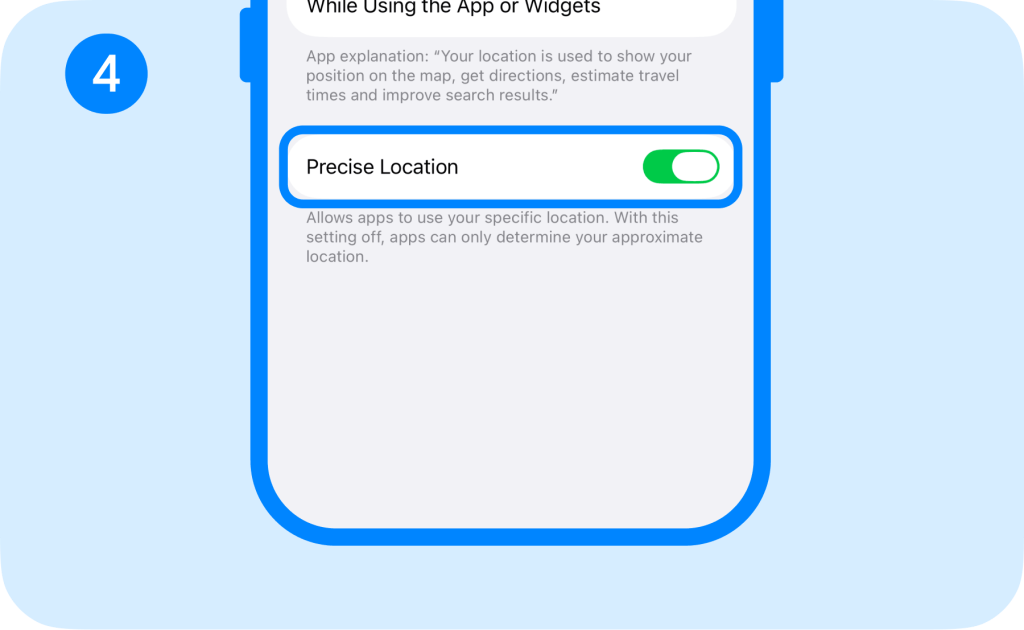
- Turn on Precise Location and Visited Places.
- Open Apple Maps.
- Tap Places → Visited Places.
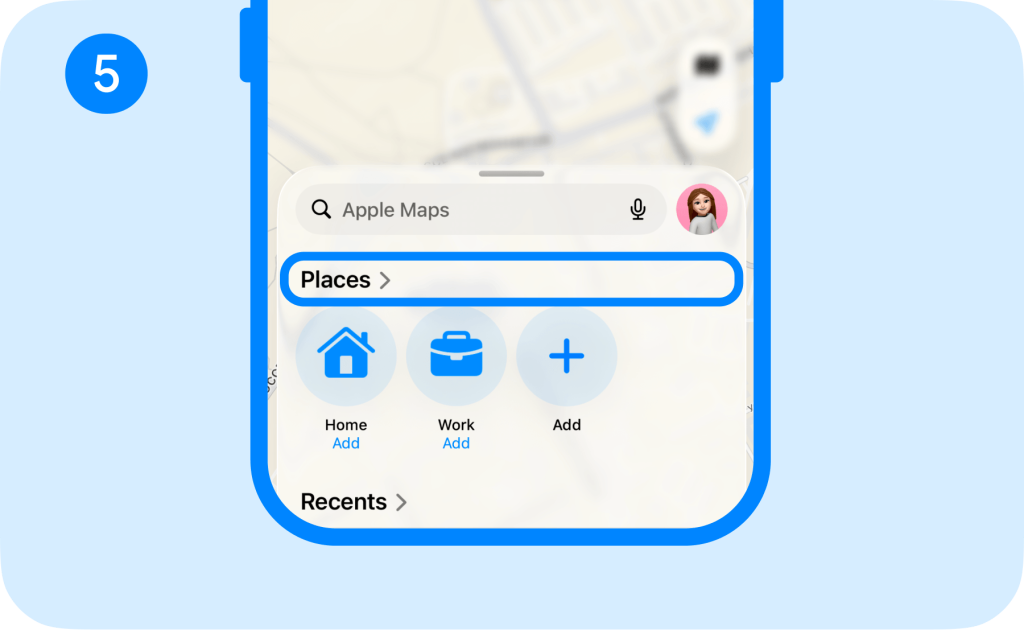
Visited Places provides a record of places you’ve visited, which you can search and filter by date, category, or city, but it isn’t a continuous GPS route.
What Information Do iPhone Significant Locations Show?
iPhone’s Significant Locations & Routes shows information about places you’ve been, how often you visited those places, when you visited them, and the routes you regularly take to get there. It then uses this information to provide personalized services in apps like Maps, Calendar, and Photos.
However, it’s important to understand that Significant Locations works in the background to feed the information to relevant apps. It isn’t really something you can use to see a comprehensive list of the locations you’ve been to.
Why Are Significant Locations Missing or Incorrect?
Technology can be tricky, so Significant Locations may be incomplete or show an approximate location. That’s why parents shouldn’t rely on it to track their child’s location and where they’ve been. In some cases, locations can be misidentified, or locations might not register at all, especially if the feature is turned off.
That said, parents should think of Significant Locations as a way for their iPhone to get to know you better. That allows it to give more personalized recommendations.
Significant Locations vs. Findmykids: What’s the Difference?
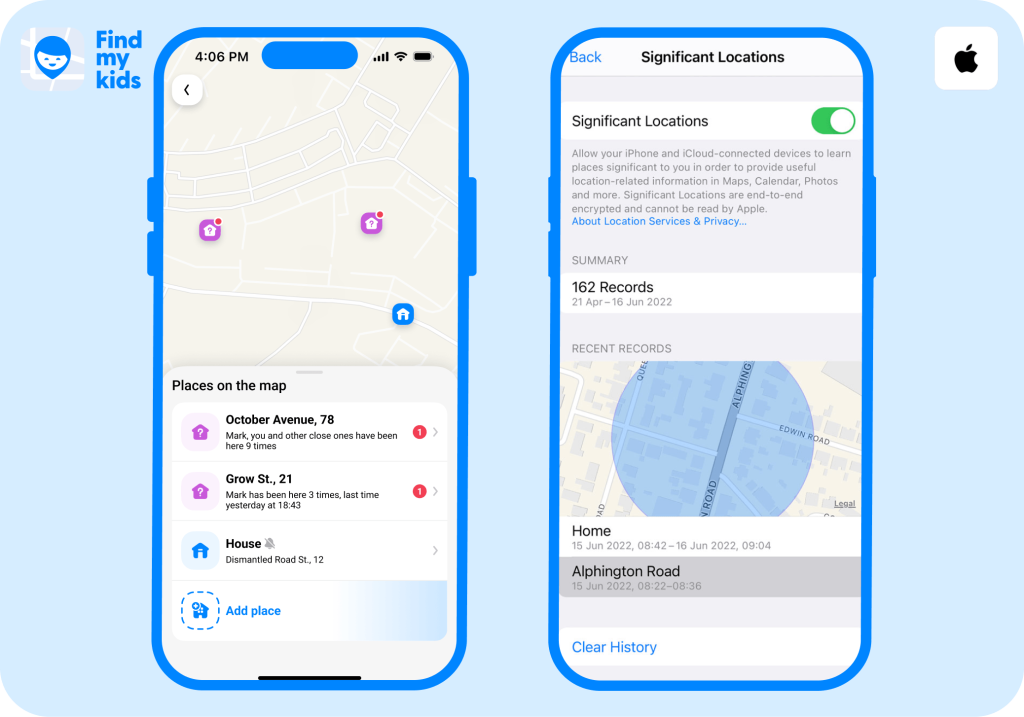
When choosing a location-tracking app to keep your kids safe, it’s important to understand its capabilities. Below is a comparison between Significant Locations on iPhone and Findmykids:
| Feature | Significant Locations / Visited Places | Findmykids |
| Main Purpose | Learns places and routes to personalize iPhone experience | Designed specifically for parents to track a child’s location and receive safety information |
| Real-Time Location | No, it’s not intended to show another person the iPhone’s location | Yes, parents can view their child’s current location |
| Location History | Limited, as it learns recently visited places, frequency of visits, and commonly traveled routes | Yes, Findmykids provides location history to let parents review where their child has been |
| Shows Every Place Visited | No, locations can be missing because iOS decides which places are significant | More detailed, but still dependent on the child’s device being able to report its location |
| Detailed Movement/Routes | Can learn frequently used routes, but it’s not a minute-by-minute GPS log | Designed to provide detailed GPS location history |
| Arrival and Departure Alerts | No parental alerts for significant locations | Yes, parents can create Safe Zones and set alerts when a child enters or leaves |
| Safety Features | No safety features are included in Significant Locations | Findmykids contains an SOS Button, Loud Signal, Parental Controls, and battery monitoring |
⠀
Can Parents Use Significant Locations to Track a Child?
Don’t get the wrong idea of what Significant Locations is for. Ultimately, parents cannot use Significant Locations to determine their child’s location. That’s better left to dedicated parental control apps like Findmykids.
While Significant Locations is helpful for iPhone to personalize a user’s experience, it does not offer real-time location tracking or a GPS timeline showing where your child has been with dates.
If you’re looking for an app to track your child’s real-time location, see a route history, review where they have been, and get alerts when they enter or leave a place, then Findmykids is the app for you!
FAQs
Can I see my full Significant Location history?
No, you usually cannot see a complete log of your Significant Location history on an iPhone. You can see Visited Places on Apple Maps to review past locations, though.
Can I see my child’s Significant Locations?
To see your child’s Significant Locations on iPhone, you must go into their iPhone’s settings. However, you won’t be able to see a complete history log of visited locations.
Why can’t I tap my Significant Location records?
With newer iOS versions, you might not be able to tap the Significant Locations & Routes button in Settings. Instead, you’ll see the number of locations saved. This is normal because Apple uses this feature in the background rather than collecting the data to show you.
Does Apple track every place I visit?
Not necessarily. With Significant Locations, Apple only collects information on places that you’ve visited frequently or spent a long time in. It doesn’t collect a minute-by-minute record of your location.
Can Apple or other people read my significant locations?
No, your Significant Locations cannot be read by Apple, third-party apps, or somebody who does not have your phone. This information is end-to-end encrypted, meaning it is private and just for your iPhone.
Will deleting significant locations affect Find My?
No, if you delete Significant Locations history, it does not affect or disable Find My because they are separate features. Significant Locations is used internally by your iPhone to track learned places and routes. Find My tracks your real-time location, which can be shared with contacts if you allow.
Is there a way to see where my child frequently goes?
The best way to see where your child frequently goes is with the Findmykids app. With the Places feature, you can save specific locations and see where your child spends a lot of their time. With Places cards, you’ll also have information about how many times they’ve visited and how long they’ve spent there.
Sources & References
- Significant Locations: How Your iPhone Knows Where You’ve Been, Reader’s Digest, 2023
- View and Manage Visited Places in Maps on iPhone, iPhone User Guide
- Where Has Your Child Been? Track Visited Places with Findmykids Places Feature, Findmykids Blog, 2026
Проверьте электронный ящик