WhatsApp, with over 3 billion monthly active users, has become a primary way we talk to our family and friends. However, its popularity has also made it a prime target for fraudsters launching sophisticated (and dangerous) WhatsApp scams.
If you’re worried about suspicious messages landing in your child’s inbox, or about someone trying to hijack your account, you’re in the right place. Here, we have practical, no-nonsense advice you can tap into to keep yourself and your family safe.
Contents:
- What Are WhatsApp Scams?
- Most Common WhatsApp Scams
- Red Flags: How to Spot a WhatsApp Scam Message
- How Parents Can Protect Their Kids
- What to Do If Your Child Receives or Falls for a WhatsApp Scam
- FAQs
What Are WhatsApp Scams?
freepik / Freepik.com
A WhatsApp scam is essentially any fraudulent activity that takes place on the platform, generally, in which scammers try to trick you into handing over money, personal data, or access to your account. Unlike spam emails that often get filtered out, a WhatsApp message lands right on your phone screen, resulting in an experience that often feels more personal and immediate.
Scammers love WhatsApp because, again, it has such a large pool of active users. According to the Federal Trade Commission (FTC), social media and messaging apps have become a veritable hotbed for fraud, with reported losses hitting billions annually. Scammers use the platform because it’s fast, free, and allows them to cast a wide net with minimal effort.
Plus, the app relies on phone numbers rather than usernames, which can sometimes give a false sense of security. You assume that if someone has your number, they might know you.
Scammers exploit this trust while also taking advantage of the platform’s end-to-end encryption. While encryption keeps your private messages safe from hackers and even WhatsApp itself, it also means WhatsApp can’t scan your messages for scams in the same way an email provider scans for spam.
How Scammers Operate on WhatsApp
Regardless of the platform where the fraud is taking place, scammers don’t guess. They use calculated tactics. Here are some of the main ones to keep an eye out for so you can take the first steps toward beating them.
Fake Accounts and Cloned Profiles
Scammers often create fake profiles using photos stolen from social media. They might pretend to be a family member, a friend, or a support representative from a well-known company. In some cases, they clone an existing profile entirely, using the same name and profile picture, so when they message friends of the victim, it looks legitimate.
Urgent Requests and Emotional Manipulation
Scammers know that if you have time to think, you’ll realize something is wrong. That’s why most scams rely on urgency: in other words, they need you to act quickly. You might get a message saying a relative is in the hospital and needs money for bills, or that your bank account is compromised. This pressure jacks up the adrenaline, which forces you to bypass your critical thinking.
Verification Code Theft
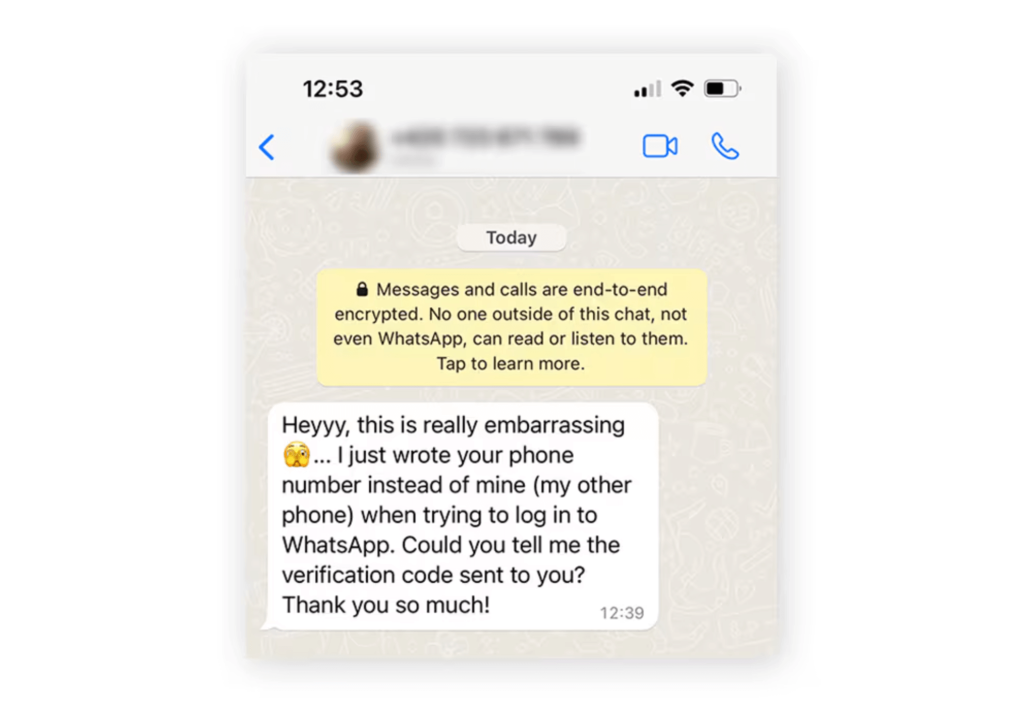
One of the most damaging tactics involves stealing your account entirely. A scammer will trigger a verification code to be sent to your number. Then, they’ll message you (perhaps posing as a friend who “accidentally” sent their code to you) asking you to forward it. If you send that code, you hand over the keys to your WhatsApp account.
Why Kids and Teens Are Vulnerable
Younger users might be digital natives, practically born with devices in their hands, but that doesn’t make them immune to fraud. In fact, their comfort with technology can sometimes be a blind spot, leading to 83% of all young adults falling for scams (higher than any other age group). Kids and teens are used to meeting people online, sharing digital content, and responding quickly to notifications.
They’re often less skeptical than adults about unsolicited messages. A teenager might see a message about a “free gift card” or a “brand ambassador” opportunity and click without thinking twice. They’re also targets for more predatory behavior, such as romance scams or sextortion, where scammers pretend to be a peer to build a relationship before demanding money or compromising photos.
Furthermore, kids might not understand the value of their personal information. They might unknowingly share their location, school details, or even their parents’ financial information if a scammer manipulates them effectively.
Most Common WhatsApp Scams
Credit: ca.norton.com
To help you spot trouble before it happens, let’s break down the most common scams on WhatsApp: how they typically begin, what the scammers are after, what a suspicious message might look like, and what you should do if you come across one.
Impersonation Scams (“Family Member,” “Friend,” or “New Number”)
You might suddenly get an unexpected message from someone claiming to be a family member or friend using a new phone number. The scammer will probably ask for money, urgent bank transfers, or even personal details, often spinning a story about an emergency. A typical message could be: “Hi, it’s me, I lost my phone. Can you help me urgently?” Always verify the person’s identity by calling their known number, and be extra careful if you get an unexpected message about money. These “friend in need” scams have cost WhatsApp users millions, showing they’re nothing to be trifled with.
Verification Code Scam / Verification Code Requests (Account Takeover)
This scam starts with the fraudster asking you to share a six-digit code that’s just been texted to you. They often pose as someone you know and tell you it was sent to your phone by mistake. They’re after your WhatsApp account and login details.
Look out for: “I accidentally sent my code to your number, can you send it to me?” Never share verification codes with anyone, even if they seem trustworthy, and enable two-factor authentication for added security.
Phishing Scams / Phishing Attacks
Here, you’ll receive messages containing fake links, often from scammers pretending to be a trusted business or even WhatsApp itself. Their goal is to steal your login credentials, personal information, or to install malware on your device.
Typical messages threaten you: “Your account will be suspended. Click here to verify your phone number.” Don’t click any links that seem suspicious, check the sender’s phone number, and only visit official WhatsApp pages.
WhatsApp Gold Scam / “Premium Version” Offers
This scam claims you can upgrade your WhatsApp or unlock a special premium version with exclusive features. In reality, there’s no such thing. Scammers want your data, payment for a fake upgrade, or to get you to install malware. You might get a message like: “Upgrade to WhatsApp Gold for exclusive features!”
Don’t believe any of these offers. Never click upgrade links, and remember, there’s only one official WhatsApp.
Job Scams / Fake Job Offers
You may get an unexpected message offering high-paying jobs or investments, often from an unknown WhatsApp number. Scammers either want your personal information, money for fake training, or just to get you to share bank details. They promise things like: “Earn $500/day from home! Send your details to apply.”
Always do background checks before accepting any job, never pay for training up front, and avoid sharing personal information with strangers.
Investment Scams / “Guaranteed Returns”
If you’re ever offered crazy, high-return investments with no risk, be skeptical. Scammers will message you with “great” investment opportunities (often involving crypto), and promise: “Invest $100 and get $1000 in a week!” They want your money or personal information. Research everything carefully and walk away from anything promising guaranteed results.
Romance Scams (Often via Dating Apps Moving to WhatsApp)
Scammers create fake profiles on dating apps, start chatting to build trust, and then persuade you to continue the conversation on WhatsApp.
Over time, they’ll ask for money to help with emergencies. Don’t send cash to anyone you haven’t met in person and be aware of red flags in online relationships.
Malware Install / Download Attachments
Sometimes scammers send links or attachments disguised as updates, apps, or videos (“Download this new WhatsApp update here!”), hoping you’ll download and install malware. They’re after access to your device and personal data.
Never download apps or open attachments from unknown sources, and always install WhatsApp directly from official app stores.
QR Code Phishing
Another sneaky trick is being sent a QR code to scan, which supposedly gives you a prize or benefit but actually compromises your personal data or installs malware. Common messages include: “Scan this QR code to win a prize!” Don’t scan QR codes from anyone you don’t trust, as scammers can use them to hijack your account or device.
Lottery Scams
These scams start with a message claiming you’ve won a prize or a lottery you didn’t enter. The scammers want your personal details or will ask for payment to claim your “winnings.” A typical text might read: “Congratulations! You’ve won the WhatsApp lottery. Send your details to claim.” Ignore these messages, and never share personal information or pay to collect a prize.
Read more: WhatsApp for Kids: Exploring Safety Concerns and Tips for Parents.
Red Flags: How to Spot a WhatsApp Scam Message
starline / Freepik.com
You don’t need to be a cybersecurity expert to spot a fake. You just need to know the telltale signs. Use this checklist to analyze any suspicious messages:
- Unknown number or different country code: If a “family member” or “friend” contacts you from a number you don’t recognize, especially if it has a foreign country code like +234 or +92, be extra cautious. Even if the profile picture looks familiar, verify their identity through another method.
- Unexpected message: Beware of messages about contests you never entered, jobs you didn’t apply for, packages you weren’t expecting, or surprise requests. These are major warning signs.
- Urgency and pressure: Scammers often try to make you act immediately so you don’t have time to think. Phrases like “immediate action required,” “family emergency,” or threats that your account will be suspended are designed to make you panic.
- Requests for money, bank cards, verification codes, or personal info: No legitimate company, bank, or government agency will ask you to transfer money via WhatsApp or request sensitive information, verification codes, or login credentials over chat.
- Suspicious links: Watch for links that look strange or slightly misspelled (e.g., “whats-app-support.com” instead of “whatsapp.com”). These often lead to phishing sites that steal your login details.
- Poor grammar, grammatical errors, or odd sender behavior: Many scammers operate from different countries, so look for awkward phrasing, grammar mistakes, or generic greetings like “Dear Customer” instead of your actual name.
- Profile inconsistencies: If a business or “official” account contacts you but doesn’t have the verified green checkmark, or if something feels off about their profile photo or info, proceed carefully.
- “Good to be true” investment opportunities or giveaways: Be very skeptical of messages promising guaranteed returns, exclusive offers, or expensive prizes you didn’t sign up for. If it sounds too good to be true, it probably is.
How Parents Can Protect Their Kids
As a parent, you need to combine education and the right tools. You can’t monitor every single message your child sends, but you can create a digital safety net.
Open Communication
Talk to your kids about the value of their personal information, explaining that people online aren’t always who they say they are. Make sure they know never to share their address, school name, or financial information on messaging apps. Encourage them to come to you if they receive a weird message, promising you won’t get angry or take their phone away.
Adjust Privacy Settings
although WhatsApp isn’t perfect, it has shut down more than 6.8 million accounts linked to scammers. You can do your part by paying close attention to your privacy settings. To do this, go into the WhatsApp settings:
- Profile photo: Set this to “My Contacts” so strangers can’t see their picture.
- Groups: Change settings so only contacts can add them to groups. This prevents scammers from adding them to crypto or spam groups.
- Two-step verification: Enable this immediately. It adds a PIN that is required to register the phone number with WhatsApp again, preventing account takeovers.
Using Parental Control Apps

Findmykids app
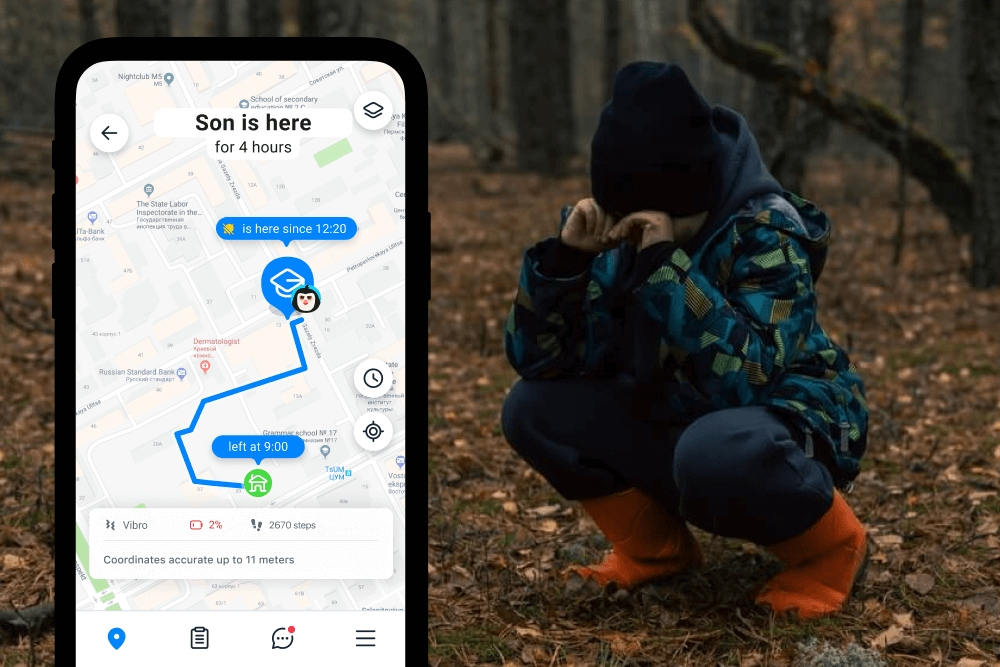
For an extra layer of safety, consider using parental control tools like Findmykids. While Findmykids is primarily known for GPS tracking to keep kids safe in the physical world, it also offers app management features on Android devices. You can see how much time your child is spending on WhatsApp.
This is especially important because, according to our research, WhatsApp is one of the top five most popular apps among children, ranking second overall and first among social apps. That makes it one of the most common platforms where kids communicate daily—and, unfortunately, one of the most likely places where they may encounter suspicious messages or scam attempts.
If you notice a sudden spike in WhatsApp usage, especially late at night, it can be a useful signal rather than a reason for panic. It might prompt a calm conversation about who they’re talking to, what kind of messages they’re receiving, and whether they know how to respond to strangers or unexpected links. Based on the data from the app, parents can make informed decisions: for example, temporarily blocking WhatsApp at night, limiting usage during certain hours, or even blocking the app entirely until they’re confident that privacy settings are secure and their child knows how to behave safely online.
The app also helps you monitor your child’s digital habits without being invasive, making sure they aren’t glued to their screen responding to a scammer’s urgent demands. By managing app usage, you reduce the window of opportunity for scammers to pressure or manipulate your child.
Findmykids
In addition to app control, Findmykids’ location tracking adds another important layer of protection. Geolocation data can help you notice if your child is visiting unfamiliar or potentially risky places—situations where someone may have persuaded them to meet in person or leave their usual routes. While location tracking shouldn’t replace trust, it can provide valuable context and help parents step in early if something doesn’t feel right.
Used together, app management and GPS tracking allow parents to stay informed, spot warning signs early, and support their child’s independence without constant monitoring or confrontation.
Try Findmykids today to protect your child both online and offline, and download the app to make safer digital habits part of everyday family life.
What to Do If Your Child Receives or Falls for a WhatsApp Scam
Panic is your enemy here. If the worst happens, you need to act methodically to secure their account and data.
If they receive a scam message:
- Do not reply: Responding confirms the number is active, leading to more spam.
- Block and report: Tap the contact name, scroll down, and select “Block.” You should also tap “Report Contact” so WhatsApp can investigate the number.
- Delete the message: Remove it so no one accidentally clicks the link later.
If they clicked a link or shared info:
- Disconnect from the Internet: Turn off Wi-Fi and mobile data immediately to stop any malware from sending data.
- Run a virus scan: If they downloaded an attachment, run a security scan on the device to find and remove malware.
- Change passwords: If they entered login credentials on a phishing site, change those passwords immediately from a different device.
- Contact the bank: If financial information was shared or your bank account details were compromised, contact your bank immediately to freeze your cards and monitor for fraud.
- Recover the account: If their WhatsApp account was stolen, reinstall WhatsApp and log in with your phone number. You will get a new verification code. Entering it logs the scammer out.
Staying One Step Ahead of WhatsApp Scammers
WhatsApp scams are evolving, but they rely on the same old tricks: urgency, impersonation, and too-good-to-be-true offers. You can shut down most attempts before they cause harm.
Keeping your personal or financial information private and securing your settings with two-step verification are your best defenses. Combine this awareness with supportive tools like Findmykids to manage screen time, and you’ll create a much safer digital environment for your children.
Stay alert, trust your gut, and when in doubt… block that unknown number!
FAQs
What are the most common WhatsApp scams?
The most common scams on WhatsApp include impersonation scams (where someone pretends to be a friend or family member), lottery and prize scams, gift card scams, romance scams, real estate scams, verification code scams, investment scams, and job offer scams. Recognizing these common scams is crucial to protect yourself from fraud and identity theft.
What are suspicious messages on WhatsApp?
A suspicious message on WhatsApp may include unsolicited links, requests for personal information, notifications about winning a lottery or prize, or urgent requests for money. Red flags include poor grammar, unknown senders, and messages that pressure you to act quickly.
What should I do if I got a verification code I didn’t request?
If you receive a WhatsApp verification code you didn’t request, do not share it with anyone. Scammers may be trying to access your account by tricking you into revealing your login details, which can lead to account takeover.
Can scammers hack me through WhatsApp?
Yes, scammers can attempt to hack you by tricking you into installing malware through fake apps, malicious links, or attachments disguised as legitimate updates or videos. They may also use QR code phishing, where scanning a malicious QR code gives scammers access to your account or device.
What are the common characteristics of WhatsApp scammers?
WhatsApp scammers often send messages that feel urgent or unusual, including suspicious messages with grammatical errors or emotional pressure. They may ask for personal or financial information or include unexpected links and phishing links designed to steal data. Scammers typically avoid WhatsApp video calls and real-time interaction, as these make it harder to hide their identity. To stay safe, WhatsApp users should review their security settings, be cautious of unknown contacts, and watch out for other scams that follow similar patterns.
Is WhatsApp safe with end-to-end encryption?
WhatsApp uses end-to-end encryption, which means your message content is protected and cannot be read by third parties, including WhatsApp itself. However, you should still be cautious of scams and phishing attempts.
What is the WhatsApp Gold scam?
The WhatsApp Gold scam involves fake offers to upgrade to a premium version of WhatsApp called “WhatsApp Gold,” which does not exist. Scammers use this ruse to trick users into downloading malware or providing personal information.
How do job scams work on WhatsApp?
Job scams often involve scammers contacting victims through a WhatsApp number, offering fake job opportunities. They may ask for personal information, upfront payments, or direct you to suspicious links.
How can I protect my WhatsApp account?
Enable two-step verification, never share your verification code or login details, and be cautious of unsolicited messages or links. Always verify the identity of anyone asking for sensitive information.
What if the scammer is pretending to be a family member?
If someone contacts you on WhatsApp claiming to be a family member and asks for money or sensitive information, verify their identity through another method before responding. Scammers often use this tactic in impersonation scams.
Cover image: freepik / Freepik.com
Проверьте электронный ящик