
The ease of online gambling has fundamentally changed how youth interact with betting services. A recent shift in the industry shows that a large number of gamblers now place bets exclusively through mobile phones, making the risk of gambling addiction a constant presence in a child’s pocket. For a parent, knowing how to block gambling apps on an iPhone is a necessary and important step in protecting a child’s financial future and mental health.
Establishing effective blocking requires more than just deleting gambling apps. It involves a layered strategy that uses Screen Time, specialized blocking software, and parental control tools to restrict access to gambling websites. By taking control of the home network and various devices, you can create a digital environment where gambling content is no longer a click away.
Contents:
Why Gambling Apps Are a Serious Concern for Parents
The danger of online gambling sites lies in their 24/7 availability and the sophisticated gamification of betting. Unlike a physical casino, gambling online allows a person to lose a large amount of money in total secrecy, often from the privacy of their own bedroom. For kids and teens, the setup process of these apps often mimics harmless mobile games, making it difficult for them to recognize when dangerous gambling habits are forming.
When a minor has access to gambling websites on an iPhone, the psychological rewards of gambling can quickly lead to a gambling problem. Gambling operators use targeted ads and push notifications to encourage frequent gambling activity and keep users engaged for long periods. Without parental control software, a child can easily install an app and bypass basic restrictions.
Key Risks of Mobile Gambling
- The “Loot Box” Trap: Many video games now feature gambling mechanics that let kids spend money for a chance at a virtual prize, blurring the line between gambling and online gaming.
- Financial Devastation: Because gambling transactions are digital, it is easy for a teen to lose track of how much money they are actually spending until the damage is done.
- Mental Health Impact: a Gambling addiction is often linked to increased anxiety, depression, and academic decline in younger users.
- Targeted Manipulation: Online gambling sites use algorithms to offer “free” credits or bonuses that entice people with a gambling problem to keep playing.
- Ease of Access: With a few taps on a phone, a person can bypass self-exclusion lists or block gambling filters if the setup quality of their blocking software is low.
Online gambling apps pose real risks to children. Parents can take concrete steps to protect their kids: block gambling websites and apps, monitor digital activity, discuss how in-game rewards work, and control financial access.
Can iPhone Block Gambling Apps by Itself?
Many parents want to know if Apple’s internal tools are enough to block gambling. While Screen Time is a powerful feature, it is often most effective when used as a baseline rather than a total solution. You can use privacy restrictions to limit the types of apps downloaded from the App Store, but gambling sites can still be accessed through a mobile browser.
Native control allows you to block gambling websites by their specific URLs. The large number of new online gambling domains makes manual entry difficult. This is why blocking access usually requires a combination of iPhone settings and external software.
How to Block Gambling Apps on iPhone Using Screen Time
To begin blocking access, you must use Content & Privacy Restrictions in iOS. This process ensures that even if an app is free to download, the phone will still restrict its installation.
Step-by-step native blocking:
- Open the Settings menu on the iPhone or iPad.
- Tap Screen Time, then create a passcode that the child does not know.
- Select Content & Privacy Restrictions and toggle the switch to turn it on.
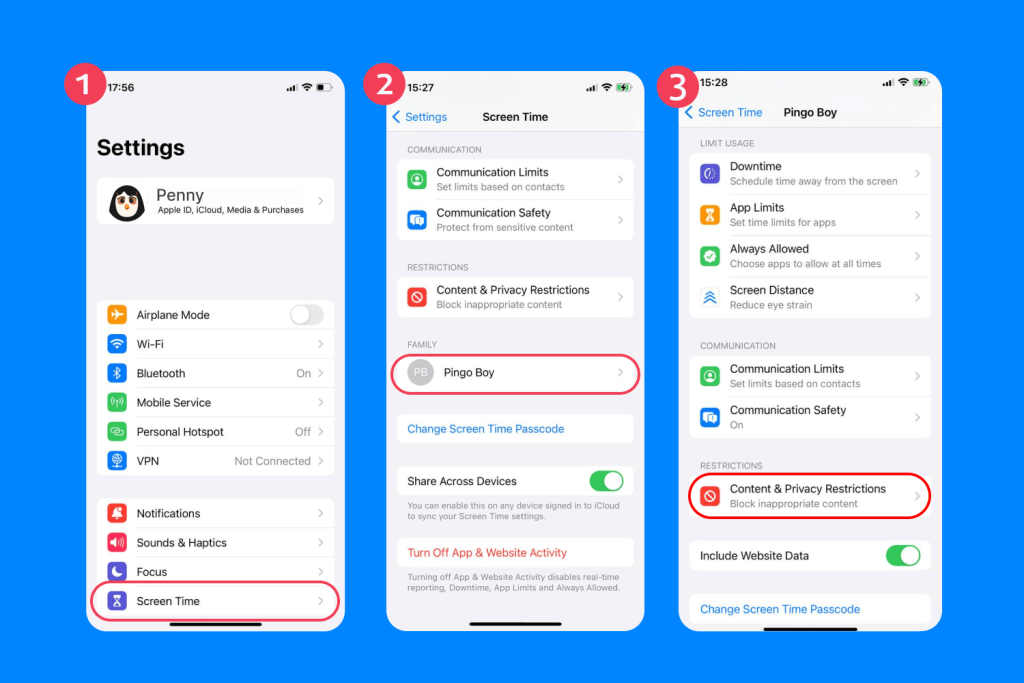
- Block app installation:
- Go to iTunes & App Store Purchases → Installing Apps → Don’t Allow. This prevents new gambling apps from being installed.

- Go to iTunes & App Store Purchases → Installing Apps → Don’t Allow. This prevents new gambling apps from being installed.
- Block websites:
- Tap Content Restrictions → Web Content → Limit Adult Websites.
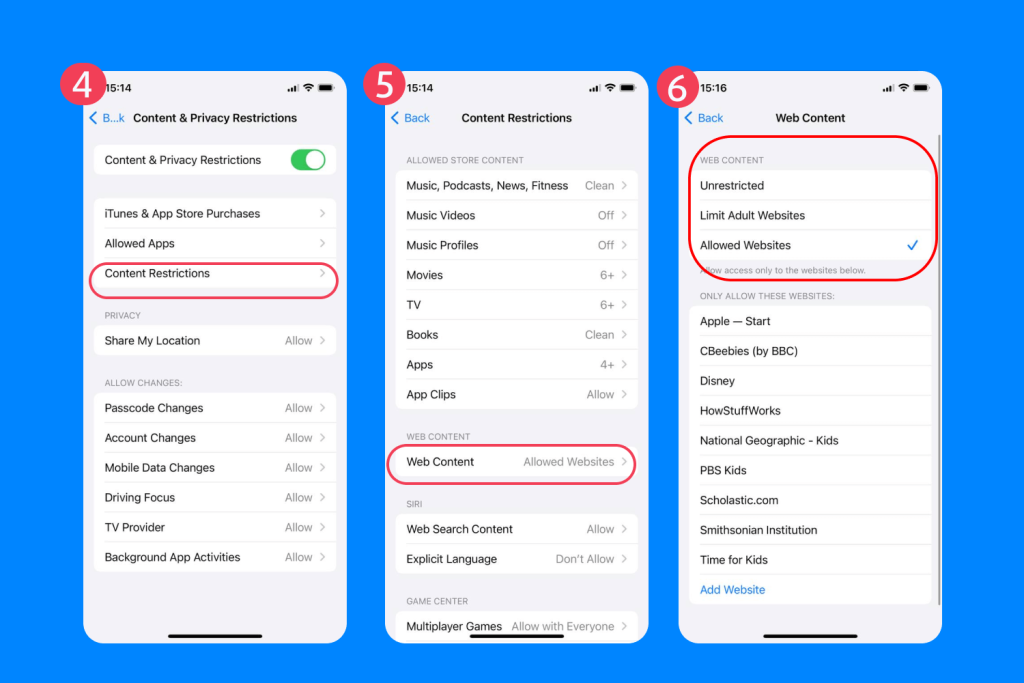
- Under Never Allow, manually add gambling site URLs to block permanently.
- Tap Content Restrictions → Web Content → Limit Adult Websites.
- Block existing gambling apps (or restrict app use):
- Go to App Limits → Add Limit → choose categories like Games or Entertainment, or select specific apps.

- Set daily time limits (even 1 minute effectively blocks usage).

- Go to App Limits → Add Limit → choose categories like Games or Entertainment, or select specific apps.
All these settings can be applied remotely via Family Sharing from the parent’s iPhone—detailed guide.
How Findmykids Helps Parents Stay Aware
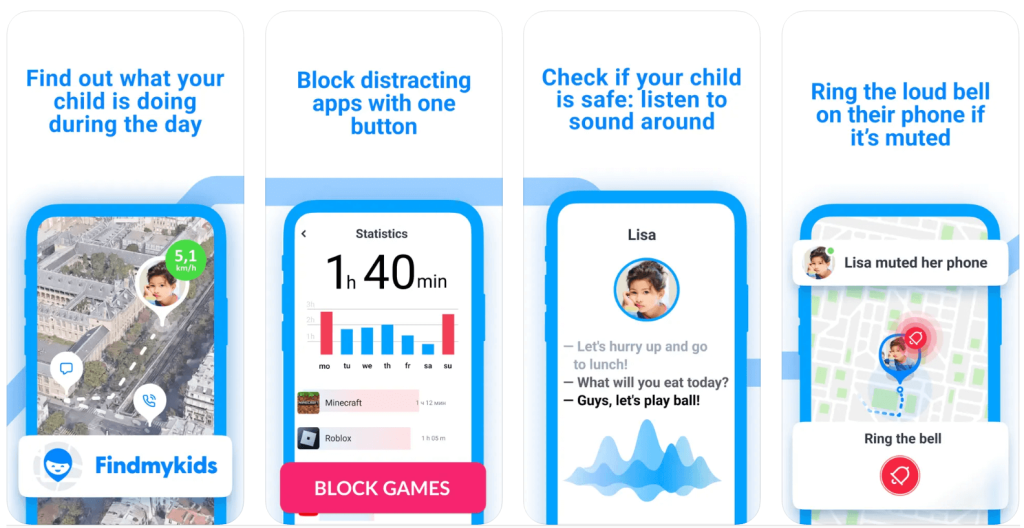
Findmykids app
Findmykids on iPhone focuses on prevention and safety, giving parents practical tools to protect their children from gambling, adult content, and unsafe apps. Rather than monitoring every app in detail, it provides reliable control and offline safety, helping parents stay engaged with their child’s digital life responsibly.
Key iPhone features:
- Block All Apps Permanently: Prevent access to all apps if necessary, including gambling or other unsafe apps.
- Block 18+ Websites: Stop access to adult or gambling websites directly on the child’s device, supplementing iOS restrictions.
- Block In-App Purchases: Prevent accidental or intentional spending in apps, including games with gambling-like mechanics.
- Offline Safety Tools: Use SOS and Loud signals and the Sound Around feature to ensure your child’s safety even without internet access.
- Location-Based Safety: Receive notifications if your teen visits a location associated with gambling or other high-risk activity, adding real-world awareness that standard blockers cannot provide.
With Findmykids, iPhone parents can set strong digital boundaries, protect their child’s well-being, and respond quickly in emergencies. It’s a practical, safety-first solution that combines prevention, control, and offline protection.
Keep your child safe online and offline with the Findmykids app!
Specialized Gambling-Specific Blocking Software
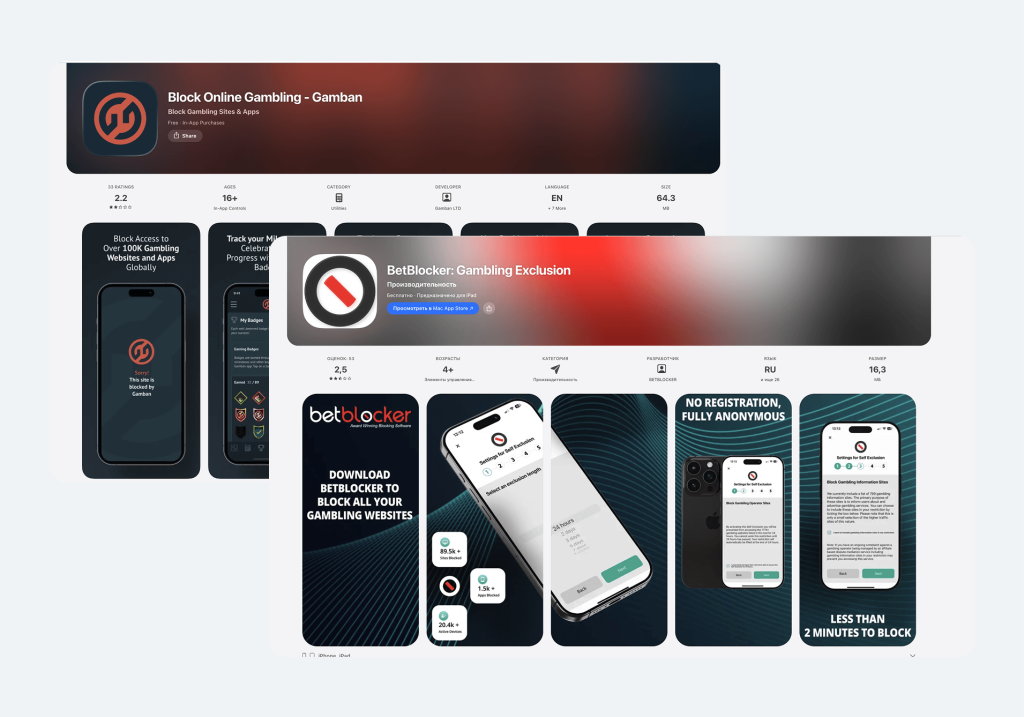
App Store
For those dealing with a gambling problem, general parental control software may not be enough. This is when gambling-specific blocking software, such as the Gamban app, becomes a necessary and important step.
Why Specialized Software is More Effective
Specialized software is designed to block gambling transactions and specific URLs associated with online gambling sites. While a standard app might only restrict the browser, a gambling blocker works at the system level of the computer, phone, or tablet.
- Hard Blocks: These tools are notoriously difficult to delete or bypass, and they impose a set period of self-exclusion.
- Universal Coverage: Specialized software can be installed on as many devices as needed, including Windows and Android.
- Transaction Blocking: Some services even work with banks to block gambling transactions directly from an account.
Examples of Gambling‑Specific Blocking Apps
- Gamban. A dedicated gambling blocker that prevents access to thousands of online gambling sites and apps across devices. Once installed, it blocks gambling content at a system level so that websites and apps related to betting cannot be opened. Works on Windows, MacOS, Android and iOS (via configuration). Ideal for adults and older teens needing strict exclusion.
- BetBlocker. A free self‑exclusion tool that blocks access to gambling sites and apps across multiple devices. It offers different self‑exclusion timeframes and can be used alongside other support tools. Works on computers and mobile devices through installation or browser extension.
- GamBlock. One of the longest‑standing gambling blockers available. Blocks online gambling sites on supported devices and provides configurable exclusion periods. Available for Windows, macOS and Android. GamBlock is known for strong system‑level blocking that’s difficult to remove without a password.
- Cold Turkey Blocker (with gambling lists). Not gambling‑specific but highly customizable blocking software: you can add lists of gambling domains and apps to a block schedule. Works on Windows and macOS. Useful if you want flexible blocking (e.g., during study or recovery periods).
- Self‑Exclusion Registers (not an app but important). In many countries, national self‑exclusion programs allow gamblers to register and then be banned from licensed gambling operators’ platforms. While not software, this is an important legal complement to blocking tools (e.g., GAMSTOP in the UK).
How to Block Gambling Websites on iPhone via Network Settings
If you want to block gambling websites for every device, you should look at your home network. Adjusting your router settings can block gambling sites for everyone connected to the Wi-Fi, including those on a computer or iPad.
- DNS Filtering: Use services that automatically block online gambling sites at the router level.
- Browser Extensions: Install free browser extensions on every computer to block gambling while the child is doing schoolwork.
- VPN Restrictions: Ensure your parental control settings also block unauthorized VPNs that could bypass your restrictions.
Related: The Best Methods to Block Websites on a Router.
Why Blocking Works Best with Further Support
It is vital to remember that blocking software is a tool, not a cure. For a teen battling a gambling problem, blocking access is just one part of a recovery journey. Parents must provide additional support and encourage seeking professional help.
Recognizing Signs of Gambling Addiction
- Sudden secrecy around devices or apps.
- Frequent checking of phones late at night or during school hours.
- Spending money on in-app purchases or online games that resemble gambling.
- Emotional changes such as irritability, anxiety, or depression linked to device use.
- Preoccupation with gambling sites or withdrawal when blocked.
Actions Parents Can Take:
- National Gambling Helpline: Reach out for free counseling and guidance when you notice warning signs.
- Self-Exclusion Lists: Help your teen register with self-exclusion programs to block access to gambling operators for a set period.
- Accountability and Dialogue: Discuss online habits openly and set boundaries using parental control software. Focus on trust and understanding, not just restrictions.
- Monitor Safely: Use safe monitoring tools like Findmykids to stay aware of location or emergencies, without infringing on privacy.
- Professional Support: Consider therapists or local support groups specializing in adolescent gambling prevention.
Blocking alone is not enough. Combining digital restrictions with education, dialogue, and professional guidance gives teens the best chance to avoid or overcome gambling-related risks.
A Proactive Path to Safety
Learning how to block gambling apps on iPhone is a powerful and important step toward a safer digital life for your family. By combining native iOS restrictions, gambling-specific blocking software, and the awareness provided by Findmykids, you create a robust defense against online gambling.
True, effective blocking comes from a combination of technology and support. Stay interested in their gambling habits, keep internet control active, and always be ready to address any signs of a gambling problem with empathy and further support.
FAQs
Can Screen Time block gambling apps on iPhone?
Yes, you can use Screen Time to restrict app downloads and limit access to gambling websites.
How do I block gambling websites on iPhone?
Go to Settings → Screen Time → Content & Privacy Restrictions → Content Restrictions → Web Content and manually add gambling websites to the Never Allow list.
Is deleting gambling apps enough?
No, because a person can easily reinstall the app or access online gambling sites through a browser.
What is gambling-specific blocking software?
It is specialized software, like the Gamban app, designed specifically to block gambling transactions and gambling content across as many devices as possible.
Cover image: SashkaB / Freepik.com
Проверьте электронный ящик