If you’re looking for a family safety or parental control app, Life360 and Verizon Smart Family could be a couple of the options you’re considering. But which is best for parents? Below, we take a deep dive into Life360 vs Verizon Smart Family, looking at the safety features, tools, and limitations of each to help you make a decision.
Contents:
What are Life360 and Verizon Smart Family?
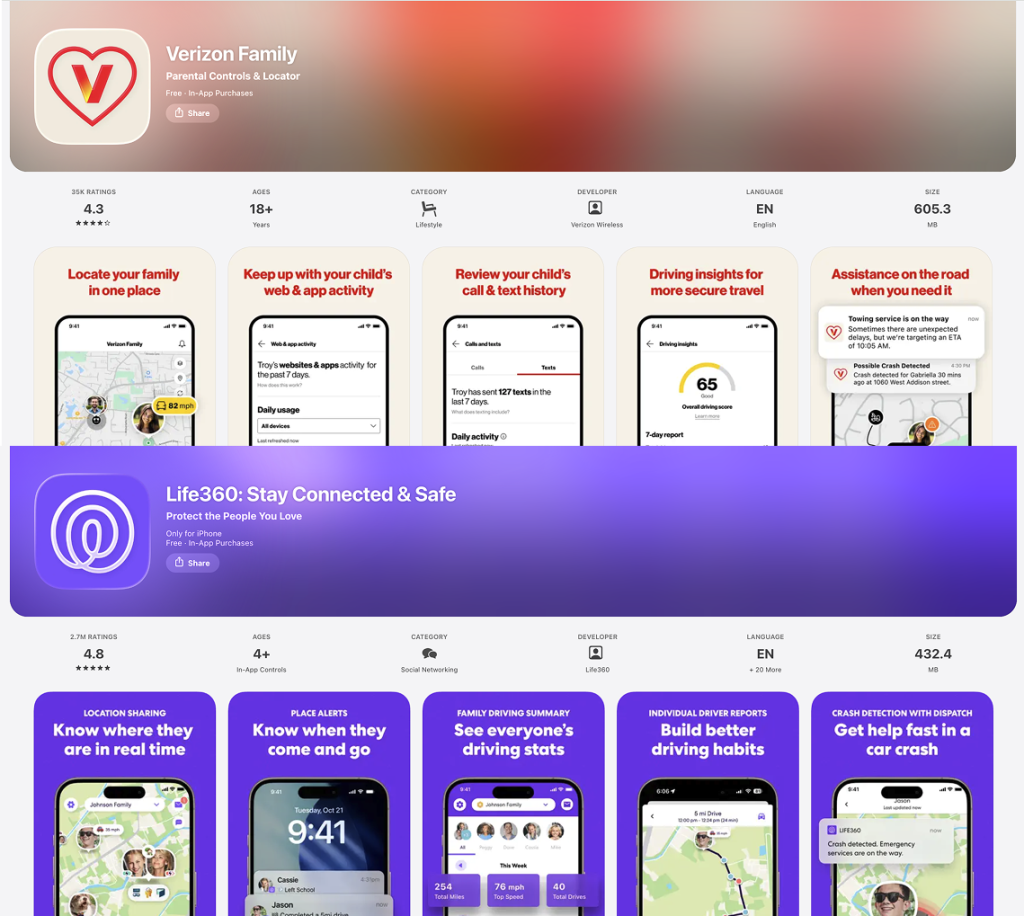
App Store
Life360 and Verizon Smart Family are both family safety apps that offer location tracking tools.
- Life360 typically does best when it comes to real-time location tracking, geofencing alerts, and location history, and also offers crash detection, particularly helpful for parents concerned about driving safety.
- Verizon Smart Family, on the other hand, is the better choice for parents seeking more digital oversight and control over what their kids are doing online and their phone usage. As well as real-time GPS tracking, it offers call and text monitoring and screen time controls.
While the terms may be used interchangeably, it’s important to recognize the difference between family safety and digital supervision. The first is about providing a range of comprehensive safety features that help family members stay safe and connected both on and offline, while the second is focused on overseeing and managing a child’s internet usage and online activities.
When comparing Verizon Smart Family to Life360, it’s also crucial to look at device compatibility and plans to select the best option for your family’s needs.
- Life360 works across all devices and different carriers, including Android and iOS, and the app has a free plan that offers basic features. More features can be accessed via a paid plan, such as roadside assistance and ID theft protection.
- The Verizon Smart Family app, meanwhile, can only be used by Verizon customers. The app requires a Verizon plan, and its basic location tracking features are free to access. A premium plan is available for $14.99 a month and gives access to additional feature sets, including parental controls and location sharing services for all family members’ phones.
Read also: Life360 vs Bark: Which App Works Better for Parents?
Life360 vs Verizon Quick Verdict: Which is Better?
While choosing the best option will depend on every family’s unique circumstances and needs, Life360 is generally the superior choice regarding family location tracking and physical safety. Its geofencing and SOS alerts, real-time GPS tracking, and crash detection allow parents to always stay in the loop when it comes to their child’s whereabouts.
Moving on to parental controls and screen time limits, Verizon Smart Family could be the better option. Its wide-ranging suite of features includes content filtering tools and the ability to block apps designed to ensure children have a safer online experience.
To make the differences easier to compare at a glance, here’s a quick breakdown:
| Best for | App |
| Physical safety and real-time location tracking | Life360 |
| Parental controls and screen time management | Verizon Smart Family |
| A balanced solution combining safety, tracking, and digital parenting tools | Findmykids |
Key Features Comparison
Most parents want both a family tracking app and a parental control tool in a single package, making the choice between Life360 and Verizon Smart Family a tricky one. That’s why it’s worth breaking down the key features in more detail.
Life360 vs Verizon Smart Family for Location Tracking
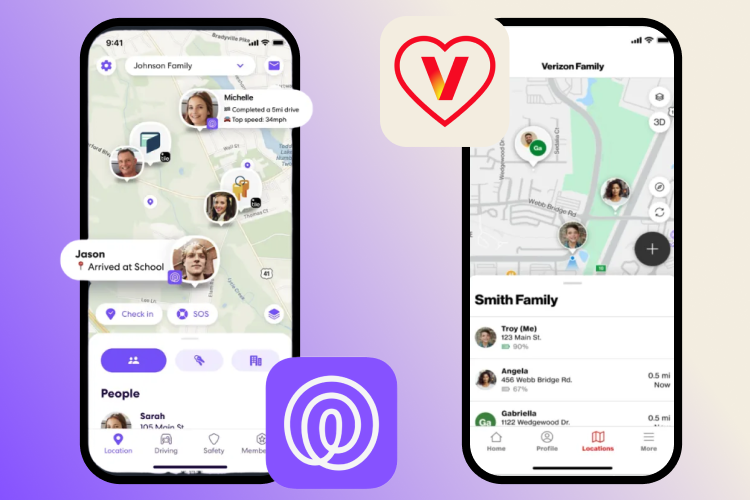
If you’re looking for constant location sharing and real-time tracking, the standalone app Life360 is a solid choice. As well as accurate family tracking and location data on multiple devices, it offers geofencing alerts, which means you’ll receive a notification when a family member arrives at or leaves a set location, such as work or school.
While Verizon Smart Family also offers location tracking features, you’ll need an existing Verizon account to use this app. In general, Life360 is likely to be the better choice for those seeking a family tracking app, as it’s particularly strong around location tracking and emergency response.
| Feature | Life360 | Verizon Smart Family |
| Real-time location tracking | Yes | Yes |
| Location history (timeline) | Yes | Limited |
| Routes / trip history | Yes | No |
| Geofencing alerts | Yes | Yes |
| Device / carrier requirements | Works independently | Verizon account required |
Life360 vs Verizon Smart Family for Driving Safety
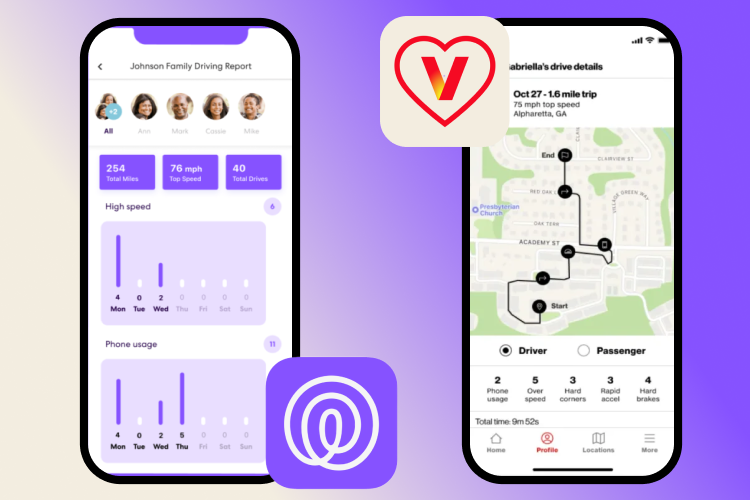
Life360 offers crash detection and driving insight tools, especially helpful for parents keen to keep an eye on how their new teen drivers are behaving on the road. Driving reports give you an overview of total miles driven, top speeds, and any unsafe events, such as using a phone while driving or hard braking. Life360 also has an emergency assistance feature, which notifies emergency contacts in the event of an accident to ensure a quick response.
Verizon Smart Family also offers driving insights similar to those of Life360, such as around speed and hard braking, but does not offer an emergency response feature. For families with new drivers, Life360 is probably the best choice.
| Feature | Life360 | Verizon Smart Family |
| Driving behavior reports | Yes | Limited |
| Speed tracking | Yes | Yes |
| Hard braking detection | Yes | Yes |
| Phone use while driving detection | Yes | No |
| Crash detection | Yes | No |
| Emergency alerts to contacts | Yes | No |
| Trip summaries / driving history | Yes | Limited |
Life360 vs Verizon Smart Family for Parental Controls
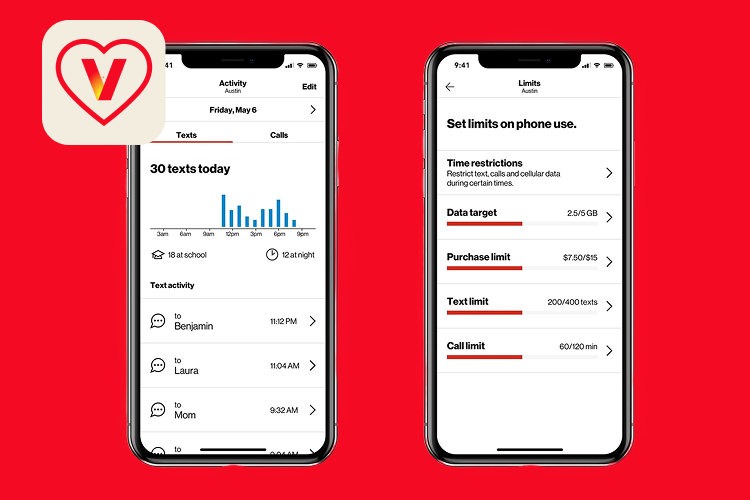
Both Life360 and Verizon Smart Family offer an array of family safety features designed to help parents stay connected with their kids. While Life360 is strong for location sharing and driving safety reports, it’s much more limited in terms of parental controls, which may be an issue.
Verizon Smart Family has a more comprehensive range of parental control options and tools to promote online safety. These include content filters, app blocking, call and text monitoring, and the ability to set screen time limits, all of which work directly through the Verizon network, which could make them harder for kids to circumvent. However, only Verizon customers can access the Smart Family app and its screen time management features, whereas Life360, as a standalone solution, has much broader compatibility across devices and carriers.
| Feature | Life360 | Verizon Smart Family |
| Screen time management | Limited | Yes |
| App blocking | No | Yes |
| Web / content filtering | No | Yes |
| Call & text monitoring | No | Yes |
| Communication controls (contacts limits) | Limited | Yes |
| Activity / usage insights | Limited | Yes |
| Ease of bypass by child | Higher | Lower (network-level controls) |
Limitations that Parents Should Know About
While both Life360 and Verizon Smart Family have their strengths, there are some limitations that parents should be aware of. Starting with Life360, the app doesn’t offer communication monitoring, and privacy concerns have been raised by some users. Further, premium features can only be accessed via paid tiers. Moving on to Verizon Smart Family, this app can only be used by existing Verizon customers, and it offers fewer advanced tracking insights and limited emergency features.
There’s another issue shared by both options.
Life360 and Verizon Smart Family both have a focus on surveillance, which can cause trust issues, with kids feeling frustrated at a lack of privacy. Such close digital supervision and monitoring of kids’ phones or text messages risks rebellion, potentially tempting children to find workarounds to “beat the system.”
In today’s world, kids are extremely tech-savvy, and you may be surprised at just how adept they are at jumping digital hurdles.
A More Balanced Alternative: Findmykids
Findmykids app
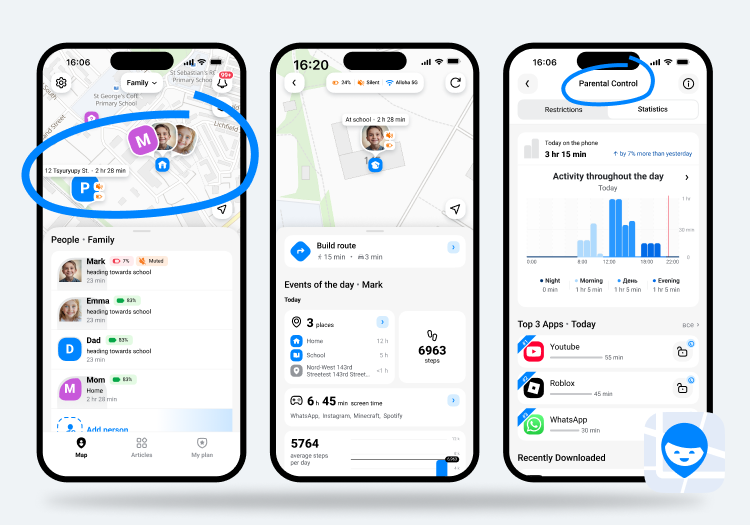
Given these differences and limitations, what’s the answer? Life360 offers strong tracking but weak controls, while Verizon Smart Family is good for control, but has limited flexibility. While Life360 focuses primarily on location tracking and Verizon Smart Family provides carrier-based controls, the Findmykids app brings both together in a more flexible and parent-friendly way, combining real-time tracking, app management, and safety features in one place.
Findmykids is an all-in-one parental control and family tracking app, which has care and connection at its heart, rather than surveillance and control.
The platform features app management tools that allow parents to see which apps their child has used and how long they have spent in each, to help identify patterns and problems early. You can use Findmykids to block apps, either entirely or selectively, for a set time period or permanently, which can be particularly useful to stop kids from getting distracted at homework or bedtime.
When it comes to phone safety, Findmykids also has parents covered, too. Block calls from unknown numbers from connecting to your child’s phone, and view the call log to show both incoming calls and blocked numbers that have attempted to get through.
Moving on to physical safety, Findmykids provides real-time location tracking, location history, and route history, as well as custom place alerts, so you’ll receive a notification when your child arrives at or leaves a designated place. You can also bypass Do Not Disturb mode, meaning that, if you need to get hold of your child in an emergency, they’ll receive a loud alert on their phone. Further, the Sound Around tool allows you to listen in to what’s going on around your kid, for context, which can be invaluable should your child be lost, for example, or you’re worried they’re being bullied. For transparency and trust, your child will be notified when Sound Around is activated.
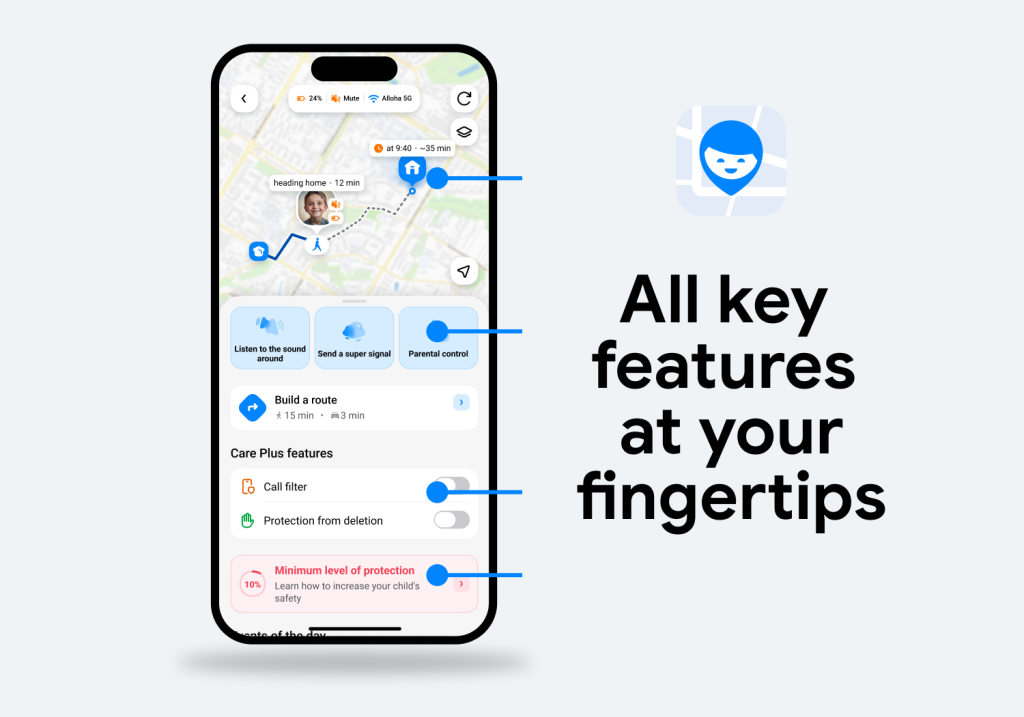
Findmykids has a focus on promoting trust and personal development, which can make a real difference in nurturing family connectedness. If you’re looking for a reliable family safety app that combines parental controls with location tracking and has a user-friendly, intuitive interface, this option is likely to be the best for your needs.
Download the Findmykids app for free to start enjoying its features and benefits today!
So, Which App Should You Choose?

| App | Compatibility | Location Tracking | Parental Controls | Standout Features | Best for |
| Life360 | Android & iOS | Strong | Limited | Driver safety insights, crash detection, family circles | Families focused on driving safety and real-time location tracking |
| Verizon Smart Family | Verizon users only | Limited | Strong | Web filtering, call & text monitoring, carrier-level controls | Verizon users looking for built-in parental controls tied to their mobile plan |
| Findmykids | Android & iOS | Strong with high accuracy | Strong | App usage insights, app blocking, Sound Around, Loud signal, SOS button, family circles | Parents who want both digital monitoring and real-world safety features in one app |
⠀
Related: Findmykids vs. Life360: Which Location-Tracking App is Best for Your Family?
In summary, if you want just a tracking tool, Life360 is probably the best option for you, but if you’re currently a user of the Verizon ecosystem, Smart Family may be the better choice. And if you want both? Findmykids offers the perfect blend of balanced control and tracking to help keep kids safe both on and offline, and gives parents that all-important peace of mind.
FAQs
Is Life360 or Verizon Smart Family better for parents?
Both Life360 and Verizon Smart Family are focused on family safety and have their unique strengths. Life360 is generally very strong when it comes to family tracking, driver insights, and emergency features, whereas Verizon Smart Family is more focused on parental control, incorporating web filtering and screen time limiting tools. Which is best for parents will ultimately depend on an individual family’s circumstances and needs.
If you’re looking for a more balanced solution that combines both safety and screen time management in one place, it may also be worth considering apps like Findmykids, which bring together location tracking, app usage insights, and flexible controls.
Which app is better for location tracking and driving safety?
Generally speaking, Life360 is a strong option for location tracking and driving safety. As well as real-time location tracking, the app offers a range of driver safety features such as insights that detail unsafe events, hard braking, high-speed driving, and the use of phones while driving. The app also includes emergency features that can notify contacts in case of an accident.
Alternatively, if your focus is less on driving and more on overall child safety and everyday monitoring, apps like Findmykids provide location tracking alongside additional tools for managing screen time and digital habits.
Does Verizon Smart Family offer stronger parental controls than Life360?
Many users find that Verizon Smart Family’s parental controls are stronger and more comprehensive than those offered by Life360. While the latter’s parental controls are limited, Verizon Smart Family tools include web filtering and app blocking features, screen time management tools, and call and text monitoring. However, Smart Family is only available to those already using Verizon services.
For families who want similar controls without being tied to a specific carrier, solutions like Findmykids can offer app usage monitoring and flexible app blocking features across both Android and iOS devices.
Can you use Life360 without Verizon?
Yes, you can use Life360 without Verizon. Life360 is a standalone family safety app that doesn’t need a specific carrier to function. It’s compatible with Android and iOS devices, and an account can be accessed via a web browser, but tracking features cannot be accessed.
Can you use Verizon Smart Family without Verizon?
No, Verizon Smart Family is designed specifically for Verizon customers and requires an active Verizon mobile account to work. It is tied to the carrier’s network and services, which means it isn’t available as a standalone app for families using other providers. If you’re looking for a similar set of parental controls without being tied to a specific carrier, it may be worth considering apps like Findmykids.
Проверьте электронный ящик