
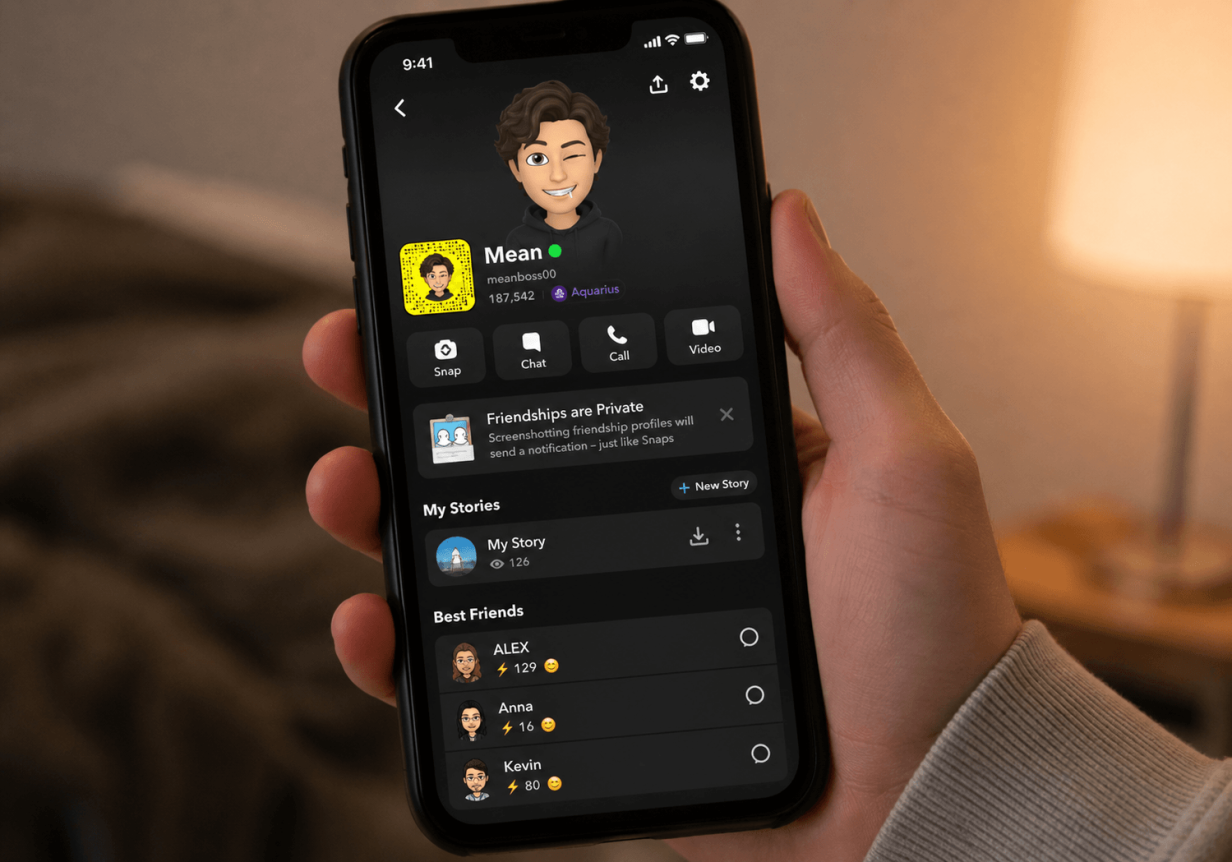
Snapchat is one of the most popular apps among teens, allowing them to send photos and videos to their friends. When you see your child using Snapchat, or maybe you have Snapchat yourself, you might notice a green dot appears next to a contact’s name, but it doesn’t appear next to others. This leaves you wondering, what does the green dot mean on Snapchat?
In this post, we’ll explain exactly what the green dot on Snapchat means, how to stay informed when your child uses Snapchat, and ways to elevate privacy settings on the app.
Contents:
What Is the Green Dot on Snapchat?
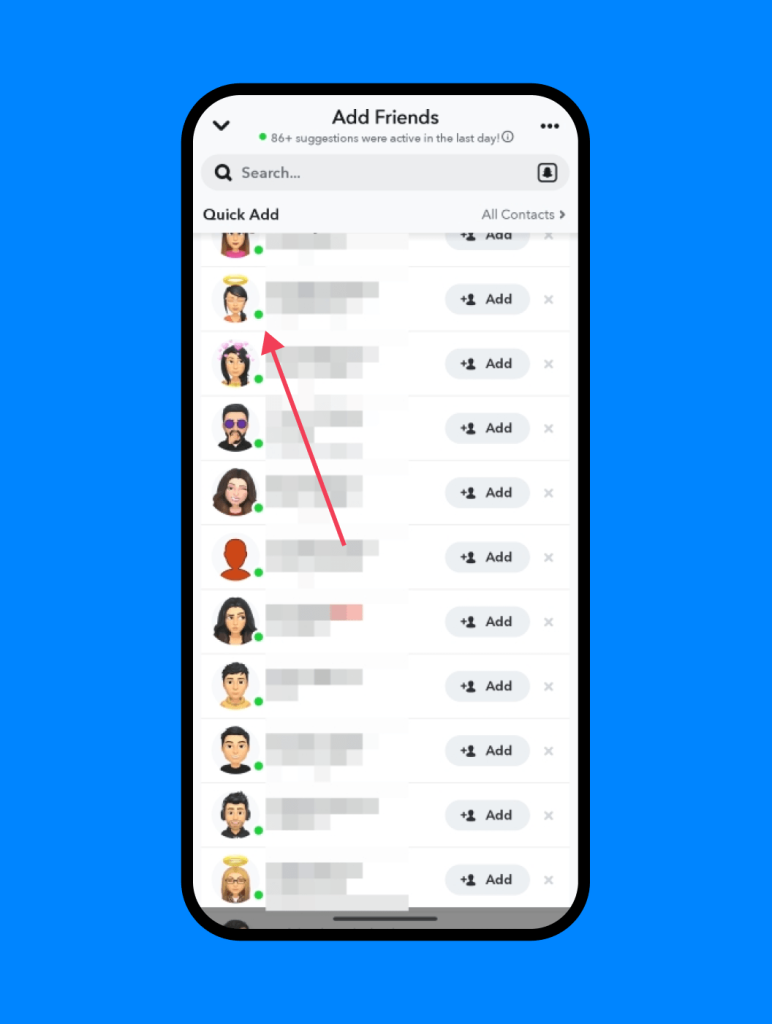
The green dot on Snapchat is an activity indicator that shows when a user is currently active or has been active recently.
You’ll see it appear next to a friend’s name or Bitmoji, indicating that they are either online at the moment or have used the app within a recent timeframe, such as the past hour.
This indicator can show up in several places across the app — including the chat list, a user’s profile, and the “Quick Add” section, where suggested friends appear. It helps others understand whether someone is likely to be available, and many users take it as a signal that a message might be seen and answered quickly.
Does the Green Dot Mean Your Child Is Online Right Now?
Yes, when you see a green dot next to your child’s name on the Snapchat chat list, it likely means they are online. However, it is not necessarily a real-time indicator of exactly when they are using the app.
If your child has a Snapchat account, then it’s a good idea for parents to have one too. This allows you to view your child’s stories on the app. But it also allows you to see if your child is currently online and using the Snapchat app, thanks to the green dot next to their name.
How Accurate Is the Green Dot on Snapchat?
The green dot on Snapchat is fairly accurate, but it is not meant to be a real-time activity status indicator. There are some cases where the green dot shows up next to someone’s name up to an hour after they were active on the app. So, the green dot on Snapchat means there was recent activity from the user, but not necessarily that they are using the app at that very second.
Should Parents Be Concerned?
Parents should always be aware of what the apps that their children use do and any potential danger they pose. When it comes to the green light on Snapchat, there are some privacy concerns that parents should be aware of.
This feature actively shows when a user is using the Snapchat app. And in some cases, your child may be sharing their location on the Snap Map, updating where they are every time they open the app. This can be extremely dangerous if strangers start to engage, such as sending Snaps, with your child.
However, if the child’s account is set to private, which is highly recommended, then these privacy concerns become less of an issue. The main concern is how much time your child is spending on the app. Too much screen time can lead to mental and physical issues, especially when used late at night.
Related: Recommended Screen Time for Kids: How Much Is Healthy by Age.
What the Green Dot Doesn’t Tell You
While the green dot on Snapchat tells you that a user is active on the app or was recently using it, that’s about as much information as it shares. For example, the green dot symbol does not provide information about:
- Who your child is talking to on the app
- A history of chats or who your child interacts with
- What your child is doing in the app
- How much time is your child spending on Snapchat
- Whether interactions on Snapchat are safe
Fortunately, there are apps that can tell parents these details and can be extremely helpful in keeping teens safe while online.
How Parents Can Stay Informed About Their Child’s Phone Usage
Knowing your child is online isn’t the same as knowing that your child is safe.
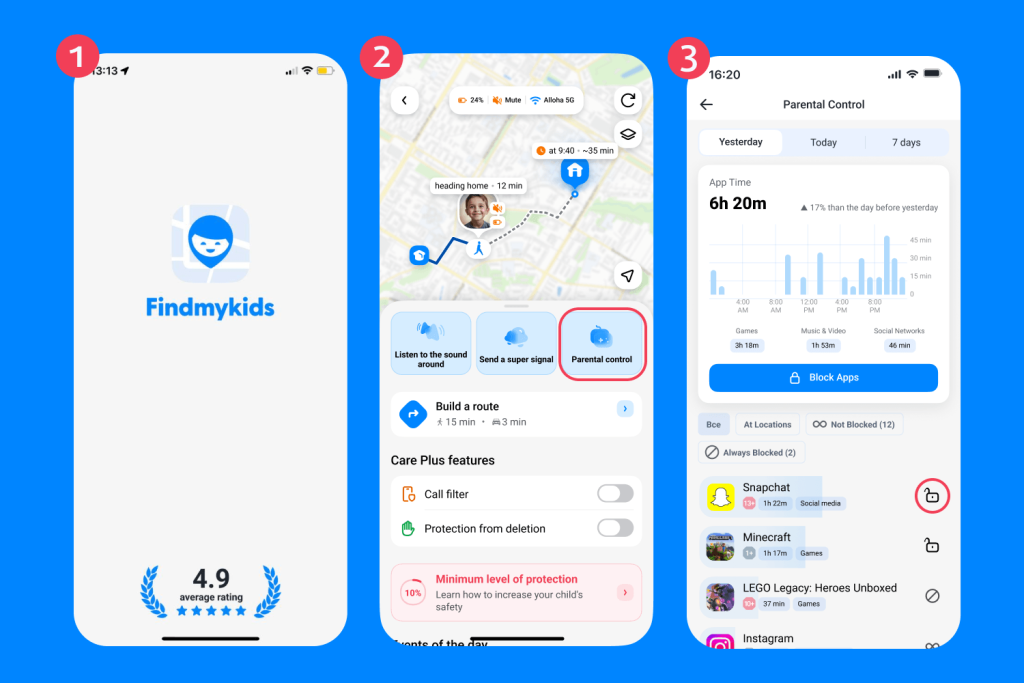
The best way parents can stay informed about how their child uses their phone (including Snapchat) is with the Findmykids app. This all-in-one parental control app provides information about what apps your child uses, how much time they spend on them per day, and even where they use them.
And while this information can be extremely helpful, it’s the parental control features that make the app worthwhile. Parents can set screen time limits and even block individual apps. That means you can temporarily block Snapchat for a set period of time if you feel your child is spending too much time on it. And, if needed, you can also remotely block all apps on your child’s phone.
How to Use Findmykids
Findmykids app
Findmykids is designed to be intuitive and easy to use. Below are some instructions on how to use it:
- Download the Findmykids app from the App Store or Google Play Store.
- Follow all instructions to link your child’s phone.
- Open the Findmykids app on your phone.
- Choose your child’s profile.
- Tap Parental Controls.
- Find Snapchat in the list of apps and tap the lock icon to block it completely or restrict access for a set period of time.
- Alternatively, tap Block Apps to restrict access to all distracting apps at once, except system apps, which can be individually included or excluded depending on your settings.
Additional Features Parents Find Useful
Findmykids app
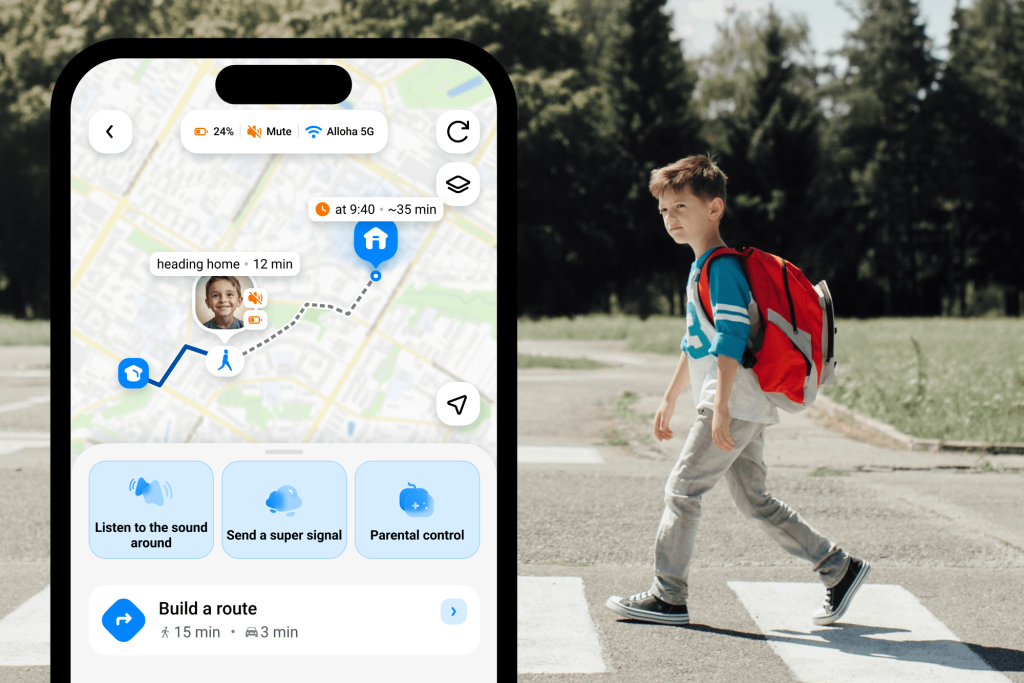
App control is only part of what Findmykids offers. The app is designed to give parents a fuller picture of their child’s safety and daily routine—without constant calls or messages.
In addition to managing screen time, parents can:
- Track their child’s real-time location and view movement history
- Receive notifications when a child arrives at or leaves key places like school or home
- See which apps their child uses and how their screen time changes over time
- Listen to the surrounding environment (on supported devices) to determine if there are safety concerns
- Stay connected through quick signals and alerts in urgent situations
Download Findmykids and take a more complete view of your child’s safety and screen time today!
What Does the Green Dot Mean for Privacy?
The green dot on Snapchat indicates that a user is currently active or was recently using the app. From a privacy standpoint, it does not reveal location or show how long someone has been online. It simply signals recent activity.
Why Activity Status Can Feel Intrusive
But even a simple activity indicator like the green dot can feel uncomfortable for some users. Seeing when someone is online may create an unspoken expectation to reply quickly, which can add pressure—especially for teens, where social dynamics often revolve around instant responses.
For some, this constant visibility can feel like being watched or monitored, even if no detailed information is shared. While the feature is designed to improve communication, it can also raise concerns about privacy and personal boundaries, particularly when users feel they are expected to be “available” at all times.
Read also: Is Snapchat Safe and Private for Kids?
How to Turn Off the Green Dot on Snapchat
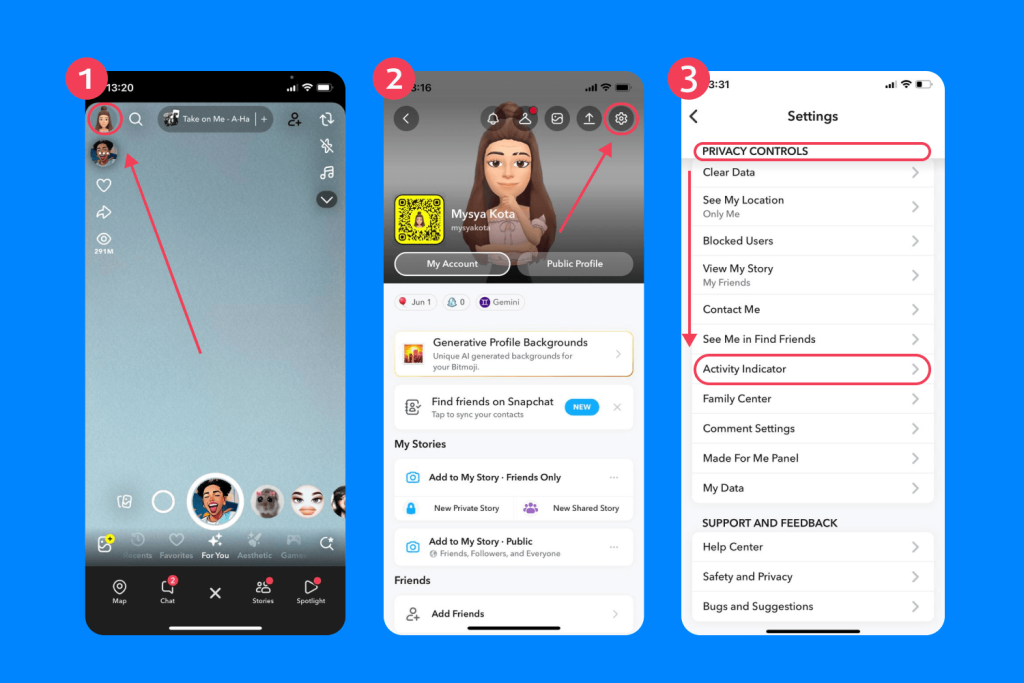
Findmykids app
In some cases, users may want to hide their activity status on Snapchat. To disable the green dot on Snapchat in privacy controls, follow the steps below:
- Open Snapchat.
- Go to your Snapchat profile.
- Tap the gear icon to open Settings.
- Scroll down to Privacy Controls.
- Tap Activity Indicator.
- Toggle it off.
This makes the green dot next to your profile disappear, so people cannot see when you are on the app.
Reasons to Turn Off the Green Dot
It’s very common for users to remove the green dot from their Snapchat profile when they want more control over their digital footprint, want more privacy, or want to create social boundaries.
When their friends see that they are active online, they may feel more pressured to respond to messages. If they do not respond right away, even though they have the green dot, it can lead to misunderstandings between friends. But remember, that green dot appears even after someone has closed the app.
Overall, turning off the activity indicator is a way to protect one’s peace and instill digital boundaries.
Is the Green Dot on Snapchat Dangerous?
No, the green dot on Snapchat is not dangerous. It simply lets people know when a user is active or has been recently active on the app. Many social media apps have this feature, including Instagram and Facebook.
As parents, it can be helpful to know when your child is actively using Snapchat, especially if it’s late at night. However, that green dot is just a brief insight into your child’s digital behaviors. You can get greater detail and analytical data when you use the Findmykids parental control app.
If you found this article helpful and informative, make sure to share it with a friend who is also curious about what the green dot means on Snapchat.
FAQs
What does the green dot mean on Snapchat?
The green dot on Snapchat means that a user is currently or was recently using the app.
Does the green dot mean someone is active right now?
Not necessarily. The green dot still appears next to someone’s name in the chat screen or on the chat list up to an hour after the user was active.
How do I turn off the green dot on Snapchat?
You can turn off the green dot on Snapchat in the Privacy Controls. Click on the gear icon in your Snapchat profile and tap Activity Indicator. Then toggle the feature off.
Can people see my green dot on Snapchat?
Yes, mutual friends and people that you have interacted with on Snapchat can see the green dot next to your name. It appears on the chat screen, on your profile, and even in the “Quick Add” section.
How long does the green dot stay visible?
The green dot disappears within a few minutes to an hour after someone uses the app. It’s important to understand that it is not a real-time monitor of when someone is on the app, so it is not meant to be depended on for accuracy.
Does the green dot mean someone is chatting with me?
When you have a message conversation with someone on Snapchat and a green dot is next to their name, it means that they are either currently active or were recently active on the app.
Cover image: generated by ChatGPT / OpenAI
Проверьте электронный ящик