

















If you’re wondering, “Is Kik safe?”, you’re asking an important question. While Kik Messenger has been around for years, its anonymous features, public communities, and ability to connect strangers make it different from many other messaging apps.
If your child already has a Kik account or wants to download the app, understanding how it works can help you make informed decisions and have better conversations about online safety.
Key Takeaways
- Kik Messenger lets users communicate without sharing a phone number, making it easier for strangers to start conversations than on many other messaging apps.
- Although Kik includes some safety features, it has limited moderation and doesn’t offer built-in parental controls, so your guidance is essential.
- Your child could encounter unwanted messages, inappropriate content, scams, cyberbullying, grooming attempts, and adult communities through public groups and live streams.
- Open conversations, strong privacy settings, and tools like Findmykids can help you stay connected to your child’s digital life without turning online safety into surveillance.
Contents:
What Is Kik and How Does It Work?
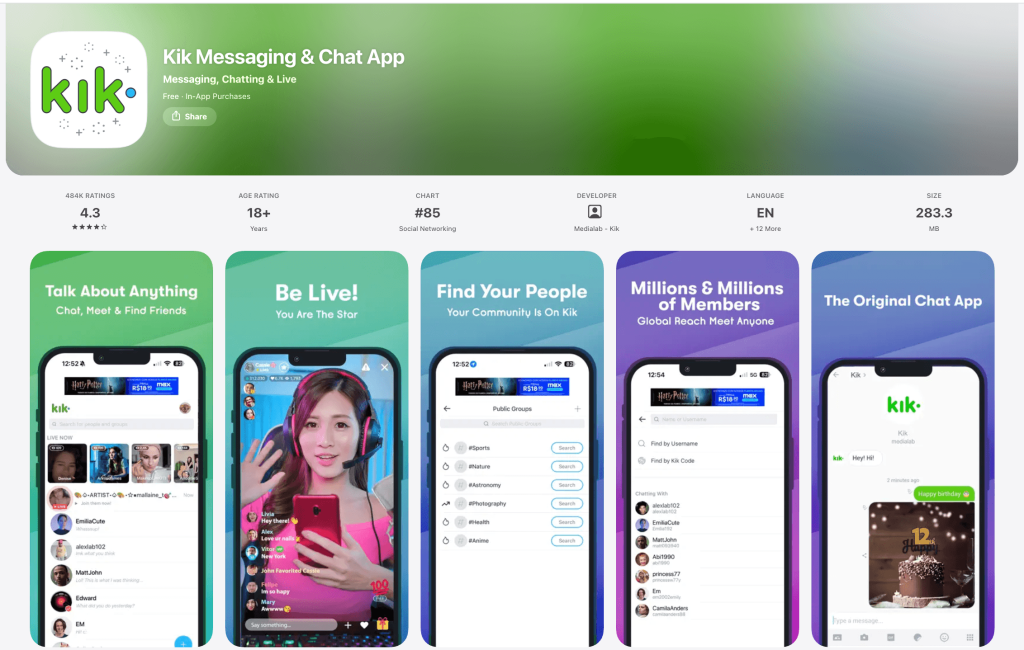
The Kik app is a free messaging platform available on Android and iPhone. Like many messaging apps, it lets users send messages, photos, GIFs, stickers, videos, and links using Wi-Fi or mobile data instead of traditional text messages. Beyond messaging, Kik includes other features like live streams, public groups, and virtual gifts.
Your child doesn’t have to share a phone number with other users. Instead, every Kik account is connected to a username, which can make the app feel more anonymous than many other platforms.
Kik Messenger and Private Chats
Kik Messenger works much like other messaging apps. Your child can start private conversations, create new chats, and manage messages from a single inbox.
Instead of searching by phone number, people connect using a username or by scanning a unique code called a Kik Code. That means someone your child has never met can still find their Kik account if they know the correct username.
Every chat appears in the main chats list, where messages can be read, answered, or deleted.
Username, Display Name, and Kik Code
Every account includes several identifying features.
| Feature | What It Does |
| Username | A permanent identifier people use to find a Kik account |
| Display name | The name shown during conversations that can be changed |
| Profile picture | An optional photo visible to other users |
| Kik Code | A scannable unique code for adding contacts quickly |
⠀
Unlike some social media platforms, Kik has a limited verification process, so it’s easier for someone to create fake profiles or pretend to be someone else.
Public and Private Group Chats
Kik allows users to create or join a group chat with dozens or even hundreds of people. Some group conversations are private and only include friends, while others are public groups that anyone can join.
Kik Live Streams
Kik has expanded beyond messaging by adding live streams, which let users watch videos, leave comments, and purchase virtual gifts for creators. While plenty of streams are harmless, many streams include mature conversations or themes that aren’t appropriate for children.
Because moderation is limited, live streams can expose users to risky interactions or encourage them to continue conversations in private chat messages.
Meet New People and Random Chats
One of Kik’s biggest draws and one of its biggest risks is how easy it is to meet new people.
Several discovery features connect users with others who share similar interests. Some third-party communities even encourage random chats, making it easy for your child to start talking with a random person they’ve never met. Essentially, the more new chats your child starts, the more likely they are to interact with a random stranger.
Is Kik Anonymous?
Although Kik doesn’t automatically reveal your child’s phone number, every conversation is connected to a Kik account and username.
Other users won’t immediately see personal information unless your child shares it. Still, anonymity often makes people feel more comfortable taking risks or behaving in ways they wouldn’t face-to-face.
What Is the Minimum Age for Kik?
According to Kik, users generally must be at least 18 years old or meet the minimum digital consent age in their country.
Even if your child meets that age requirement, that doesn’t automatically mean the app is a good fit. Before you let them use Kik, consider whether they can recognize red flags, ignore peer pressure, and leave uncomfortable conversations without hesitation.
It’s also important to know that Kik doesn’t require strict age verification, making it possible for younger users to create an account using false information.
What Are the Main Kik Safety Risks?

rawpixel.com / magnific.com
No app is dangerous by itself. The concern comes from how certain features can be misused. Kik combines anonymity, public communities, and limited moderation, creating risks that are important to understand before your child begins using the platform.
- Unwanted messages from strangers: Unlike some messaging apps, Kik makes it easy for strangers to contact other users. A simple greeting can quickly become repeated unwanted messages or requests to move the conversation elsewhere. Encourage your child to trust their instincts, tap block, and report suspicious accounts.
- Inappropriate content: Your child may encounter inappropriate content in private chat, public groups, or live streams, including explicit images, sexual images, violence, offensive language, spam, or links to unsafe websites. Some communities encourage sharing inappropriate content despite Kik’s community standards.
- Grooming and sexual extortion: Online predators often spend days or weeks gaining a child’s trust before asking for personal information, photos, or private conversations. These interactions can lead to grooming, blackmail, or sexual extortion. Anonymous messaging platforms have also been linked to the distribution of illegal material involving child sexual abuse material.
- Public groups, live streams, and dating-style interactions: A harmless-looking group name doesn’t always reflect what’s happening inside a group. Some public groups, live streams, and Kik’s dating section expose users to adult content, sexual discussions, or encourage them to meet new people and join private new chats. Remind your child never to assume the person behind an account is who they claim to be.
- Cyberbullying: Like many online platforms, Kik can become a place for cyberbullying and harassment. If your child receives abusive messages, encourage them to stop responding, save screenshots before they delete anything, report the account, tap block, and tell a trusted adult.
- Scams and impersonation: Not every Kik user is genuine. Some accounts are bots or scammers that send messages containing phishing links, fake giveaways, or requests for passwords, verification codes, money, personal information, or photos and videos. If something seems suspicious, stop communicating and report the user.
- Privacy and digital footprint: Although Kik doesn’t display your child’s telephone number, every message, photo, or video they share can be copied or saved. Remind your child never to share identifying information, passwords, financial details, or intimate photos in a private chat.
- In-app spending: Kik is free to download, but live streams allow users to purchase virtual gifts. Review your device’s purchase settings and require approval for in-app purchases to avoid unexpected charges.
What Safety Features Does Kik Have?
Kik includes a handful of built-in safety features, but they don’t provide the same level of protection you’ll find on some other platforms.
Some of the tools available include:
- Block users: To block someone, open the chat. Tap the menu, and show your child how to block and report another user.
- Report accounts: Report spam, harassment, impersonation, or violations of Kik’s community standards directly within the app.
- Privacy settings: Adjust settings to reduce unwanted contact from other users.
- Content moderation: Kik may remove some content that violates its policies, but its limited moderation means harmful content isn’t always caught immediately.
Related: How to Protect Personal Information Online in Your Family.
Does Kik Have Parental Controls?
Kik does not offer built-in parental controls. Unlike some messaging apps, you can’t link your child’s account to your own, approve contacts, monitor conversations, or automatically restrict certain features.
What Should You Do If Your Child Uses Kik?
If your child wants to use Kik, banning the app outright isn’t always the only answer. A better approach is helping them recognize risks before they encounter them.
Talk About Online Strangers
Make sure your child understands that not everyone online is who they claim to be.
Explain that someone can use a fake username, profile photo, or display name to pretend they’re another teenager. Encourage your child to tell you if anyone asks for personal information, photos, or wants to move the conversation to another platform.
Use Parental Controls
Findmykids app
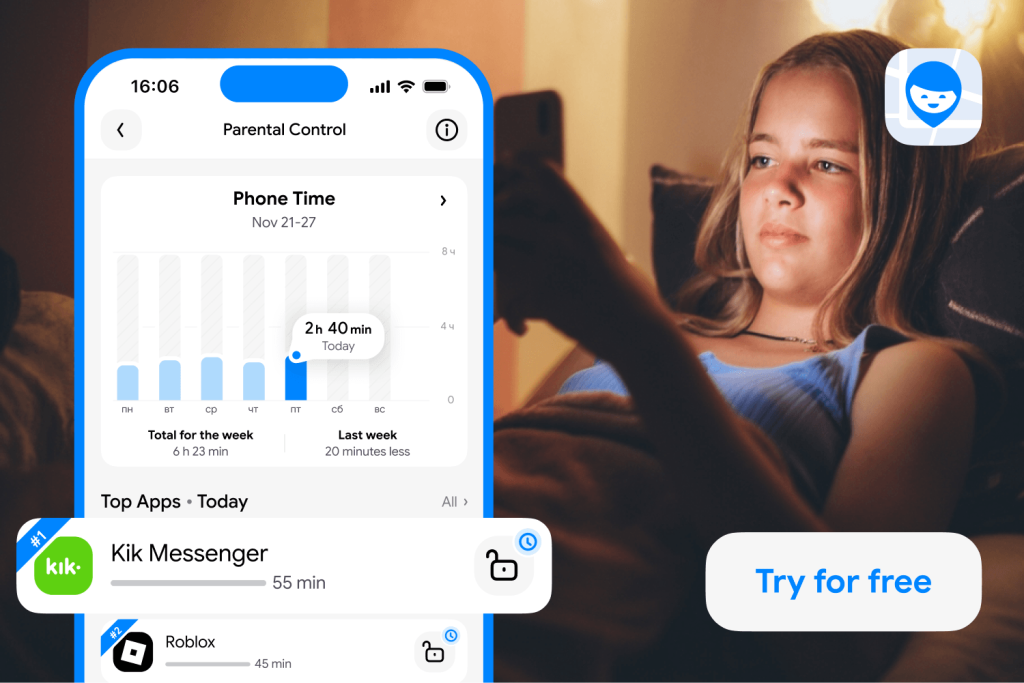
Instead of relying only on restrictions, parental control tools can help families create safer digital habits while keeping children connected. Findmykids allows parents to stay informed about their child’s digital routine and location without reading private conversations.
With Findmykids, parents can:
- Set screen time schedules: Create daily routines that limit device use during school hours, homework, bedtime, or other important moments.
- Block or limit distracting apps: Restrict access to games, social networks, or other apps when children need to focus, while keeping essential communication tools available.
- Monitor device activity: Get insights into how children use their smartphones and understand their digital habits better.
- Track real-time location: See where a child is on the map and receive notifications about important arrivals or departures.
- Create family circles: Add trusted relatives and caregivers so multiple loved ones can stay connected and share location information when needed.
- Use emergency safety features: Send loud signals or quickly reach a child’s device when a phone is muted or a child does not respond.
A good parental control app is not about constant surveillance. It helps families create clear expectations, support responsible smartphone use, and give children more freedom as they learn to navigate the digital world.
Create healthier smartphone routines with Findmykids. Set limits, manage apps, and stay connected with your child wherever they are!
Set Communication Rules
Before your child starts using any messaging apps, agree on a few simple rules.
For example:
- Only talk with people you know in real life
- Never share your address, school, passwords, or financial information
- Never send photos or videos you’re uncomfortable sharing publicly
- Leave any group that becomes inappropriate
- Tell a trusted adult if someone makes you uncomfortable
Review Privacy Settings Together
Take a few minutes to go through the app together.
Show your child where to tap settings, review notification preferences, and learn how to report or block another user. Understanding these tools before they’re needed makes it much easier to respond confidently if something goes wrong.
Read more: Social Media Privacy Settings: What to Change First — and Why It Matters.
Stay Connected Without Constant Monitoring
Children are often more willing to ask for help when they don’t feel like they’re being watched every minute.
Instead of reading every chat, focus on building trust through regular conversations about what they’re seeing online, who they’re talking to, and how they’re feeling about their digital experiences.
What Are Safer Alternatives to Kik for Teens?
If your child wants to stay connected with friends, there are several apps that generally offer stronger safety tools than Kik. No app is completely risk-free, but here are some you may want to try as an alternative to Kik:
| App | Why it may be a better choice |
| End-to-end encryption and communication with existing contacts | |
| Findmykids | Allows families to create private circles with trusted contacts. Children can communicate safely with approved family members inside the app while parents and loved ones can also see each other’s location on the map, making it easier to stay connected and feel secure |
| Messenger Kids | Built specifically for younger children with parent-managed contacts |
| Apple Messages | Works well for families using iPhones and includes built-in parental features |
| Google Messages | Familiar texting experience with Family Link compatibility |
| Discord | Better suited for older teens, though parental guidance is still important because public servers can present similar risks |
Read also: 20+ Secret Text Messaging Apps: Everything Parents Need to Know.
Should You Let Your Child Use Kik?
Whether you let your child use Kik depends on their maturity and your comfort level. Its anonymous usernames, public groups, and limited moderation make it riskier than many other messaging apps.
If your child already has a Kik account, don’t panic. Talk with them about the risks, review the privacy settings together, and make sure they know they can come to you if something online feels wrong.
No app can replace open communication, and that’s still (and likely always will be!) the best tool for keeping kids safe online.
FAQs
Is Kik safe for 12-, 13-, or 16-year-olds?
Kik generally requires users to be at least 18 years old. Even then, the app may not be appropriate for every young adult. Because it allows strangers to connect easily and has limited moderation, many online safety experts recommend waiting until older teens are mature enough to recognize scams, grooming attempts, and inappropriate conversations.
Can people find me on Kik without my phone number?
Yes. People can find your Kik account using your username or Kik Code. Your phone number isn’t required for someone to start a conversation.
Does Kik have parental controls?
No. Kik doesn’t offer built-in parental controls. You’ll need to rely on your device’s parental control tools, privacy settings, third-party apps like Findmykids, and regular conversations with your child.
How many random chats does Kik allow?
There isn’t a fixed limit on how many random chats someone can have. A user can continue starting more chats with new people, especially through public communities or third-party services that connect strangers.
Can deleted Kik messages be recovered?
In many cases, no. Once messages are deleted or disappear from a device, they may not be recoverable. If your child receives threatening or inappropriate content, save screenshots and report the account before deleting the conversation.
Sources & References
- What is Kik?, Internet Matters, 2026
- Kik Community Standards, Kik, 2026
- Blackburn presses Kik on kids safety after ‘disturbing’ research report, The Hill, June 12, 2026
- The Online Disinhibition Effect, CyberPsychology & Behavior, 2004
Cover image: arialfatih / magnific.com
Проверьте электронный ящик