Over half of U.S. teens (ages 13–17) are Instagram users, making it one of the most popular social media sites for this age group. Parents need to become familiar with Instagram to better monitor their kids’ digital safety. Here are some key things to know about the site, along with steps to reset an Instagram password if necessary.
Key Takeaways
- Resetting an Instagram password is a simple process, but the exact steps depend on the device and login method.
- If a reset email does not arrive, there are several recovery options, including checking spam folders, verifying contact details, and using SMS or linked accounts.
- Fake password reset emails are a common phishing tactic, so it’s important to verify the sender before clicking any links.
- Parents should regularly talk with kids about digital safety and help them build habits like using strong passwords and enabling two-factor authentication.
- Using parental controls from Findmykids can keep kids safe on Instagram, on other online sites, and even in real-world situations.
Contents:
How to Reset Your Instagram Password
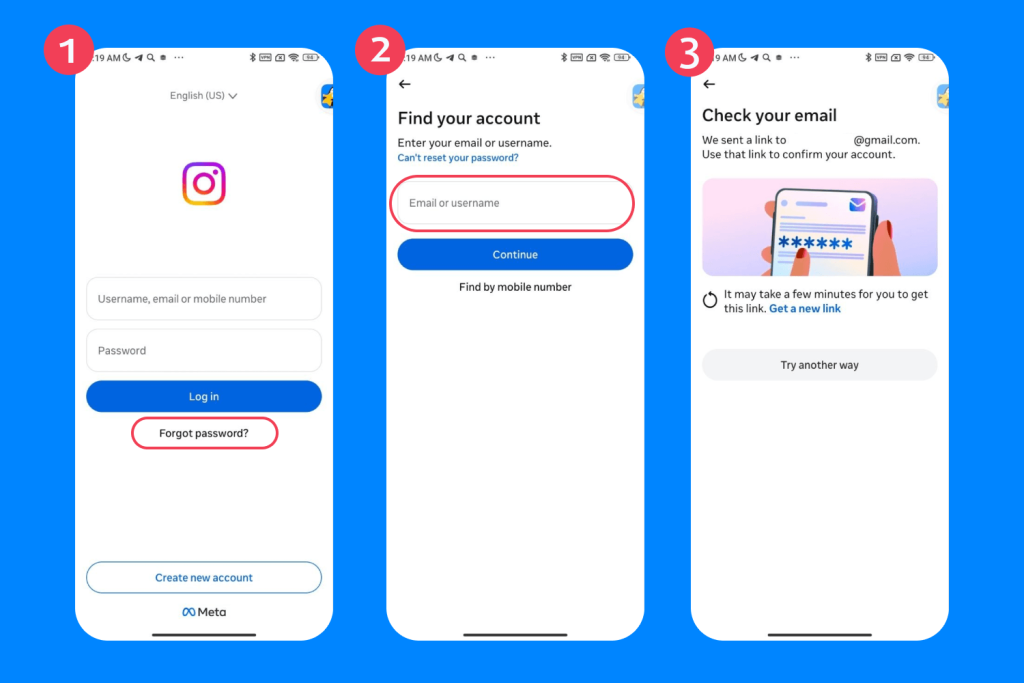
Resetting an Instagram password is easy, but the steps vary slightly by device. In all cases, you will first need to request password reset emails from Instagram before following the recovery instructions.
From the Instagram App on iOS
- On the login screen, above Log in, tap Forgot password?.
- Next, enter your username, email, or phone number, and then tap Continue.
- Follow the on-screen instructions.
- A password reset link or code will be sent to your email address or phone number.
From the Instagram App on Android
- On the login screen, below Log in, tap Forgot password?
- Then enter your username, email, or phone number.
- Tap Continue and follow the on-screen instructions.
- A password reset link or code will be sent to your email address or phone number.
From a Computer Browser
- On the login screen, click Forgot password?
- Enter your username, email address, or phone number, then click Send login link.
- Click OK and then follow the on-screen instructions.
- A password reset link or code will be sent to your email address or phone number.
Read also: Is Instagram Safe for Kids to Use: What Parents Need To Know.
What to Do if the Reset Email Does Not Arrive?
If you are not seeing the password reset email in your inbox, try the following steps:
- Check your spam, junk, promotions, or social folders.
- Make sure you entered the correct email address or phone number connected to your Instagram account.
- Wait a few minutes and try requesting a new reset link again, as email delivery can sometimes be delayed.
- If your Instagram and Facebook accounts are linked, try logging in or resetting your password through Facebook.
- Try a different recovery method, such as receiving a login code by SMS instead of email.
- Make sure your email service provider is not blocking messages from the @instagram.com domain.
What to Do if the Reset Link Expires?
If your password reset link expires, you can request a new password reset email by following the same recovery steps again. Make sure to open the newest reset link, as older links usually become invalid once a new one is generated.
How to Reset Your Instagram Password While Logged In
If you’re logged into your account and have your current password, you can change it from Settings.
- Tap Profile or your profile picture in the bottom-right corner.
- Tap the Menu icon in the top-right corner.
- Go to Accounts Center, then tap Password and Security.
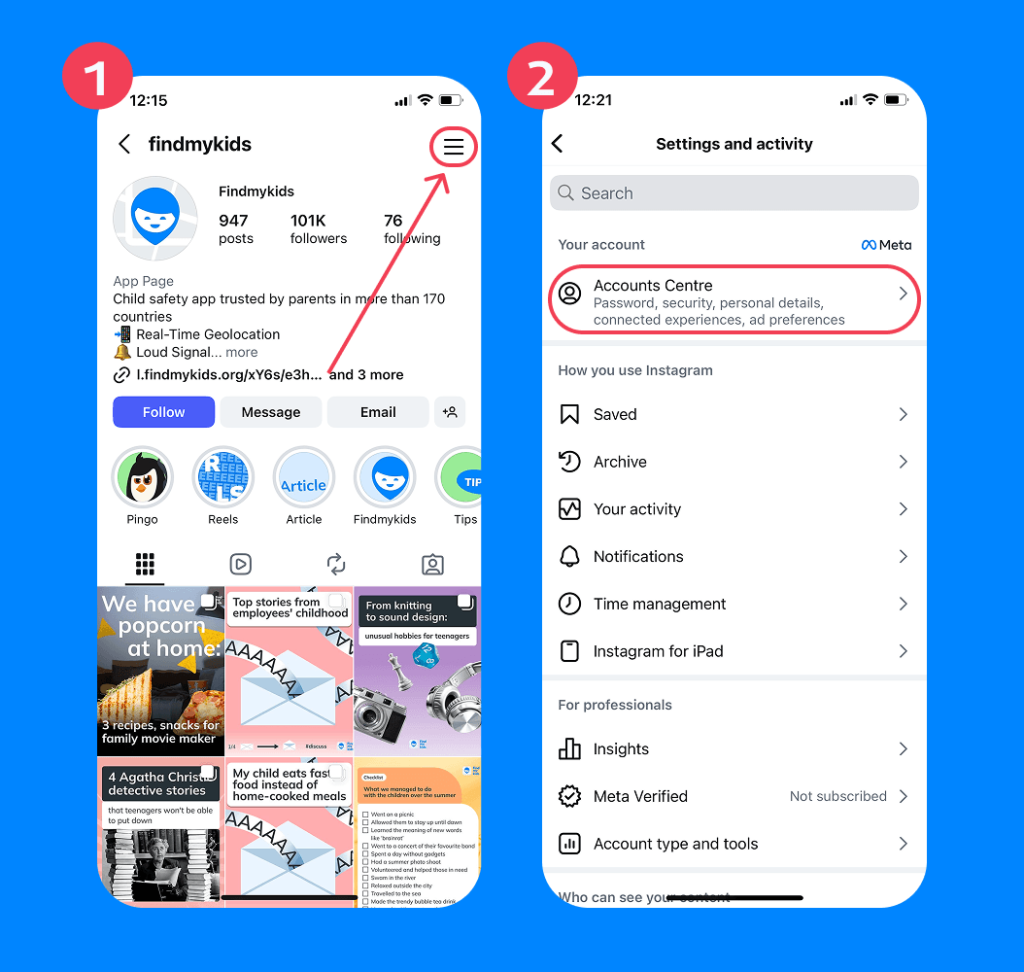
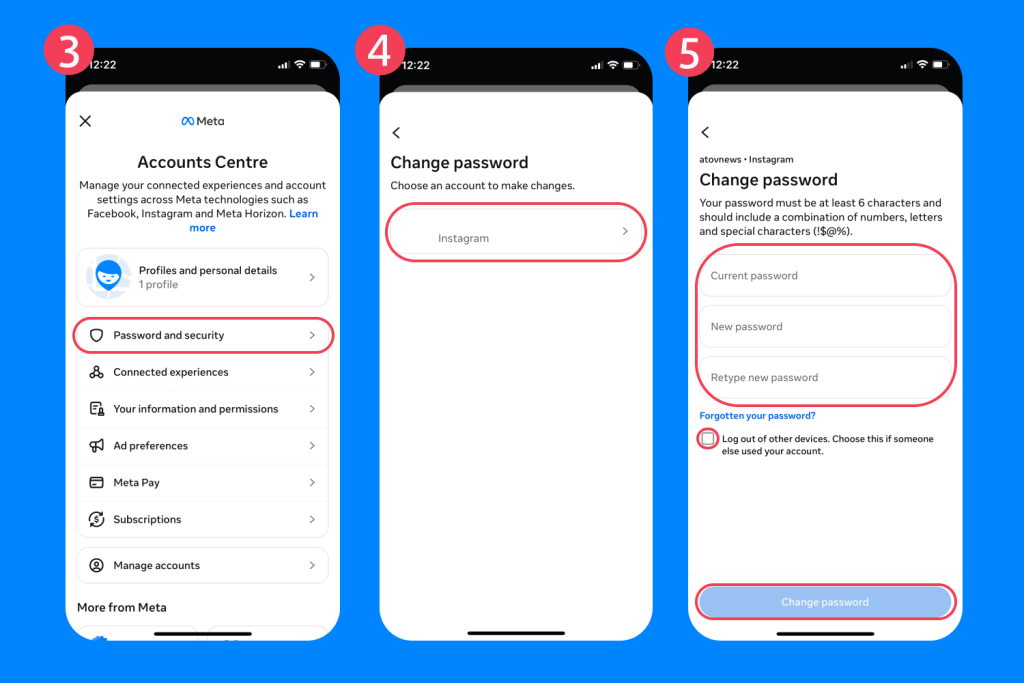
- Tap Change Password.
- Select the account you want to update.
- Enter your current password.
- Create a new strong password and enter it again to confirm.
- Finally, retype your new password, and tap Change Password.
Tip: When creating a new password, choose one that is long and hard to guess. A strong password usually includes a mix of uppercase and lowercase letters, numbers, and symbols, and avoids using personal information like your name or date of birth.
What to Do After You Get a Password Reset Email You Requested
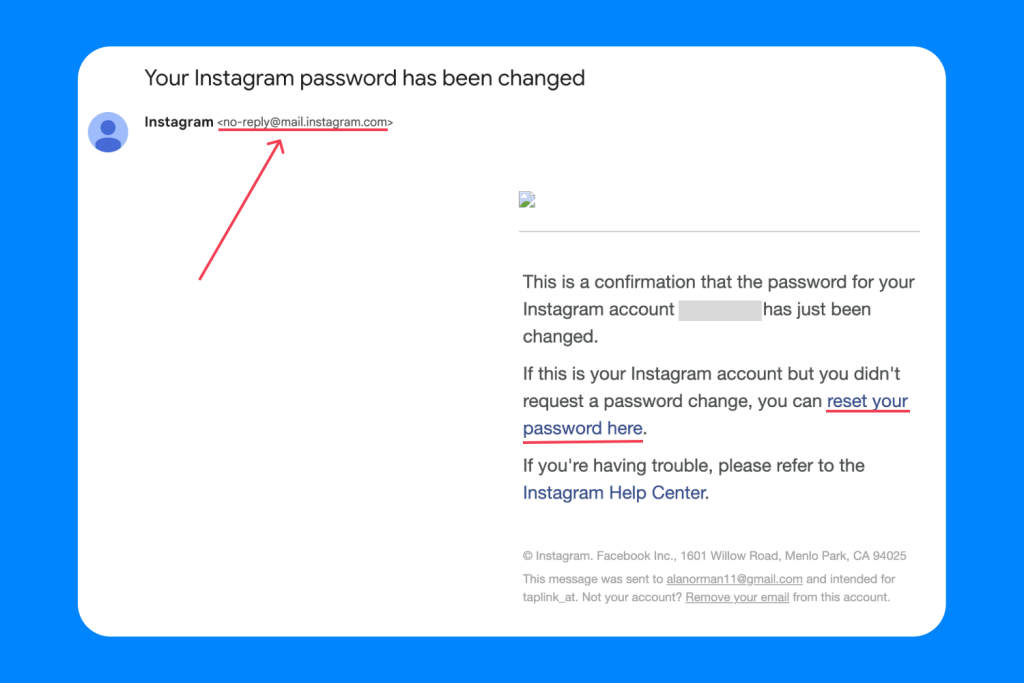
Once you have requested a password reset and received the email from Instagram, simply follow the instructions in the message. First, click the Reset Your Password button. This will open a page where you can enter a new password.
For parents, this is a good moment to remind children that account security matters. A strong password should always be unique and not reused across different apps or games. It’s also a good idea to log out of all other devices if this option is available—especially if the account may have been used on shared phones or tablets.
After updating the password, make sure it is saved in a safe place or stored in a trusted password manager rather than written down where others can see it.
How to Recognize Fake Instagram Password Reset Emails
Children and teens can sometimes receive fake “password reset” emails that look convincing. These are often phishing attempts designed to steal login details.
Official Instagram emails from the Meta company are sent from @mail.instagram.com. If the message comes from a different address, or if something feels unusual (for example, urgent language or suspicious links), do not click anything.
Instead, open Instagram directly through the app and reset the password manually. It is also strongly recommended to enable two-factor authentication, which adds an extra layer of protection even if someone learns the password.
It’s important for parents and children to understand that receiving a reset email does not automatically mean an account has been hacked. In many cases, it simply means someone accidentally entered the wrong email while trying to log in or recover their own account. Only people with your password or a login link from the password reset request can log in to your account.
Signs an Instagram Account May Be Compromised
Instagram accounts are a common target for hackers, which is why it’s important for both parents and teens to recognize early warning signs. According to an Identity Theft Resource Center survey, 85% of social media account takeover victims had data from their Instagram accounts compromised. Here are a few red flags to watch for:
- Unexpected or suspicious emails: If Instagram sends you password reset emails you didn’t request, follow the instructions above to get the issue fixed. Also, when someone tries to log in from a new device, Instagram will send an email to confirm the login. If it wasn’t you, then someone else may be trying to access the account.
- Login problems: If users have trouble signing in, someone may have hacked their account, changed their password, logged out, or changed the associated email address.
- Suspicious login alerts: If you get a notification asking if you recently logged in, but you didn’t, someone could be trying to hack the account.
- Unknown linked email or identifying info: After accessing an account, cybercriminals often change the associated email address to prevent you from using two-factor authentication. They may also change the profile picture or other identifying information.
- Strange messages/posts: Scammers could send messages from the account containing malicious links to your friends. Similarly, hackers can pose as you and post on your account. Be on the lookout for a photo, story, or comment you didn’t post.
For parents, these signs are especially important to discuss with children and teens. Quick detection and response can prevent further damage and help restore control of the account faster.
Related: Shielding Young Minds: Safeguarding Children from Instagram Scams.
What If Your Instagram Account Was Hacked?
If you suspect that your Instagram account has been compromised, it is important to act quickly and calmly. The faster you respond, the easier it is to regain control and prevent further access.
- Reset password immediately: If you still can, change to a new, secure password.
- Secure your email: Immediately change the password for the associated email account and enable two-factor authentication for your email.
- Log out of other devices: Check your Instagram settings and log out of any devices you do not recognize or no longer use.
- Report issues to Instagram: Go to https://www.instagram.com/hacked/.
- Use two-factor authentication: This makes it harder for hackers by requiring a code if there’s a login attempt from an unknown device. Instagram enables two-factor authentication by default, so check that it wasn’t turned off.
How to Protect Kids on Instagram and Beyond
Findmykids app
There are many practical steps parents can take to help keep kids safe on Instagram and other online platforms, as well as in everyday digital and real-world situations. The key is combining good digital habits with clear boundaries and ongoing conversations.
- Practice basic online safety: Set up two-factor authentication and use strong, unique passwords for every account. Reusing passwords across apps and websites increases the risk of multiple accounts being compromised. Avoid clicking on suspicious links, especially those sent via direct messages or email. It’s also important to teach kids how to recognize common scams and phishing attempts, which often look like urgent or “too good to be true” messages.
- Keep accounts private by default: Set your child’s Instagram account to private so only approved followers can see posts, stories, and activity. This reduces exposure to strangers and unwanted contact.
- Understand Instagram’s safety tools: Instagram offers several built-in safety features designed to support families, including parental guidance options available through the Family Center. These tools can help parents better understand account activity and guide conversations around safe platform use.
- Review followers regularly: Encourage kids to periodically check who follows the account and remove unknown or suspicious profiles. This helps keep the social circle safe and intentional.
- Turn off location sharing in posts and stories: Make sure children avoid sharing real-time location tags or geotags, especially in public posts or stories, as this can reveal sensitive information about daily routines and whereabouts.
- Be cautious with direct messages (DMs): Most scams and phishing attempts start in DMs. Teach kids not to click unknown links or respond to messages from strangers, even if they appear friendly or “official.”
- Teach kids not to share personal information: Have ongoing conversations about digital privacy. Children should avoid sharing sensitive information online, such as their home address, school name, daily routines, or location in real time. Even seemingly harmless details can be misused when combined.
- Talk regularly, not just when something goes wrong: Ongoing conversations about online experiences help children feel safe sharing problems early, before they escalate into more serious issues.
- Check app permissions together: Occasionally review what permissions Instagram and other apps have (camera, microphone, location) to ensure nothing unnecessary is enabled or being misused.
- Agree on clear screen-time boundaries: Instead of reacting after problems occur, set predictable rules for when and how long Instagram can be used. Consistency reduces conflicts and encourages healthier digital habits.
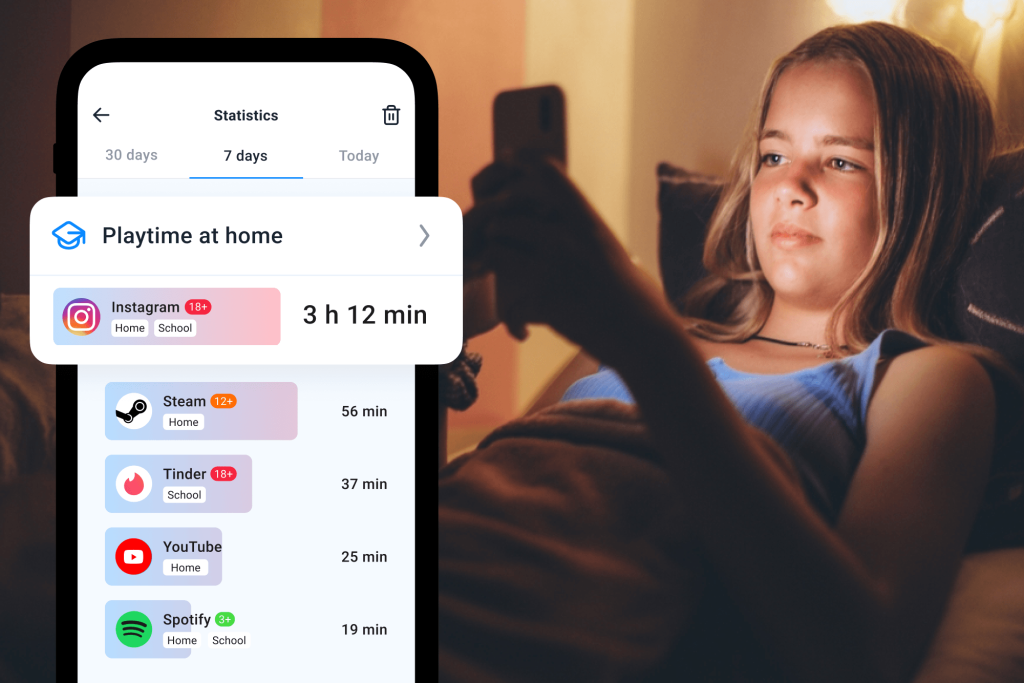
- Use parental control tools like Findmykids: In addition to education and open communication, parents may choose to use parental control solutions to better manage digital boundaries. The Findmykids app helps parents guide children’s online activity by supporting app and content restrictions, managing screen time, and limiting access to inappropriate apps or websites. It can also help prevent excessive in-app purchases and encourage healthier screen habits.
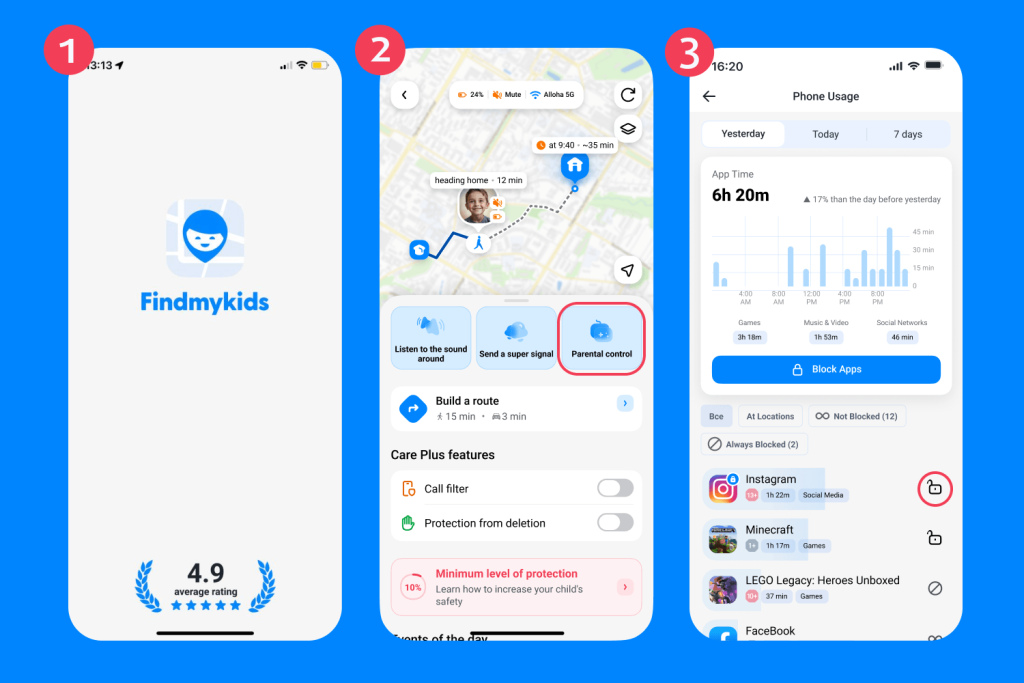
Findmykids app
Beyond online safety, Findmykids also includes real-world protection features. These include accurate real-time GPS tracking, location history, and arrival or departure notifications. In case of emergency, children can use an SOS alert to quickly notify parents. The app also includes a Sound Around feature, allowing parents to check the child’s immediate surroundings when needed for safety reassurance.
Download Findmykids for free right now to help you stay aware of your child’s digital and real-world safety, and build healthier online habits together!
Though teens might love Instagram, it’s important that parents know how to keep them safe on it. Learning how to change their Instagram password is just one security step you can take. Findmykids can be a valuable partner in helping parents control kids’ activities on Instagram and beyond.
FAQs
How do I reset my Instagram password?
Though the steps vary by device, they are always simple. Start by going to your login screen and choosing Forgot Password? Then you will be guided through the steps to get a password reset link.
How do I change my Instagram password if I am logged in?
If you’re logged into your account and have your current password, you can change it from Settings. First, tap Profile or your profile picture to get to your profile. In the Menu, tap Accounts Center → Password and Security → Change Password.
Why did I get an Instagram password reset email?
If you requested a password reset, you will get an email to do so. However, if you know that one wasn’t requested, this could be a sign that your account has been hacked.
Is it safe to ignore an Instagram password reset email?
Yes, getting an unsolicited Instagram password reset email does not necessarily mean that your account has been compromised. Just be sure not to click any links or attachments on any suspicious emails.
Sources & References
- Instagram Help Center, 2026
- Instagram account hacked? Here’s how to recover it, Norton blog, 2025
- What I would do first if my Instagram account got hacked today, Medium, 2026
- Weekly Breach Breakdown: Hacked and Furious – The Rise in Social Media Account Takeovers, Identity Theft Resource Center Podcast, 2023
- Consumer Impact Report, Identity Theft Resource Center, 2022
- Teens, Social Media and Technology, Pew Research Center, 2023
Cover image: generated by ChatGPT / OpenAI
Проверьте электронный ящик