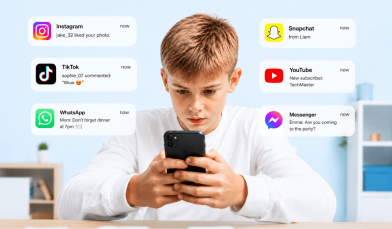

Kids as young as 1-year-old are learning how to use phones, tablets, and other handheld devices. But how much screen time is too much, and how can parents set healthy habits and limits? When adults struggle with cell phone addiction and limiting their own screen time, it’s no wonder that kids would need some help with managing screen time as well.
Contents:
- The Problems with Screens
- What Age is Appropriate to Introduce Screens?
- How Much Screen Time Should You Allow?
- Developing Screen Time Rules for Kids
- Setting Limits for Older Children & Teens
The Problems with Screens

Setting your child up with a device may seem harmless at first, but more and more research shows the harmful effects of too much screen time. There are many issues with screens for young children, including:
- Educational deficits. Constant screen use can negatively impact a child’s ability to learn. The endless scrolling features of many videos and social media apps, such as YouTube, can reduce an individual’s attention span and make it hard to maintain focus on a single task.
- Poor sleep habits. In addition to kids not wanting to go to bed because they’d rather be on their device playing games or scrolling through apps, the actual type of light given off by electronic devices can make it even harder for little brains to shut down and be ready to sleep. This can be mitigated somewhat by using nighttime mode or special blue-light screen filters, but it is best to remove all devices from your child’s bedroom at least 1 hour before you want them to fall asleep.
- Obesity. The lack of physical activity due to time being spent sedentary on screens can contribute to an increased health risk of obesity in kids and teens, leading to long-term health issues down the road.
- Addictive Tendencies. Even adults have trouble with the perils of screentime addiction. Digital overexposure is even worse for developing brains. according to one study, excessive screen usage affects the cortex of the brain!
- Behavioral Issues & Poor Social Skills. Time spent on screens cuts back on the time your child learns how to engage and interact with the real world. And every parent has experienced the struggle of an upset child who doesn’t want to put down the iPad or video game.
Are some screens worse than others? Screen time for your child could include a cell phone, tablet, computer, TV, or video game console. All screen time is alike in that it prevents your child from engaging in other, non-screen activities that could be more beneficial for them, such as face-to-face communication or playing outdoors.
The average American child spends 7.5 hours a day using screens and less than one hour being active. That’s a total of 52.5 hours per week! The more you can limit your child’s screen time use (on all devices) and encourage other activities, the better.
What Age is Appropriate to Introduce Screens?

In this day and age, it’s simply not realistic for most families to completely limit screen time altogether in their households. Young children and toddlers see the rest of the family using their devices, and simply want to imitate and be involved as well. Many families find themselves asking at what age they should consider introducing screens to their little ones. Is screen time always bad for toddlers?
As tempting as it can be to calm or quiet your toddler with a smart device, in the long run, it may not always be the best choice for their emotional growth and mental development. According to research, screen time for toddlers can cause a variety of issues, including a shorter attention span, desensitization to violence, behavioral issues, anxiety, and even developmental delays.
On the other hand, there are times when screentime for toddlers and young children can be beneficial, such as using FaceTime for video chatting with a parent who is out of town or at work, engaging with educational apps, or bonding with a caregiver while watching a movie or playing together.
So how much screen time is OK for a toddler? The AAP recommends that toddlers younger than 18 months avoid all electronic device use and that young children between the ages of 2 and 5 use screens for no more than 1 hour per day. What about older children? How much screen time is healthy for a child? As children reach school age, the recommended allowance increases to 2 hours to allow time to complete homework, engage in school assignments during the day, and communicate with friends.
These screen time limits may not be realistic for your family, especially in our post-COVID-19 digital world. But in general, parents should make sure that children are getting the appropriate amount of sleep each night and spending at least 1 hour a day engaging in physical activity.
For any family allowing screen time for young children and toddlers, it is best to closely monitor how much time they spend on the device and set reasonable limits on the types of content they consume. For example, toddlers should use screens only for video calls or educational content, and with a caregiver present whenever possible.
Read also What Age Should a Kid Get a Phone? The Ultimate Guide to Deciding.
How Much Screen Time Should You Allow?
Knowing exactly how much time to set aside for your child to sign into their favorite games or relax and watch a movie can be intimidating. The fact of the matter is that the screen time limits you set should be done by age group, alongside your parenting style and priorities.
Below are recommended screen time limits based on age:
- Under 18 Months: No screen time except video chatting with family.
- 18–24 Months: Limited to high-quality content viewed with supervision.
- 2–5 Years: 1 hour per day (7 hours per week) of educational and slow-paced content.
- 6–10 Years: 1–2 hours per day of recreational screen time (schoolwork doesn’t count).
- 11–13 Years: 2 hours per day for recreational use (outside of schoolwork).
- 14–18 Years: ~ 2 hours with no set hourly limits; instead, a focus on intentional use for healthy screen habits.
Your child’s age definitely matters when it comes to deciding how much screen time to set. Understanding what type of content is appropriate and what amount of time they should be viewing that content will help with overall development and building healthy digital habits.
Read more: Recommended Screen Time for Kids: How Much Is Healthy by Age.
Developing Screen Time Rules for Kids

Developing screen time rules for your kids is the best way to ensure a healthy balance between time spent in the digital world and time spent in real life. Having clear boundaries on screen time usage sets you and your child up for success. Additionally, kids learn the rules and know what is expected of them. It is also important to have consequences for breaking the rules you set up for the family.
What strategies can parents use to set screen time limits for their kids? Below are some of the best ways families can get a handle on their kids’ technology usage.
Model Good Digital Behavior
Kids live by the rule of imitation. Don’t set up an environment where the standard for your kids is “do as I say, not as I do.” If you want your child to learn healthy screen time limits, you will need to be a good example and limit your own screen time.
Many adults use their devices to try to reduce stress or relax after a long day. But even for them, these 20 minutes of downtime can turn into hours. Make it a point to set a good example and limit how much time you spend on your computer, tablet, or smartphone. Your children learn from you more than you think!
Encourage Outdoor Time
The best way to break an unhealthy habit is to replace it with a healthy one! Go for a family group bike ride or encourage your kids to spend time outside and try to start a pick-up game of baseball or basketball with neighborhood friends next door. The more time your kids spend outdoors and being active with others, the less appealing spending time on their devices will seem. Not only does this encouragement help reduce your child’s screen time, but it can also promote lifelong health habits.
Set Up “Screen-Free Times”
Many families find great success with enforcing clear rules around when screens can be used. For example, you may choose not to allow screen time in the morning, at night, at the dinner table, in the car, during family time, or before homework is complete. Setting specific times within your family group schedule can support expectations and create a healthy digital routine.
Special exceptions can be made for holidays, weekends, days off from school, the summer months, etc., where you may allow your child extra screen time. Let your child know upfront what the rules and expectations are, for example: “I am going to give you your iPad for 1 hour, and then it will be time for bed.”
Use Transitions
Giving special attention to transitions is especially helpful for young children who often still have trouble shifting from one activity to the next. No one wants to be told to stop what they are doing immediately if they are immersed in a game or in the middle of a movie, TV show, or music video.
You may consider telling your child, such as “once this show is over, it is time to put the iPad away and come eat dinner.” Giving time-based warnings, such as “you have 5 more minutes to watch TV before you need to start getting ready for bed,” is also effective
Give Reasonable Choices
Helping your children feel in control of how they manage their screen time will reduce tantrums and set them up to make healthy choices as they get older and you become less involved. You can ask young children questions like: “Would you like to watch a movie on your iPad or play a game on the computer while I cook dinner?” or “You can play your video game for 30 minutes right now, or I will let you play it for 1 hour tomorrow.”
Setting Reasonable Limits for Older Children & Teens

Setting limits may look a little bit different for older children and teens. In addition to the tips above, consider adding these methods:
Set The Rules
It sounds simple, but remember that YOU are the parent. You are the one who gets to set the rules for your child’s device. Especially with teenagers, it can be too easy to let them dictate their own device usage, but this isn’t wise or safe.
You get to decide when they get a gadget and whether or not they continue to earn the privilege. Adolescents must also prove themselves with healthy, responsible device usage.
Create a “Curfew”
All screens should be removed from bedrooms and shut off at least 30-60 minutes before bedtime. Not only do they become a distraction, but they also stimulate the mind, making it difficult to get good sleep.
For older children and teens, at night is when they may be more likely to get into trouble with their cell phone usage. During these late hours is when they often scroll on social media platforms and talk with friends. Take away or even lock up all of your child’s devices at night whenever possible.
Use Parental Control Apps
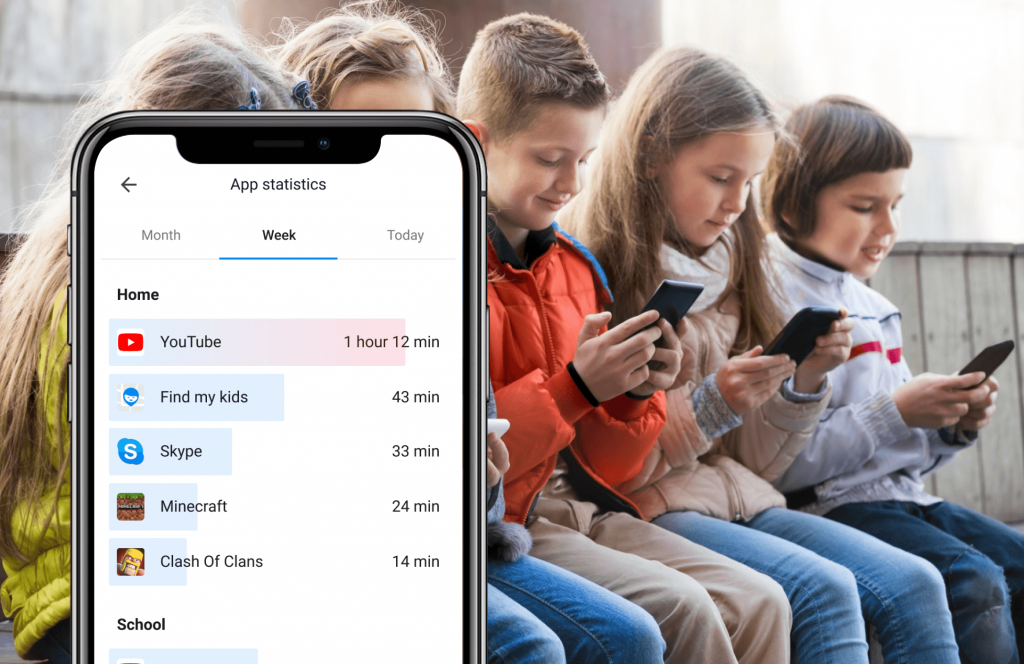
The Findmykids app
This tip is especially beneficial for parents of older kids who can’t simply take the iPad away when they want their child to stop watching so much digital content. Using parental control apps and screen time limit apps helps place a fence around your child’s media usage and lets you be in control even when your kids aren’t at home.
Most devices already include built-in Parental Controls. On iPhones and iPads, Screen Time allows families to adjust screen time settings, set downtime, and limit specific apps. On Android devices, Digital Wellbeing and Family Link offer similar screen time settings, giving parents basic tools to manage usage on a child’s device. These built-in features are helpful, but they may not offer the flexibility many families need as children grow older.
With parental control apps, you can set specific times and app limits, such as social media, while still allowing your child access to essential functions like calls and messaging. You can set limits, create a daily schedule for homework or bedtime, silence notifications at night, and lock apps during time learning or family activities. Parents can tap into detailed reports to see how much time their child is really spending online and better manage digital habits.
apps like Kids360 and Findmykids offer more advanced options. With Findmykids, parents can monitor app activity by day and week, block individual apps or all apps at once (with flexible exceptions), and set temporary or permanent restrictions. It also allows parents to track real-time location, receive low battery notifications, and even send a loud signal that works when the phone is on silent. Parents can tap to adjust restrictions instantly, making it easier to respond to changing routines.
Some features also encourage good behavior through built-in task systems, where children earn rewards for completing chores or responsibilities. This helps balance structure with motivation instead of relying only on restrictions.
Create a “Family Media Plan”
Many organizations have created templates and guides for how to go about this including the AAP, Turning Life On, Turning Life On, and iMom. These contracts often outline the rules, limits, and consequences of your child’s cell phone usage and behavior. Every family’s media usage will look different, and a lot will depend on the maturity and personality of your children, as well as the lifestyle and habits of your home.
Managing screen time for teens is tricky, and even adults struggle with appropriately managing their screen use. Controlling your child’s digital life is a balance, and every household and family must find their own way to limit screen time in the ways that work best for them.
Every family approaches screen limits differently. Take a moment to consider what works best for your child’s device use—and share this article with someone who may benefit from it.
Проверьте электронный ящик