Many parents wonder whether Snapchat has parental controls that genuinely help keep kids and teens safe when using an app built around disappearing content. While it does offer some supervision tools, they don’t give parents the whole picture—especially when messages vanish, and settings constantly shift with updates.
This guide sheds light on what Snapchat’s safety tools really offer—and the gaps parents should be aware of. We’ll walk you through how to use Family Center confidently to tighten up location and privacy settings, and recognize the kinds of risks Snapchat’s built-in controls overlook. Most importantly, we’ll show you how simple, consistent check-ins can keep your foot in the door of your child’s digital world as this platform continues to evolve.
Contents:
- How Snapchat Handles Safety for Kids and Teens
- Snapchat Family Center — What Parents Can Do
- Privacy & Location Settings
- Why Built-In Parental Controls Aren’t Enough
- What’s New (2024–2025): AI Chatbots, Content Filtering & Growing Risks
- Smart Safety Plan: What Parents Can Actually Do
- FAQs
How Snapchat Handles Safety for Kids and Teens
Snapchat includes several safety settings, such as privacy controls, reporting tools, and the Family Center, to help parents understand who their child interacts with and how visible their account is. But even with these tools, one fact remains: the platform allows users as young as 13, many of whom aren’t developmentally ready to recognize the risks of a space where anyone can hide behind a username—making active supervision essential.
For a complete walkthrough of each setting, families can also review the step-by-step guide on how to use Snapchat parental controls.
On this app, teens can decide who may contact them, who can view their stories, and which friends can see their location on Snap Map—and because messages disappear by default with features like tap clear, delete My AI data, or clear chat history, much of what they do on the platform becomes difficult for parents to see.
Note: The Family Center helps parents monitor general patterns, but it cannot show private chats, photos, or calls.
Most safety settings sit under the gear icon on the user’s profile—an area only the teen can fully access. Parents can review these settings together with their teens during occasional check-ins to help strengthen safer habits. This makes these shared reviews essential for ensuring the account stays aligned with your family’s agreed-upon boundaries.
Snapchat Family Center — What Parents Can Do
The Family Center is Snapchat’s central hub for parental controls. It creates a middle ground that allows parents to stay informed while still respecting a teen’s growing independence. Once your teen accepts supervision, parents can see their teen’s friends’ list, new connections, and activity summaries. They can also see when their teen has been added to group chats, although they still cannot view any chat content.
Parents can also check whether their teen has interacted with strangers through the search bar or phone contact, and report content or accounts that seem unsafe. The system may use a mobile number to help match contacts, making it easier to identify who their teen connects with.
Families can also set parental controls within the Family Center, adjusting which features a teen can use to reinforce safer digital habits. Although the Snapchat Family Center does not show message content or disappearing photos, it still provides an essential layer of awareness.
Because access is limited, communication between parents and teens matters. The goal is not to monitor every moment but to create a safer environment for everyday use. Reviewing the Family Center together creates space for conversations about community guidelines, emotional safety, and what to do if something online makes your teen uncomfortable. These tools also help families stay connected while offering teens some independence.
Privacy & Location Settings
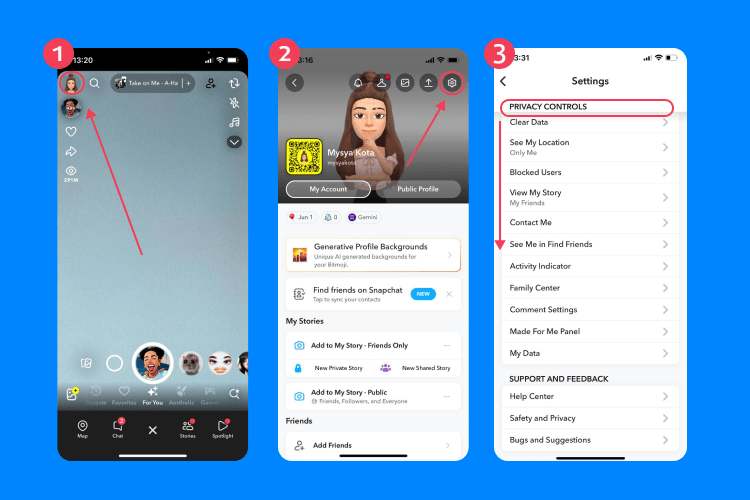
A significant part of safe Snapchat use involves privacy controls and location sharing. These options determine who can contact a teen and how visible they are on the app. Adjusting these contact settings early helps prevent unwanted contact and reduces exposure to strangers.
Parents should guide their kids through these settings early, especially when adjusting who can reach them and who can see their stories. Be aware that Snapchat updates can shift defaults, and these settings should be checked regularly.
Story Visibility & Contact Settings
Every Snapchat account includes settings that decide who can message your kid or view their stories. Teens can choose:
- Only friends
- Close friends
- Custom lists
- Public visibility
Families should encourage the safest options, such as only friends or close friends, to reduce the risk of strangers finding a teen through suggestions or mutual connections. Monitoring the friends list also helps keep track of who a teen interacts with online and whether any users might be unsafe or unfamiliar.
What Is Snap Map
Snap Map shows a user’s location to their friends. While it helps teens stay connected, it can also reveal routines, neighbourhoods, or frequently visited places. The safest option is Ghost Mode, which hides a teen’s location from everyone.
To activate it:
- Open the Snapchat app and go to the profile page.
- Tap Snap Map.
- Select the gear icon in the top right corner.
- Choose Ghost Mode.
On some devices, the Bitmoji icon in the top left corner also opens the Snap Map.
Families can also restrict location tracking to trusted real friends, balancing connection with privacy.
Why Settings Need Regular Review
Teens often change settings on their own, and Snapchat regularly adjusts its features.
Parents should periodically review:
- The friends list
- Location settings
- Search bar activity
- Content they may deem inappropriate
- Changes to the child’s profile
Read also: Is Snapchat Safe and Private for Kids?
Why Built-In Parental Controls Aren’t Enough
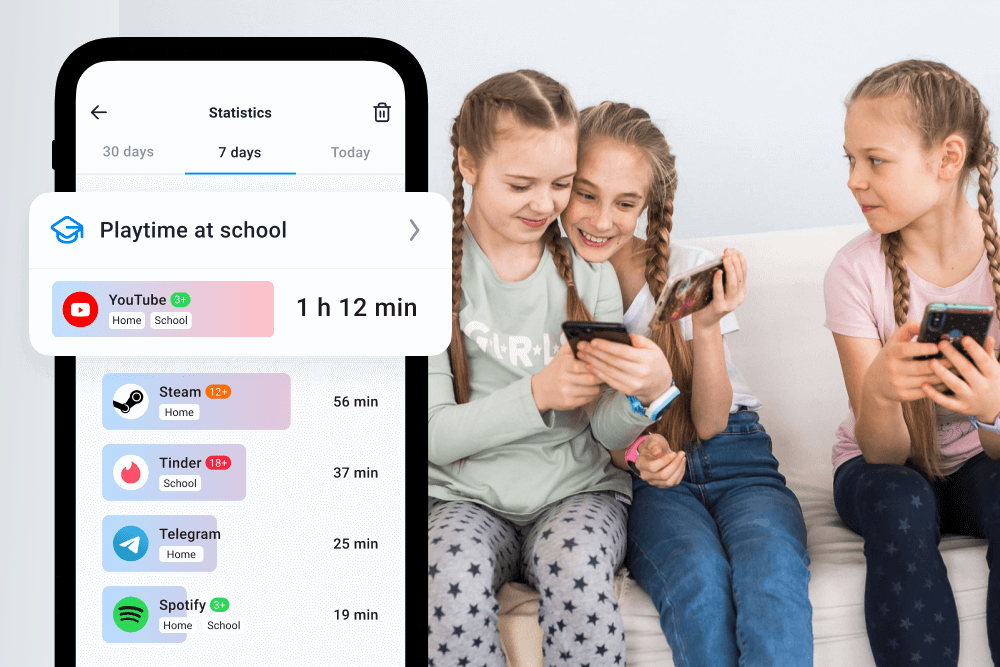
The Findmykids app
Snapchat’s parental controls support safety, but they cannot cover every risk. Teens may create additional accounts, clear chats with tap clear, switch to disappearing content, or connect with strangers through the search feature.
The fast pace of the app can lead to cyberbullying, exposure to sensitive content, and pressure to respond quickly.
Snapchat also cannot monitor activity across other social media apps, and it cannot fully block inappropriate content. Teens may also connect with strangers through different social media accounts, making cross-platform risks harder to track. For these reasons, many parents add Findmykids for broader device protection. Tools like this provide alerts, app-use insights, and full-device visibility, helping compensate for Snapchat’s limitations.
Stay in the know with Findmykids: download the app to see where your child is, what apps they use, and get alerts when something unusual happens.
What’s New (2024–2025): AI Chatbots, Content Filtering & Growing Risks
Snapchat frequently introduces new tools, which can shift how teens interact with the app.
AI Chatbots (My AI)
My AI allows teens to explore ideas or ask questions, but younger users may not recognize how convincing AI responses can feel. It may show personalized content or draw on stored data, including AI-generated selfie data from Dreams—a still-active optional feature as of 2025 that lets users create AI photos from their selfies. Families can delete My AI or Dreams data at any time through privacy controls if they prefer not to store previous interactions.
Parents may also choose to delete Dreams data if the feature is enabled on their child’s account, helping reduce the number of AI-generated images stored. They can review AI settings under the gear icon and decide whether younger teens should have access to these features.
Content Filtering
New content controls help reduce exposure to sensitive content, but they cannot block everything. Teens may still encounter:
- Suggestive images
- Group chats with risky behaviour
- Public stories from strangers
- Search bar results they deem inappropriate
A Faster, More Complex Environment
Updates appear often, sometimes changing how the app behaves. Parents can stay informed by checking:
- Snapchat’s update notes
- The Safety Hub
- The Support page
- The child’s Snapchat account settings
This ongoing awareness helps families respond to changes before they affect a child’s safety.
Smart Safety Plan: What Parents Can Actually Do
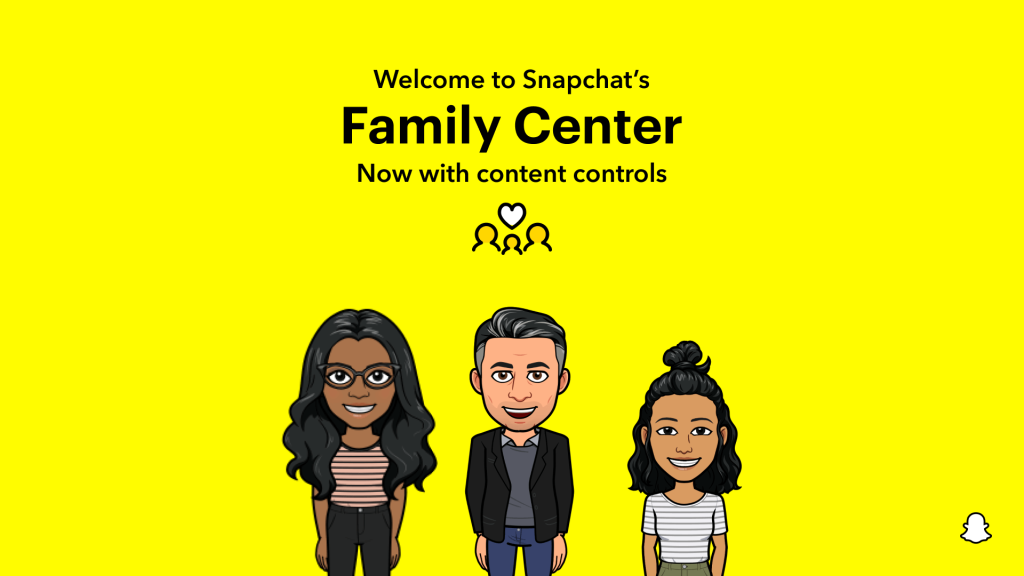
Credit: values.snap.com
A safer Snapchat experience depends on consistent habits and predictable structure.
- Set up Family Center: Once a teen accepts supervision, parents gain access to their friend’s list, interaction summaries, and tools to set parental controls.
- Adjust filters and My AI: Families can reduce sensitive content and limit My AI if needed. Clearing Dreams data occasionally helps maintain privacy.
- Use device-level limits: Tools such as Screen Time or Digital Wellbeing help manage how the app is used.
- Add external protections: Findmykids supports location tracking, device insights, and alerts.
- Talk regularly: Discuss blocking, reporting, and choosing real friends online.
- Review monthly: Check privacy controls, location settings, and new connections after major updates.
Staying One Step Ahead in Your Child’s Digital World
Snapchat shifts quickly, and updates can change settings without notice. Still, parents can stay ahead by regularly reviewing controls, using the Family Center, monitoring location sharing, and adding device-wide tools when needed.
FAQs
Can Snapchat be monitored by parents?
Partially. Parents can view interactions, manage settings, and address safety concerns, but chats and disappearing messages remain private.
Can I put parental controls on Snapchat?
Yes. The Family Center includes parental controls that show who a child interacts with and allow parents to report content.
How do I set up parental controls on Snapchat?
Snapchat itself doesn’t have traditional parental controls, but parents can guide their teen’s account settings to help protect them. On your child’s profile, tap the gear icon on the profile page to open privacy options. Here you can adjust who can contact your teen, who can view their Stories, and who can see their location on Snap Map. Encourage your teen to choose safe settings, like Friends or Close Friends for Stories and Ghost Mode for location. Regularly checking these settings helps maintain privacy and security as your teen’s social activity grows.
How do I make Snapchat safe for my 12-year-old?
Snapchat is intended for ages 13 and up, so children under 13 shouldn’t be using the platform. If a family chooses to allow supervised access, use Ghost Mode to hide their location, adjust privacy controls, set stories to Friends Only, and use device-level limits to help reduce risks.
How can I help my teen use Snapchat safely?
To ensure your teen uses Snapchat safely, review their profile page settings together. Use the gear icon to manage who can contact them, view their Stories, and see their location. Discuss the importance of Snapchat username privacy and encourage your teen to avoid sharing it outside trusted friends. Parents can also check connections with other social media accounts and remind teens about safe sharing practices. Consistent guidance helps your teen enjoy Snapchat responsibly while maintaining safety online.
Is there a kid version of Snapchat?
No. The age limit ranges from 13 to 17, based on the birth year entered during setup—but because this information isn’t verified, both younger children and adults can easily create accounts and appear as teens.
Why do I see both “Snapchat Family Center” and “Snapchat Family Centre”? Are they the same thing?
Yes, they refer to the same feature. “Snapchat Family Center” is the official spelling used by Snapchat in the U.S., while “Snapchat Family Centre” is the British English version. Both allow parents to monitor their teen’s friends list and activity without accessing private messages. The difference is only in regional spelling.
Cover image: Chay_Tee / Shutterstock.com
Проверьте электронный ящик